
Are you tired of paying monthly fees to web hosting companies? Imagine having complete control over your website’s performance, security, and uptime.
Building your own web hosting server might sound daunting, but it’s more achievable than you think. This guide will walk you through the process step-by-step, unlocking the secrets to creating a reliable hosting environment right from your home or office.
You’ll gain the skills to customize your server to fit your exact needs, potentially saving hundreds of dollars each year. Ready to take the power into your own hands and never rely on third-party hosting services again? Keep reading to discover how you can transform your digital presence today.
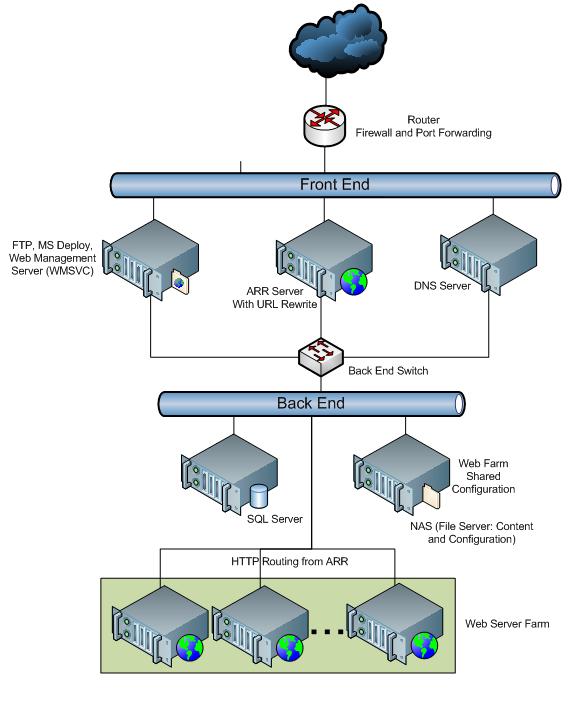
Credit: learn.microsoft.com
Choosing The Right Hardware
Selecting the right server is crucial. CPU and RAM are the main parts. A fast CPU helps in quick processing. More RAM means better multitasking. Storage also plays a big role. Choose SSD for faster access. Backup storage is also important. This keeps your data safe.
Storage holds all your data. HDDs are cheaper but slower. SSDs are faster but cost more. Consider the data size you need to store. RAID can help in data protection. It duplicates your data. Always keep backups for safety.
A network card connects the server to the internet. Gigabit Ethernet is fast and reliable. Switches help in connecting multiple servers. Routers guide data traffic. Firewalls protect from attacks. Good networking ensures smooth data flow. Always secure your network with passwords.
Selecting The Operating System
Choosing the right operating system is crucial for building a web hosting server. Consider factors like compatibility, security, and ease of use. Popular options include Linux for its flexibility and Windows for its user-friendly interface.
Linux Vs Windows
Choosing between Linux and Windows is crucial. Linux is known for being free and open-source. It has strong community support. Many web servers use Linux. It is also compatible with many programming languages.
Windows is a paid operating system. It is user-friendly and has a graphical interface. Windows is preferred for specific applications like ASP.NET. It is also compatible with Microsoft products.
Compatibility is important. Consider the software you will use. Linux supports Apache, MySQL, PHP. Windows supports IIS, SQL Server, ASP.NET.
Linux is usually more secure than Windows. Windows requires regular updates. Choose the system that best fits your needs. Both systems have strengths. Think about your budget and requirements. Each has pros and cons. Make an informed decision.
Installing Essential Software
A web server is important for hosting websites. It helps display web pages. Apache and Nginx are popular choices. Apache is older and very common. Nginx is newer and faster. It handles more users. Choose one based on your need. Install the software on your server. Follow the instructions carefully. Make sure to configure it correctly. This ensures your site runs smoothly.
Databases store information for websites. MySQL and PostgreSQL are top options. MySQL is simple and widely used. PostgreSQL offers more features. Both work well for different needs. Install your chosen database on the server. Follow setup guides for best results. Ensure your database is secure. This protects your data and keeps it safe.

Credit: diggitymarketing.com
Configuring Server Security
Firewalls protect your server. They block bad traffic. You must set them correctly. This stops hackers. Keep them updated. Updates fix security holes. Choose a good firewall. It should be easy to use.
Antivirus software is essential. It fights viruses. Viruses can harm your server. Make sure it scans often. Regular scans catch threats early. Pick antivirus software carefully. It should be reliable.
SSL Certificates secure connections. They encrypt data. This keeps information safe. Users trust secure sites. Install certificates on your server. Renew them when needed. They expire after a while.
Setting Up Domain And Dns
Choosing a good name for your website is important. This name is called a domain. You can buy a domain from a domain registrar. These are companies that sell domains. Check if your desired name is available. If yes, you can register it. This process is called domain registration. Keep it short and easy to remember.
DNS stands for Domain Name System. It helps computers find websites. After domain registration, set up your DNS. Enter your server’s IP address in the DNS settings. This connects your domain to your server. Proper DNS setup is crucial. It ensures people can visit your site. Always double-check your settings.

Credit: www.youtube.com
Testing And Monitoring Performance
Load testing tools help check server strength. They simulate many users at once. JMeter and LoadRunner are popular tools. They measure speed and response time. This helps find weak spots.
ApacheBench is another tool. It checks web server performance. These tools help make servers strong. Strong servers handle more users. This keeps websites working well.
Monitoring software watches server health. It tracks CPU usage, memory, and disk space. Nagios and Zabbix are popular choices. They send alerts for any issues. Alerts help fix problems fast.
New Relic is another tool. It gives detailed reports. Reports show how servers work over time. Keeping an eye on servers is important. It ensures websites run smoothly.
Troubleshooting Common Issues
Facing challenges in building a web hosting server? Identify common issues like hardware compatibility and software configuration. Ensure smooth setup by checking network settings and security protocols.
Network Problems
Network problems can stop your server from working right. Check your cables and connections first. Make sure everything is plugged in. Restart your router and modem. This can solve many issues. If the problem continues, check your IP settings. Wrong settings can break the network. Also, make sure your firewall is not blocking important traffic. Sometimes firmware updates can fix network bugs. Keeping your software up-to-date is key.
Software Errors
Software errors can cause big trouble on your server. First, check for any error messages. They can give clues to the problem. Reboot your server to clear minor bugs. Ensure all software is updated. Old versions may have bugs. Look at your logs for more details. They can show what went wrong. Sometimes, reinstalling the software can solve persistent errors. Always back up data before making big changes.
Optimizing For Scalability
Load balancing helps servers handle more users. It shares the work among many servers. This stops one server from getting too busy. A busy server can slow down websites. With load balancing, all servers work together. This makes websites faster. Users stay happy.
Resource allocation is like sharing snacks at a party. Servers need memory, CPU, and storage. Give each server enough resources. If one server gets too much, others might slow down. Balance is key. Ensure each server gets what it needs. This helps keep websites running smoothly.
Frequently Asked Questions
How Do I Create My Own Website Hosting Server?
To create your own website hosting server, choose suitable hardware, install a Linux OS, and set up a LAMP stack. Configure DNS, ensure security with firewalls, and regularly update software. Manage hosting through control panels like cPanel or Webmin.
Can I Host My Website By Myself?
Yes, you can host your website by yourself. It requires technical knowledge and equipment. You’ll need a reliable server, a fast internet connection, and security measures. Consider costs and time investment. Self-hosting offers control but can be complex for beginners.
Can I Host My Website On My Home Server?
Yes, hosting a website on your home server is possible. Ensure high-speed internet, a static IP address, and security measures. Consider potential downtime and maintenance efforts. It’s suitable for small projects, but professional hosting services offer more reliability and scalability for larger websites.
Can I Turn My Pc Into A Web Server?
Yes, you can turn your PC into a web server. Install server software like Apache or Nginx. Ensure your PC has a static IP address. Configure firewall settings for security. Regularly update software to maintain performance and security. Check your internet service provider’s terms for hosting permissions.
Conclusion
Building a web hosting server can be straightforward. Follow each step carefully. Choose reliable hardware to ensure stability. Install the right software for efficiency. Configure settings for optimal performance. Secure your server to protect data. Regularly monitor and update software.
Troubleshoot issues promptly to maintain uptime. Test your server to ensure functionality. Remember, each component is important. Take your time with setup and testing. A well-built server supports your hosting needs. Keep learning and improving your skills. This boosts your web hosting capabilities.
Enjoy the process and growth of building your server.


