
Are you curious about how to become a successful web host? Imagine having the power to manage websites, ensure smooth online experiences, and generate income through hosting services.
The world of web hosting might seem complex, but with the right guidance, you can master it. We’re going to break down the essentials of becoming a web host into simple, actionable steps that you can follow. Whether you’re looking to start a new business or expand your current offerings, understanding web hosting can open new doors for you.
Stay with us as we explore the crucial aspects of web hosting, and discover how you can tap into this lucrative domain. Your journey to becoming a web host starts here, and you’ll want to read every word to ensure you’re equipped with the knowledge needed for success.
What Is Web Hosting?
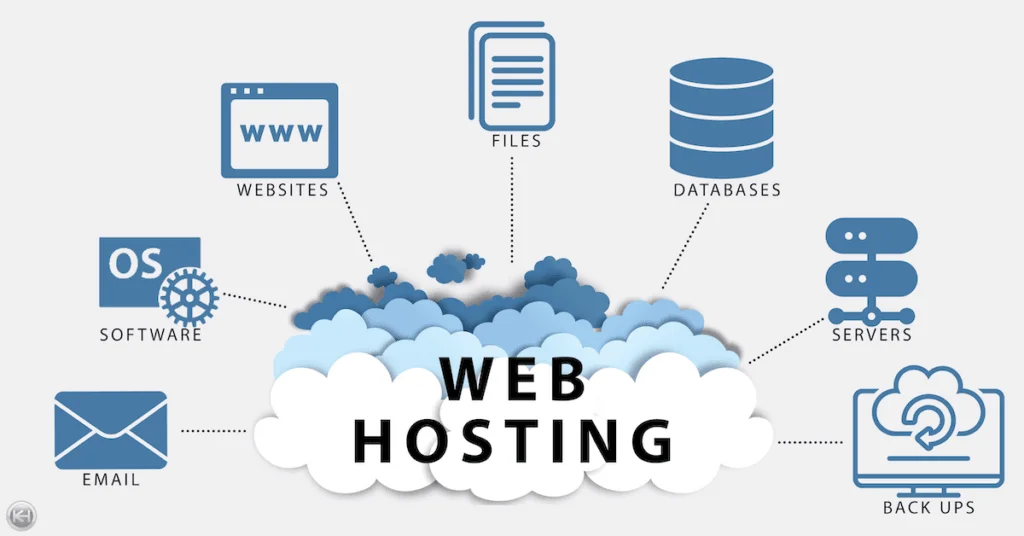
Web hosting is like renting space on the internet. Websites need a place to live. This place is called a server. Servers store website files. They send these files to people who visit the site. Hosting makes websites available online. Without it, websites cannot be seen.
Many companies offer hosting services. Shared hosting is common. It means many sites share one server. Dedicated hosting means one site gets its own server. This is better for big sites. Cloud hosting uses many servers. It can handle lots of visitors. Choosing the right hosting is important. It affects site speed and safety.
Credit: www.knownhost.com
Types Of Web Hosting
Shared hosting is like sharing a room with friends. Many websites share the same server. This makes it cheap and easy for beginners. But, if one site gets busy, others slow down. Security can also be a concern. It’s good for small websites and blogs.
With dedicated hosting, you get a whole server just for you. This means more control and faster speeds. It’s like having your own house. It costs more than shared hosting. Great for big websites with lots of visitors. It offers better security too.
VPS stands for Virtual Private Server. It’s a mix of shared and dedicated hosting. You get your own space on a server. It offers more flexibility and control than shared hosting. Costs more than shared but less than dedicated. Good for growing websites.
Cloud hosting uses many servers to host your site. If one server fails, another takes over. This makes it very reliable and scalable. You pay for what you use. It’s perfect for websites that have changing traffic. Security is also strong with cloud hosting.
Choosing The Right Hosting Plan
Understanding your website’s needs is key. How much traffic do you expect? Big sites need more power. Small sites need less. Consider the type of content. Videos and images use more space. Blogs use less. Make a list of your needs. This helps in finding the best plan.
Budget is important in choosing a plan. Expensive plans offer more features. Cheaper ones might be limited. Decide how much you can spend. Remember, quality often costs more. But it can be worth it. Balance cost and features. Choose what fits your budget and needs.
Think about the future. Your site might grow. Scalable plans are flexible. They let you add resources easily. Check if the plan allows upgrades. This helps as your site gets bigger. Growth should be smooth. Choose a plan that supports this.
Setting Up Your Hosting Environment
Choose a server that fits your needs. Speed is important. Also, reliability matters. Use Linux for more control. Windows is easy to use. Adjust settings for best performance. Keep your server updated.
Protect your server from threats. Use strong passwords. Turn on firewalls. Regularly check for viruses. Secure your data with backups. Install SSL certificates for safe connections. Always monitor activity.
Choose a control panel to manage your server. cPanel is popular and easy. Plesk works well with Windows. Set up email accounts and databases. Manage domains and files. Keep your panel updated.
Managing Domains And Dns
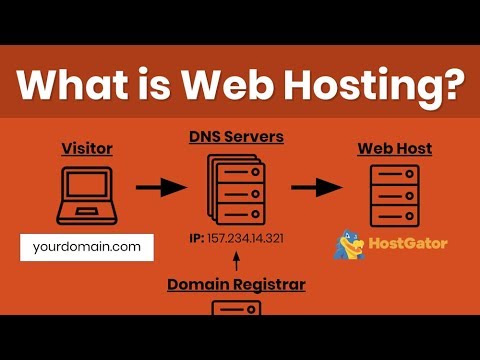
Buying a domain is the first step. Visit a domain registrar. Choose a name. Make sure it’s unique and easy to spell. Check its availability. Pay for it. Now you own a domain! Keep your domain details safe. They are important. This includes your domain name and password. Always renew your domain on time. This prevents losing it.
DNS links your domain to your website. Think of it like a phone book. It matches your domain to the correct IP address. Set up DNS correctly. Use tools provided by your host. Ensure nameservers are correct. This ensures your site is accessible. Check DNS settings often. It helps avoid problems.
Use tools to manage domains. They simplify tasks. Control domain settings. Update DNS records easily. Monitor domain health. Some popular tools are cPanel and Plesk. They offer user-friendly interfaces. Choose one that suits your needs. Explore features. These tools help keep your domain running smoothly.
Credit: www.youtube.com
Handling Website Data
Databases hold important website information. They keep data safe and organized. Regular updates help maintain security. Monitoring prevents errors. Always use strong passwords. Protect your data and your users.
FTP and SFTP are tools for moving files. They help upload and download data. Secure methods keep files safe. Use encryption for extra protection. Always check for errors during transfers. Files must arrive intact.
Backups are a safety net. They save copies of your data. Daily backups ensure nothing is lost. Store backups in different locations. Cloud storage is a good option. Always test your backup system. Make sure it works when needed.
Ensuring Website Security
SSL certificates are like a digital lock. They keep data safe. These certificates protect information between a user and a website. This means no one can steal it. Websites with SSL show a padlock icon. This tells users the site is secure and trustworthy. Always use SSL to keep websites safe.
A firewall is like a security guard for your website. It blocks bad traffic. Only good traffic can enter. This keeps hackers away. Firewalls can be hardware or software. Both types help protect your website. Always have a firewall in place. This will make your site safer.
Malware is bad software. It can harm your website. Always scan your site for malware. Use tools that detect and remove malware. Update these tools regularly. This keeps your website clean and safe. Protecting your site from malware is very important. It keeps your data and users safe.

Credit: www.hostinger.com
Monitoring And Support
Keeping an eye on your server is important. It ensures everything runs smooth. Use tools to check the server’s speed. Slow websites make people leave. Always aim for fast loading times. This makes visitors happy.
Help your customers whenever they need it. Answer their questions quickly. Be friendly and clear. This builds trust with your customers. Offer support through chat or email. This makes it easy for them to reach you.
Websites can have problems sometimes. Fixing them quickly is key. Learn about common issues and their solutions. This helps you solve problems faster. Always keep a list of fixes handy. It saves time and keeps sites running.
Scaling And Upgrading
Traffic can grow fast. Managing traffic is important. A web host must handle more users. Load balancing helps. It shares the load across servers. Content Delivery Networks (CDNs) boost speed. They store data close to users. Monitoring tools check traffic patterns. They alert when traffic is high.
Old hardware slows down the system. Upgrading hardware keeps everything fast. New servers have more power. They handle more tasks. More RAM means better speed. Faster processors are key. SSD storage is quicker than old drives. Hardware upgrades keep sites running smoothly.
Software updates fix bugs. They add new features. Security patches are vital. They stop hackers. Updates keep the system safe. New software improves performance. It makes tasks easier. Regular updates are important. They keep everything working well.
Staying Updated With Industry Trends
Web hosting technology changes fast. New tools and software come out often. Hosts must learn about these new tools. This helps them offer the best service. Cloud hosting and SSL certificates are now popular. Using them can help secure websites. Learning and adapting is key in this field.
The hosting market is big. Many companies offer web hosting. Knowing what others do helps you stay competitive. Price and features matter to customers. Offering good customer support is important too. Look at what successful hosts do. This can give you good ideas.
Changes happen in web hosting. New rules and technologies can affect hosting. Being ready for change is vital. Adapting quickly helps you stay ahead. Training and learning are important. This keeps your skills sharp. Always be ready for new challenges.
Frequently Asked Questions
How To Be Your Own Webhost?
To be your own webhost, acquire a dedicated server or use a home computer. Install software like Apache, configure DNS settings, and ensure security with firewalls. Regularly update and maintain your server to prevent vulnerabilities. Consider your internet bandwidth for optimal performance.
Is Web Hosting Profitable?
Web hosting can be profitable with the right business model and target audience. It requires effective marketing and competitive pricing. Offering reliable service and customer support boosts profitability. Scalability and leveraging technology also enhance profits in the web hosting industry.
Can You Do Web Hosting Yourself?
Yes, you can host your website yourself. It requires a server, technical skills, and regular maintenance. Many opt for third-party hosting services for convenience and support. Ensure your server is secure and reliable for best results. Self-hosting can be cost-effective but demands time and expertise.
Can I Host My Website For Free?
Yes, you can host your website for free using platforms like WordPress. com, Wix, or GitHub Pages. These platforms offer basic hosting plans at no cost. Keep in mind, they may have limitations on storage, bandwidth, and features. Consider upgrading for more flexibility and control.
Conclusion
Becoming a web host takes dedication and learning. Start by understanding the basics. Choose a reliable server. Focus on providing excellent customer support. Ensure your website’s speed and uptime remain high. Keep security measures strong to protect data. Regularly update software to improve performance.
Stay patient; growth takes time. Always listen to feedback and adapt. Stay informed about industry trends. This will help you stay competitive. Remember, consistency and commitment are key. With these steps, you can succeed in web hosting.


