
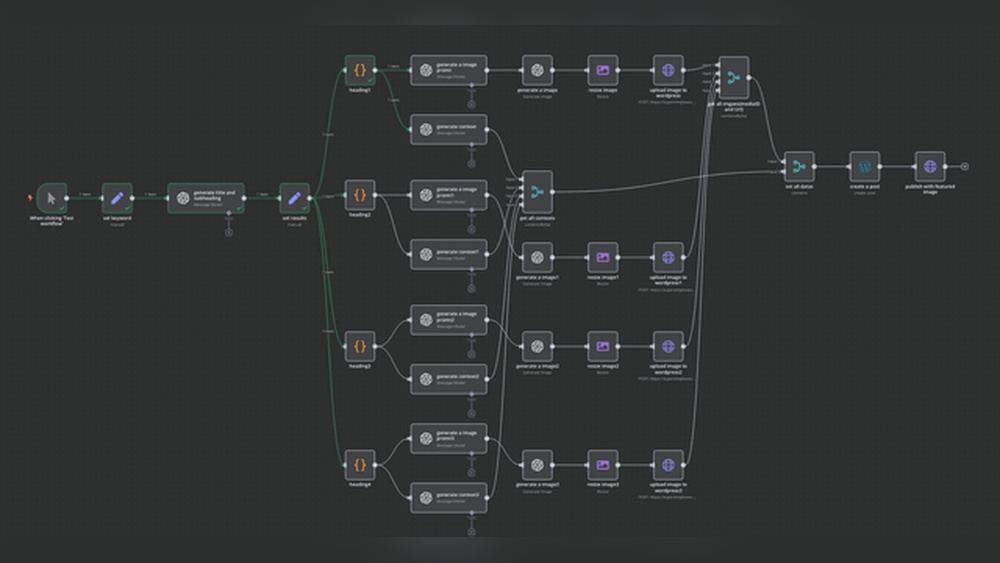
Are you spending too much time creating and publishing WordPress posts? Imagine if your blog could update itself while you focus on other important tasks.
Automating your WordPress posts isn’t just a time-saver—it’s a game-changer for your productivity and growth. You’ll discover simple, effective ways to set up automation that keeps your content flowing without constant effort. Ready to take control of your time and boost your blog’s impact?
Let’s dive in and make your WordPress work smarter for you.
Benefits Of Automating WordPress Posts
Automating WordPress posts brings many benefits to bloggers and website owners. It makes managing content easier and more efficient. Scheduled posts publish automatically at set times. This keeps your site active without constant manual work.
Automation helps you focus on creating better content. It also supports growth by keeping your site updated regularly. Here are some key benefits of automating WordPress posts.
Save Time And Effort
Automation reduces the time spent on posting tasks. You can schedule multiple posts at once. No need to log in daily just to publish content. This frees up time for other important work. It lowers stress and makes content management smoother.
Maintain Consistent Publishing
Consistent posting builds trust with your audience. Automation ensures posts go live at planned times. No missed days or irregular updates. Regular content helps improve search engine rankings. It keeps visitors coming back for fresh information.
Increase Audience Engagement
Timely and steady posts keep readers interested. Automation delivers content when your audience is most active. This increases chances of comments, shares, and likes. Engaged visitors are more likely to return. It grows your community and improves site interaction.
Credit: aminefajry.com
Choosing The Right Automation Tools
Choosing the right automation tools helps save time and improve your WordPress site. It keeps your posts consistent and reduces manual work. Picking tools that suit your needs is essential for smooth automation.
Consider your goals, budget, and technical skills. The right tools should be easy to use and reliable. Explore options that fit your workflow and publishing schedule.
Popular WordPress Plugins
WordPress plugins offer built-in automation features. Tools like WP Scheduled Posts and Auto Post Scheduler help plan and publish content automatically. They integrate directly into your WordPress dashboard.
These plugins often include options to set publishing times and manage post queues. They require little setup and work well for beginners. Choose plugins updated regularly for security and new features.
Third-party Automation Services
External services like Zapier or IFTTT connect WordPress to other apps. They automate tasks such as publishing posts or sharing content. These platforms use triggers and actions to perform tasks without manual input.
They support many apps and offer flexible workflows. Using these services can extend automation beyond WordPress. Some require a subscription, so check pricing before use.
Integrations With Social Media
Automate sharing your posts on social media platforms. Tools like Buffer and Hootsuite connect with WordPress to schedule and post updates. This keeps your audience engaged without extra effort.
Social media integrations save time by posting across multiple channels simultaneously. Choose tools that support platforms your audience uses. This increases your content’s reach and visibility.
Setting Up Automated Post Scheduling
Setting up automated post scheduling helps keep your WordPress site active without constant effort. Scheduled posts publish at specific times, ensuring your content reaches readers regularly. This process saves time and maintains a steady flow of fresh articles.
Using WordPress Built-in Scheduler
WordPress has a built-in scheduler to automate post publishing. While editing a post, click the “Publish” button drop-down. Choose “Schedule” and set the date and time. WordPress will automatically publish the post when the time comes.
This feature works well for simple scheduling needs. No extra plugins or tools are required. It’s easy to use and reliable for basic automation.
Scheduling With Plugins
Plugins offer more control over automated scheduling. They allow bulk scheduling, repeated posts, and social media sharing. Popular plugins include “WP Scheduled Posts” and “Editorial Calendar.”
These tools provide visual calendars and notifications. They help manage multiple posts and avoid conflicts. Plugins also support team collaboration and advanced timing options.
Best Practices For Timing
Choose posting times based on your audience’s activity. Experiment with mornings, afternoons, and evenings. Analyze traffic to find peak engagement hours.
Space posts evenly to avoid flooding readers. Posting too often can reduce interest. Consistency builds trust and keeps readers coming back.
Automating Content Creation And Curation
Automating content creation and curation helps save time and effort. It allows your WordPress site to stay active with fresh posts. Using tools and strategies, you can generate and gather content quickly. This keeps your audience engaged without constant manual work.
Using Ai Content Generators
AI content generators can create articles based on your topics. They write drafts that you can edit and customize. This speeds up the writing process significantly. Choose tools that fit your niche and style. Always review AI content carefully before publishing.
Curating Content From Rss Feeds
RSS feeds provide a stream of relevant content from other sites. You can automate importing these posts to your WordPress blog. This keeps your site updated with new information regularly. Use plugins to filter and display content that matches your theme. Curating content adds value without writing everything yourself.
Ensuring Content Quality
Automated content still needs quality checks. Read and edit posts before they go live. Check facts and correct grammar errors. Use tools to scan for plagiarism and readability. High-quality content builds trust and attracts visitors. Balance automation with human review for best results.
Automating Social Sharing
Automating social sharing saves time and boosts your WordPress post visibility. It helps share your content on multiple platforms without manual effort. This way, your posts reach a wider audience faster. Setting up automation is simple and improves your online presence steadily.
Connecting Social Accounts
Start by linking your social media accounts to WordPress. Use plugins like Jetpack or Social Auto Poster. These tools allow direct connection to Facebook, Twitter, LinkedIn, and more. Once connected, your posts can share automatically. This step is crucial for smooth social sharing automation.
Customizing Share Settings
Adjust settings to control how and when posts are shared. Choose which platforms to post on and set posting times. Customize messages to fit each social network’s style. You can include hashtags, images, or summaries. Tailoring these settings increases engagement and clicks on your posts.
Tracking Social Engagement
Monitor how your shared posts perform on social media. Use analytics tools in your plugin or third-party services. Track likes, shares, comments, and clicks. Understanding engagement helps improve future content and sharing strategies. Regular tracking ensures your automation works effectively.

Credit: aminefajry.com
Monitoring And Managing Automated Posts
Automating WordPress posts saves time and keeps your site active. Monitoring and managing these posts ensures everything runs smoothly. Regular checks help catch issues early and maintain content quality. Proper management avoids duplicate posts and scheduling conflicts. It also helps improve user experience and SEO results.
Reviewing Scheduled Content
Check your scheduled posts regularly. Confirm titles, dates, and content accuracy. Look for outdated information or broken links. Make sure posts fit your current strategy. Adjust the schedule if needed to match audience habits.
Handling Errors And Conflicts
Identify errors like failed uploads or formatting problems. Fix conflicts between plugins or themes that affect posts. Clear cache and update software to reduce errors. Use logs to track issues and find solutions fast.
Optimizing Automation Workflows
Analyze your automation steps for efficiency. Remove unnecessary actions to save resources. Test workflows after changes to ensure smooth operation. Use plugins that support flexible scheduling and error handling. Keep workflows simple and easy to manage.

Credit: www.reddit.com
Frequently Asked Questions
How Can I Schedule WordPress Posts Automatically?
You can schedule posts using WordPress’s built-in scheduler. Set the publish date and time in the post editor. WordPress will publish it automatically at the set time without manual intervention.
What Plugins Help Automate WordPress Post Publishing?
Popular plugins like WP Scheduled Posts, Auto Post Scheduler, and CoSchedule simplify automation. They offer features like bulk scheduling, social sharing, and calendar views for easy management.
Can I Auto-post WordPress Content To Social Media?
Yes, plugins like Jetpack and Buffer enable automatic sharing of new posts on social media platforms. This boosts your reach without manual posting on each network.
Is Automating WordPress Posts Safe For Seo?
Yes, automation is safe if done correctly. Ensure posts are original, well-optimized, and scheduled logically to avoid duplicate content and maintain good SEO practices.
Conclusion
Automating WordPress posts saves time and effort every day. It helps keep your site fresh and active without constant work. Simple tools and plugins make the process easy to set up. Regular posting can boost your website’s traffic and reach.
Start small, test what works, and adjust as needed. Automation lets you focus on creating great content. Your blog will stay updated, even when you are busy. Give automation a try to improve your WordPress experience.


