
Are you looking to simplify your online presence and make the most out of your website? Assigning Wix as your web hosting could be the perfect solution for you.
With Wix, you gain access to an all-in-one platform that streamlines the process of building, hosting, and managing your website. Imagine having one less technical headache to worry about while focusing on what truly matters—growing your brand and reaching your audience.
In this guide, you’ll discover how effortless it is to assign Wix as your web hosting provider, unlocking features that enhance your site’s performance and reliability. Stick around, and you’ll soon see why choosing Wix could be the game-changer your online strategy needs.
Benefits Of Wix Web Hosting
Wix offers an easy-to-use platform for building websites. It provides many templates. This helps users create beautiful sites. The drag-and-drop feature is simple. It allows anyone to customize their site. Wix also includes built-in SEO tools. These help websites rank better in search results.
Security is a key benefit of Wix. The platform keeps websites safe. It offers SSL certificates for free. These certificates protect data. Wix also provides regular updates. This ensures that websites stay secure.
Wix has reliable customer support. Help is available 24/7. Users can get assistance anytime. The platform also supports multiple languages. This helps users from different regions.

Credit: support.wix.com
Setting Up A Wix Account
Start by visiting the Wix website. Click on the Sign Up button. Enter your email and choose a password. You can also sign up using Google or Facebook. After signing up, check your email. You will find a confirmation message. Click the link in the email. This will verify your account.
Wix offers several plans. Start with the basic plan if new to web hosting. For extra features, explore the premium plans. Each plan has different features. Check the Wix plan page. Compare costs and benefits. Choose a plan that fits your needs. You can always upgrade later.
Domain Setup With Wix
Wix makes it easy to use their domain. First, visit the Wix site. Log in to your account. Go to the Domains section. Here, you can buy a new domain. Choose a name you like. Make sure it’s unique. Click on purchase. Next, Wix will guide you. Follow each step closely. Your domain will be ready soon.
Have a domain already? You can use it with Wix. Start by logging into Wix. Go to the Domains page. Find the option to connect a domain. Click on it. Enter your domain name. Wix will show you the steps. Follow them one by one. Update your DNS settings with your provider. This connects your domain to Wix. Your website will be online in no time.

Credit: support.wix.com
Designing Your Wix Website
Choose a template that fits your website’s style. Wix offers many options. Consider your site’s purpose. A business site needs a professional look. A blog might use something fun and colorful. Look through categories like Business, Blog, or Portfolio. You can preview each template. This helps you see the design in action. Don’t worry. You can change it later if needed.
Personalize your site to make it unique. Add your own text and pictures. Change fonts and colors to match your brand. Wix has a drag-and-drop editor. This makes changes easy. Just click and move elements where you want. Add pages like Home, About, and Contact. Remember to save your work often. A customized site feels more personal. It shows visitors who you are.
Publishing Your Wix Site
Before making your website live, always preview it first. This helps spot errors. Check every page for mistakes or missing content. Ensure images are clear and text is readable. Make sure links work properly. Previewing helps catch errors early. It saves you from embarrassment later. Wix has a preview button. Use it before publishing. It’s easy and quick. Always double-check your work. Look at your site on different devices. Phones, tablets, and computers. Each device shows your site differently. This ensures it looks good everywhere.
Once the preview looks good, it’s time to launch. Wix makes this simple. Click the ‘Publish’ button. Your site goes live instantly. Your work is now online for everyone to see. Tell your friends about your site. Share it on social media. People will visit your site soon. Keep updating your site regularly. Fresh content attracts visitors. Make sure your site stays interesting. Check for errors often. Fix them quickly when they appear.
Managing Your Website With Wix
Wix makes it easy to update your website. Click on the edit button. You can add text, images, and videos. Drag and drop features make changes simple. You can also use the mobile editor. It helps you see changes on phones. This keeps your website fresh and current.
Wix offers tools to improve your website’s search results. SEO Wiz provides a step-by-step guide. It helps you choose the right keywords. You can also edit your page titles and descriptions. This makes your site more visible on search engines. Check your progress with the SEO dashboard. It shows how well your site is doing.
Troubleshooting Common Issues
Assigning Wix as your web hosting involves straightforward steps. Begin by accessing your Wix dashboard. Navigate to the domain section, select your domain, and follow the prompts to connect Wix with your domain provider. Ensure DNS settings are correctly configured for smooth integration and optimal website performance.
Resolving Domain Problems
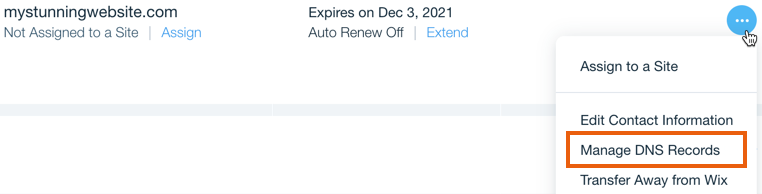
Domains sometimes act tricky. A common issue is domain connection failure. First, check your DNS settings. These settings must match Wix requirements. Incorrect settings cause domain problems. Ensure your domain points to Wix servers. This step is crucial. Sometimes, domain registration expires. Renew it immediately to avoid issues. Always keep your domain active. Contact your domain provider for help. They offer support for technical problems. Never hesitate to ask for assistance. Keep records of your changes. This helps in troubleshooting. Follow Wix guides for detailed instructions. These guides offer step-by-step solutions. Troubleshooting becomes easier with proper guidance.
Addressing Design Challenges
Design issues often arise in web hosting. Templates may not display correctly. Check template compatibility with your site. Some templates need specific settings. Adjust these settings for better display. Design glitches can confuse users. Clear instructions help users navigate. Regular updates fix design issues. Always update your site tools. Outdated tools cause design problems. Test your site on different devices. This ensures your design looks good everywhere. Mobile view must be clear and functional. Seek Wix support for design help. They offer expert advice. Good design enhances user experience. Keep designs simple and user-friendly.
Credit: support.wix.com
Frequently Asked Questions
Can I Use Wix To Host My Website?
Yes, Wix can host your website. It offers built-in hosting services with various plans. Enjoy reliable uptime, security, and support. Wix simplifies website creation and hosting, making it ideal for businesses and individuals. Choose a plan that fits your needs and start building your online presence.
How Do I Know If Wix Is Hosting My Website?
Check your Wix account dashboard for site details. See if your domain is connected to Wix hosting. Visit “My Sites” section for confirmation. Verify if billing includes hosting fees. Contact Wix support for assistance.
How Do I Connect My Wix To Hosting?
Link your Wix site with hosting by changing DNS settings. Access your domain settings in Wix. Enter your hosting provider’s nameservers. Save changes to connect.
Where Can I Host My Wix Website?
Host your Wix website directly on Wix’s own hosting platform. It offers seamless integration, security, and reliability. Enjoy features like automatic updates and scalability. Wix ensures optimal performance for your site. No need for third-party hosting. It’s convenient and easy for beginners and professionals alike.
Conclusion
Assigning Wix as your web hosting is straightforward. You can enhance your website’s reliability. Wix offers user-friendly tools for easy setup. It helps you manage your online presence efficiently. With Wix, you can focus more on content creation. You get support for various website features.
It’s a great choice for beginners and experts alike. Enjoy customizing your website with ease. Wix provides excellent templates and design options. You can build a professional-looking site without stress. Explore Wix hosting today for a seamless experience. Your website deserves the best foundation.
Start hosting with confidence and creativity.


