
Are you ready to transform your WordPress website into a vibrant, personalized space that captures your brand’s essence? Adding themed pages to your WordPress site is a fantastic way to do just that.
Imagine your website not only speaking to your audience but also visually engaging them with a cohesive and appealing design. Themed pages offer this magic by allowing you to customize the look and feel of your site according to your unique style or campaign needs.
But how do you get started? The process might sound daunting, but it’s simpler than you think. You’ll discover straightforward steps to seamlessly integrate themed pages into your WordPress site, enhancing both user experience and visual appeal. Dive in and learn how to make your website a true reflection of your brand, captivating visitors and keeping them engaged.
Choosing A Theme
WordPress offers many themes for your site. Some themes are free. Others are premium and cost money. Each theme has its own features. Choose a theme that fits your site’s style. Some themes are good for blogs. Others work well for business sites. Look through the theme library. Try different themes to see which one you like best.
Free themes are a good start. They do not cost money. But, they may have limited features. Premium themes cost money but offer more options. They may have better support too. Think about your needs. Do you need extra features? If yes, a premium theme might be better. Always read reviews before buying a theme.
Responsive design is important. It means your site looks good on all devices. Whether on a phone or a computer, your site should work well. Check if the theme is responsive. Most modern themes are. Test the theme on different devices. Make sure it looks good everywhere.
Installing A Theme
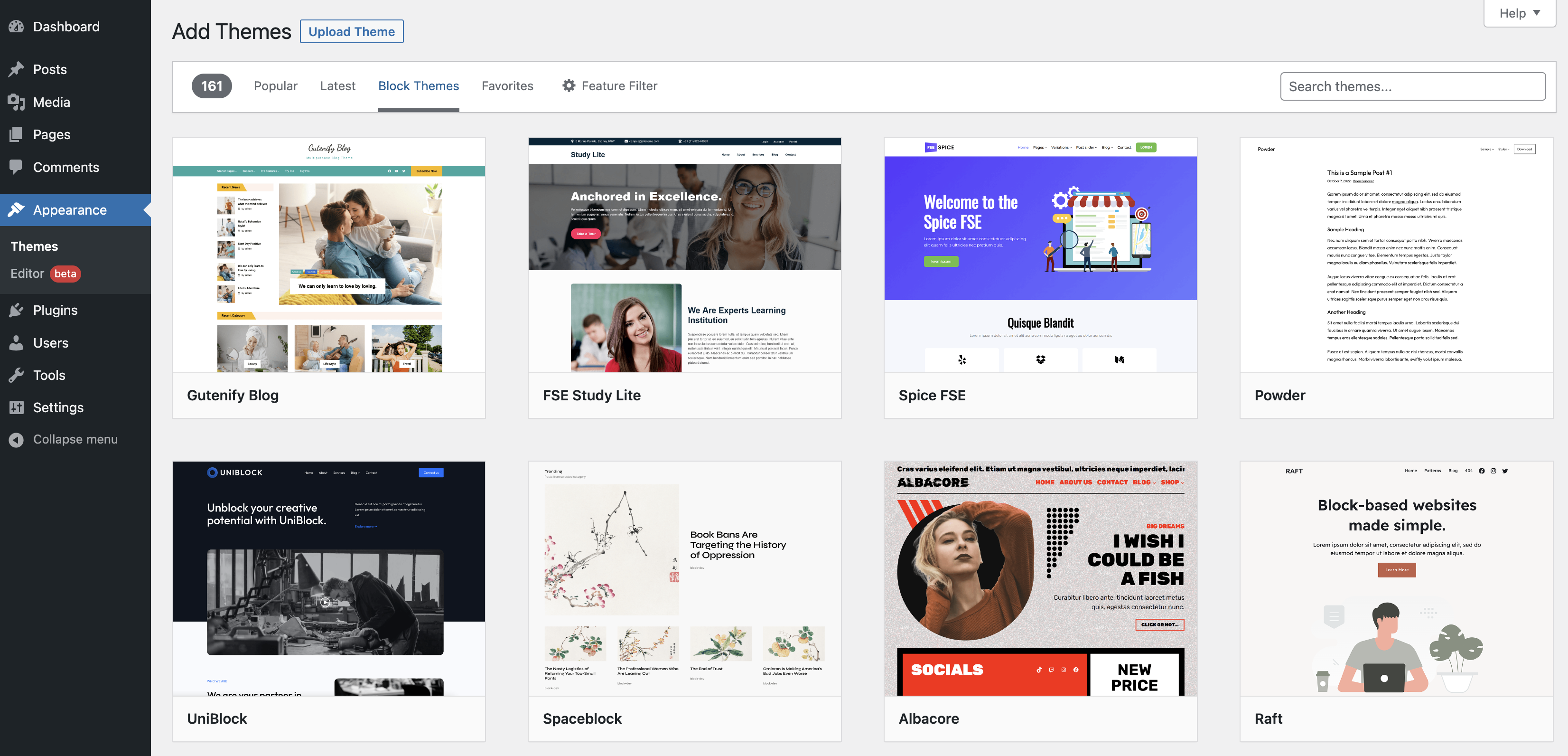
WordPress has many themes. They are in the Theme Directory. First, go to your WordPress dashboard. Find and click on Appearance. Then, click on Themes. You will see many themes. Use the search box to find the theme you like. Click Install to add the theme. Wait for it to finish. You now have a new theme.
Sometimes you have a theme file. This is how you add it. First, go to your dashboard. Click on Appearance then click Themes. Click on Add New. You will see an Upload Theme button. Click it. Choose your theme file. Click Install Now. Wait for it to finish. Your theme is ready.
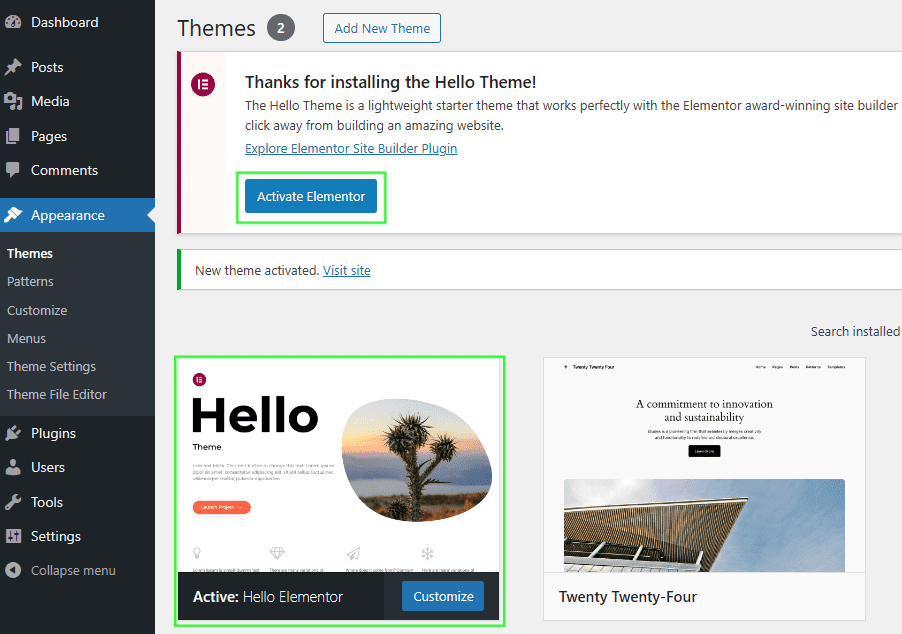
Your theme must be active to use it. Go to your dashboard. Click on Appearance then Themes. Find your theme. Click on Activate. Your theme is now live. Check your site. You will see the new look.
Customizing Theme Settings
The Customizer lets you change your site’s look. It’s found in the WordPress dashboard. Click on “Appearance” then “Customize.” This is where you can make changes. The Customizer is easy to use. It shows changes in real-time. You can preview your site as you make updates. Always save your changes before you leave.
Colors and fonts are important for your site. In the Customizer, find the “Colors” or “Fonts” option. Choose colors that fit your theme. Keep text easy to read. Select fonts that match your style. Remember, too many colors can be confusing. Stick to two or three colors for a clean look.
Menus help people find pages on your site. Go to the “Menus” section in the Customizer. Add items like “Home” or “Contact.” Arrange them in order. Widgets add extra features to your site. Drag widgets to your sidebar or footer. Some widgets show recent posts or social links. Check how they look. Make sure they work well together.
Creating Themed Pages
First, open your WordPress dashboard. Click on the Pages section. Then, select Add New. You can now create a new page. Give it a unique name. Make sure the name fits your theme. This helps visitors understand the content.
Look for the Page Attributes box. It’s on the right side. There, find the Template dropdown. Choose the template you want. Each template has a different style. Pick one that suits your theme best. This changes the look of your page.
Use the Page Builder to add elements. You can insert text, images, and videos. Arrange them in a way that makes sense. Make sure it looks neat and clean. Adjust colors and fonts to match the theme. Keep it simple and easy to read.
Utilizing Page Builders
Create themed pages in WordPress using page builders for a seamless design experience. These tools simplify adding custom layouts and styles. Enhance your site’s appearance without coding skills.
Popular Page Builder Plugins
WordPress has many page builder plugins to choose from. Some popular ones are Elementor, Beaver Builder, and Divi. These plugins help users design beautiful pages without coding. Each plugin has unique features. Users can try free versions first. Paid versions offer more options.
Drag-and-drop Functionality
Drag-and-drop makes designing easy. Users move elements with their mouse. This method is simple and fast. Beginners can learn quickly. No coding needed. Just choose, drag, and drop. It’s fun to create pages this way.
Designing With Pre-built Elements
Pre-built elements are ready to use. They save time and effort. Choose from buttons, images, and text boxes. Designs look professional. Mix and match elements for unique pages. Users can customize colors and fonts. It’s easy to make changes anytime.
Credit: wordpress.org
Optimizing For Performance
Fast websites are important. Slow sites make people leave. Use light themes. Avoid heavy scripts. Keep plugins to a minimum. Each plugin can slow down your site.
Caching plugins save time. They store website parts. This makes loading faster. Try plugins like WP Super Cache. Easy to use and helps a lot. Fewer requests mean quicker pages.
Large images slow sites. Make them smaller. Use image tools to compress. This helps keep quality. Load images only when needed. Lazy loading can help. Videos should be short. Use links for longer ones.
Ensuring Mobile Compatibility
Adding themed pages in WordPress enhances mobile compatibility, crucial for user experience. Mobile-friendly designs ensure seamless navigation and faster loading times. Prioritize responsive themes to adapt content effortlessly across various devices.
Testing On Various Devices
Phones and tablets are important. Test your pages on these devices. Make sure text is clear. Images should look good. Buttons must be easy to click. Check different screen sizes. This helps users have a better experience.
Mobile-friendly Adjustments
Simple adjustments can make a big difference. Use large text that is easy to read. Make buttons bigger. Ensure menus are easy to find. Avoid small details that are hard to see. This makes the page better for mobile users.
Using Responsive Themes
Responsive themes adjust to screen sizes. They help your site look good everywhere. Choose a theme that fits your needs. Make sure it works well on phones. This gives users a nice experience on all devices.
Credit: help.elements.envato.com
Maintaining Themed Pages
Regular updates keep your website fresh. Themes often come with new features. Updates can fix bugs. They also improve security. Check for updates often. Use the WordPress dashboard. Make updating a habit. It protects your site.
Conflicts can break your site. Plugins might clash with themes. Check for compatibility issues. Test new plugins first. Use staging sites. This helps avoid problems. Always read theme reviews. Choose themes wisely.
Backups are important. Use them to save your work. Themes can change things. Backups let you restore them. Use plugins for backups. Do it regularly. It is like insurance for your site.

Credit: learn.wordpress.org
Frequently Asked Questions
What Is A Themed Page In WordPress?
A themed page in WordPress is a custom page template that matches your site’s design style. It enhances the user experience by providing a consistent look. You can create themed pages using page builders or custom coding, making your site visually appealing and user-friendly.
How Can I Add A Themed Page?
To add a themed page, go to your WordPress dashboard. Create a new page and select a template from the dropdown menu. You can use page builders like Elementor or custom code to design your themed page, ensuring it aligns with your site’s aesthetics.
Why Use Themed Pages In WordPress?
Themed pages offer a cohesive design, enhancing user experience and site aesthetics. They help maintain brand consistency across different pages. These pages can be customized to suit specific needs, attracting more visitors and improving engagement. They are essential for professional-looking websites.
Are Plugins Necessary For Themed Pages?
Plugins aren’t necessary but can simplify the process. Page builder plugins like Elementor or Beaver Builder offer drag-and-drop functionality for creating themed pages. They provide pre-designed templates and customization options, making it easier to design aesthetically pleasing pages without coding.
Conclusion
Creating themed pages in WordPress is simple and effective. Follow the steps outlined to enhance your site’s appearance. Users appreciate visually appealing layouts. Custom themes provide a unique look. They also improve user engagement. Always keep your audience in mind when designing.
Choose themes that fit your brand and message. Remember, consistency across pages is key. Experiment with different designs. Find what works best for your website. Keep learning and adapting. Stay updated with new WordPress features. Your site will grow with these improvements.
Enjoy your creative journey in WordPress design!


