
Are you looking to give your WordPress blog a fresh new look? Adding a theme can transform your site’s appearance and enhance your readers’ experience.
Whether you want a sleek, professional design or a vibrant, creative layout, WordPress offers a wide array of themes to fit your vision. But how do you choose the right one and install it without a hitch? In this guide, you’ll discover step-by-step instructions on how to add a theme to your WordPress blog.
By the end of it, you’ll have the tools to captivate your audience and keep them coming back for more. Ready to dive in and elevate your blog’s aesthetic? Let’s get started!
Choosing The Right Theme
Understanding your blog’s purpose is vital. Is it a travel blog, a cooking site, or a tech hub? Each type needs a different theme. Themes should match the blog’s focus. This ensures your readers stay engaged. A travel blog might need a visual layout. Meanwhile, a tech blog might focus on text clarity. Choose wisely.
User experience matters a lot. Themes should be easy to navigate. Readers should find content quickly. Avoid cluttered designs. Simple designs often work best. Make sure buttons and links are easy to spot. This keeps readers happy. Happy readers return.
Themes must work on all devices. This is called responsive design. Phones, tablets, and computers should all show your blog well. Many people use phones to browse. If your theme isn’t responsive, they might leave. Make sure your theme adjusts to all screens.
Customization is key. A good theme lets you change colors and fonts. You can add your own logo. Custom options help make the blog unique. This sets your blog apart from others. Choose themes with many customization options. This gives you more control.
Credit: www.greengeeks.com
Finding Themes In WordPress
The WordPress Theme Directory has many themes. You can find new themes there. Search by features and colors. Each theme has a rating and review. Read them before choosing. You can preview themes. This helps you see how they look. Click “Install” to add a theme. It is quick and easy.
Themes are also sold outside WordPress. Theme marketplaces offer many choices. Some popular ones are ThemeForest and Elegant Themes. These sites have a wide range. You can find themes for every need. Many have support and updates. This is helpful if you need help. Always check reviews first. They tell you how good the theme is.
Themes can be free or paid. Free themes are easy to use. They do not cost money. Premium themes have more features. They usually look better. Free themes may have fewer updates. Paid themes often have support. You choose based on your needs. Think about your budget too. Both types can be good.
Installing A New Theme
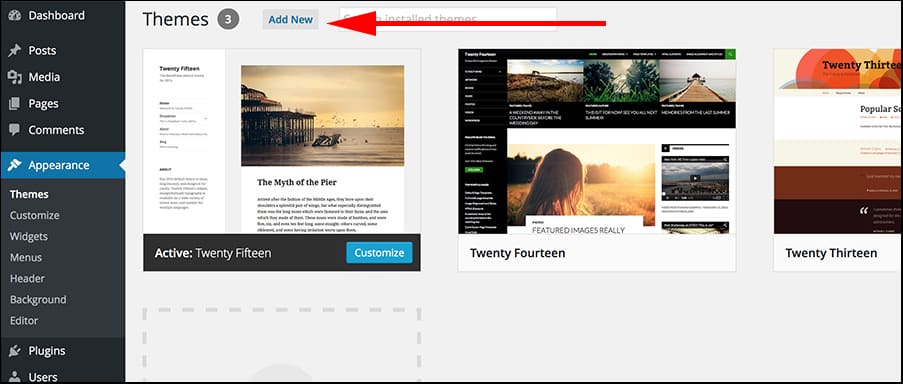
Open your WordPress dashboard. Click on “Appearance”, then “Themes”. Click on “Add New” to find new themes. You can search by keywords or use filters to find the right theme. Once you find a theme you like, click “Install”. Wait a few seconds for it to download.
First, download a theme to your computer. Go to your WordPress dashboard. Click on “Appearance”, then “Themes”. Click “Add New”, then “Upload Theme”. Click “Choose File” and find your theme file. Click “Install Now”. Wait for the upload to complete.
After installing, find your theme under “Themes”. Click on “Activate” to make it live. Your blog will now have a new look. Check to see how your site appears. Sometimes adjustments are needed. Explore theme options to customize further.
Customizing Your Theme
The WordPress Customizer is a simple tool. It helps you change your blog’s look. You can find it in your dashboard. Open it and see many options. You can change the site title. You can also upload a logo. Explore features like background images. You will see your changes live. This makes it easy to decide. Experiment with different styles. Your blog will look unique.
Widgets and menus are fun to use. They add features to your blog. Go to the “Appearance” section. Choose “Widgets” or “Menus”. You can add a menu for easy navigation. Widgets can show recent posts. Or a calendar. Drag and drop them to your sidebar. Customize them as you like. Make sure they match your theme. They can make your blog better.
Colors and fonts make your blog unique. In the Customizer, find “Colors” or “Typography”. Choose a color scheme. Pick fonts that are easy to read. You can change the background color. Or the text color. See changes live on your blog. Try different options to find the best look. This will make your blog stand out. Keep it simple and fun to read.
Testing Your Theme
Mobile users are growing each day. It’s important your theme works well on phones. Open your blog on a phone. Check if the layout fits the screen. Make sure buttons and links are easy to click. Text should be clear without zooming. Mobile-friendly themes attract more visitors.
Browsers like Chrome, Firefox, and Safari are popular. Your theme should work well on all. Open your blog on different browsers. Check if images and text display correctly. Look for any broken links or missing content. A compatible theme keeps visitors happy.
Fast loading pages are important. Slow pages make visitors leave. Use tools like Google PageSpeed Insights. Test your blog’s loading time. Improve speed by compressing images. Remove unnecessary plugins. A fast theme helps keep visitors engaged.
Credit: themeforest.net
Maintaining Your Theme
Discover the process of adding themes to your WordPress blog. Navigate to the dashboard, choose “Appearance,” and click “Themes. ” Select “Add New” to explore thousands of free and premium options, ensuring your blog reflects your unique style.
Regular Theme Updates
Updating your theme keeps your blog fresh and secure. New updates add features and fix bugs. Always check for updates in your WordPress dashboard. It helps your blog run smoothly. Regular updates protect your blog from hackers. They also ensure your blog is compatible with new plugins. Always update themes to enjoy new features.
Backing Up Your Theme Settings
Backup is crucial before any updates. Save theme settings to avoid loss. Use plugins like UpdraftPlus for backups. This plugin is easy and helpful. Backups keep your settings safe. You can restore them if something goes wrong. Always backup before major changes. This keeps your blog safe and sound.
Troubleshooting Common Issues
Sometimes themes cause issues. Conflicts with plugins are common. Deactivate plugins to find the problem. Themes can also break after updates. Use WordPress support forums for help. These forums have many solutions. Always check compatibility before updating. Troubleshooting keeps your blog in top shape.

Credit: www.interserver.net
Frequently Asked Questions
How Do I Install A WordPress Theme?
To install a WordPress theme, log in to your dashboard. Navigate to Appearance > Themes > Add New. Search for a theme or upload a ZIP file. Click “Install” and then “Activate” to apply the theme to your site. Ensure compatibility with your plugins and version.
Can I Customize My WordPress Theme?
Yes, WordPress themes can be customized. Use the Customize feature under Appearance in your dashboard. Modify colors, fonts, and layout. Some themes offer more options than others. Consider using child themes for advanced customization to preserve changes after updates.
Are Free WordPress Themes Reliable?
Free WordPress themes can be reliable if sourced from reputable developers. Check ratings, reviews, and update frequency. Ensure the theme is compatible with the latest WordPress version. Opt for themes from the official directory to minimize security risks and ensure quality.
How To Update A WordPress Theme Safely?
To update a WordPress theme safely, back up your site first. Navigate to Appearance > Themes and click “Update” if available. Check for compatibility issues with plugins. Use a child theme to preserve custom changes, preventing loss during updates.
Conclusion
Adding a theme to your WordPress blog is simple. It enhances your site’s appearance and functionality. Choose a theme that matches your content. Install it with a few clicks. Customize the theme to reflect your brand. Make sure it’s mobile-friendly and loads fast.
Regularly update your theme for security and new features. A well-chosen theme improves user experience. It keeps visitors engaged and returning. Take your time to explore options. Enjoy the process of creating a unique blog. Your WordPress journey is just beginning.
Keep learning and experimenting.


