
Are you ready to elevate your WordPress Newspaper theme with a simple yet powerful feature? Imagine the impact of allowing your readers to effortlessly share snippets of your engaging articles with just a click.
Adding a text share option not only boosts your content’s reach but also enhances user interaction, turning your blog into a buzzing hub of activity. In this guide, you’ll discover the step-by-step process to seamlessly integrate text sharing into your WordPress Newspaper theme.
It’s time to transform your readers into enthusiastic promoters of your content. Dive in to learn how you can make your articles more shareable and amplify your blog’s visibility effortlessly!
Setting Up A Child Theme
Using a child theme keeps your site safe. Main theme updates won’t affect it. This means your changes are safe from updates. You can try new things without fear. Changes can be reversed easily. This makes editing stress-free and fun.
First, create a new folder in the themes directory. Name it like your main theme with “-child” at the end. Inside, make a file named style.css. Add a header with theme details. Next, create a functions.php file. This file will help to enqueue styles. Save your work and activate the child theme. You are now ready to make changes safely.
Installing Necessary Plugins
Plugins make text sharing easy in WordPress Newspaper theme. They add helpful features. Choose wisely to ensure smooth functionality.
Recommended Plugins For Text Sharing
Easy Social Share Buttons is popular. It lets readers share content fast. Social Warfare is another good choice. It offers customizable sharing buttons. Shareaholic is user-friendly and adds sharing tools without fuss.
Steps To Install And Activate Plugins
First, go to your WordPress dashboard. Click on Plugins then select Add New. Type the plugin name in the search box. Click Install Now once you find it. After installation, click Activate. Configure settings as needed.
Ensure plugins are up-to-date. Regular updates fix bugs and improve performance. Check for updates in the plugins section of your dashboard.
Customizing Theme Files
Easily add a text share option to your WordPress Newspaper theme. Modify theme files to include share buttons for articles. Enhance reader engagement by encouraging content sharing on social media platforms.
Locating Theme Files For Customization
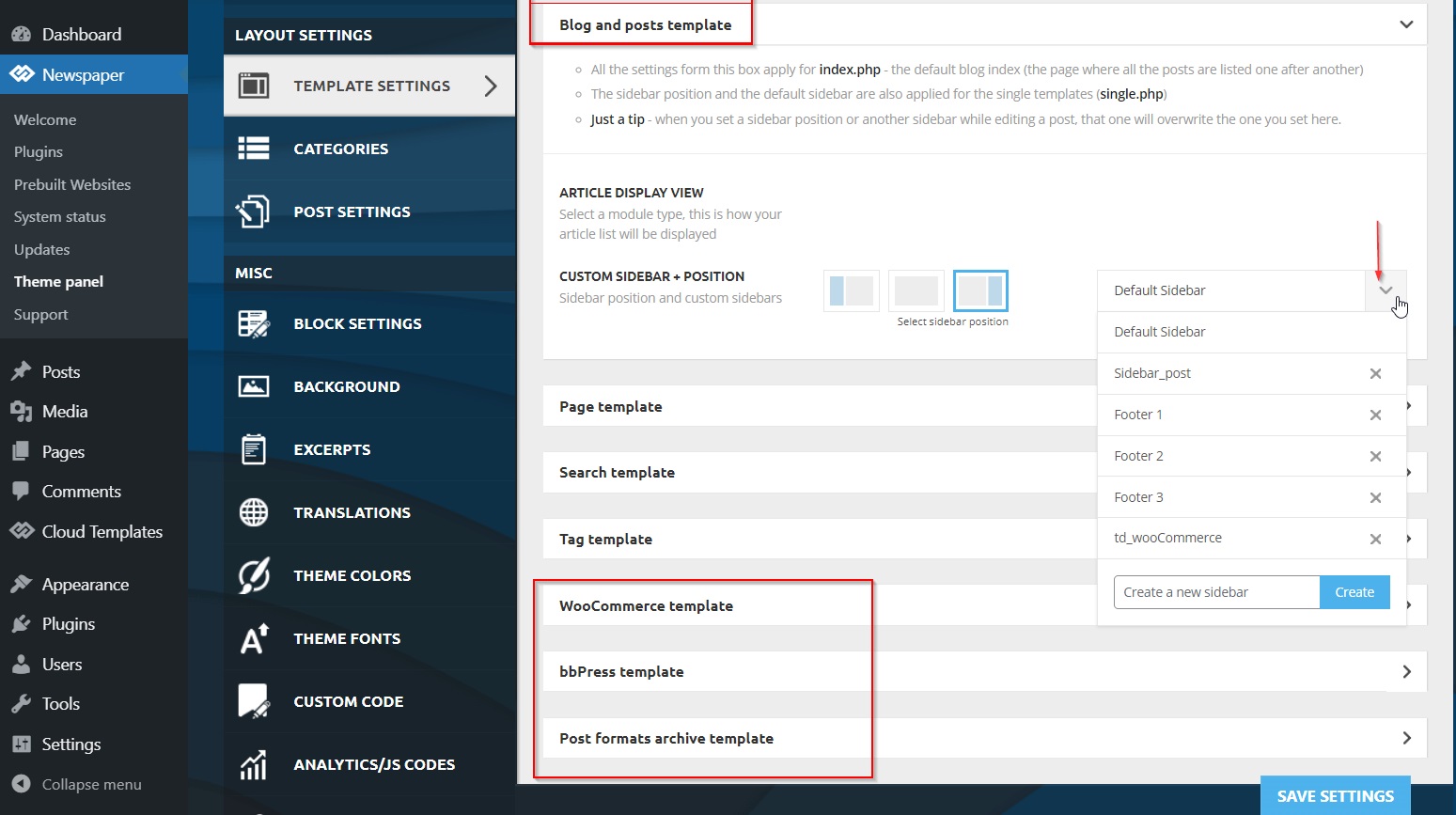
First, access your WordPress dashboard. Click on Appearance and then Theme Editor. A list of theme files will appear. Find the functions.php file in the list. This is the file you need to edit. Make sure to back up this file first. This way, you can restore it if needed.
Adding Code For Text Share Functionality
Open the functions.php file. Add the code for text share functionality. You can find this code online or create your own. Make sure the code is simple and clean. After adding the code, click Update File. Check your site to see if the text share works. If it doesn’t, you may need to debug the code.
Credit: forum.tagdiv.com
Integrating Social Media Apis
Choosing the right social media platforms is important. Each platform has its own strengths. Facebook is great for connecting with friends. Twitter is perfect for quick updates. Instagram is all about photos. Consider where your audience spends time. This helps in making the right choice. Keep it simple. Focus on a few platforms first. This makes managing them easier.
Configuring API settings is the next step. Each platform has its own API. You need to create an account first. Then, get your API key. This key is like a password. It helps your site talk to the platform. Keep your API key safe. Never share it with others. Enter the key in your WordPress settings. Check if everything works fine. If not, try again or seek help.
Designing Share Buttons
Choosing Button Styles is fun. Buttons can be round. They can be square. Choose colors that stand out. Red or blue are good choices. Make sure buttons are easy to see. People should want to click them. Buttons should look nice. They should fit with your theme.
Customizing Button Appearance is important. Add cool effects. Make buttons glow. Add shadows. Make them pop out. This makes them more interesting. People like interesting buttons. Change the size if needed. Big buttons are easy to click. But not too big. They should fit on the screen. Test them on different devices.
Credit: www.upwork.com
Testing Text Share Feature
It is important to test the text share feature on different devices. Use a computer, tablet, and phone. See how it works. Check if the text looks right. Make sure buttons are easy to click. Is everything readable?
Ask friends to test it too. They can help find problems. Different people use different devices. This is why testing on many devices is important.
Sometimes, text does not share correctly. Check internet connection. Poor connection causes problems. Update the theme if needed.
If sharing still fails, check settings. Make sure sharing options are turned on. Ask for help if stuck. Online forums can help.
Optimizing For User Engagement
Enhance user engagement by adding text share options in the WordPress Newspaper Theme. Simplify sharing through accessible buttons, encouraging readers to distribute content effortlessly. Boost interaction by integrating intuitive sharing features, promoting active participation across various social platforms.
Analyzing User Interaction Data
Collecting user data helps understand how people use your site. This data shows which buttons users click most often. It also reveals the pages they spend time on. With this information, you can make smart choices. Improve your site based on what users like. Use tools like Google Analytics to gather data. Look at the numbers to see patterns. Adjust your site’s layout to match user behavior. This boosts engagement and keeps users coming back.
Improving Share Button Placement
Place share buttons where they are easy to find. Users should not struggle to locate them. Popular spots are at the start or end of articles. These placements increase the chance of users sharing content. Test different locations to see what works best. Use bright colors to make buttons stand out. Ensure buttons are big enough for easy clicking. A well-placed share button can increase article visibility.
Maintaining And Updating
Regular updates keep your WordPress site safe. They fix bugs and add features. Plugins and themes need this care too. Always check for new versions. Update them as soon as you can. This helps your site run smoothly.
Sometimes updates bring compatibility issues. This means plugins might not work well together. Or they might not fit with the theme. Test updates on a small site first. This way, you avoid big problems on your main site.
Keep a backup of your site. Do this before updates. It saves your work if something goes wrong. Use tools to help with backups. They make the job easy and fast.
Monitoring for Compatibility Issues is very important. Always check your site after updates. Look for errors or strange behavior. Fix them quickly to keep visitors happy.

Credit: forum.tagdiv.com
Frequently Asked Questions
How Can I Add Text Sharing In WordPress?
To add text sharing in WordPress, you need a plugin like Highlight and Share. Install and activate it. Customize its settings to fit your theme’s style. Once configured, users can easily share selected text on social media platforms like Facebook and Twitter.
What Is The Newspaper Theme In WordPress?
The Newspaper theme is a popular WordPress theme designed for news websites. It offers customizable layouts and features like article sharing, social media integration, and responsive design. It is ideal for bloggers, online magazines, and publishers seeking a professional look.
Does Text Sharing Improve Blog Engagement?
Yes, text sharing can significantly improve blog engagement. It encourages readers to share interesting snippets, increasing your content’s visibility. This can lead to more traffic, higher user interaction, and potential growth in your audience base.
Is A Plugin Required For Text Sharing?
A plugin is typically required for text sharing functionality in WordPress. Plugins like Highlight and Share provide easy-to-use options for enabling text sharing. They offer customization features that integrate seamlessly with themes like Newspaper.
Conclusion
Adding text share features to your WordPress Newspaper theme is simple. It boosts engagement and makes sharing easy for readers. Follow the steps carefully, and you’ll enhance your site’s interactivity. Remember to test the changes. Ensure everything works smoothly before launching.
This small tweak can make a big difference. Your readers will appreciate the convenience. Keep your content shareable. It encourages wider distribution and attracts more visitors. It’s a practical way to improve user experience. Stay updated with the latest plugins.
They often offer new, helpful features. Enjoy the benefits of a more interactive blog!


