

Are you looking to make your WordPress posts easier to find and more organized? Adding tags to your content is a simple way to boost your site’s visibility and help your readers find exactly what they need.
If you’ve ever wondered how to add tags on WordPress but felt unsure where to start, this guide is made just for you. By the end, you’ll know exactly how to use tags to improve your site’s navigation and attract more visitors.
Ready to get started? Let’s dive in!
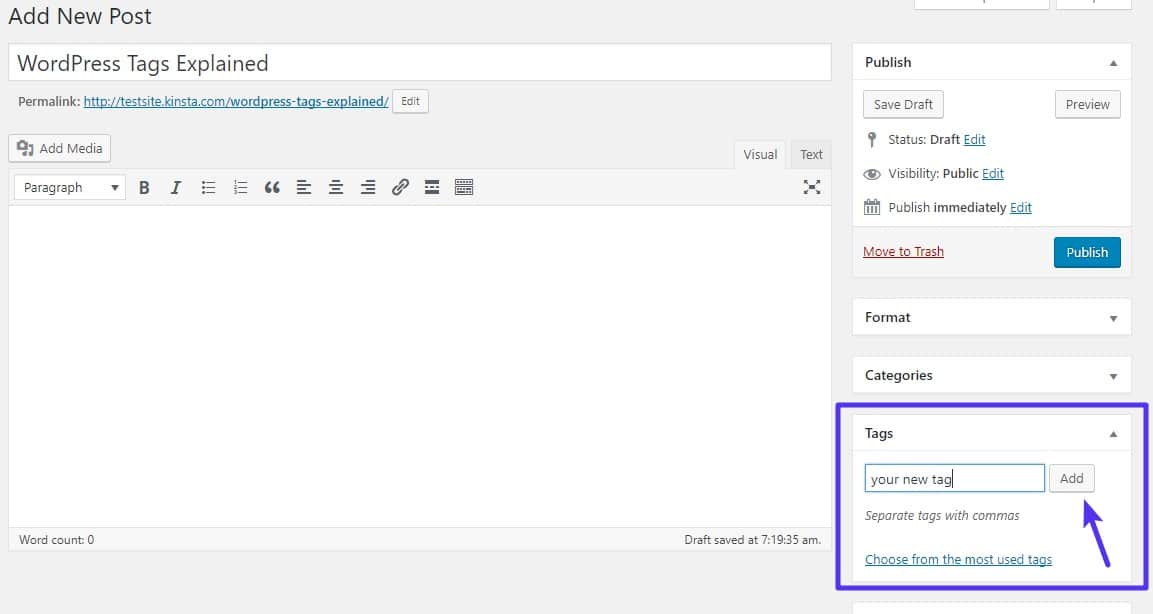
Credit: kinsta.com
Benefits Of Using Tags In WordPress
Using tags in WordPress brings many benefits to your website. Tags help sort and group content in a clear way. They make your site easier to use and help search engines understand your pages. Tags improve both the visitor’s experience and your site’s performance.
Enhancing Content Organization
Tags create a simple system to group related posts. This system helps keep your content neat and easy to find. Instead of searching through many posts, visitors can click tags to see similar topics. Tags make your site look well-structured and professional.
Improving User Experience
Tags guide users to find more posts on the same subject. They reduce the time visitors spend searching for information. Easy navigation keeps users happy and encourages them to stay longer. Visitors enjoy a smooth journey through your content.
Boosting Seo Performance
Search engines use tags to understand your content better. Tags add extra keywords that help rank your pages in search results. Well-tagged posts get more visibility and attract more visitors. Tags help your site reach a wider audience online.
Credit: make.wordpress.org
Preparing Your WordPress Site For Tags
Preparing your WordPress site for tags is an important step. Tags help organize content and improve site navigation. Proper setup ensures tags work smoothly and boost SEO. Start by making sure your site theme supports tags well. Then, use plugins to enhance tag management and SEO benefits.
Choosing The Right Theme
Select a WordPress theme that clearly shows tags on posts. Themes with built-in support for tags improve user experience. Look for themes that display tags at the bottom of posts. This helps visitors find related content easily. A simple, clean design works best for tag visibility.
Installing Essential Seo Plugins
SEO plugins help manage tags effectively and improve search rankings. Plugins like Yoast SEO or Rank Math offer tag optimization tools. They allow you to edit tag titles and descriptions. These plugins also prevent duplicate content issues from tags. Install and activate a reliable SEO plugin for better tag control.
Adding Tags To Posts
Adding tags to posts helps organize content and improves site navigation. Tags group related posts under common words. This makes it easier for readers to find similar topics. Tags also help search engines understand your content better.
WordPress offers two main editors to create posts. Each editor has a simple way to add tags. Let’s explore how to add tags using both editors.
Using The Classic Editor
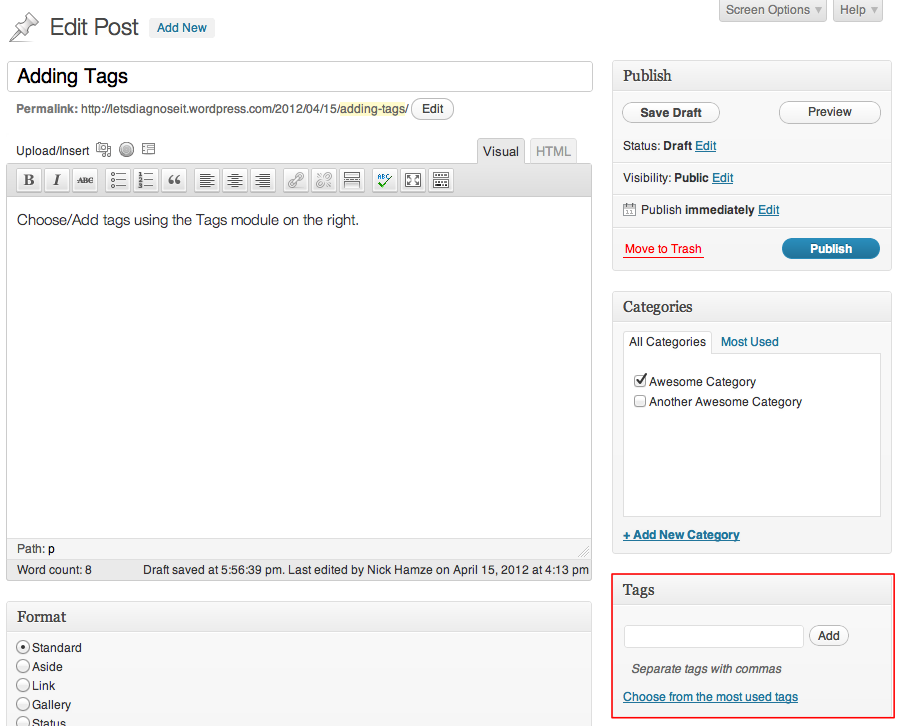
The Classic Editor shows a box labeled “Tags” on the right side. Click inside the box and type your tag. Separate multiple tags with commas. Press the “Add” button to save them. The tags will appear below the box. You can remove tags by clicking the “X” next to each one.
Remember to add tags that fit your post topic. Avoid using too many tags on one post. This keeps your site neat and easy to navigate.
Using The Block Editor
The Block Editor places the tag option in the “Post” settings on the right. Scroll down to find the “Tags” panel. Click the field to enter tags. Type each tag and press Enter to add it. You can add several tags this way.
To remove a tag, click the small “X” next to it. Adding relevant tags helps readers and search engines. Use simple words that match your post content.
Managing And Editing Tags
Managing and editing tags in WordPress keeps your content organized. Tags help visitors find related posts quickly. Proper tag management improves your site’s navigation and SEO. Editing tags lets you fix mistakes or update keywords. Deleting unused tags cleans up your database. Merging similar tags avoids confusion and duplicates.
Accessing The Tags Section
Start by logging into your WordPress dashboard. Look for the “Posts” menu on the left side. Click on “Tags” under the “Posts” tab. This opens the Tags management page. Here, you see all existing tags on your site. You can add new tags or manage current ones.
Editing And Deleting Tags
To edit a tag, find it in the list and click its name. Change the tag name or slug as needed. Save your changes by clicking the “Update” button. To delete a tag, hover over it and click “Delete.” Confirm the deletion to remove the tag from your site. Deleted tags no longer appear in posts or tag archives.
Merging Similar Tags
Merging tags keeps your site clean and organized. WordPress does not merge tags by default. Use a plugin like “Term Management Tools” to merge tags easily. Select tags you want to merge, then choose the main tag. This combines posts under one tag and deletes duplicates. Merging reduces clutter and improves user experience.
Best Practices For Tagging
Tags help organize your WordPress content. They make it easy for visitors to find related posts. Using tags wisely improves your site’s SEO and user experience. Follow these best practices for tagging to keep your site neat and effective.
Selecting Relevant Tags
Choose tags that describe the main topics of your post. Pick words your readers might use to search for content. Avoid vague or broad tags that do not match the post’s focus. Use specific terms to help users find exactly what they want.
Avoiding Over-tagging
Use only a few tags per post. Too many tags can confuse search engines and visitors. Limit tags to five or six relevant keywords. Over-tagging dilutes your content’s focus and lowers SEO value. Keep tags clear and purposeful for better results.
Maintaining Consistency
Use the same tags for similar topics across posts. Consistent tags build a strong internal linking structure. Avoid creating multiple tags that mean the same thing. Check your existing tags before adding new ones. Consistency helps search engines understand your content better.
Monitoring Tag Performance For Seo
Monitoring tag performance is key to improving SEO on your WordPress site. Tags help organize content and boost search visibility. Tracking their effectiveness shows which tags bring more traffic. This helps you focus on the best keywords and topics.
Using Google Analytics
Google Analytics lets you see how visitors find and use your tagged pages. Check which tags bring the most traffic over time. Look at metrics like session duration and bounce rate. These show if visitors find your content useful after clicking a tag. Use this data to keep or change tags.
Tracking Keyword Rankings
Keyword ranking tools track how your tags perform in search engines. Enter your tag keywords to see their position in results. Watch for changes in rankings after adding or editing tags. Higher ranks mean better visibility and more clicks. Adjust tags based on this to improve SEO results.

Credit: wordpress.com
Frequently Asked Questions
What Are Tags In WordPress And Why Use Them?
Tags in WordPress are keywords that describe your post’s content. They help organize posts by topics. Using tags improves site navigation and SEO by grouping related content for readers and search engines.
How Do I Add Tags To A WordPress Post?
To add tags, open your post editor in WordPress. Find the “Tags” box usually on the right sidebar. Enter relevant keywords separated by commas and click “Add. ” Save or update your post to apply the tags.
Can I Edit Or Delete Tags After Adding Them?
Yes, you can edit or delete tags anytime. Go to Posts > Tags in your WordPress dashboard. Here, you can edit tag names or delete unwanted tags without affecting your posts.
Do Tags Affect WordPress Seo Ranking?
Yes, tags improve SEO by organizing content and creating internal links. Proper use of tags helps search engines understand your site structure and boosts keyword relevance, enhancing your site’s visibility.
Conclusion
Adding tags to WordPress posts helps organize your content better. Tags make it easier for readers to find related topics on your site. Use clear and simple tags that match your post’s subject. Avoid using too many tags in one post to keep things neat.
Regularly update your tags to keep your site fresh and user-friendly. Start adding tags today to improve your WordPress site’s navigation and user experience. Small steps like this can make a big difference over time.


