
Want to grow your audience and keep visitors coming back to your WordPress site? Adding a subscribe button is one of the easiest ways to do that.
But if you’re not sure how to set it up, don’t worry—you’re in the right place. In this post, you’ll learn simple, step-by-step instructions to add a subscribe button that grabs attention and encourages your visitors to stay connected. Ready to turn casual visitors into loyal subscribers?
Let’s get started!
Benefits Of A Subscribe Button
Adding a subscribe button to your WordPress site brings many benefits. It helps connect visitors to your content easily. Visitors can stay updated with new posts, offers, or news. This simple tool can improve how users interact with your site.
Increase Audience Engagement
A subscribe button invites visitors to join your updates. It encourages them to come back often. Regular updates keep readers interested and active. Engaged users spend more time on your site. They also share content with friends and family.
Build A Loyal Community
Subscribers form a group that trusts your content. They feel part of your site’s journey. This loyalty helps your site grow steadily. Loyal readers are more likely to support your goals. They offer feedback and participate in discussions.
Grow Email Lists
Email lists are valuable for direct communication. A subscribe button helps collect email addresses easily. With emails, you can send updates straight to inboxes. This direct link boosts your marketing efforts. Growing your list means more chances to reach readers.
Preparing Your WordPress Site
Preparing your WordPress site is the first step to adding a subscribe button. The right setup helps the button work smoothly. It also improves user experience and site performance. Small details matter for attracting subscribers. Start with the basics to build a strong foundation.
This section covers choosing a theme and installing plugins. Both are important for a clean, functional subscribe button.
Choose The Right Theme
Select a theme that supports modern features. Responsive design is a must. It makes your site look good on phones and tablets. A lightweight theme helps your site load faster. Speed is key for keeping visitors on your page.
Some themes come with built-in subscription options. This saves time and effort. Check user reviews and ratings before picking a theme. Avoid themes that are outdated or poorly coded. The right theme makes adding a subscribe button easier.
Install Necessary Plugins
Plugins add extra functions to your WordPress site. Choose plugins that help with email subscriptions. Popular options include newsletter and contact form plugins. These make it easy to create and manage subscribe buttons.
Keep plugins updated to avoid security risks. Too many plugins can slow your site. Only install what you need. Test the subscribe button after installing plugins. This ensures it works well and collects emails correctly.
Adding A Subscribe Button Using Plugins
Adding a subscribe button to your WordPress site helps grow your email list. Plugins make this process simple. They offer ready tools to place and manage subscription buttons without coding. Using plugins saves time and ensures your button works well on all devices.
Popular Subscription Plugins
Several plugins offer easy subscription button setups. Mailchimp for WordPress is popular for its user-friendly interface. Newsletter plugin allows full control over subscription forms. Another option is Sumo, which supports multiple email services. Choose one that fits your needs and budget.
Step-by-step Plugin Setup
Start by installing your chosen plugin from the WordPress dashboard. Go to Plugins > Add New, then search by name. Click “Install Now” and activate the plugin. Follow the plugin’s setup wizard to connect your email service. Create a new subscription form or button. Place it on your site using shortcode or widget areas.
Customizing Button Appearance
Most plugins let you change the button’s look. Adjust colors to match your website style. Change the button text to invite visitors clearly. Set button size and shape for easy clicking. Preview your changes before saving. A well-designed button draws attention and encourages clicks.

Credit: www.youtube.com
Adding A Subscribe Button Manually
Adding a subscribe button manually on WordPress gives you full control over its look and placement. You can create a simple form and place it anywhere on your site. This method works without extra plugins and keeps your site light.
Creating A Signup Form
Start by creating a basic HTML form. It should ask for the visitor’s email address. Use the tag with method="post". Add an field for the email and a submit button.
Example:
Replace your-subscription-handler-url with your email service provider’s URL or your custom script.
Embedding The Button In Widgets
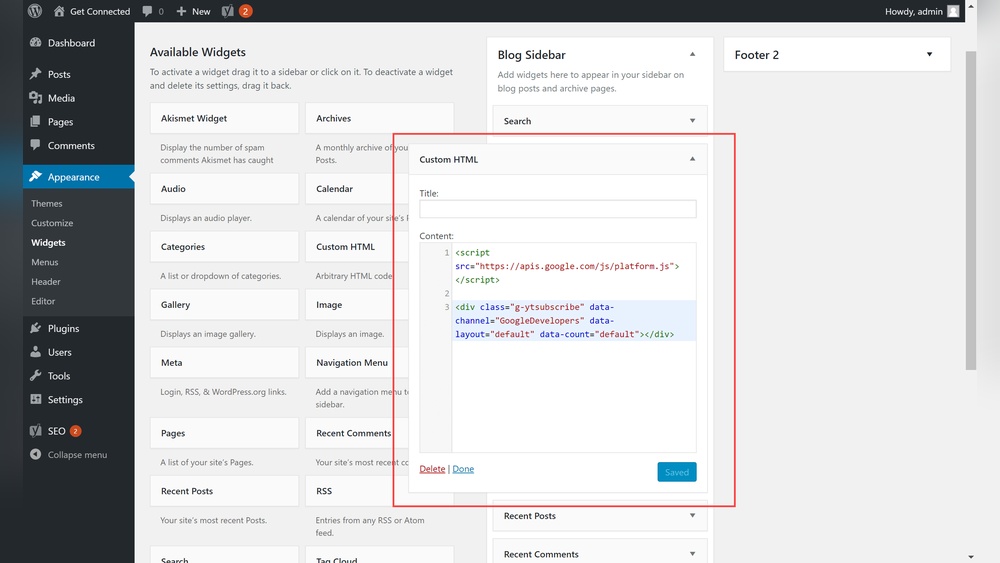
WordPress widgets allow easy placement of your subscribe button. Go to Appearance > Widgets in your dashboard. Add a Custom HTML widget to your desired widget area.
Paste your signup form’s HTML code inside this widget. Save the changes. The subscribe button will now appear where you placed the widget.
Using Shortcodes For Placement
Create a shortcode to place the subscribe form inside posts or pages. Add this code to your theme’s functions.php file:
function custom_subscribe_form() { return ''; } add_shortcode('subscribe_form', 'custom_subscribe_form'); Use the shortcode [subscribe_form] in any post or page. This inserts the subscribe button exactly where you want it.
Optimizing Subscribe Button Placement
Optimizing the placement of your subscribe button can increase sign-ups. The right location grabs visitor attention quickly. It also fits naturally into your site design. This makes users more likely to click and subscribe. Focus on spots where visitors spend time and look often. Proper placement helps your subscribe button stand out without being annoying.
Best Locations On Your Site
Place the subscribe button at the top of your page. The header area is visible immediately. It catches the eye before visitors scroll down. Another good spot is the end of blog posts. Readers who enjoy your content may want to subscribe. A sidebar on every page also works well. This spot stays visible while visitors explore your site. Avoid hiding the button in footers or behind menus. These places get less attention and fewer clicks.
Mobile-friendly Design Tips
Make sure the subscribe button works on small screens. Use a button size easy to tap with a finger. Avoid placing it too close to other links or buttons. Keep some space around the button to prevent accidental clicks. Test your site on different phones to check how the button looks. The button should load fast and not block content. Clear text and bright colors help the button stand out on mobile devices.
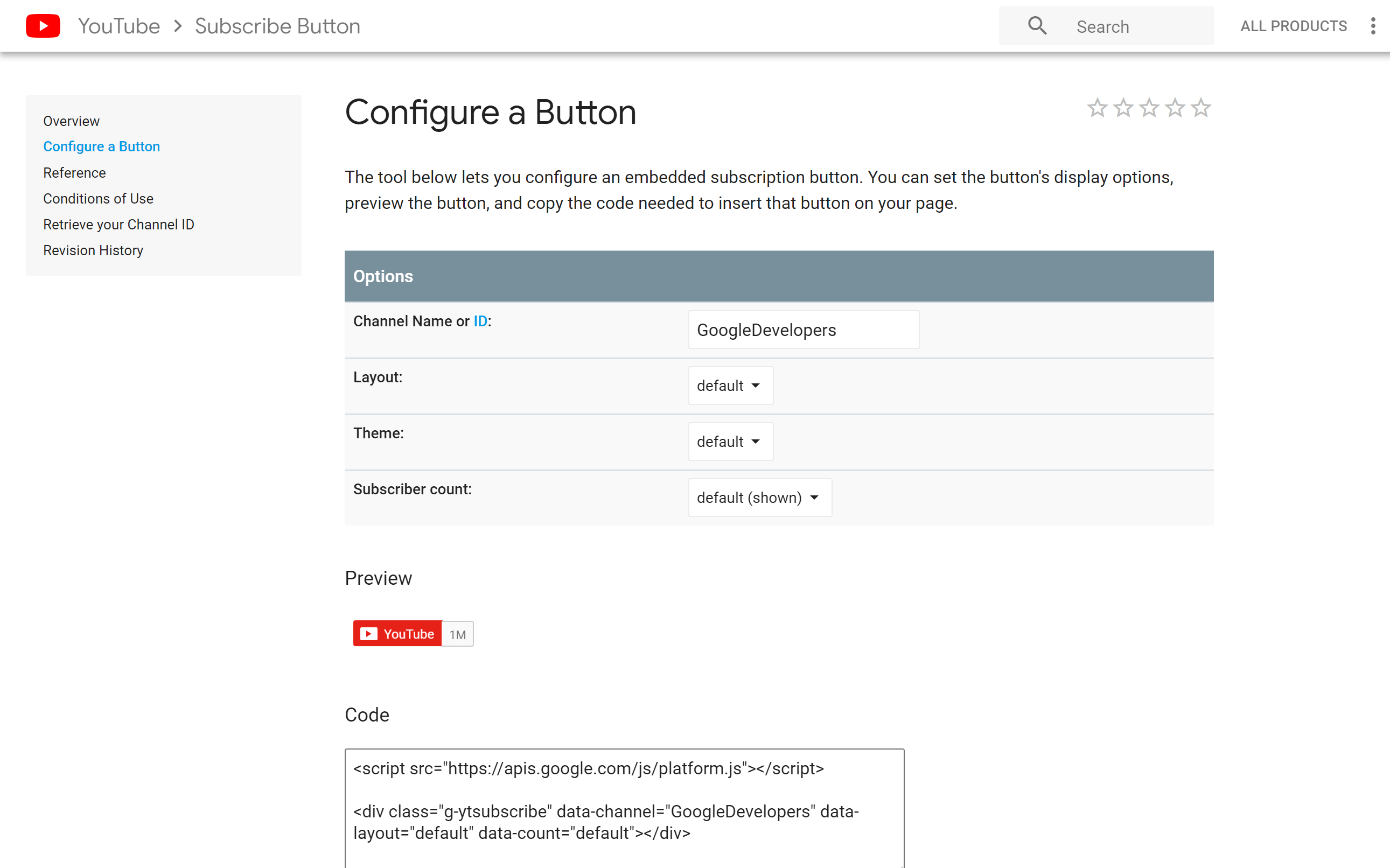
Credit: www.hostpapa.com
Promoting Your Subscribe Button
Promoting your subscribe button is key to growing your email list. Just placing it on your site is not enough. You need to attract visitors’ attention and encourage them to click. Smart promotion helps you get more subscribers and build a strong audience.
Using Pop-ups And Slide-ins
Pop-ups and slide-ins catch visitors’ eyes quickly. They appear on the screen at the right moment. These tools remind people to subscribe without being too pushy. You can set them to show after a visitor spends time on your page or scrolls down.
Make sure your pop-ups are easy to close. Use clear, simple messages to explain why visitors should subscribe. A good offer or a reason to join increases sign-ups.
Incorporating Calls To Action
Calls to action (CTAs) guide visitors to your subscribe button. Use short, direct phrases like “Join our newsletter” or “Get updates.” Place CTAs near your content, such as at the end of blog posts or in the sidebar.
Use buttons with bright colors that stand out on your page. Keep the message simple and focused on the benefit for the subscriber. This helps visitors understand why they should click and subscribe.
Tracking And Analyzing Subscriber Growth
Tracking and analyzing subscriber growth is key to improving your email list. It helps you see what works and what does not. Watching your numbers over time shows trends and patterns. This information guides your decisions to grow your audience steadily.
Using Analytics Tools
Analytics tools show detailed data about your subscribers. Google Analytics tracks visitor actions on your site. You can see how many click the subscribe button. Email marketing services offer reports on new sign-ups. These tools reveal where subscribers come from and what they like.
Adjusting Strategies Based On Data
Data helps you change your approach for better results. If one form gets more clicks, use it more. Low subscriber rates suggest testing new button placements. Changing the button color or text can attract attention. Keep testing small changes to find what grows your list.

Credit: natalieducey.com
Frequently Asked Questions
How Do I Add A Subscribe Button In WordPress?
You can add a subscribe button using plugins or manual HTML code. Popular plugins like Mailchimp simplify this process. Choose a plugin, configure settings, and place the button on your site using widgets or shortcodes.
Which Plugin Is Best For WordPress Subscribe Buttons?
Mailchimp and Newsletter are top plugins for adding subscribe buttons. They offer easy integration, customization, and email list management. Select a plugin that fits your needs and supports your email marketing platform.
Can I Customize The Subscribe Button Appearance?
Yes, most plugins allow button color, size, and text customization. You can also use custom CSS for advanced styling. This helps match the button with your website’s design and branding.
Where Should I Place The Subscribe Button On WordPress?
Place the subscribe button in visible areas like the sidebar, header, or footer. You can also add it at the end of blog posts to maximize sign-ups. Strategic placement improves user engagement and subscription rates.
Conclusion
Adding a subscribe button to your WordPress site helps grow your audience. Visitors can easily sign up for updates and news. The process is simple and does not take long. Choose the right plugin or use built-in features for best results.
Test the button to ensure it works well on all devices. Keep your site user-friendly and inviting. Watch your subscriber list grow steadily over time. This small step can make a big difference for your blog’s success.


