
Are you looking to boost your website’s visibility and enhance its search engine performance? Adding schema markup to your Astra WordPress theme might just be the game-changer you need.
Schema markup helps search engines understand your content better, potentially leading to higher rankings and more clicks. Imagine your site standing out in search results with rich snippets that capture attention and drive traffic. In this guide, we’ll walk you through the simple steps to integrate schema into your Astra theme, ensuring you stay ahead in the digital landscape.
Get ready to transform your website into a search engine magnet and keep your audience engaged like never before!
Credit: www.rswebsols.com
Understanding Schema Markup
Schema helps search engines understand your website. It uses special tags. These tags give search engines extra info. This helps your site show up better in search results.
Schema makes your site more visible. People can find your site easier. It gives search engines clear info. This helps your site rank higher.
- Article: For blog posts and news.
- Recipe: For cooking and food sites.
- Event: For concerts and meetings.
- Product: For online shops and items.
Benefits Of Schema For Seo
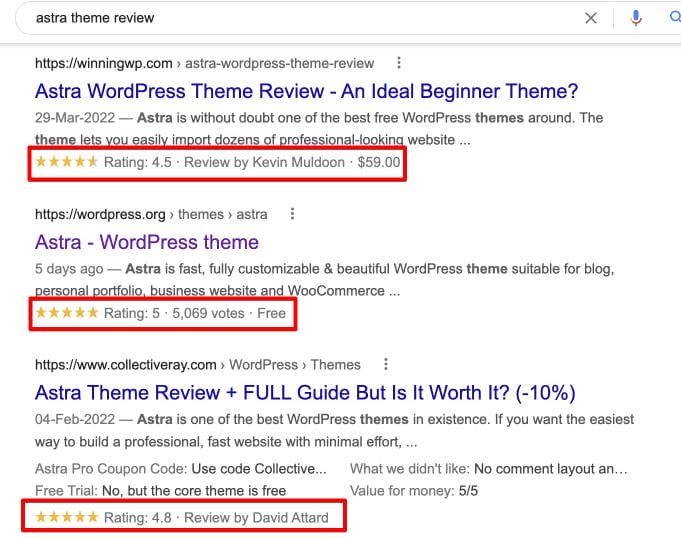
Schema helps search engines understand your website. With schema, sites can show rich snippets. Rich snippets make search results more attractive. They can increase click-through rates. Schema makes your content look unique and trustworthy. Search engines might rank sites higher with schema. This means more visitors and better visibility. Schema can improve local SEO too. Businesses can show contact info easily. Schema helps show reviews and ratings.
Choosing The Right Plugin
Adding schema to your website helps search engines. It makes your site more visible. Many plugins can help with this.
Yoast SEO is well-known. It is easy to use. Another option is Schema Pro. It offers many features. You can try All in One Schema Rich Snippets. It is simple and free.
Some plugins work better with Astra. Schema Pro is a good choice. It blends well with Astra. Yoast SEO is also compatible. It works well with Astra’s settings.
It is important to check plugin updates. They keep your site running smoothly. Always make sure plugins are compatible. This avoids any issues later.
Installing A Schema Plugin
Adding schema to your Astra WordPress Theme is simple. First, install a schema plugin. This helps search engines understand your website better. Start by navigating to the WordPress dashboard. Click on “Plugins” and then “Add New”. In the search bar, type “schema plugin”. Choose a plugin with good reviews. Click “Install” and then “Activate”.
After activation, locate the plugin settings. This is usually under “Settings” or “Tools”. Open the plugin settings to start configuring. Make sure to read the instructions. This helps in setting up the plugin correctly. Don’t skip any steps. Each step is important for the schema to work.
In the settings, you can choose basic schema types. Common options include “Article” and “Product”. These help describe the content of your pages. Select the types that match your content. Save your changes after each adjustment. This ensures the settings are applied.
Customizing Schema Markup
Custom fields help you add extra information to your posts. This could be a rating or author name. Go to the post editor in WordPress. Look for the custom fields option. Click on it. You can now add new fields. This makes your content more detailed. It also helps search engines understand your page better.
JSON-LD is a way to add structured data. It is easy to use. You can add it in the header or footer of your site. Copy the JSON-LD code you need. Paste it into your theme’s header.php or footer.php file. This tells search engines about your page. It helps your site show up better in search results.

Credit: wpspectra.com
Testing Schema Implementation
Adding schema to the Astra WordPress theme can enhance your site’s search visibility. Use a plugin like Schema Pro to easily implement structured data. This helps search engines understand your content better and improves your site’s ranking.
Using Google’s Structured Data Testing Tool
Google’s tool checks if schema works right. Open the tool in a browser. Paste your page URL in the box. Click “Run Test” to see results. The tool shows errors and warnings. Fix them for better performance. Check for missing tags or wrong formats. Use correct schema types. Google likes clean data.
Common Errors And Fixes
Errors can confuse search engines. Check for missing elements. Add required tags if absent. Watch for wrong syntax or type. Use Google’s guide for correct schema. Errors can lower site ranking. Fix them for better visibility. Regular checks help keep data clean. Schema makes sites more searchable. Keep data updated for best results.
Maintaining Schema Markup
Enhancing your Astra WordPress theme with schema markup boosts search engine visibility. Use plugins like Schema Pro for easy integration. Structured data improves search results by highlighting key information about your website.
Regular Updates
Schema Markup needs updates to stay effective. New SEO trends appear often. Keep your markup fresh. Check for new schema types. Use the right ones for your site. Update your theme often. This ensures compatibility. Astra makes it easy to update. You can use plugins. They help with schema changes. Plugins like Yoast or Rank Math are good. They offer schema options. Updates can fix bugs too. Bug fixes improve site performance.
Monitoring Performance
Track how your schema markup affects your site. Use tools like Google Search Console. It shows how your schema works. Check your site’s search visibility. Look for changes in rankings. Schema should improve visibility. If it doesn’t, make changes. Test different schema types. See what works best. Always monitor site speed. Schema can affect loading times. Fast sites rank better. Make sure schema doesn’t slow your site.

Credit: wpastra.com
Frequently Asked Questions
What Is Schema In Astra Theme?
Schema is structured data that helps search engines understand your site’s content. Adding schema enhances SEO and improves visibility. Astra theme supports easy integration of schema, allowing you to mark up important elements like articles, products, and events, thus providing a better user experience and boosting organic search results.
Why Add Schema To Astra Theme?
Adding schema to Astra theme helps search engines understand your content better. It improves your website’s visibility in search results. Schema can enhance rich snippets, leading to increased click-through rates and better user engagement. It’s a crucial SEO practice for optimizing your WordPress site effectively.
How Do I Implement Schema In Astra?
Implementing schema in Astra involves using plugins or custom code. Popular plugins like Schema Pro or WP SEO Structured Data Schema can simplify this. They offer easy-to-use interfaces for adding various schema types. Alternatively, you can manually add schema markup using Astra’s hooks and filters for greater customization.
Can Schema Improve My Site’s Seo?
Yes, schema can significantly improve your site’s SEO. It helps search engines understand and display your content more accurately. By providing structured data, schema can enhance rich snippets, making your site more appealing in search results. This can lead to higher click-through rates and better user engagement.
Conclusion
Adding schema to your Astra WordPress theme boosts your site’s visibility. Schema helps search engines understand your content better. A clear schema improves your site’s ranking. Astra makes it easy to integrate schema. This enhances user experience and increases organic traffic.
Implementing schema doesn’t require advanced coding skills. Follow simple steps to ensure your site stands out. Engage users with rich snippets and structured data. Boost your website’s performance today. Start applying schema and reap the benefits. Your site deserves to be noticed.
Keep your content relevant and updated. Watch your site grow with better SEO.


