

If you want to build trust and boost your website’s credibility, adding reviews to your WordPress site is a smart move. Imagine visitors reading real opinions from happy customers – it instantly makes your brand more believable.
But how do you add those reviews easily, without any technical headaches? This guide will walk you through simple steps to get reviews on your WordPress site quickly. By the end, you’ll have a powerful tool to turn visitors into loyal customers.
Ready to make your site stand out? Let’s dive in!
Credit: www.greengeeks.com
Benefits Of Adding Reviews
Adding reviews to your WordPress site brings several important benefits. Reviews build trust with visitors and show real opinions. They make your site feel active and reliable.
Reviews also help your site rank better on search engines. They create fresh content and include keywords naturally. This helps new visitors find your site more easily.
Boosting Credibility
Reviews show that real people use your products or services. Positive feedback builds trust fast. Visitors feel safer buying or using your site.
Without reviews, visitors may doubt your quality. Honest reviews reduce hesitation. They prove your business is reliable.
Increasing Engagement
Reviews invite visitors to interact. People like to share their thoughts and experiences. This creates a community around your site.
More comments and ratings keep users longer on your pages. Longer visits improve your site’s performance in search results. Engagement boosts your site’s popularity.
Enhancing Seo
Search engines love fresh, original content. Reviews add unique text to your pages regularly. This helps search engines see your site as active.
Keywords in reviews help your site appear in relevant searches. User-generated content improves your site’s ranking. This brings more traffic to your WordPress site.
Choosing The Right Review Plugin
Choosing the right review plugin is important for your WordPress site. A good plugin helps visitors trust your products or services. It also improves your site’s appearance and user experience. There are many plugins available, so knowing what to pick saves time and effort.
Popular Free Plugins
Many free plugins offer solid features for basic review needs. WP Customer Reviews lets users leave feedback easily. Site Reviews is simple and includes rating stars. Taqyeem is a free option with nice design options. These plugins work well for small blogs or new sites.
Premium Options
Paid plugins provide advanced features and support. WP Review Pro offers rich snippets for SEO and multiple rating types. Rich Reviews Pro adds customization for review layouts. These plugins often include better support and more design choices. They suit sites wanting more control and growth.
Key Features To Look For
Choose a plugin with user-friendly forms for easy reviews. Look for options to add star ratings and pros/cons lists. Check if it supports rich snippets to improve search results. Mobile responsiveness is important for visitors on phones. Also, consider plugins with moderation tools to manage reviews.
Installing And Activating Plugins
Installing and activating plugins on WordPress is the first step to add reviews to your site. Plugins extend your website’s features without needing to code. Choosing the right plugin makes managing reviews easier and more effective.
Plugins are easy to find and install from the WordPress dashboard. Once installed, you activate them to start using their features. This process takes just a few minutes and opens many possibilities for your site.
Step-by-step Installation
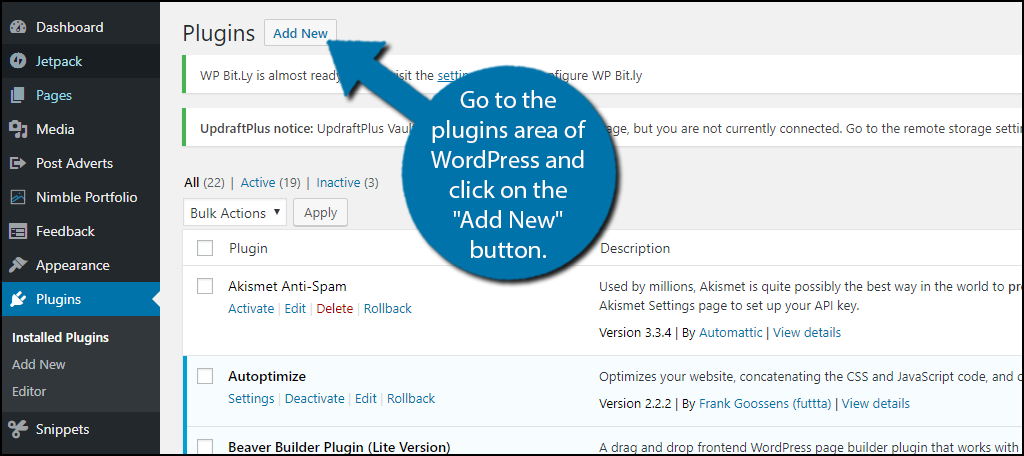
Log in to your WordPress dashboard. Go to the “Plugins” menu and click “Add New.” Use the search box to find a review plugin by typing keywords like “review” or “testimonials.”
Find a plugin with good ratings and many active installations. Click “Install Now” next to the plugin’s name. Wait a moment while WordPress downloads and installs the plugin files.
After installation, click the “Activate” button. Activation makes the plugin ready to use on your website. You can now start setting up the plugin to collect and display reviews.
Configuring Basic Settings
Once activated, locate the plugin’s menu in your dashboard. Most plugins add a new menu or settings option. Click on it to open the plugin’s control panel.
Set basic options like where reviews will appear on your site. Choose whether visitors can submit reviews directly or if you will add them yourself. Adjust the star rating system or review format if available.
Save your settings after making changes. Test the review feature on your site to ensure it works properly. Adjust settings as needed for better user experience and appearance.
Creating Review Sections
Managing reviews on WordPress helps build trust with visitors. Proper moderation ensures only genuine feedback appears. Displaying reviews clearly encourages more users to share their experiences.
Moderating and displaying reviews protects your site from spam. It also highlights positive comments that attract customers. Let’s explore how to approve, filter, and showcase reviews.
Approving Submissions
Review submissions need approval before showing on your site. Check each review for relevance and politeness. Approve only honest and helpful feedback to keep quality high. This step prevents bad or off-topic comments from appearing.
Filtering Spam And Fake Reviews
Spam and fake reviews can harm your site’s reputation. Use spam filters or plugins to block suspicious content. Look for repeated phrases or unnatural language as red flags. Removing fake reviews keeps your site trustworthy and reliable.
Showcasing Reviews Effectively
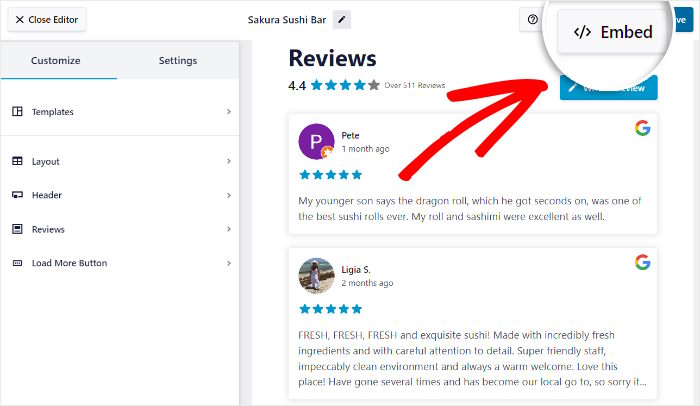
Display reviews in a clean, easy-to-read layout. Use stars or rating numbers to catch attention. Highlight the best reviews at the top or in a slider. Good presentation makes reviews more convincing and boosts visitor confidence.
Collecting User Reviews
Optimizing reviews for SEO helps your website rank higher in search engines. It also attracts more visitors and builds trust. Proper SEO ensures search engines understand your reviews clearly. This boosts your site’s credibility and user engagement.
Adding Schema Markup
Schema markup is a code that explains your reviews to search engines. It helps display star ratings and review details in search results. Use a plugin or add JSON-LD code manually to your WordPress site. Make sure each review has the correct schema type, like Review or Product. This improves how your reviews show up in Google.
Improving Review Visibility
Place reviews where visitors can easily see them. Use widgets or blocks to show reviews on product pages or homepage. Encourage users to leave detailed reviews with keywords naturally included. Update reviews regularly to keep content fresh and relevant. Visible, updated reviews increase user trust and improve SEO rankings.

Credit: formidableforms.com
Credit: smashballoon.com
Frequently Asked Questions
How Do I Add Reviews To My WordPress Site?
To add reviews, install a review plugin like WP Customer Reviews. Activate it, configure settings, then add review sections on pages or posts. This method is simple and helps display authentic customer feedback effectively.
Which Plugin Is Best For WordPress Reviews?
WP Customer Reviews, Site Reviews, and WP Review Pro are top choices. They offer easy setup, customization, and rating options. Choose based on your needs and site design for the best user experience.
Can I Display User-generated Reviews On WordPress?
Yes, most review plugins allow user-submitted reviews. They often include moderation features to ensure content quality. This helps build trust by showcasing real customer opinions directly on your site.
How To Customize Review Appearance In WordPress?
Most plugins provide design options like star ratings, colors, and layouts. Customize through plugin settings or CSS to match your website’s style. This ensures reviews blend seamlessly with your site’s branding.
Conclusion
Adding reviews on WordPress helps build trust with visitors. It shows real opinions about your products or services. Reviews also improve your site’s SEO and can boost traffic. Keep the process simple and clear for users. Use plugins or built-in tools to collect feedback easily.
Regularly update and respond to reviews to keep engagement high. Start adding reviews today and watch your site grow naturally.


