
Are you looking to make your recipes stand out on your WordPress site? Adding a recipe card can do just that—making your recipes easy to read, share, and follow.
Imagine your visitors quickly finding ingredients and steps without scrolling through long paragraphs. This simple change can boost engagement and keep your audience coming back for more. In this post, you’ll discover exactly how to add a recipe card to your WordPress site, step-by-step, so your recipes look professional and appealing every time.
Let’s dive in and make your cooking content shine!
Choosing A Recipe Card Plugin
Choosing the right recipe card plugin is important for your WordPress site. It helps display your recipes clearly and attractively. A good plugin makes your recipes easy to read and follow. It also helps improve your site’s SEO, so more people find your recipes online.
Many recipe card plugins offer different features. Some focus on design, others on functionality. Think about what you need before picking one. Consider ease of use, customization, and support options. Also, check how well the plugin works with your WordPress theme and other tools.
Popular Recipe Card Plugins
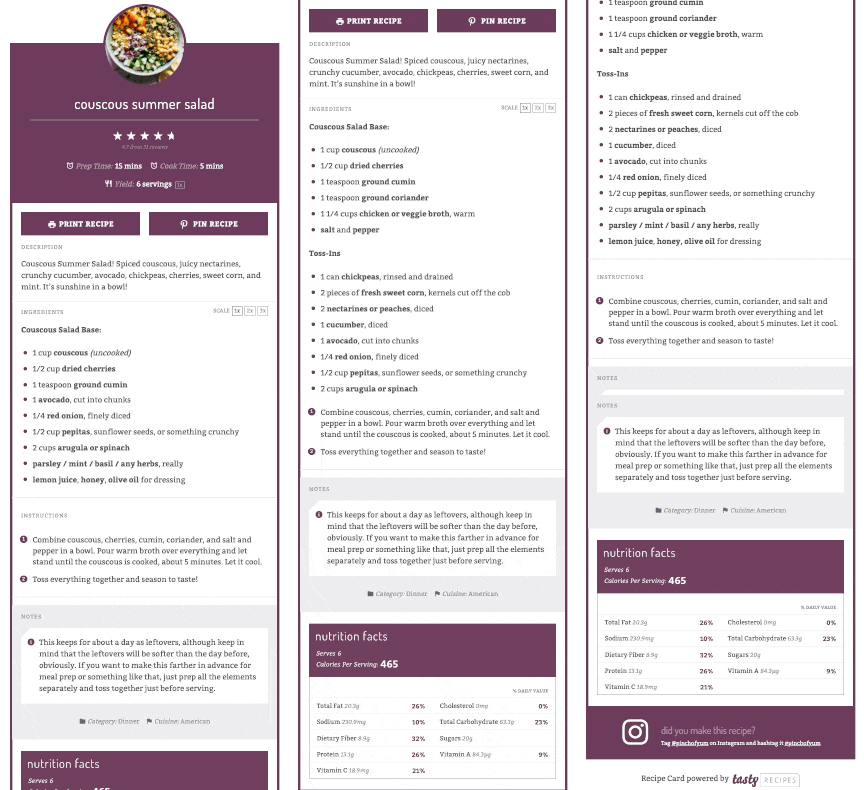
Some popular options include WP Recipe Maker, Tasty Recipes, and Cooked. WP Recipe Maker is user-friendly and widely used. Tasty Recipes offers great styling and SEO features. Cooked has a drag-and-drop builder for easy recipe creation. Each plugin has unique strengths to fit different needs.
Free Vs Premium Options
Free plugins give basic features for simple recipe cards. They are good for beginners or small blogs. Premium plugins offer advanced tools like nutrition facts and print buttons. They often include better support and updates. Choose based on your budget and feature needs.
Plugin Compatibility
Check if the plugin works well with your WordPress version. Make sure it fits your theme and other plugins without causing errors. Look for plugins regularly updated by developers. Compatibility ensures smooth performance and fewer technical issues.
Credit: www.wptasty.com
Installing The Recipe Card Plugin
Installing a recipe card plugin on WordPress makes sharing recipes easy and neat. It helps organize your recipes in a clear format. Visitors can follow your cooking steps without confusion. The process is simple and fast. Below are the basic steps to get started.
Plugin Installation Steps
Log in to your WordPress dashboard. Go to the “Plugins” menu on the left side. Click “Add New” at the top of the page. Use the search box to find “Recipe Card” plugins. Choose one that fits your needs. Click the “Install Now” button next to it. Wait a few seconds while WordPress downloads the files.
Activating The Plugin
After installation, click the “Activate” button. Activation makes the plugin ready to use. You will see a new menu or settings option appear. This confirms that the plugin works correctly. Without activation, the plugin will not function.
Initial Plugin Setup
Open the plugin’s settings from the dashboard menu. Enter basic information like your recipe style and layout. Adjust colors and fonts to match your site’s theme. Save your changes before leaving the page. Now the plugin is ready to create recipe cards easily.
Creating Your First Recipe Card
Creating your first recipe card in WordPress is simple and rewarding. It helps readers follow your recipes easily. A well-made card shows all key details clearly.
Start by gathering your recipe information. Think about ingredients, steps, cooking time, and servings. Organize these details before adding them to the card.
Adding Recipe Details
Enter the recipe title and description first. List the ingredients in order. Add clear, step-by-step instructions.
Include cooking time, preparation time, and the number of servings. These help readers plan their cooking better. Use bullet points for easy reading.
Using Images And Videos
Upload photos of the finished dish to attract readers. Use clear, bright images that show the food well.
Videos are useful for showing cooking steps. Add short clips to guide your audience visually. This makes the recipe easier to follow.
Formatting Tips
Keep text short and easy to read. Use headings and lists to break content into parts. This improves readability on all devices.
Choose a clean font and maintain consistent spacing. Highlight important parts like tips or warnings. Use color sparingly to keep focus on the recipe.
Credit: www.wpzoom.com
Customizing Recipe Card Appearance
Optimizing recipe cards for SEO helps your recipes appear in search results. It makes your content easier for search engines to understand. This can increase your website traffic and attract more readers.
Good SEO practices also improve user experience. Visitors find your recipes faster and enjoy using your site. This keeps them coming back for more delicious ideas.
Adding Schema Markup
Schema markup is a special code that tells search engines about your recipe. It includes details like ingredients, cooking time, and calories. This helps search engines show rich results with pictures and ratings.
Use a plugin or manual code to add schema markup. Make sure all recipe details are accurate and complete. Rich results stand out in search listings and attract clicks.
Improving Load Speed
Fast-loading recipe cards keep visitors happy. Slow pages make users leave quickly, hurting SEO. Use optimized images and minimize scripts to speed up your site.
Choose a reliable web host and use caching tools. Test your page speed regularly and fix any issues. A quick site improves rankings and user satisfaction.
Enhancing Readability
Clear and simple recipe cards help readers understand quickly. Use short sentences and easy words. Break instructions into steps with bullet points or numbers.
Highlight important information like cooking time and servings. Make text large enough to read on all devices. Better readability keeps visitors engaged and reduces bounce rates.
Inserting Recipe Cards Into Posts
Adding a recipe card in WordPress can sometimes lead to common problems. These issues can stop your recipe from showing correctly or cause other errors. Troubleshooting helps fix these problems fast. It keeps your site looking good and working well. Below are some common issues and ways to solve them.
Plugin Conflicts
Plugins may not always work well together. Some plugins can cause your recipe card to break or not display. Deactivate other plugins one by one. Check if the recipe card works after each step. This helps find the conflicting plugin. Update all plugins to their latest versions. Sometimes, older versions cause conflicts.
Display Problems
Recipe cards may not show correctly on all devices or browsers. Clear your browser cache and reload the page. Check your theme settings as some themes hide recipe cards by default. Use a different browser to see if the problem stays. Adjust the card’s width or font size in plugin settings. Make sure your WordPress and theme are up to date.
Updating And Maintenance
Keep your recipe card plugin updated for best performance. Plugin updates fix bugs and add new features. Backup your website before updating plugins or themes. Regularly check your recipe cards after updates. Fix any broken links or missing images quickly. Proper maintenance avoids future problems with your recipe cards.
Optimizing Recipe Cards For Seo
Advanced tips help recipe bloggers improve their site and engage visitors better. These tips make recipes more interactive and user-friendly. They also help increase visitor trust and sharing.
User Ratings And Reviews
Allow users to rate your recipes using stars or numbers. Ratings show which recipes are popular and trusted. Adding reviews lets visitors share their experience and tips. This feedback helps others decide which recipes to try. Use plugins that support ratings and review features easily.
Printable Recipe Cards
Offer visitors printable recipe cards for convenience. A clean, simple print version makes cooking easier. Visitors can print recipes without ads or extra content. Use plugins that create printable cards automatically. This feature keeps your content neat and professional.
Integrating With Social Media
Connect your recipe cards with social media platforms. Add share buttons for Facebook, Pinterest, and Twitter. This helps visitors share recipes with their friends quickly. Social sharing increases your blog’s reach and traffic. Use plugins that support easy social media integration.
Credit: recipecard.io
Frequently Asked Questions
What Is The Best Plugin For Recipe Cards In WordPress?
The best plugin is WP Recipe Maker. It’s user-friendly, SEO optimized, and supports rich snippets for Google. It helps create attractive, printable recipe cards easily.
How Do I Add A Recipe Card Manually In WordPress?
You can add a recipe card manually using HTML or Gutenberg blocks. Create sections for ingredients, instructions, and notes. This method requires basic coding skills and offers full customization.
Can Recipe Cards Improve Seo On My WordPress Site?
Yes, recipe cards boost SEO by enabling rich snippets. Structured data helps Google display your recipes attractively in search results, increasing visibility and click-through rates.
Are Recipe Card Plugins Compatible With All WordPress Themes?
Most recipe card plugins work well with popular WordPress themes. However, always check plugin documentation for compatibility to avoid display or functionality issues on your chosen theme.
Conclusion
Adding a recipe card to your WordPress site makes your recipes easier to read. It helps visitors find ingredients and steps quickly. Recipe cards also improve your site’s search engine ranking. Use plugins or manual coding to create clear, attractive cards.
Test your card on different devices to ensure it looks good. Keep your recipe card simple and organized for the best results. Start adding recipe cards today to make your food blog more user-friendly and professional.


