
Are you looking to enhance your WordPress theme with customizable options but don’t know where to start? You’re in the right place.
Adding an Options Framework to your WordPress theme can transform it from a static design into a dynamic and flexible masterpiece. Imagine having the power to tweak and tailor your website to suit your exact needs without diving into the depths of code every time.
This guide is crafted to help you navigate the process with ease, ensuring you can create a more engaging and personalized experience for your audience. Curious to see how simple it can be to supercharge your site? Let’s dive in and unlock the potential of your WordPress theme together.

Credit: wptheming.com
Choosing The Right Options Framework
Options frameworks help make themes flexible. They allow users to change settings easily. Many frameworks are available for WordPress. Each has its unique features and benefits. Choosing the right one is important for your theme’s success.
Popular Frameworks For WordPress
Redux Framework is popular. It’s easy to use and has many options. Another choice is Kirki. It offers many customization tools. Options Framework is simple. It works well for basic needs. Each framework has its strengths. Consider your theme’s needs before selecting one.
Criteria For Selection
| Criterion | Details |
|---|---|
| Ease of Use | Is the framework easy for beginners? |
| Features | Does it offer a wide range of options? |
| Compatibility | Will it work well with other plugins? |
| Community Support | Is there a strong user community? |
Credit: www.wpexplorer.com
Installing The Options Framework Plugin
First, download the Options Framework Plugin from the WordPress plugin directory. Save it to your computer. Go to your WordPress dashboard. Click on Plugins in the menu. Select Add New. Choose Upload Plugin at the top. Click the Choose File button. Find the downloaded file and select it. Now, click on Install Now. The plugin will upload and install automatically.
After installation, it’s time to activate. Go back to your dashboard. Click on Plugins again. Find the Options Framework Plugin in the list. Click Activate under the plugin name. Your theme now supports additional settings. You can start customizing your theme options with ease. Enjoy the new features!
Configuring Basic Options
Begin with adding theme support in your WordPress theme. Use the add_theme_support() function. This function helps to add custom features. Place it in the functions.php file. Make sure it’s inside the after_setup_theme action hook. This makes sure your theme is ready. Ready for custom options.
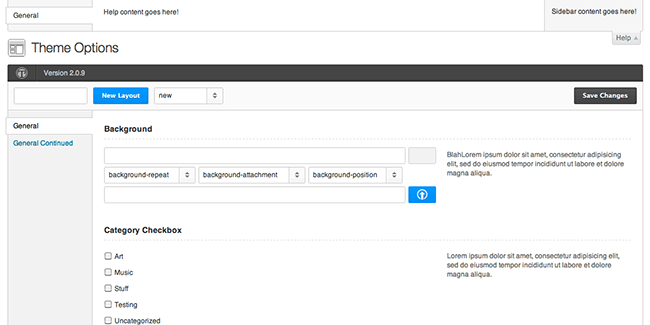
Create a custom options panel using the Options Framework. First, download the Options Framework plugin. Next, upload it to your theme directory. Once done, create a new file called options.php. In this file, define your theme options. Use arrays to list each option. Each option should have a unique ID. This ID helps to save and retrieve the option values.
Adding Custom Fields
Custom fields add extra data to your WordPress posts. These fields are like small notes. They can be anything you want. For example, a color choice or a special tag. Fields can be text, numbers, or even images. This makes your theme more flexible. You can use them to make posts look different. This helps to keep your site fresh and engaging. Users love options. They like to see new things. Custom fields give them that.
First, find your theme’s functions.php file. Open it with a text editor. Add code to register your custom fields. Use simple code snippets. Test your theme. Check if the fields show up. Go to your post editor. You should see your new fields. Fill them with data. Save your changes. View your post. Enjoy your new custom fields. They make your site special. They add a personal touch. Your theme will stand out.
Styling The Options Panel
Choose colors that match your theme style. Add a custom logo to make the panel unique. Use fonts that are easy to read. Change the panel layout for a better user experience. Make buttons big enough to click easily.
CSS can change how your options panel looks. Use CSS to adjust spacing and alignment. Add shadows for a 3D effect. Use CSS to create hover effects. Make the panel responsive for mobile devices. Use CSS for a modern look and feel.
Integrating Options With Theme Settings
Adding an options framework is very important. It helps in customizing your theme easily. You can adjust colors, fonts, and layout. This makes the website look unique and fit your needs. The options framework is like a toolbox. It gives you the right tools to build a cool site.
Connect theme options with its features carefully. This makes the theme work better. You need to match the right options with the right features. Choose settings that improve the look and function of your theme. Well-connected options make it easier to update the theme. They ensure users have a smoother experience.
Test the theme regularly. Make sure all features work fine. Check if changes apply as expected. Testing helps find errors early. Fixing them makes your theme more reliable. Consistent testing ensures everything runs smoothly. It keeps your theme user-friendly and efficient.
Troubleshooting Common Issues
Integrating the Options Framework into a WordPress theme can lead to several issues. Ensure compatibility with the theme version and check for conflicting plugins. Troubleshooting these problems involves verifying code syntax and updating outdated elements within the theme’s files.
Debugging Errors
Errors can make things confusing. Double-check your code for typos or mistakes. Missing semicolons and brackets are common issues. Always make sure your files are saved correctly. If errors still appear, try deactivating plugins. Sometimes, plugins cause conflicts with the theme. Check if the error is gone when plugins are off. Remember to activate them again when done.
Seeking Community Support
Online forums can be very helpful. WordPress forums have many users ready to help. Just post your question clearly. Always explain what you tried and what went wrong. You can also search for similar problems. Many times, someone else had the same issue. Reading their solutions can save you time. If forums don’t help, try social media groups. Many users share tips and solutions there.
Best Practices For Maintenance
Integrating an options framework into a WordPress theme enhances customization. Start by choosing a suitable framework like Redux. Follow detailed documentation to implement and activate it within the theme, allowing users to easily modify settings from the dashboard.
Regular Updates
Keep your theme fresh with regular updates. This makes sure it works well. Use the latest tools and features. Themes need care like plants need water. Regular updates prevent bugs and glitches. They also add new features.
Ensuring Compatibility With WordPress Updates
WordPress often gets new updates. It is important to check theme compatibility. This keeps your site running smoothly. Test your theme after every WordPress update. Use a staging site for testing. This avoids risks on the live site. Regular checks ensure everything works well together.

Credit: medium.com
Frequently Asked Questions
What Is The Options Framework In WordPress?
The Options Framework is a powerful tool for WordPress theme customization. It allows developers to create theme options panels easily. Users can adjust settings like colors, fonts, and layouts without touching code. This enhances theme flexibility and user experience, making it a popular choice for theme developers.
How Do I Install Options Framework?
To install the Options Framework, download the plugin from WordPress. org. Upload it to your WordPress site via the Plugins section. Activate the plugin after uploading. Once activated, you’ll find a new menu item in your WordPress dashboard. This allows you to start adding customizable options to your theme.
Can Options Framework Be Used With Any Theme?
Yes, the Options Framework can be integrated with any WordPress theme. It’s designed to be theme-agnostic, making it versatile. By integrating it, you can offer users customizable theme settings. This can enhance your theme’s flexibility and user appeal, regardless of the theme’s original design.
Why Use Options Framework For Theme Customization?
The Options Framework simplifies theme customization. It provides a user-friendly interface for adjusting theme settings. Without coding, users can change colors, fonts, and layouts. This improves the theme’s usability and appeal, making it an attractive choice for both developers and end-users.
Conclusion
Adding the Options Framework enhances your WordPress theme significantly. It provides flexibility and customization. Users can easily modify settings without coding knowledge. This makes your theme more user-friendly. The framework streamlines theme management. It also improves user experience with intuitive controls.
A well-implemented framework can attract more users to your theme. Remember, keep your code clean and updated. This ensures compatibility and security. With these steps, your theme stands out. Ready to meet diverse user needs. Enjoy the benefits of a more dynamic WordPress theme today.


