

Are you looking to grow your audience and keep your visitors coming back? Adding a newsletter to your WordPress site is one of the smartest moves you can make.
It lets you connect directly with your readers, share updates, and build trust. But if you’re not sure where to start or worried it might be too technical, don’t worry. In this guide, you’ll discover simple, step-by-step ways to add a newsletter to your WordPress site—no hassle, no confusion.
By the end, you’ll have a powerful tool to boost your engagement and turn visitors into loyal followers. Ready to make your website work harder for you? Let’s dive in.
Benefits Of Adding A Newsletter
Adding a newsletter to your WordPress site brings many benefits. It helps you stay connected with your audience regularly. Newsletters provide a direct way to share updates, news, and offers. They keep your visitors interested and coming back for more.
With a newsletter, you can grow your website’s reach. It allows you to send personalized content straight to your readers’ inboxes. This personal touch builds trust and loyalty over time.
Boosting Audience Engagement
Newsletters invite your readers to interact with your content. You can ask questions, share stories, or highlight user feedback. This interaction makes your audience feel valued. Engaged readers are more likely to share your content and join discussions.
Driving Website Traffic
Every newsletter you send can bring visitors back to your site. Include links to your latest posts, products, or events. This helps increase your website traffic steadily. More visitors mean more chances to grow your brand and audience.
Increasing Sales And Conversions
Newsletters can promote your products or services directly. Sending special deals and discounts encourages readers to buy. Regular contact builds trust, making readers more likely to choose your brand. This steady approach improves sales and conversions.
Credit: wpforms.com
Choosing The Right Newsletter Plugin
Choosing the right newsletter plugin for your WordPress site is important. It shapes how you connect with your readers. A good plugin should be easy to use and fit your needs. It should help you grow your email list and send newsletters smoothly.
Many options exist, each with different features and prices. Understanding what each plugin offers helps you pick one that works best for your site and budget.
Popular WordPress Newsletter Plugins
Some plugins are widely used and trusted by many users. Examples include MailPoet, Newsletter, and Mailchimp for WordPress. These plugins offer good tools to create and send newsletters. They also integrate well with WordPress and popular email services.
Each plugin has its own style and setup process. Trying demos or reading reviews can help you find the best fit.
Features To Look For
Look for features like easy signup forms and email automation. A drag-and-drop editor makes creating newsletters simple. Check if the plugin supports responsive design for mobile users.
Integration with email marketing services is also helpful. Analytics to track open rates and clicks can guide your email strategy. Good support and updates ensure the plugin stays reliable.
Comparing Free Vs Premium Options
Free plugins often cover basic needs. They work well for small mailing lists and simple newsletters. Premium versions add advanced features and better support.
Premium plugins may offer more templates, better automation, and fewer limits on subscribers. Consider your budget and goals before choosing. Sometimes starting with free is smart, then upgrading as your list grows.
Setting Up Your Newsletter Plugin
Setting up your newsletter plugin is a key step to start collecting emails on your WordPress site. This process lets you create forms, manage subscribers, and send newsletters easily. Follow simple steps to install and configure your plugin for smooth operation.
Installing The Plugin
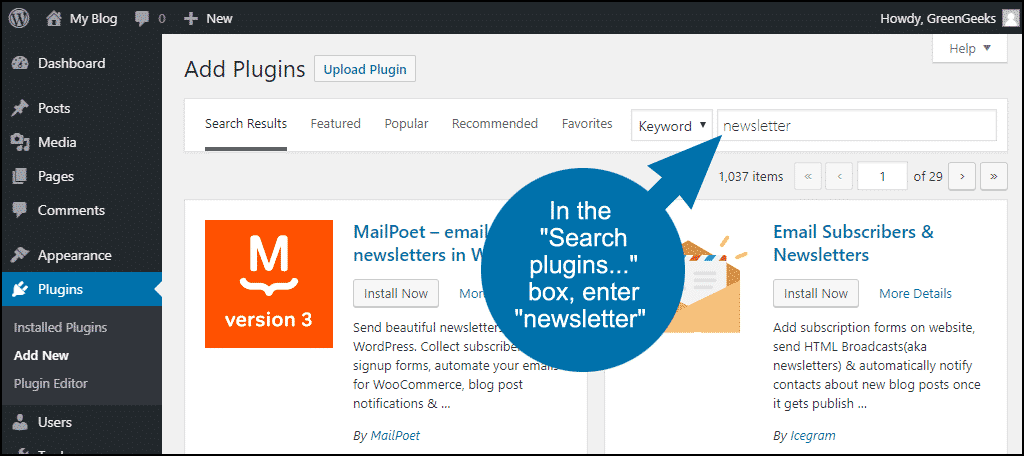
Go to your WordPress dashboard. Click on “Plugins” and then “Add New.” Search for a newsletter plugin that fits your needs. Popular choices include MailPoet, Newsletter, and Mailchimp for WordPress. Click “Install Now” next to the plugin. After installation, click “Activate” to enable it.
Configuring Basic Settings
Open the plugin settings from your dashboard menu. Set your sender name and email address. Choose how often you want to send newsletters. Customize subscription forms with simple fields like name and email. Save your settings to apply changes.
Connecting To Email Marketing Services
Many plugins connect with email marketing services for better delivery. Find the integration or API section in your plugin settings. Enter the API key from your email service provider. This allows you to sync subscribers and send campaigns easily. Test the connection to ensure it works well.
Credit: www.greengeeks.com
Creating Signup Forms
Creating signup forms is a key step in building your newsletter audience. These forms collect visitor emails and help grow your subscriber list. A well-made form looks good and works smoothly. It encourages visitors to join your newsletter without any hassle.
Focus on simple, clear designs that attract attention. Think about where to place forms on your site for best results. Use pop-ups and widgets carefully to reach visitors at the right time. Each method has its own benefits and suits different website styles.
Designing Eye-catching Forms
Choose colors that match your website style but stand out. Use short, clear text to explain what visitors get by signing up. Add a strong call to action, like “Join Now” or “Subscribe Today.” Keep the form fields minimal—ask only for email or name and email. Too many fields can scare visitors away. Use large buttons and readable fonts to make the form easy to use.
Placing Forms On Your Site
Put signup forms where visitors can easily see them. Good spots include the top of the sidebar or at the end of blog posts. You can also place forms on your homepage to catch new visitors. Avoid hiding forms at the bottom of pages where few people scroll. Test different locations to find what works best for your audience.
Using Pop-ups And Widgets
Pop-ups grab attention by appearing on the screen at the right moment. Use them wisely, so they do not annoy visitors. Set pop-ups to show after a visitor spends some time on your page. Widgets can stay visible in the sidebar or footer while visitors browse. Both pop-ups and widgets help increase signups by reminding visitors to join your newsletter.
Crafting Effective Newsletter Content
Crafting effective newsletter content is key to keeping readers interested and engaged. Good content encourages readers to open your emails and take action. It builds trust and strengthens your connection with your audience.
Focus on clear, simple language. Break information into small parts. Use a friendly tone that feels personal. This makes your newsletter easy to read and enjoyable.
Writing Engaging Subject Lines
Subject lines are the first thing readers see. They decide if the email gets opened or ignored. Use short, clear phrases that spark curiosity. Avoid spammy words like “free” or “urgent.”
Try to make the subject line relevant to the email content. Ask a question or offer a benefit. This grabs attention and invites clicks.
Personalizing Your Messages
Personal messages feel more meaningful. Use the reader’s name to create a connection. Mention past purchases or interests if possible.
Write as if you are speaking to one person. This makes readers feel special. Personalized emails often get higher open and click rates.
Incorporating Calls To Action
Calls to action (CTAs) guide readers on what to do next. Use clear phrases like “Read more,” “Sign up,” or “Get your discount.”
Place CTAs where they stand out. Use buttons or bold text. Make it easy for readers to take the next step.
Credit: wpforms.com
Automating Your Newsletter Campaigns
Automating your newsletter campaigns saves time and keeps your audience engaged. Automation lets you send emails automatically based on user actions. This helps build strong connections without manual work. Setting up simple automation steps improves your email marketing results.
Setting Up Welcome Emails
Welcome emails greet new subscribers right after they sign up. They introduce your brand and set expectations. Use your WordPress plugin to create an automatic welcome email. This message can include a thank you note and useful links. A quick welcome email increases subscriber trust and interest.
Scheduling Regular Newsletters
Send newsletters at fixed times to keep readers informed. Use your email tool to schedule emails ahead. Regular newsletters build habits in your audience. Plan topics and set dates for easy scheduling. Consistency helps your readers know when to expect news.
Segmenting Your Audience
Divide your subscribers into smaller groups based on interests. Segmenting allows targeted emails that match reader needs. Use WordPress plugins to tag subscribers by behavior or preferences. Sending relevant content improves open rates and clicks. Audience segmentation makes your campaigns more effective.
Tracking And Analyzing Performance
Tracking and analyzing the performance of your WordPress newsletter helps you understand how your readers engage. It shows which parts work well and which need change. Regular checks improve your email campaigns and keep your audience interested.
Monitoring Open And Click Rates
Open rates tell you how many people read your email. Click rates show how many click links inside the newsletter. These numbers reveal how strong your subject line and content are. Use your email service to track these rates easily.
Using Analytics To Improve Campaigns
Analytics give detailed data about your readers’ actions. They show the best time to send emails and which content readers like. Use this data to plan better emails and send them at the right time. This helps increase reader interest and response.
A/b Testing Newsletter Elements
A/B testing means sending two versions of your newsletter to small groups. Change one element, like the subject line or button color. See which version gets better results. Use this method to find what your audience prefers and improve your emails.
Tips For Growing Your Subscriber List
Growing your subscriber list is key to a successful newsletter. More subscribers mean more readers and better reach. Focus on simple, clear ways to attract new people. Use tactics that make signing up easy and rewarding. Engage your audience with content they want. Here are some tips to help you grow your list effectively.
Offering Incentives And Freebies
People love getting something for free. Offer a small gift like an ebook, checklist, or discount. Make sure the freebie fits your newsletter topic. This encourages visitors to join your list quickly. Keep the sign-up process short and simple. Highlight the value subscribers will get from your freebie.
Promoting Newsletters On Social Media
Share your newsletter on social media platforms regularly. Use posts to explain the benefits of joining. Show sneak peeks of your newsletter content. Add a clear call to action for people to subscribe. Join groups or communities where your audience is active. This helps you reach more interested readers.
Encouraging Referrals
Ask your current subscribers to invite friends. Create a referral program with rewards for sharing. Rewards can be exclusive content or discounts. Make it easy for subscribers to share your sign-up link. Word of mouth is a strong way to grow your list fast. Keep your audience engaged and motivated to share.
Frequently Asked Questions
How Do I Add A Newsletter To WordPress?
To add a newsletter, install a newsletter plugin like Mailchimp or Newsletter. Configure the plugin and create signup forms to embed on your site.
Which Plugins Are Best For WordPress Newsletters?
Popular plugins include Mailchimp, Newsletter, and MailPoet. They offer easy setup, customizable forms, and email automation features.
Can I Customize Newsletter Signup Forms In WordPress?
Yes, most plugins let you customize forms. You can change colors, fields, and placement to match your website design.
How To Connect WordPress Newsletter With Email Services?
Newsletter plugins usually integrate with email services like Mailchimp or Sendinblue. Connect via API keys for seamless email delivery and management.
Conclusion
Adding a newsletter to your WordPress site helps you stay connected. Visitors can get updates right in their inbox. It builds trust and keeps your audience engaged. Choose a simple plugin and customize your signup form. Test it to ensure it works smoothly.
Regular emails keep readers interested and bring them back. Start small and grow your list over time. Consistency matters more than frequency. Keep your messages clear and useful. This way, your newsletter supports your website’s success.


