
Are you looking to enhance your WordPress theme with some dynamic features? Adding JavaScript (JS) to your WordPress site can transform your static pages into interactive experiences, capturing your visitors’ attention and keeping them engaged.
Whether you want to add animations, improve user interaction, or integrate third-party tools, understanding how to seamlessly incorporate JS into your theme is crucial. In this guide, you’ll discover simple yet effective steps to integrate JavaScript into your WordPress theme effortlessly.
By the end, you’ll feel confident in your ability to elevate your website’s functionality and user experience. So, are you ready to unlock the full potential of your WordPress site? Let’s dive in and explore how you can do just that!
Setting Up Your WordPress Environment
Picking a theme is the first step. Go to your WordPress dashboard. Click on Appearance, then Themes. Choose a theme that fits your needs. Make sure it is responsive. This helps your site look good on all devices. Also, ensure the theme is compatible with the latest WordPress version.
Set up your development tools before adding JS. You need a code editor. Examples are Visual Studio Code or Notepad++. These help write and edit code. Install a FTP client like FileZilla. This helps upload files to your server. Check if you have local server software. XAMPP or MAMP are good choices. These tools will make your work easier.
Credit: kriesi.at
Understanding WordPress File Structure
WordPress has important files. These files help your site work. The wp-admin directory is for your dashboard. wp-includes is for all functions. It has PHP files. wp-content is where themes and plugins live. You can add your own files here. Keep these files safe. Don’t change them without backup.
Theme files are inside the wp-content directory. Each theme has its own folder. You can find style.css for design. functions.php is for custom code. Adding JS is easy here. Use header.php for scripts that load first. footer.php is for scripts that load last. Always save your changes. It helps if things go wrong.
Enqueuing Javascript In WordPress
To add JavaScript, use wp_enqueue_script. This is the best way. It ensures scripts load properly. It’s simple and effective. Just add your script file path.
Always register scripts first. Use wp_register_script. This function sets up your script. It does not load it. Registering keeps your code clean.
Mention dependencies if needed. Scripts may depend on others. Use the dependencies parameter. Also, specify a version. This helps with cache busting.
Adding Custom Javascript
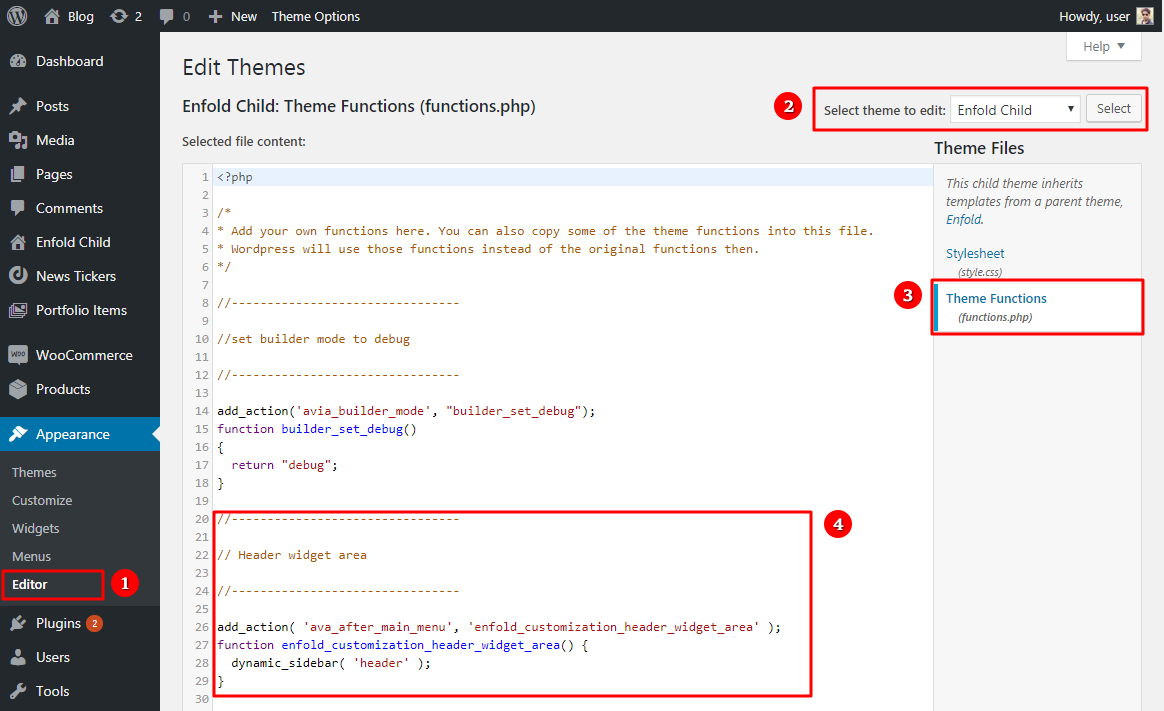
First, make a new JavaScript file in your theme folder. Name it something simple like custom-script.js. Open your WordPress dashboard. Go to Appearance and click on Editor. Find your theme’s functions.php file. Add code to load your new script. Use wp_enqueue_script() function. This code tells WordPress to use your JavaScript. Save your changes. Now, your custom script file is ready.
Sometimes you need libraries like jQuery. First, find the library link you need. Copy the link. Go to your functions.php file. Use the wp_enqueue_script() function. Add your library link in the right place. This will load the library on your site. Save your changes. Now, your site can use this library.
Placing Javascript In Theme Files
Adding JavaScript to header or footer is common. Use the wp_enqueue_script function. Place scripts in the functions.php file. This method is safe. It prevents conflicts.
For the header, use the wp_head action hook. For the footer, use wp_footer. This keeps your theme neat. Your site will load faster. Scripts in the footer allow quick page rendering.
Load scripts only when needed. This saves resources. Use is_page or is_single functions. They check page type. Then load specific scripts. This technique is efficient. It makes your site fast.
Conditional loading is helpful for large sites. It minimizes unnecessary load. Your server stays relaxed. Visitors enjoy a faster experience. Everyone wins.
Using Javascript With WordPress Hooks
WordPress hooks help to add scripts easily. Action hooks let you load JavaScript at the right time. Use wp_enqueue_scripts action hook for loading. It connects your script to WordPress. Add your script file path in your theme. Use the wp_enqueue_script function. This makes sure your script loads properly. Scripts can load in the header or footer. Choose the right spot for your script. This helps your website run smoothly. Loading scripts in the footer can speed up your site.
Filter hooks are useful for changing scripts. They adjust scripts before loading. Use the script_loader_tag filter hook. This lets you add extra attributes to your script tags. Add async or defer attributes for better performance. Async loads scripts without blocking the page. Defer waits until the page is loaded to run scripts. Proper use of filters enhances site performance. Script changes can improve site speed. Filters make script modifications easier.
Testing And Debugging Javascript
Integrating JavaScript into a WordPress theme enhances functionality. Add scripts by editing the theme’s functions. php file. Ensure scripts load correctly to prevent errors during testing and debugging.
Using Browser Developer Tools
Browser developer tools help to test and debug JavaScript. Open your browser and press F12. This opens the developer tools. You can see many tabs like Console and Elements. The Console tab shows errors and messages. Check the console for red error messages. These messages show where the problem is. Fix the code and refresh the page. This helps to see if the error is gone.
Identifying Common Errors
JavaScript errors are common. Syntax errors happen when code is written wrong. Check for missing brackets or semicolons. Logic errors occur when the code does not do what you expect. Make sure your code steps are in the right order. Always test small pieces of code to find errors easily.
Optimizing Javascript For Performance
Integrating JavaScript into a WordPress theme enhances site performance. Use the functions. php file to enqueue scripts properly. This method ensures faster loading times and better user experience, making your website more efficient.
Minification Techniques
Minification makes JavaScript files smaller. It removes spaces and unused code. Smaller files load faster. This improves website speed. Use tools like UglifyJS or Terser for minification. They help in making files compact. Minified files boost performance. They also reduce server load.
Asynchronous And Deferred Loading
Asynchronous loading does not block page rendering. JavaScript loads in the background. This speeds up page display. Deferred loading waits for HTML to load first. It then loads scripts. Both methods enhance user experience. They help in faster page load times. Use async and defer attributes in script tags. These attributes improve script loading efficiency.
Best Practices For Javascript In WordPress
Keeping your website safe is very important. Always use trusted sources for your JavaScript files. Do not add unknown scripts. This can harm your site. Use the wp_enqueue_script function to add JavaScript. This helps to avoid conflicts and keeps your site secure.
Code should be easy to read. Organize your code into small parts. This makes it simple to find and fix issues. Use comments to explain what your code does. Comments help others understand your work. It also helps you remember why you wrote it. Keep your code clean and tidy for best results.

Credit: webdesign.tutsplus.com

Credit: wordpress.com
Frequently Asked Questions
How Do I Add Javascript In WordPress?
To add JavaScript in WordPress, enqueue your script using `functions. php`. Use `wp_enqueue_script` function. This ensures proper loading. Avoid directly adding scripts to theme files. This method maintains theme updates and compatibility. Always test on a staging site first.
Can I Use Javascript In WordPress Themes?
Yes, you can use JavaScript in WordPress themes. Enqueue scripts using `functions. php`. This method is recommended for maintaining theme integrity. Directly editing theme files can cause issues. Always backup your site before making changes.
What Is The Best Way To Add Js?
The best way to add JS is through `wp_enqueue_script`. This method ensures scripts load correctly. It’s WordPress’s preferred method. Avoid directly editing theme files. This keeps your theme update-friendly. Always test changes in a safe environment first.
Why Should I Enqueue Scripts In WordPress?
Enqueuing scripts ensures proper script management. It prevents conflicts and redundant loading. WordPress uses this method to maintain site performance. Directly adding scripts can lead to errors. This method also supports script dependencies and versioning.
Conclusion
Adding JavaScript to your WordPress theme enhances functionality. Follow these simple steps to integrate JS. Always back up your files before making changes. Use child themes to keep customizations safe. Properly enqueue scripts to avoid conflicts. This ensures your site runs smoothly.
Regular updates and testing are essential. They maintain compatibility and performance. Stay informed about best practices. Your WordPress theme will benefit greatly. Happy coding!


