

Are you struggling to make your images work harder for your WordPress site? Adding the right keyphrase to your images can boost your SEO and help your content get noticed faster.
You’ll learn simple, step-by-step methods to add image keyphrases effectively. By the end, your images won’t just look good—they’ll also bring more visitors straight to your page. Ready to unlock this powerful trick? Let’s dive in!

Credit: www.crazyegg.com
Why Image Keyphrases Matter
Image keyphrases are important for your WordPress site. They help search engines understand what your images show. This makes your site easier to find. Using keyphrases correctly can improve your site’s ranking. It also helps visitors enjoy your content more. Below are key reasons why image keyphrases matter.
Impact On Seo
Search engines cannot see images like humans do. They rely on text to understand images. Image keyphrases give this text meaning. They tell search engines what the image is about. This helps your pages rank higher in search results. Using the right keyphrases makes your images more visible. It boosts your overall SEO performance.
Enhancing User Experience
Image keyphrases improve how users interact with your site. They appear as alt text or captions. This helps users who cannot see images clearly. Screen readers read these keyphrases aloud. It makes your site more accessible to everyone. Clear descriptions also help users understand content better. This creates a smoother and friendlier experience.
Driving Organic Traffic
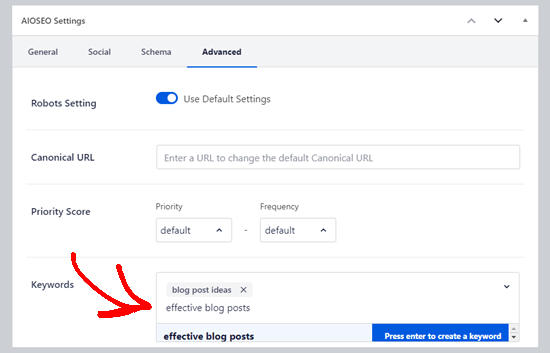
Images with good keyphrases can attract more visitors. They show up in image search results on Google. This brings new visitors to your site without extra cost. People often search for images before reading articles. Good keyphrases help your images appear in those searches. This increases organic traffic and potential customers.
Credit: www.wpbeginner.com
Choosing The Right Keyphrase
Choosing the right keyphrase is important for your WordPress images. It helps search engines understand your content. This makes your images more likely to appear in search results. The right keyphrase drives more traffic to your site. It also improves your website’s overall SEO.
Keyword Research Tools
Keyword research tools show which keyphrases people search for. They help find popular and relevant words for your images. Some tools are free and easy to use. Google Keyword Planner, Ubersuggest, and AnswerThePublic are good options. Use these tools to discover keyphrases with low competition and high search volume.
Analyzing Competitors
Check your competitors’ websites to see their keyphrases. Notice which words they use for image descriptions and alt text. This gives ideas for your own keyphrases. Avoid copying exactly. Instead, find gaps or less used phrases. This makes your site stand out in search results.
Long-tail Vs Short-tail Keyphrases
Short-tail keyphrases are broad and general. They attract a large audience but face high competition. Long-tail keyphrases are specific and detailed. They have lower competition and attract targeted visitors. Use a mix of both types to balance traffic and relevance. Long-tail keyphrases often perform better for image SEO.
Preparing Images For Seo
Preparing images for SEO is an important step before uploading them to WordPress. Properly prepared images can improve page speed and help search engines understand your content better. This increases your chances of ranking higher in search results.
Images that are too large or not optimized can slow down your website. Search engines prefer fast-loading sites. Optimized images also offer a better experience for your visitors. Let’s explore key steps to prepare images for SEO.
Optimizing Image Size
Choose the right dimensions for your images. Large images take longer to load. Resize images to match the display size on your site. Avoid uploading images bigger than needed. Smaller images load faster and save bandwidth.
Selecting Image Formats
Pick the best format based on your image type. Use JPEG for photos and detailed images. PNG works well for images with transparency or text. WebP is a modern format that offers good quality and small size. Choose the format that balances quality and performance.
Compressing Without Quality Loss
Compress images to reduce file size without losing visible quality. Use tools or plugins that keep images sharp after compression. Smaller files improve loading time and SEO. Test your images to ensure they still look clear after compression.
Adding Keyphrases In WordPress Images
Adding keyphrases to images in WordPress helps improve your site’s SEO. Search engines read these keyphrases to understand your content better. Proper use of keyphrases in images boosts your chances of ranking higher in search results. It also makes your site more accessible to users with disabilities. Below are simple ways to add keyphrases to your WordPress images effectively.
Using Alt Text Effectively
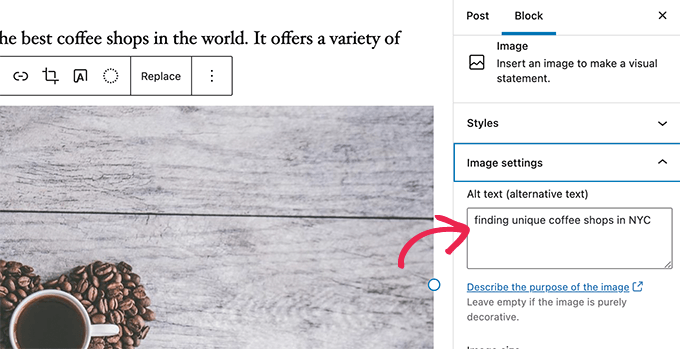
Alt text describes the image for search engines and screen readers. Use clear, short phrases that include your keyphrase. Avoid stuffing too many keywords. Write alt text that matches the image content and your page topic. This helps both SEO and user experience.
Filling Title And Caption Fields
The title and caption fields provide extra space for keyphrases. The title shows when users hover over the image. Captions appear below the image on the page. Use simple sentences with your keyphrase. Keep these fields relevant and helpful to readers.
Leveraging File Names
Rename image files before uploading them to WordPress. Use descriptive names with your keyphrase separated by hyphens. For example, “blue-widgets-sale.jpg” is better than “IMG1234.jpg.” Search engines read file names to understand images. Proper naming improves SEO and organization.
Plugins To Simplify Image Seo
Using plugins can make adding image keyphrases in WordPress much easier. They help improve your image SEO without extra effort. Plugins save time by automating tasks and managing many images at once. This way, your site ranks better in search engines.
Top Seo Plugins For WordPress
Several SEO plugins offer tools for image optimization. Yoast SEO and Rank Math are popular choices. They allow easy editing of alt text and image titles. These plugins guide you to add relevant keywords to images. They also check if your images follow SEO best practices.
Automating Alt Text Generation
Writing alt text for every image can take a long time. Some plugins automatically create alt text based on your keyphrase. This saves hours and keeps your images optimized. These tools use smart algorithms to describe images clearly. This helps users and search engines understand your images better.
Managing Bulk Image Optimization
Optimizing images one by one is slow and tiring. Plugins allow you to optimize many images with a single click. They compress images to load faster without losing quality. Bulk optimization improves your website speed and SEO rankings. Managing images this way keeps your site running smoothly.
Credit: www.wpbeginner.com
Best Practices For Image Seo
Optimizing images for SEO helps improve your website’s visibility and user experience. Best practices for image SEO ensure search engines understand your images well. This boosts your chances of ranking higher in search results. Follow these steps to make your image keyphrase strategy effective and clean.
Consistent Keyphrase Usage
Use the main keyphrase consistently across image elements. Include it in the file name, alt text, and image title. This consistency signals the image’s relevance to search engines. Keep the keyphrase natural and relevant to the content. Consistent use helps search engines connect your images with the page topic.
Avoiding Keyword Stuffing
Do not overload images with the keyphrase. Stuffing keywords can harm your SEO rankings. Use the keyphrase only where it fits naturally. Write alt text that describes the image clearly and simply. Focus on user experience and accessibility, not just keywords. This balance keeps your site trustworthy and readable.
Regular Seo Audits
Perform SEO audits on your images regularly. Check if all images have proper keyphrases in alt text and file names. Remove or update outdated or irrelevant keyphrases. Audits help fix errors and improve overall SEO health. Keep your image SEO up to date for better performance.
Tracking Image Seo Performance
Tracking image SEO performance helps you see how well your images attract visitors. It shows which images bring traffic and which need improvement. This makes your SEO efforts more effective and focused.
Regular tracking saves time and improves results. It helps you understand visitor behavior and image impact. You can then refine your image keyphrases and SEO strategy.
Using Google Analytics
Google Analytics tracks visitor actions on your website. You can see which pages get the most visits. It also shows how users interact with images.
Set up event tracking to monitor clicks on images. This data reveals popular images and user interest. Use this information to improve image placement and descriptions.
Monitoring Search Console
Google Search Console offers insights about your site’s search performance. It shows image search traffic and keyword rankings. You can find which image keyphrases bring visitors.
Check the “Performance” report for image-related queries. It helps identify high-performing and low-performing images. Use this data to optimize your image SEO further.
Adjusting Strategy Based On Data
Use data from Analytics and Search Console to improve your SEO. Focus on images that bring more traffic. Update image alt text and file names with better keyphrases.
Remove or replace images that do not perform well. Test different keyphrases and track their impact. This cycle of review and adjustment boosts your image SEO success.
Frequently Asked Questions
What Is An Image Keyphrase In WordPress?
An image keyphrase is a targeted keyword describing your image content. It helps improve SEO by making images discoverable in search engines.
How Do I Add An Image Keyphrase In WordPress?
To add an image keyphrase, edit your image’s alt text and title with relevant keywords. Use SEO plugins for better optimization.
Why Is Adding Image Keyphrases Important For Seo?
Image keyphrases improve search visibility and user experience. They help search engines understand your content and boost your website’s ranking.
Can I Use The Same Keyphrase For Multiple Images?
It’s best to use unique keyphrases for each image. This avoids keyword stuffing and enhances SEO diversity across your site.
Conclusion
Adding an image keyphrase in WordPress helps your site rank better. It makes your images easier to find in search engines. Use clear, simple keyphrases that match your content. Always add keyphrases in the image title, alt text, and description.
This small step improves your site’s SEO and user experience. Keep practicing, and your website will grow steadily. Simple changes bring steady results. Try these tips on your next post and watch the difference.


