

Are you struggling to get your WordPress posts noticed by search engines? Adding a focus keyphrase is one of the simplest and most effective ways to boost your content’s visibility.
But if you’re not sure how to do it right, your efforts might go unnoticed. You’ll learn exactly how to add a focus keyphrase in WordPress—step by step. By the end, you’ll have the tools to make your posts stand out and attract more readers.
Keep reading, and let’s unlock the full potential of your content together.
Credit: www.monsterinsights.com
Choose The Right Keyphrase
Choosing the right focus keyphrase is key to improving your WordPress site’s SEO. It guides search engines to understand your content better. Picking a good keyphrase helps attract the right visitors to your site.
Research Popular Search Terms
Start by finding popular search terms related to your topic. Use tools like Google Keyword Planner or Ubersuggest. These tools show what people type in search engines. Choose terms that many users search for but are not too competitive.
Analyze Competitor Keywords
Look at your competitors’ websites and see which keywords they use. This gives ideas about what works in your niche. Use tools like SEMrush or Ahrefs to check competitor keywords. Avoid copying exactly but find gaps you can fill.
Select Long-tail Keyphrases
Long-tail keyphrases are longer and more specific keyword phrases. They usually have less competition and attract targeted visitors. For example, instead of “shoes,” try “comfortable running shoes for women.” These phrases help your site rank higher for niche searches.
Credit: www.wpbeginner.com
Install Seo Plugins
Adding a focus keyphrase to your WordPress posts is easier with an SEO plugin. These tools help you optimize content for search engines. They guide you to use keyphrases correctly. Installing a good SEO plugin is the first step.
Popular Seo Plugin Options
Several SEO plugins are trusted by WordPress users. Yoast SEO is popular for its user-friendly features. Rank Math offers detailed keyphrase analysis. All in One SEO is simple and effective. Choose one that fits your needs and comfort.
Setting Up The Plugin
After installing, activate the plugin from the dashboard. Follow the setup wizard to configure basic settings. Input your website details and choose your goals. This process prepares the plugin to work with your site.
Configuring Keyphrase Features
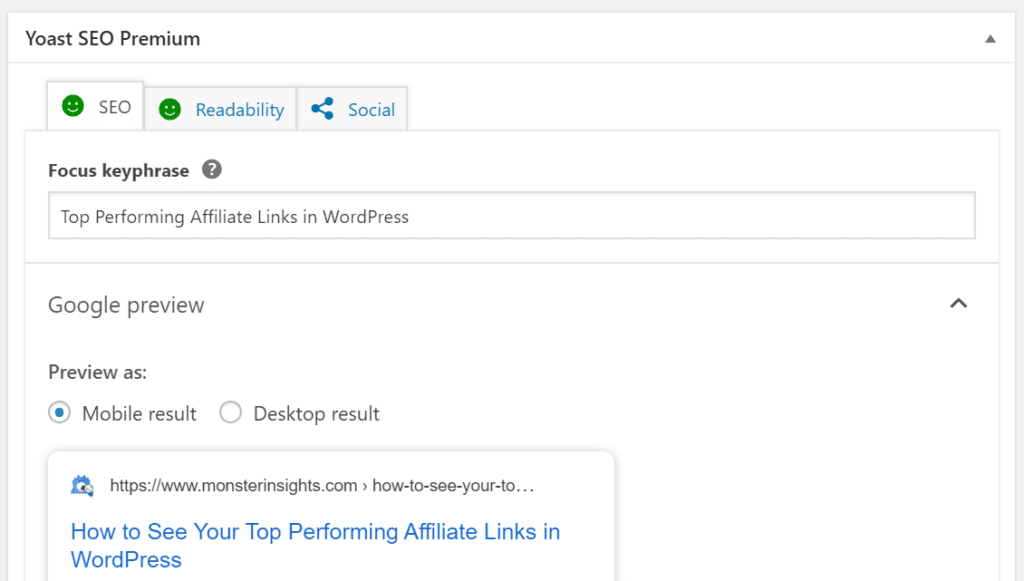
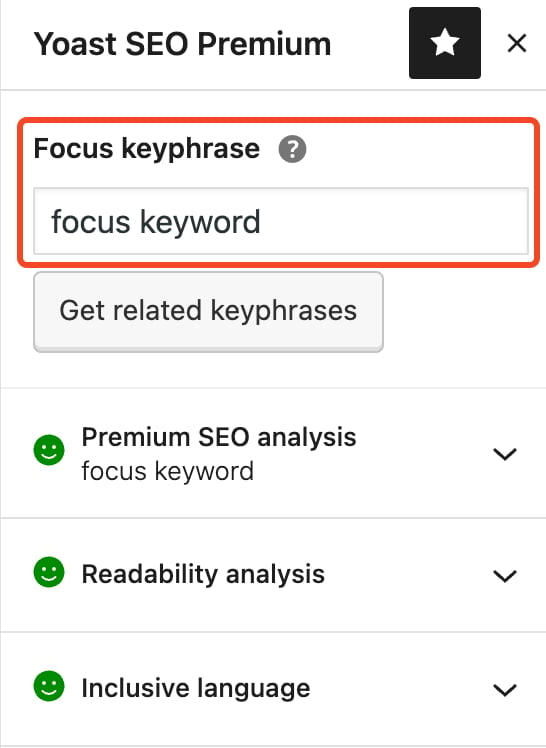
Go to the post editor to find the keyphrase section. Enter your focus keyphrase in the designated box. The plugin will analyze your content and give tips. Use these tips to improve your post’s SEO score.
Add Keyphrase In WordPress Editor
Adding a focus keyphrase in the WordPress editor helps improve your post’s SEO. This keyphrase guides search engines to understand your content better. It also helps you write with clarity and purpose. Using the right keyphrase can boost your page’s ranking on search results.
Locate Keyphrase Input Field
Open your WordPress post editor. Scroll down to the SEO plugin section. For example, Yoast SEO or Rank Math usually appears below the content area. Find the box labeled “Focus Keyphrase” or “Focus Keyword.” Click inside the box to type your chosen keyphrase. This field is where you enter the main keyword for your post.
Incorporate Keyphrase In Title
Check your post title at the top of the editor. Make sure the keyphrase appears naturally in the title. The keyphrase should fit smoothly without sounding forced. A clear title with the keyphrase helps both readers and search engines. Keep your title concise and relevant to the content.
Add Keyphrase In Meta Description
Locate the meta description box in the SEO plugin area. Write a short summary of your post here. Include the focus keyphrase in this description. The meta description shows up in search results below the title. It should attract readers and explain the post’s main idea. Use simple language and keep it under 160 characters.
Optimize Content For Keyphrase
Optimizing your content for a focus keyphrase helps search engines understand your page. This increases the chances of ranking higher in search results. Proper use of the keyphrase improves both visibility and user experience.
Use Keyphrase Naturally In Text
Place the focus keyphrase in the content without forcing it. Use it in a way that sounds natural and fits the topic. Avoid repeating the keyphrase too many times. Spread it evenly throughout the text for better flow and readability.
Include Keyphrase In Headings
Incorporate the keyphrase in headings and subheadings. This signals search engines about the main topics of your content. Headings with keyphrases help readers quickly find important information. Use them sparingly for clarity.
Add Keyphrase In Image Alt Text
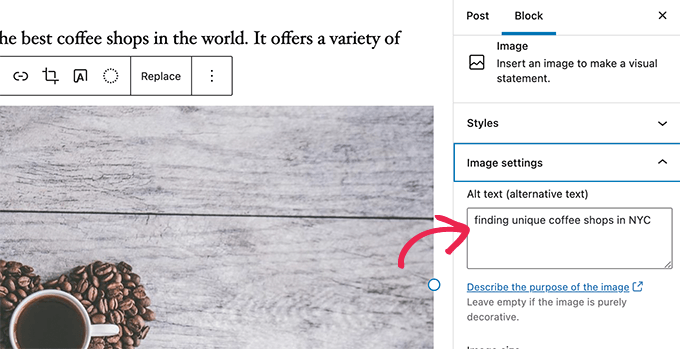
Use the focus keyphrase in the alt text of images. This helps search engines understand what the image shows. It also improves accessibility for users who use screen readers. Keep alt text short and descriptive with the keyphrase included.
Check Seo Analysis Results
Checking your SEO analysis results is a key step after adding your focus keyphrase in WordPress. It helps you see how well your content matches the keyphrase. This review guides you to improve your post for better search engine ranking.
Review Plugin Suggestions
The SEO plugin gives specific advice based on your content. It points out areas that need work. Look carefully at these suggestions. They can include improving titles, meta descriptions, or using the keyphrase more effectively.
Improve Content Based On Feedback
Use the feedback to make clear changes. Rewrite sentences to include the keyphrase naturally. Add related words to support the main topic. Fix any issues the plugin highlights, like missing images or links.
Monitor Keyphrase Density
Check how often the keyphrase appears in your content. Avoid using it too little or too much. A good balance helps search engines understand your post. Keep the keyphrase density around 1-2% for best results.
Credit: yoast.com
Track Keyphrase Performance
Tracking the performance of your focus keyphrase is important. It helps you see how well your WordPress content ranks. You can find out what works and what needs change. This way, you improve your SEO step by step.
Use Google Analytics
Google Analytics shows how visitors find your site. It tells which keyphrases bring more traffic. Check the keywords in the Acquisition section. Look for patterns and popular search terms. This data guides your content updates.
Monitor Search Console Data
Google Search Console provides detailed info about your keyphrase. It shows clicks, impressions, and average position. These metrics tell how visible your page is. Use this data to find weak spots. Fix problems and improve rankings.
Adjust Strategy For Better Results
Use the data to change your SEO plan. Add more content around high-performing keyphrases. Fix or remove pages that don’t rank well. Test different keyphrases to find better options. Keep improving based on real data.
Frequently Asked Questions
What Is A Focus Keyphrase In WordPress?
A focus keyphrase is the main keyword or phrase you want your post to rank for. It helps optimize content for search engines and improves SEO performance.
How Do I Add A Focus Keyphrase In WordPress?
To add a focus keyphrase, use an SEO plugin like Yoast. Enter your keyphrase in the designated focus keyphrase field within the post editor.
Why Is Adding A Focus Keyphrase Important?
Adding a focus keyphrase improves your post’s search engine ranking. It guides content optimization and helps attract relevant traffic to your website.
Can I Use Multiple Focus Keyphrases In WordPress?
Most SEO plugins allow only one main focus keyphrase per post. You can use related keywords throughout the content for better SEO impact.
Conclusion
Adding a focus keyphrase in WordPress helps improve your site’s SEO. It guides search engines to understand your content better. Use clear and relevant keyphrases in your posts. Check that your keyphrase appears in titles, headings, and throughout the text.
Keep your content natural and easy to read. Small changes can make a big difference in your website’s visibility. Practice regularly to get comfortable with the process. This simple step supports your online goals effectively.


