

If you want to grow your audience and keep visitors coming back, adding an email signup to your WordPress site is a smart move. But you might be wondering how to do it without any hassle or technical headaches.
Don’t worry—this guide will show you simple, step-by-step ways to get your signup form up and running quickly. By the end, you’ll have a powerful tool to build your email list and connect with your visitors like never before. Ready to turn your WordPress site into a lead-generating machine?
Let’s dive in.
Credit: easydigitaldownloads.com
Benefits Of Email Signup
Adding an email signup form to your WordPress site brings many benefits. It helps you connect with visitors beyond their first visit. Email signup lets you build a direct line to your audience. This connection can grow your website and business steadily.
Collecting emails gives you a way to share updates, offers, and useful content directly. It creates trust and keeps your visitors interested in your site. Here are some key benefits of having an email signup on your WordPress site.
Boosting Website Traffic
Email newsletters remind subscribers about your content. Regular emails encourage them to visit your site again. This steady flow of visitors improves your website’s traffic numbers. More traffic can also improve your search engine ranking.
Emails can include links to new blog posts, products, or events. This drives people back to your site naturally. It creates a cycle where visitors keep coming back for more.
Building A Loyal Audience
Emails help you build a relationship with your readers. You can share personal stories, tips, and exclusive content. This makes subscribers feel special and valued. Over time, this loyalty turns casual visitors into fans.
Subscribers are more likely to trust your brand. They listen to your advice and support your work. A loyal audience is more stable and easier to engage.
Increasing Sales And Engagement
Email signup can directly boost your sales. You can send special offers and discounts to subscribers. This encourages them to buy your products or services. It is a cost-effective way to increase revenue.
Emails also invite feedback and interaction. You can ask questions or share surveys. This engagement improves your understanding of your audience’s needs. It helps you create better content and offers.
Choosing The Right Plugin
Choosing the right plugin is crucial for your email signup success. The plugin you select affects how easy it is to collect emails and grow your list. It also impacts your website’s speed and user experience. This section helps you find a plugin that fits your needs and skills.
Popular Email Signup Plugins
Many plugins help add email signup forms to WordPress. Some popular options include Mailchimp for WordPress, WPForms, and OptinMonster. These plugins offer simple ways to create forms and connect with email services. They have good reviews and are used by many website owners.
Key Features To Consider
Look for plugins with easy form design and customization. Make sure they support your email marketing service. A plugin should have spam protection and mobile-friendly forms. Check if it offers analytics to track signups. Fast loading times are important too.
Free Vs Premium Options
Free plugins cover basic needs and often work well for small sites. Premium versions add advanced features like A/B testing or extra templates. They may include better support and updates. Choose based on your budget and how much control you want.
Setting Up Email Signup Forms
Setting up email signup forms is a key step in building your email list. These forms allow visitors to subscribe to your newsletter or updates. A good signup form is simple, clear, and easy to use. It helps grow your audience and keeps your readers connected.
Creating A Signup Form
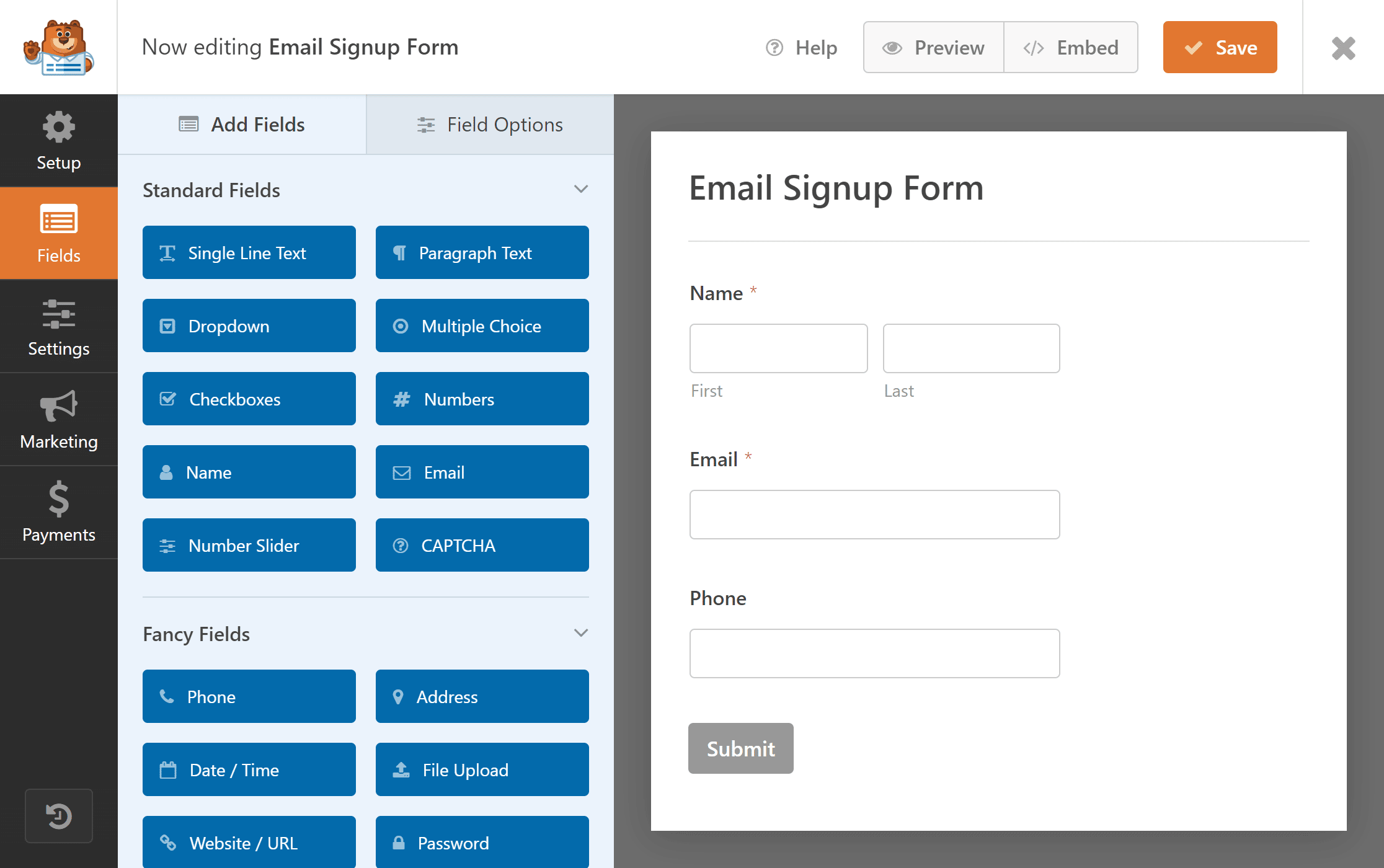
Start by choosing a plugin or tool for your signup form. Popular options include Mailchimp, WPForms, and ConvertKit. Install and activate the plugin in your WordPress dashboard. Follow the instructions to create a new signup form. Enter fields such as name and email address. Keep the form short to encourage more signups.
Customizing Form Design
Make your signup form match your website’s look. Change colors, fonts, and button styles in the plugin settings. Use clear labels for each field. Add a simple message that tells users what they get by signing up. Avoid clutter to keep the form easy to read and use on all devices.
Placing Forms On Your Site
Decide where your signup form will be most visible. Good spots include the sidebar, footer, or after blog posts. Use widgets or shortcodes provided by the plugin to place the form. Test the form on your site to make sure it works well. Position the form where visitors can easily find and use it.
Integrating With Email Marketing Services
Integrating your WordPress site with email marketing services boosts your newsletter signup success. It connects your signup forms directly to your email platform. This setup saves time and reduces errors. Plus, it helps you manage contacts easily and send emails automatically.
Connecting To Popular Providers
Popular email services like Mailchimp, Constant Contact, and Sendinblue offer easy WordPress integration. Most provide plugins or built-in tools. Install the plugin and enter your API key to link accounts. This connection lets your signup form send data straight to your email list.
Automating Email Campaigns
Automation sends welcome emails and follow-ups without extra work. You can set triggers based on user actions. For example, a new subscriber can get a welcome message immediately. This helps keep new contacts engaged from the start.
Managing Subscriber Lists
Good list management keeps your emails organized and effective. Segmentation groups subscribers by interests or behavior. You can create targeted campaigns for each group. Cleaning your list regularly removes inactive contacts. This improves your email delivery and open rates.
Optimizing Signup Forms
Optimizing signup forms is key to growing your email list. A well-designed form attracts more visitors to subscribe. It also improves user experience, making signup easy and quick. Small changes can boost conversions significantly.
Using Effective Call-to-actions
Use clear and direct call-to-actions (CTAs). Phrases like “Join Now” or “Get Updates” work well. Keep CTAs short and action-focused. Make the button stand out with a contrasting color. Place CTAs near the form fields for better visibility. Use words that show value or benefit to the user.
Reducing Signup Friction
Keep the form simple with only essential fields. Ask for name and email only to start. Avoid asking for too much information upfront. Use inline validation to catch errors instantly. Make the form mobile-friendly for easy signup on any device. Fast and simple forms encourage more signups.
A/b Testing Form Variations
Test different form designs to find what works best. Change button colors, text, or form length. Compare results to see which form gets more signups. Run tests for enough time to collect data. Use the winning version to improve your signup rate. A/B testing helps make data-driven decisions.
Credit: stylemixthemes.com
Tracking And Analyzing Performance
Tracking and analyzing the performance of your email signup form is key. It helps you see what works and what does not. You can improve your form and get more subscribers over time. Use data to guide your decisions and grow your email list steadily.
Monitoring Signup Rates
Check how many visitors sign up daily or weekly. Compare these numbers to your website traffic. This shows how effective your signup form is. Look for patterns, like days with higher signups. Find out what causes these changes and repeat good actions.
Using Analytics Tools
Use tools like Google Analytics or email service reports. They provide detailed information about user behavior. Track where signups come from and which pages perform best. Analyze bounce rates and time spent on signup pages. This data reveals how visitors interact with your form.
Adjusting Strategies For Growth
Use your data to change your signup form or placement. Test different headlines, button colors, or form lengths. Try new calls to action and offers. Watch how these changes affect signup rates. Keep what works and discard what does not. Small tweaks can lead to steady growth.
Credit: wpforms.com
Frequently Asked Questions
How Do I Add An Email Signup Form To WordPress?
You can add an email signup form using plugins like Mailchimp or WPForms. Simply install, activate, and customize the form. Then, embed it using a shortcode or widget in your desired WordPress area.
Which Is The Best Email Signup Plugin For WordPress?
Mailchimp, WPForms, and ConvertKit are popular, user-friendly plugins. They offer easy integration, customization, and automation features to grow your email list efficiently.
Can I Customize The Email Signup Form Design?
Yes, most plugins allow you to customize colors, fields, and button styles. This helps match your website’s branding and improve user engagement.
How Do I Connect My Signup Form To An Email Service?
After creating the form, connect it to services like Mailchimp or Constant Contact. This syncs new subscribers automatically for easy list management.
Conclusion
Adding an email signup to your WordPress site helps grow your audience. It keeps visitors connected and informed about your updates. Simple plugins and tools make the process easy and quick. Regular emails build trust and encourage repeat visits. Start with clear signup forms and offer value to users.
Keep testing and improving your approach for better results. Consistency matters in growing your email list over time. Take small steps today to build a strong connection with your readers.


