
Are you looking to give your WordPress site a unique touch that truly reflects your brand? Adding a custom widget might be just the solution you’re searching for.
Widgets are powerful tools that can enhance your website’s functionality and aesthetics without requiring you to dive deep into coding. Imagine having the ability to display your latest Instagram posts, a personalized call-to-action, or even a countdown timer to your next big event, all neatly placed on your sidebar or footer.
Sounds intriguing, right? In this guide, we’re diving straight into how you can effortlessly add custom widgets to your WordPress theme. Get ready to transform your site into something extraordinary that keeps your visitors coming back for more.
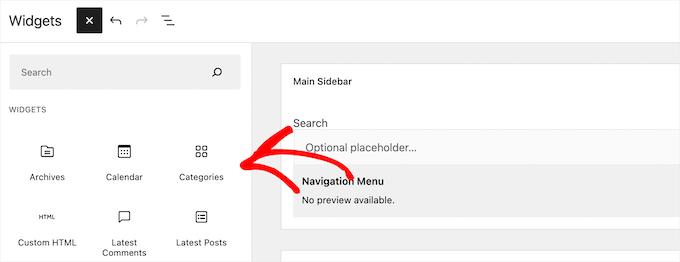
Credit: www.wpbeginner.com
Choosing The Right Widget
Always know why you need the widget. Purpose helps decide its type. Maybe you need to show weather updates. Or maybe you want a calendar. Knowing its job helps in selection.
Users must find it easy to use. Simple designs work best. Too many buttons can confuse. Keep it clean and neat. Check if the text is clear. Make sure colors are friendly on the eyes.
Check if the widget works on your theme. Compatibility is key. Some widgets may not fit all themes. Make sure it does not slow down your site. Test it before adding for the best results.
Setting Up The Development Environment
First, install a code editor. Popular ones are VS Code or Sublime Text. Then, get XAMPP or WAMP for local server setup. These tools help run WordPress locally. They’re free and easy to download. Follow the instructions on their websites.
Download the WordPress package from the official site. Extract the files into your server’s directory. Open the browser and type “localhost”. Begin the installation process. Create a database using phpMyAdmin. Link WordPress to this database. This step is crucial for running WordPress.
Navigate to the wp-content folder. Inside, find the themes folder. Choose your theme’s folder to edit. Use your code editor to open theme files. Look for functions.php or sidebar.php. These files let you add widgets. Remember, changes here affect your site.
Creating The Custom Widget
Start by creating a new class for the widget. Extend the `WP_Widget` class. This will help to make your widget. Use the constructor to set the widget name and description. Make sure it is clear and simple. Keep the code neat and tidy.
Now, you need to add the functionality. Write methods for the widget’s display. Use `widget()` method to show content. Update method is used to save settings. Form method will handle the widget options. Code should be easy to understand.
Widgets need options to work. Define default settings in an array. Use the `form()` function to handle options. Make sure users can change them. Keep the user interface simple. Ensure it is user-friendly and easy to use.

Credit: www.sktthemes.org
Registering The Widget
Easily enhance your WordPress theme by registering a custom widget. Start by accessing your functions. php file. Add the widget using the `register_widget()` function, enabling unique features for your website.
Use WordPress Hooks
To add a custom widget, use WordPress Hooks. Hooks are special commands. They help you add new features. One important hook is widgets_init. This hook helps you add widgets. You must use it in your theme’s functions file.
Register In Functions File
The functions file is like a toolbox. It stores important code. To register a widget, add code in this file. Write a function to create your widget. Then, use register_widget to make it work. This code tells WordPress about your widget.
Always test your widget. Make sure it works correctly. If you see errors, check your code. Small mistakes can cause big problems. Fix them to keep your site running well.
Integrating Widget Into Theme
Integrating a custom widget into a WordPress theme boosts site functionality. Begin by creating a widget class and registering it. Next, modify theme files to display the widget where desired. This process enhances user experience by providing dynamic content options tailored to site needs.
Locate Widget Area
Find the widget area in your WordPress theme. Usually, it’s in the Appearance menu. Click on Widgets. You’ll see different widget areas. Look for Sidebar or Footer. These are common places. Your theme might have unique widget areas too.
Add Widget To Sidebar
Drag your custom widget to the sidebar area. Click on the widget you want to add. Hold it with your mouse. Move it to the Sidebar. Release it there. Your widget is now in the sidebar. Check if it’s showing on your site.
Customize Widget Appearance
Open the widget settings. You can change the title and other settings. Adjust colors and fonts. Make sure it fits your site’s style. Save your changes. Refresh your site to see the new look. Your widget should match your theme now.

Credit: wordpress.org
Testing And Debugging
Adding a custom widget to a WordPress theme involves testing and debugging to ensure smooth functionality. This process helps identify issues and fix errors, enhancing the widget’s performance. Testing ensures the widget integrates well with the theme, offering a seamless user experience.
Check Widget Functionality
Ensure your widget works smoothly. Add it to your site. Test its basic functions. Try clicking buttons or links. Check if content displays correctly. Make sure everything loads fast. Fix any errors you find. This keeps your widget user-friendly.
Resolve Common Issues
Sometimes, widgets do not work right. Maybe they don’t show up. Or, they break the page layout. First, check for typos in your code. Next, update your theme and plugins. Outdated software can cause problems. Finally, look for plugin conflicts. Disable plugins one by one. See if the widget works. This helps find the problem.
Ensure Cross-browser Compatibility
Your widget should look good on all browsers. Test it in Chrome, Firefox, Safari, and Edge. Some features might not work everywhere. Use simple designs and code. Avoid fancy features that may break. This helps keep your widget consistent across different browsers.
Enhancing The Widget
Discover how to add a custom widget to your WordPress theme effortlessly. Personalize your site by integrating unique widgets that enhance functionality and user experience. Follow these simple steps to create a more engaging and dynamic website.
Add Custom Styles
Custom styles make your widget unique. Use CSS to change colors and fonts. Adjust margins and padding for a clean look. Styles should match your site’s theme. This keeps everything looking consistent. Always test your styles on different browsers.
Implement Responsive Design
Responsive design is crucial. Widgets must look good on all devices. Use media queries in your CSS. Change styles for different screen sizes. This ensures a great experience for mobile users. Test on phones, tablets, and computers.
Enable User Customization
User customization is important. Allow users to change widget settings. This could be colors or text size. Add options in the widget settings menu. User-friendly interfaces make it easy to customize. More choices mean happier users.
Updating And Maintaining
Always check how your custom widget is doing. Measure loading times to ensure speed. Slow widgets can make users unhappy. Keep an eye on errors. They can break your site. Use tools like Google Analytics. Track user interaction with the widget. See which parts they like. This helps you improve the widget.
WordPress updates happen often. Keep your widget compatible. Check if it works after each update. Test the widget on a staging site first. This prevents issues on the live site. Follow WordPress news for upcoming changes. This helps you prepare your widget for new features. Always have a backup before making changes.
Feedback helps you make better widgets. Ask users for their thoughts. What do they like? What needs improvement? Create surveys or polls. They are simple ways to gather opinions. Read comments and reviews. Users often share their experiences there. Use this information to update and enhance your widget.
Frequently Asked Questions
What Is A Custom Widget In WordPress?
A custom widget in WordPress is a feature that allows users to add personalized content or functionality. It enhances the website’s sidebar, footer, or any widget-ready area. Custom widgets are created using PHP and WordPress Widget API, offering flexibility to display content tailored to specific needs.
How To Create A Custom Widget In WordPress?
To create a custom widget, use PHP and WordPress Widget API. Start by creating a new PHP file in your theme’s folder. Define a class extending WP_Widget, then add functions to handle widget options and display. Register your widget using the widgets_init action hook to make it available.
Why Add Custom Widgets To Your Theme?
Adding custom widgets enhances the functionality and appearance of your theme. They allow for personalized content and features, improving user engagement. Custom widgets offer flexibility to display specific information or tools, making your website more interactive and tailored to your audience’s needs.
Can I Add Custom Widgets Without Coding?
Yes, you can add custom widgets without coding using WordPress plugins. Plugins like Elementor or SiteOrigin Page Builder offer drag-and-drop features. These tools provide pre-built widget options, allowing customization without writing code. It simplifies the process for users unfamiliar with coding.
Conclusion
Adding custom widgets to your WordPress theme enhances functionality. It provides a tailored user experience. With widgets, your site becomes more interactive. Visitors engage more effectively. Custom widgets reflect your brand’s identity. They allow flexibility in design and content. This process is straightforward with WordPress.
You don’t need advanced skills. Just follow simple steps. Your website can stand out. Widgets help keep content fresh. They adapt to your needs. Take time to explore options. This can boost your site’s appeal. Start customizing today. Make your WordPress site unique.
Enjoy the benefits of personalized widgets.


