
Are you looking to add custom code to the head section of your WordPress site but don’t know where to start? You’re not alone.
Adding code in the head can boost your site’s performance, improve SEO, or enable important features like verification tags and analytics. But if you’re worried about breaking your site or dealing with confusing steps, this guide is made just for you.
Keep reading, and you’ll learn simple, clear methods to safely add code to your WordPress head section—no technical headaches required. Let’s get your site working exactly the way you want.

Credit: www.youtube.com
Why Add Code To WordPress Head
Adding code to the WordPress head section helps control how your site behaves and looks. The head area loads before the main content. It sets up important elements that affect the whole site. This makes it a key place to insert special code snippets. These snippets can improve site speed, SEO, or tracking. Knowing why to add code here helps you use WordPress better.
Benefits Of Custom Code
Custom code in the head can improve site performance. It can add styles, scripts, or meta tags. These changes help search engines understand your site. They also make your site load faster. Custom code can control fonts and icons too. This creates a unique look for your site. It also helps add tracking tools for visitors. You get more control over your site’s features.
Common Use Cases
Many use the head section to add Google Analytics code. This tracks visitor behavior on the site. Others add custom CSS to change site design. Meta tags for SEO help search engines find your site. Verification codes for services like Google Search Console go here. Some add scripts to load fonts or icons early. These uses help your site work better and look good.
Methods To Insert Code In Head
Adding code to the head section of your WordPress site is important for many tasks. It helps to insert scripts, styles, or meta tags that improve site function and SEO. There are several ways to do this. Choose the method that fits your skill level and needs. This guide explains three simple methods to insert code in the head.
Using Theme Editor
The Theme Editor allows you to directly edit your theme files. Go to Appearance > Theme Editor in your WordPress dashboard. Find the header.php file. Insert your code between the and tags. Save changes carefully. Mistakes here can break your site. Always back up your theme before editing.
Through Functions.php File
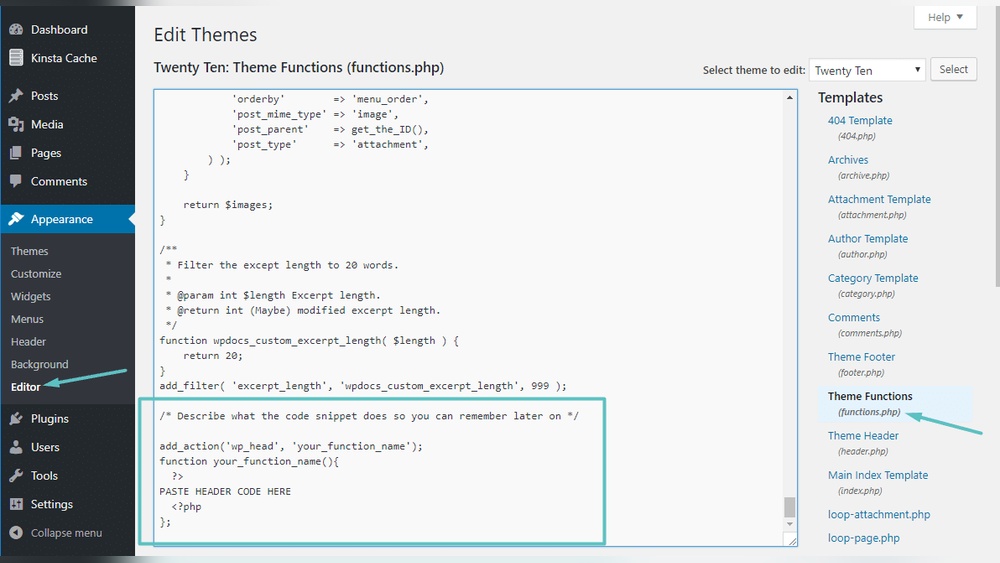
The functions.php file lets you add code safely without touching the header.php. Use the wp_head action hook to insert code. Add this snippet to your functions.php:
function custom_code_in_head() { echo ' Your code here '; } add_action('wp_head', 'custom_code_in_head'); This method keeps your changes even after theme updates. Edit functions.php via Theme Editor or FTP.
With Plugins
Plugins offer an easy way to add code without editing files. Install a plugin like “Insert Headers and Footers.” Paste your code in the header section. Save and check your site. This method is safe and user-friendly. It suits beginners and those who want quick changes.
Step-by-step Guide Using Theme Editor
Editing your WordPress site’s head section can improve SEO and add custom features. Using the Theme Editor is a direct way to insert code in the head area. This method is quick and does not require extra plugins. Follow this step-by-step guide to safely add your code.
Accessing The Theme Editor
Log in to your WordPress dashboard. On the left menu, find and click Appearance. Then select Theme Editor. A warning may appear about editing files. Read it carefully. Click I understand to proceed. The editor will open, showing your theme files.
Locating The Header.php File
On the right side, find the list of theme files. Scroll and click header.php. This file controls the top part of your site, including the head section. It contains the tag where you will add your code. Be careful not to change other parts.
Adding Your Code Safely
Inside header.php, locate the closing tag. Insert your code just before this tag. Double-check your code for errors. Save the changes by clicking the Update File button. Visit your site to confirm the code works as expected.
Adding Code Via Functions.php
Adding code to the head section of your WordPress site can improve its features and performance. Using the functions.php file is a common method. This file controls many aspects of your theme and allows you to insert custom code easily. You can add scripts, styles, or meta tags to the head section without editing theme files directly.
This method keeps your site clean and organized. It also helps avoid losing changes during theme updates. Understanding how to work with functions.php and the wp_head hook is essential for safe and effective customization.
Editing Functions.php
Start by locating the functions.php file in your theme folder. Access it through the WordPress dashboard under Appearance > Theme Editor. Make sure to back up the file before making changes.
Open the file and add your custom code at the bottom. Avoid deleting existing code to prevent errors. Save the file after editing. Always use a child theme for edits to keep your main theme safe.
Using Wp_head Hook
The wp_head hook is a WordPress action that inserts code into the head section. To use it, write a function with your code inside functions.php. Then hook it with add_action('wp_head', 'your_function_name');.
This method ensures your code loads correctly and does not interfere with other site parts. It is a clean way to add scripts, styles, or meta tags. Keep the code simple and test for errors before saving.
Testing Your Changes
After adding code, check your site on different browsers. Use the browser’s developer tools to view the page source. Confirm your code appears inside the head section.
Look for any site issues or errors. Clear your cache if changes do not show. Testing helps avoid broken layouts or functionality problems. Always test on a staging site if possible.
Top Plugins For Head Code Insertion
Adding code to the head section of your WordPress site is simple with plugins. These tools let you insert scripts and styles without editing theme files. Choosing the right plugin saves time and avoids errors. Below are some popular plugins that help with head code insertion.
Insert Headers And Footers
This plugin offers a clean and easy interface for adding code to the head and footer areas. It supports JavaScript, CSS, and HTML snippets. Users can insert tracking codes like Google Analytics quickly. No coding skills are needed, making it ideal for beginners.
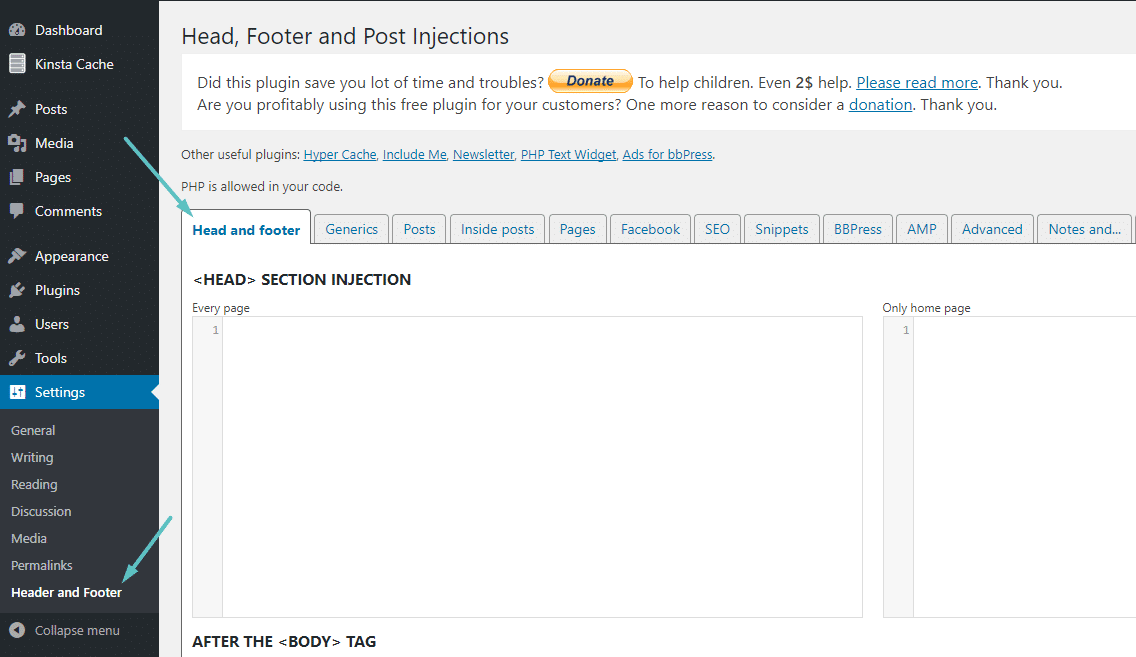
Head, Footer And Post Injections
This plugin provides more control by allowing code insertion in the head, footer, and even inside posts. It supports different code types and custom placement. Users can add scripts conditionally by page or post. This makes it flexible for varied needs.
Comparing Plugin Features
Insert Headers and Footers is simple and user-friendly but offers fewer options. Head, Footer and Post Injections provides advanced placement and conditional rules. Both plugins are free and updated regularly. Choose based on your need for simplicity or flexibility.

Credit: www.webnots.com
Tips To Avoid Common Mistakes
Adding code to the head section of your WordPress site can improve functionality. Small mistakes can cause big problems. Follow these tips to avoid common errors and keep your site running smoothly.
Backing Up Your Site
Always create a full backup before editing your site. This protects your data if something goes wrong. Use plugins or your hosting service to save a copy of your files and database. Restore your site quickly if needed.
Syntax And Code Errors
Check your code for errors before adding it. Even a missing semicolon can break your site. Use online tools to validate HTML, CSS, or JavaScript. Add code in small parts to spot mistakes easily. Test your site after each change.
Plugin Conflicts
Some plugins may interfere with your added code. Disable plugins one by one to find conflicts. Avoid adding code that duplicates plugin functions. Keep plugins and WordPress updated to reduce issues. Use plugins designed to safely insert code into the head.
Credit: kinsta.com
Frequently Asked Questions
How Do I Add Code To The Head In WordPress?
To add code to the head, use the theme’s header. php file or a plugin like “Insert Headers and Footers. ” This ensures the code loads on every page without editing core files directly.
Can I Add Javascript To The WordPress Head Section?
Yes, you can add JavaScript code by placing it within script tags in the header. php file or using header injection plugins. This method safely includes scripts site-wide.
Is It Safe To Edit The WordPress Header.php File Directly?
Editing header. php is possible but risky. Always back up files before changes. Using plugins is safer and avoids breaking your site with incorrect code.
Which Plugins Help Add Code To The WordPress Head Easily?
Popular plugins like “Insert Headers and Footers” and “Header Footer Code Manager” let you add code snippets to the head without coding knowledge or theme edits.
Conclusion
Adding code to the WordPress head is simple and useful. It helps you add scripts, styles, or tracking tools easily. Always back up your site before making changes. Use plugins or edit theme files carefully. This keeps your website safe and working well.
Practice these steps to improve your WordPress skills. You’ll see better control over your site’s features and performance. Keep experimenting with small changes to learn more. Your website will become more flexible and personalized.



