
Are you ready to share your ideas, stories, or expertise with the world? Adding a blog to your WordPress site is the perfect way to connect with your audience and boost your online presence.
But if you’re not sure where to start, don’t worry—this guide will walk you through each step, making the process simple and stress-free. By the end, you’ll have a fully functional blog that captures attention and keeps visitors coming back.
Let’s dive in and turn your WordPress site into a powerful storytelling platform.
Credit: www.youtube.com
Setting Up WordPress
Setting up WordPress is the first step to create your blog. It involves choosing the right tools and making basic decisions. These steps lay the foundation for your website’s success. Let’s explore how to set up WordPress easily and quickly.
Choosing A Hosting Provider
A hosting provider stores your website files on the internet. It makes your blog visible to visitors worldwide. Pick a reliable host with good speed and support. Look for plans that fit your budget and needs. Some popular hosts offer one-click WordPress installation. This feature saves time and effort.
Installing WordPress
Most hosting providers offer easy WordPress installation. Use their control panel to start the process. Follow the simple instructions to create your admin account. Choose a strong password to protect your site. After installation, you can log in and start customizing.
Selecting A Theme
The theme controls your blog’s look and feel. Pick a theme that matches your style and content. Free and paid themes are available in the WordPress directory. Make sure the theme is mobile-friendly and fast. Changing themes later is possible but choose wisely now.
Credit: shortiedesigns.com
Creating Your First Blog Post
Creating your first blog post on WordPress is an exciting step. It lets you share your thoughts, ideas, and stories with the world. The process is simple and user-friendly. You will learn how to find the right tools and start writing quickly.
Navigating The WordPress Dashboard
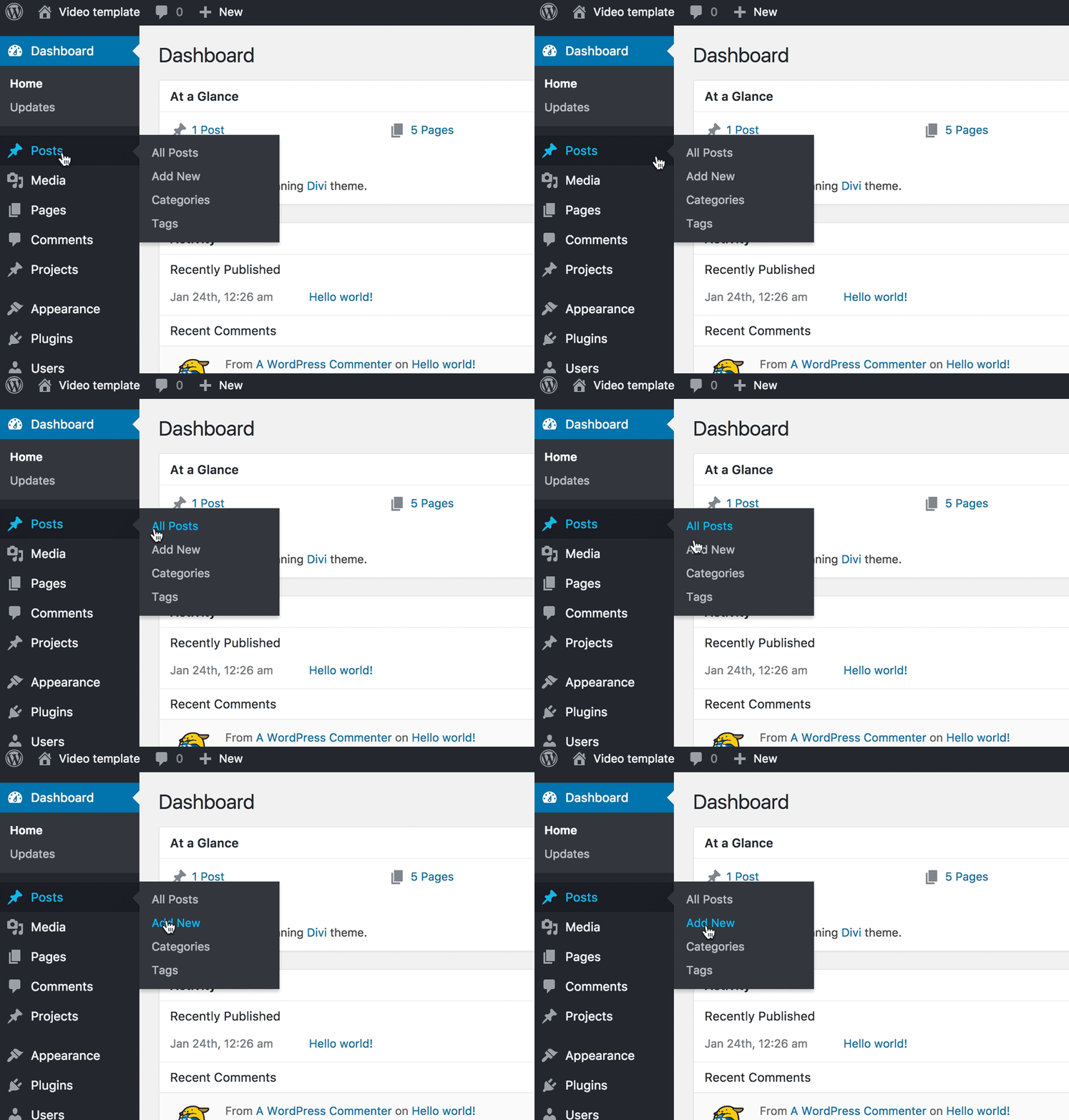
The WordPress dashboard is the control center for your website. After logging in, you see many options on the left side. These include Posts, Media, Pages, and more. Focus on the “Posts” section for blogging. It is where you create and manage all your blog content. Spend some time getting familiar with this area. It helps you work faster and easier.
Adding A New Post
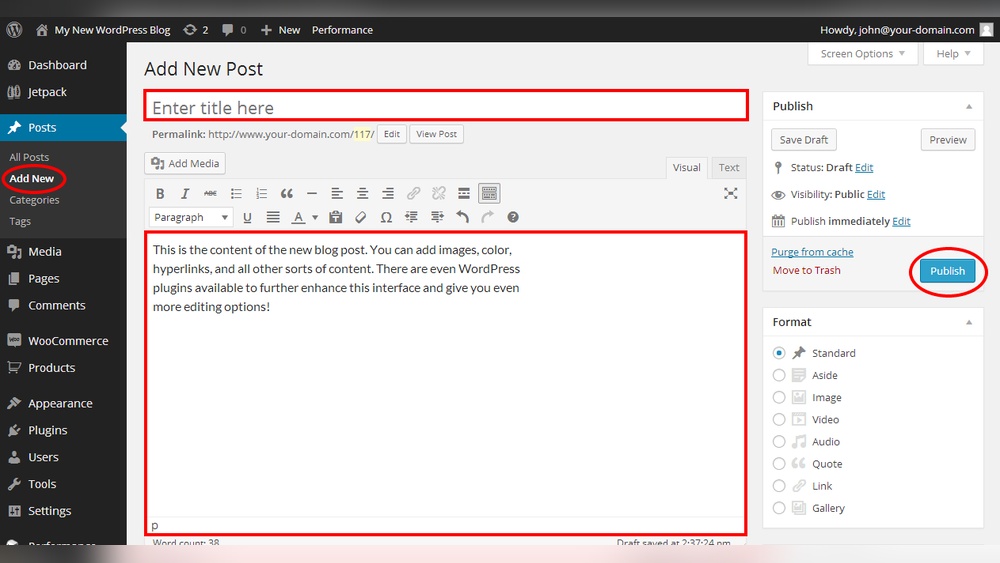
To add a new blog post, click on “Posts” in the dashboard menu. Then, select “Add New.” This opens a blank post screen. Here, you can write your blog title and content. You can also save your work as a draft. This lets you return later to finish or edit. Publishing your post will make it live on your website.
Using The Block Editor
WordPress uses a block editor to build posts. Each block holds a piece of content. Blocks can be paragraphs, images, headings, or lists. You add blocks by clicking the plus (+) icon. This lets you create a clean and organized post. You can move blocks up or down to change their order. The editor also offers tools to format text and add links easily.
Customizing Your Blog Content
Customizing your blog content makes your posts more attractive and easier to read. It helps you share your message clearly. You can use images, text styles, and links to keep readers interested.
WordPress offers simple tools to change how your blog looks and feels. These tools let you add media, format text, and include links or buttons. Each step helps your blog stand out and connect with your audience.
Adding Images And Media
Images make your blog posts lively. They break up large text blocks and explain ideas better. Upload photos or videos directly in the WordPress editor. Use clear, relevant images to support your words. Add alt text to images for better SEO and accessibility.
Formatting Text
Good text formatting improves readability. Use headings, bold, and italics to highlight important points. Break long paragraphs into smaller ones. Lists and quotes add structure and interest. Keep your sentences short and easy to follow.
Inserting Links And Buttons
Links guide readers to more information. Add links to words or phrases within your text. Use buttons for calls to action like “Read More” or “Subscribe.” Buttons stand out and encourage clicks. Make sure links open in new tabs to keep readers on your blog.

Credit: learn.wordpress.org
Organizing Posts For Readers
Organizing your blog posts helps readers find content easily. It creates a better experience and keeps visitors longer on your site. Well-structured posts show professionalism and improve your site’s SEO. Simple organization tools in WordPress make this task easy for everyone.
Creating Categories
Categories group your posts by broad topics. They help readers browse related content quickly. Choose clear and simple names for categories. For example, a cooking blog might have categories like “Recipes” and “Tips.” You can assign each post to one or more categories. This system keeps your blog tidy and easy to navigate.
Adding Tags
Tags describe specific details in your posts. They work like keywords to connect similar ideas. Use tags to highlight important points or themes. For instance, a post in the “Recipes” category might have tags like “vegetarian” or “quick meals.” Tags help readers find posts with shared topics across categories. Use them wisely to improve search results.
Managing Post Dates
Post dates show when content was published or updated. Displaying dates keeps your blog current and trustworthy. WordPress lets you set or change the date of each post. You can schedule posts to publish later, keeping your blog active. Managing dates also helps readers track your latest updates easily.
Enhancing Blog Functionality
Enhancing your blog’s functionality makes it easier to use and more attractive to visitors. A well-functioning blog keeps readers engaged and helps your site grow steadily. Simple tools and settings can improve your blog’s performance and reach.
Focus on key features that improve user experience and search visibility. These steps help your WordPress blog perform better and attract more readers.
Installing Essential Plugins
Plugins add new features to your blog without coding. Choose plugins that improve speed, security, and design. Popular plugins include caching tools, security shields, and contact forms. Install only what you need to avoid slowing your site.
Setting Up Seo Basics
SEO helps your blog appear in search engines. Use plugins like Yoast SEO or Rank Math to optimize posts. Add clear titles, descriptions, and keywords for each blog post. Good SEO brings more visitors and grows your audience.
Enabling Comments
Comments let readers share thoughts and ask questions. Enable comments in WordPress settings to start conversations. Moderate comments to keep discussions friendly and spam-free. Engaged readers return and spend more time on your blog.
Publishing And Sharing Your Blog
Publishing and sharing your blog is the final step to reach your audience. It lets people read your ideas and join the conversation. This part focuses on how to preview, publish, and share your posts. It also covers how to check your blog’s success over time.
Previewing And Publishing Posts
Before publishing, preview your post to check its look. Click the “Preview” button in WordPress to see the draft. Read it carefully for errors and format issues. Make sure images and links work well. After reviewing, click “Publish” to make your post live. Your blog is now ready for readers.
Sharing On Social Media
Share your blog on social media to get more readers. Use platforms like Facebook, Twitter, and LinkedIn. Copy your post’s link and write a short message. Share it with your followers to invite them to read. Social sharing helps your blog grow faster. It also builds a community around your ideas.
Monitoring Blog Performance
Track your blog’s performance to see what works. Use tools like Google Analytics to monitor visitors. Check which posts get the most views and shares. Notice where your visitors come from and how long they stay. Use this data to improve your future posts. Monitoring helps keep your blog interesting and popular.
Frequently Asked Questions
How Do I Create A New Blog Post On WordPress?
To create a new blog post, log in to your WordPress dashboard. Go to Posts > Add New. Enter your title, content, and click Publish. This process allows you to quickly add fresh content to your site.
Can I Add Images To My WordPress Blog Posts?
Yes, you can easily add images. In the post editor, click the Add Media button. Upload or select an image from your media library. Images make your posts visually appealing and improve reader engagement.
How Do I Optimize Blog Posts For Seo In WordPress?
Use an SEO plugin like Yoast. Add focus keywords, meta descriptions, and optimize headings. Write clear, keyword-rich content. This helps your blog rank higher in search engines.
Is It Possible To Schedule Blog Posts On WordPress?
Yes, WordPress lets you schedule posts. In the post editor, click Publish immediately and set your desired date and time. Scheduling helps you maintain consistent posting without manual effort.
Conclusion
Adding a blog on WordPress is simple and quick. You just need to follow a few clear steps. Writing and publishing posts helps share your ideas with the world. Regular updates keep your website fresh and interesting. Start today and watch your blog grow over time.
Enjoy creating content that connects with your readers.


