
If you want to earn money from your WordPress blog, adding Amazon affiliate links is one of the easiest and most effective ways to start. But how do you add these links correctly so they look natural and encourage your readers to click?
This guide will walk you through the simple steps to add Amazon affiliate links to your WordPress blog, helping you turn your content into a steady income stream. Keep reading, and you’ll learn exactly what you need to do to get it right the first time.
Set Up Amazon Affiliate Account
Setting up an Amazon Affiliate account is the first step to earning money from your WordPress blog. This process is simple and quick. Follow the right steps to join the program and start sharing affiliate links.
Create Amazon Associates Profile
Go to the Amazon Associates homepage and click “Join Now for Free.” Enter your name, email, and website details. Provide accurate information about your blog and how you plan to promote products. This profile helps Amazon understand your site and approve your account quickly.
Understand Affiliate Policies
Read Amazon’s affiliate program rules carefully. Follow guidelines about content, product promotion, and link placement. Avoid prohibited practices like fake reviews or misleading claims. Following these rules keeps your account safe and active.
Get Your Tracking Id
After approval, Amazon gives you a tracking ID. This ID tracks the clicks and sales from your links. Use it to create unique affiliate links for your blog posts. The tracking ID helps you monitor your earnings and improve your strategy.

Credit: www.youtube.com
Prepare Your WordPress Blog
Preparing your WordPress blog is the first step to adding Amazon affiliate links effectively. A well-prepared blog makes your content look professional and trustworthy. It also helps your readers find and use your affiliate links easily. Follow these steps to get your blog ready.
Choose The Right Theme
Select a clean and simple theme that loads fast. A lightweight theme improves user experience and SEO. Pick a theme that works well on phones and tablets. Responsive design keeps visitors engaged on all devices. Avoid themes with too many features that slow down your site.
Install Essential Plugins
Plugins add useful functions to your blog without coding. Install a plugin to manage affiliate links easily. Use a plugin for SEO to help your posts rank higher. Security plugins protect your site from hackers. Also, install a caching plugin to speed up your blog.
Optimize Blog Settings
Set your blog’s permalink structure to “post name” for clean URLs. Use categories and tags to organize content clearly. Enable breadcrumbs for better navigation and SEO. Configure your site’s title and tagline with relevant keywords. Finally, check your blog’s loading speed and fix issues fast.
Generate Amazon Affiliate Links
Generating Amazon affiliate links is the first step to earn commissions from your WordPress blog. These links connect your readers to Amazon products and track sales. Amazon offers easy tools to create different types of affiliate links. Choose links that fit your blog style and content.
Use Amazon Sitestripe Tool
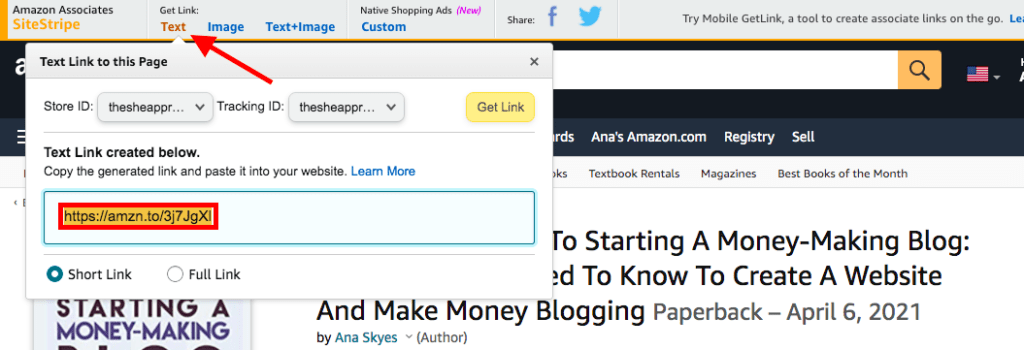
Amazon SiteStripe is a toolbar on the Amazon website. It appears when you log in to your affiliate account. You can create links directly from any product page. Just click the “Text” or “Image” link options. Copy the link and paste it into your WordPress post. This tool is fast and simple for beginners.
Create Text Links
Text links are clickable words or phrases in your blog content. Use SiteStripe to get the product URL. Highlight the text in your post and add the link. Text links blend well with your writing. They look natural and encourage readers to click. Make sure your link matches the product you discuss.
Create Image And Native Ads
Image links use product pictures to attract attention. Native ads are customizable blocks with product info. Both types are available through SiteStripe or Amazon’s affiliate dashboard. Copy the HTML code and paste it into your WordPress editor. These links stand out visually and help boost clicks.

Credit: www.postaffiliatepro.com
Insert Affiliate Links In Posts
Inserting Amazon affiliate links into your WordPress posts helps you earn commissions. Placing links naturally boosts clicks and improves user experience. Follow simple steps to add affiliate links correctly in your content.
Add Links In Text Content
Highlight the text where the link should appear. Click the link icon in the WordPress editor toolbar. Paste your Amazon affiliate URL into the box. Choose to open the link in a new tab for better user experience. Make sure the link looks natural and fits the sentence well.
Use Link Shorteners
Long affiliate URLs can look messy and confusing. Use Amazon’s built-in link shortener to create cleaner links. Short links are easier to share and remember. Copy the short link and paste it directly into your post. This also helps track clicks more clearly.
Add Links To Images And Buttons
Images and buttons attract attention and encourage clicks. Select an image or button in the editor. Click the link icon and insert your affiliate URL. Set the link to open in a new tab to keep readers on your site. Use clear call-to-action buttons for better results.
Enhance Links For Better Clicks
Enhancing your Amazon affiliate links can increase clicks and boost earnings. Simple changes make links more attractive and trustworthy. Clear actions and honest messages help visitors decide. Tracking links shows which ones work best. These steps improve your blog’s performance.
Use Call-to-action Phrases
Call-to-action phrases guide readers to click your links. Words like “Check this deal,” “Buy now,” or “See price” create urgency. Short and direct phrases work best. They tell visitors what to do next. This approach raises the chance of clicks.
Add Disclosure Statements
Disclose your affiliate relationship clearly. A simple statement like “This post contains affiliate links” builds trust. Readers appreciate honesty and feel safe clicking links. Place the disclosure near your links or at the start of the post. This is also required by Amazon’s policies.
Track Link Performance
Use tools to monitor how links perform. Amazon provides reports to see clicks and sales. Google Analytics can track user behavior on your site. Knowing which links attract clicks helps improve future posts. Focus on links that bring the most results.
Optimize For Seo And User Experience
Optimizing your Amazon affiliate links on WordPress helps both search engines and readers. Good SEO makes your site easier to find. A smooth user experience keeps visitors longer and encourages clicks on your links.
Focus on clear keywords, fast loading, and mobile-friendly design. These factors improve your blog’s ranking and usability. Visitors enjoy quick access and easy navigation, boosting your affiliate income.
Use Relevant Keywords
Choose keywords that match your blog topic and Amazon product. Use these keywords in your link anchor text and surrounding content. This helps search engines understand your page. Avoid keyword stuffing. Write naturally to keep readers interested.
Improve Page Load Speed
Fast pages keep visitors from leaving. Compress images and use caching plugins to speed up your site. Limit unnecessary scripts and plugins. A quick site improves ranking and user satisfaction. Test your page speed regularly.
Ensure Mobile Compatibility
Most users browse on phones. Make sure your WordPress theme works well on all devices. Use responsive design to adjust layout automatically. Check that Amazon affiliate links are easy to tap. Mobile-friendly sites rank higher and attract more clicks.
Monitor And Improve Affiliate Earnings
Tracking your affiliate earnings helps you know what works. It shows which links bring the most clicks and sales. This data lets you make smart changes. You can improve your blog’s income by acting on real numbers.
Analyze Amazon Reports
Amazon provides detailed reports on your affiliate links. Check these reports often. Look for which products sell well and which do not. Notice patterns in clicks and conversions. Use this info to focus on popular items.
Test Different Link Placements
Try placing links in various spots on your posts. Test links inside paragraphs, at the end, or in sidebars. See which location gets more clicks. Small changes can lead to higher earnings. Keep testing to find the best spots.
Update Links Regularly
Products and deals change on Amazon all the time. Old links may stop working or lose appeal. Check your links often. Replace outdated or broken ones with fresh offers. Keeping links current helps maintain your income flow.
Credit: thesheapproach.com
Frequently Asked Questions
How Do I Create An Amazon Affiliate Link?
To create an Amazon affiliate link, join the Amazon Associates program first. Then, find the product on Amazon, click “Get Link,” customize it, and copy the HTML or short link to add to your WordPress blog.
Where Should I Place Amazon Affiliate Links In WordPress?
Place Amazon affiliate links within your blog content, product reviews, or sidebar widgets. Embedding links naturally in relevant posts improves user experience and boosts click-through rates, enhancing your affiliate earnings.
Can I Use Amazon Affiliate Links In WordPress Posts?
Yes, you can easily insert Amazon affiliate links directly into WordPress posts. Use the text editor to add links or embed product images with affiliate URLs to monetize your content effectively.
How Do I Track Amazon Affiliate Link Performance?
Amazon Associates dashboard offers real-time tracking of clicks, conversions, and earnings. Use this data to optimize your WordPress blog content and improve your affiliate marketing strategy.
Conclusion
Adding Amazon affiliate links to your WordPress blog is simple and effective. Start by creating your affiliate account and choosing relevant products. Then, copy the affiliate link and paste it into your blog post using WordPress tools. Make sure your links fit naturally with your content.
Track your clicks and earnings regularly to see what works best. With steady effort, these links can help you earn extra income. Keep your blog honest and useful for readers. Success comes from clear, helpful content and smart link placement.



