
Imagine turning your passion for books into a thriving online business. By adding a virtual bookstore to your WordPress theme, you can share your love for literature with the world, all from the comfort of your home.
But where do you start? The process might seem overwhelming at first, but it’s easier than you think. With the right steps, you can transform your WordPress site into a digital haven for book lovers. In this guide, you’ll discover simple, effective strategies to seamlessly integrate a virtual bookstore into your site.
Whether you’re a seasoned WordPress user or a complete beginner, this article will empower you to take control of your online presence. Get ready to captivate your audience, boost your sales, and create a unique shopping experience that keeps readers coming back for more. Dive in and unlock the potential of your website today!
Choosing The Right E-commerce Plugin
Popular Plugins for WordPress include WooCommerce, Easy Digital Downloads, and WP eCommerce. WooCommerce is widely used and offers many features. Easy Digital Downloads is perfect for selling digital products. WP eCommerce provides basic features for small shops.
Choosing the best plugin depends on several factors. Consider the plugin’s ease of use and compatibility with your theme. Check if the plugin supports multiple payment gateways. Look for plugins that offer good customer support. Make sure the plugin is regularly updated. Also, consider the price and whether it fits your budget.
Some plugins offer free versions. Others require payment for extra features. Compare features to find the best match. A good plugin makes your bookstore easy to manage.

Credit: www.youtube.com
Setting Up Your WordPress Theme
First, check if your WordPress theme supports a bookstore plugin. Some themes may not work well with certain plugins. This can cause problems later. Look for documentation from the theme creator. This helps you understand compatibility. It’s important to know which plugins work. It saves time and avoids errors.
Installing your theme is easy. Go to the WordPress dashboard. Find the “Appearance” tab. Click on “Themes.” Then, click “Add New.” Here, you can upload your theme file. Make sure your theme file is in a .zip format. After uploading, click “Activate.” Your theme is now live. You can start adding features. This includes your virtual bookstore. Check the theme settings. Make sure everything looks right.
Installing The E-commerce Plugin
First, open your WordPress dashboard. Go to the “Plugins” section. Click “Add New”. In the search bar, type your chosen plugin name. Popular options include WooCommerce or Easy Digital Downloads. Click “Install Now” next to the plugin. Wait for the installation to finish. Click “Activate” to turn on the plugin.
After activation, find the plugin settings in the dashboard. Click on it to open. Follow the setup wizard for guidance. Set your store name and currency. Choose payment methods like PayPal or credit card. Set shipping options if needed. Save your changes. Your virtual bookstore setup is complete. Test your store to ensure it works properly.
Designing The Virtual Bookstore
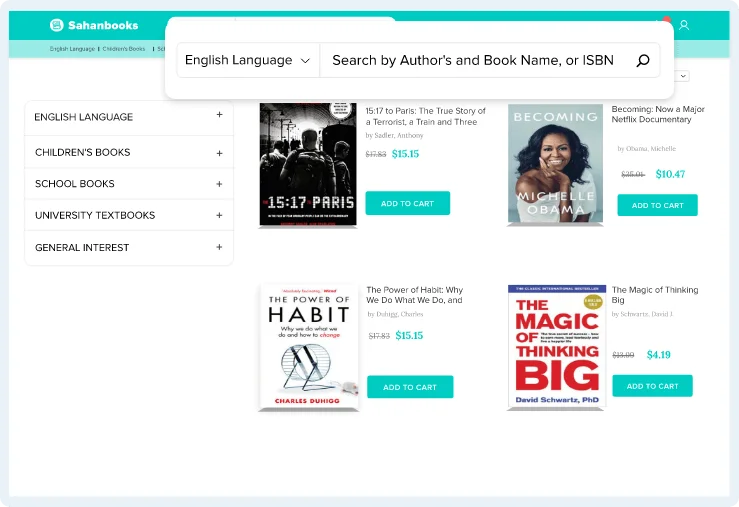
A clean layout makes your bookstore look nice. Choose simple colors for your design. Use large buttons for easy navigation. Arrange books in neat rows for better viewing. Keep the font readable and friendly. Add a search bar to find books fast. Ensure your design works on mobile devices too. Test the layout for ease of use. Make the experience enjoyable for everyone.
Your brand is special. Use a logo that stands out. Pick colors that match your brand style. Add a slogan that is short and catchy. Include author names and book covers. Show your brand on every page. Your brand should be easy to remember. This makes your bookstore unique. A strong brand attracts more visitors.
Adding Products To Your Store
Adding products to your store is simple. Use the WordPress dashboard. Click on Products. Then, select Add New. Fill in the product name and description. Add a clear image. Set a price. Click Publish to make it live.
Group books into categories. This helps customers find books. Go to Products. Choose Categories. Click Add New Category. Name the category. Examples: Fiction, Non-fiction, Kids. Save changes. Assign books to the right category.
Setting Up Payment Gateways
Integrating payment gateways is crucial for setting up a virtual bookstore on a WordPress theme. Choose secure and reliable options for processing transactions smoothly. Ensure compatibility with your theme for a seamless shopping experience.
Choosing Payment Options
Choose payment options that are easy and safe. Many people use PayPal and Stripe. They are popular and trusted. Always check fees before choosing. Some gateways charge more money. Think about what your customers like. Do they prefer credit cards or digital wallets? Offer a few choices to make them happy. This way, they can pay easily.
Integrating Payment Methods
Adding payment methods to your site is important. Use plugins to help you. Plugins make this task easy. Many plugins are free. Some plugins may require a fee. Choose a plugin that works with your theme. It should also be easy to use. Test the payment system before going live. Make sure everything works well. Your customers should have no trouble paying.
Optimizing For Seo
Easily create a virtual bookstore on WordPress by choosing a compatible theme. Install essential plugins for e-commerce functionality. Customize pages to showcase books and optimize for SEO with keywords and meta tags.
Keyword Strategies
Choosing the right keywords is key for your bookstore. Use tools to find popular words. Short and simple words work best. Place keywords in titles and headings. This helps search engines find your store. Do not stuff too many keywords. It should look natural.
Enhancing Product Descriptions
Good descriptions help buyers choose books. Use clear and easy words. Describe what makes each book special. Include the author’s name and genre. Talk about the main story or topic. Keep sentences short. This makes it easy to read. Add a few keywords but keep it natural. Always check for spelling mistakes.
Credit: www.spaceotechnologies.com
Ensuring Mobile Responsiveness
Every site needs to look good on all devices. Use flexible grids. They help content fit any screen. Images should be scalable. This makes them adjust size automatically. Also, implement media queries. They change layout for different screen sizes.
Check how your site looks on phones, tablets, and computers. Use emulators if you don’t have all devices. They show you how your site will look. Real device testing is best. It gives the most accurate results. Always test before launching your site.
Enhancing User Experience
Streamlining navigation helps users find books easily. Create a clear menu. Use simple labels for categories like genres or authors. Include a search bar at the top of the page. Ensure it is easy to spot. Users love to search quickly. Add filters for book types or prices. This makes shopping fast and fun. Highlight popular books on the homepage. Users enjoy seeing recommendations. Display book covers nicely. They catch the eye.
Improving site speed keeps users happy. Slow pages make users leave. Compress images to speed up loading. Use tools to check site speed regularly. Reduce heavy scripts and plugins. They slow down the site. Opt for lightweight themes. They are faster. Keep the site simple. Avoid too many animations. Simple pages load quickly. Fast sites make happy users. They stay longer and buy more books.
Managing Inventory And Orders
Transform your WordPress site by integrating a virtual bookstore with ease. Plugins streamline inventory and order management, ensuring a seamless shopping experience. Custom themes enhance your store’s appeal, attracting book lovers.
Tracking Stock Levels
Keeping an eye on your bookstore’s stock is important. Use plugins to monitor items. These tools help track all your books. They show how many books are left. Alerts can notify you when stock is low. This helps in ordering more books on time. You can also see which books sell best. This way, you can stock popular titles. Tracking stock keeps your bookstore running smoothly.
Automating Order Processing
Automating orders makes life easier. Plugins can handle orders quickly. They send emails to customers. They update stock levels automatically. This saves time and effort. Customers get books faster. You can focus on other tasks. Automation tools are handy for busy bookstores. They simplify order management. This ensures orders are always processed correctly.
Marketing Your Bookstore
Social media is a great tool. It can help you reach more people. Share your bookstore events and new books. Post pictures and short videos of your store. Use simple words and ask questions. Make your followers feel part of your journey. Encourage them to share your posts. This can help you get more fans. Engage with comments and messages quickly. Thank people for their support. This builds a good relationship. A happy follower can become a loyal customer.
Emails can help you talk directly to your customers. Send news about book launches and sales. Offer special deals to email subscribers. Keep your emails short and friendly. Use clear and simple sentences. Add pictures of books and short descriptions. Make sure your emails look nice on phones. Many people read emails on their phones. Include a link to your online store. Make it easy for customers to shop with just a click.
Monitoring And Analyzing Performance
Adding a virtual bookstore to your WordPress theme enhances user engagement. Monitor and analyze performance to optimize sales. Use analytics tools to understand visitor behavior and improve the shopping experience.
Using Analytics Tools
Analytics tools help you see how your bookstore is performing. They track visitor numbers and time spent on pages. These tools show which books get clicked the most. You can find out where your visitors come from. This is helpful to know if your marketing is working. Look at bounce rates. They tell if people leave quickly. High bounce rates mean changes are needed. Use this data to make smart choices for your store.
Adjusting Strategies Based On Data
Data helps improve your bookstore strategy. If a book sells well, promote it more. If some books don’t sell, check their details. Maybe descriptions need updates. Low visitor numbers need attention. Try new ads or social media posts. Change strategies based on data. It keeps your bookstore fresh and exciting. Adjustments make your store better every day.

Credit: themehunk.com
Frequently Asked Questions
How To Integrate Woocommerce Into WordPress Theme?
To integrate WooCommerce, first install the WooCommerce plugin from WordPress. Activate it, then follow the setup wizard. Customize your store settings, such as payment options and shipping details. Finally, add products and organize them into categories to enhance your virtual bookstore’s functionality and user experience.
Can I Customize The Bookstore Design?
Yes, you can customize the design using WordPress theme settings and custom CSS. Most themes offer built-in customization options. Use the WordPress Customizer to adjust layouts, colors, and fonts. For advanced edits, consider using child themes or page builders for more design flexibility.
What Plugins Enhance Bookstore Functionality?
Several plugins can enhance your bookstore. Consider using WooCommerce for e-commerce features, Elementor for design customization, and Yoast SEO for optimization. WPForms can help with contact forms. These plugins improve functionality, design, and search engine visibility for your virtual bookstore.
How To Optimize Bookstore For Seo?
To optimize for SEO, use plugins like Yoast SEO for keyword targeting. Ensure your content is well-structured and includes relevant keywords. Optimize images with alt text, and improve site speed. Regularly update content and use meta tags to increase visibility and attract more visitors.
Conclusion
Creating a virtual bookstore on WordPress is simple. Follow the steps carefully. Choose the right theme. Install necessary plugins. Customize your store. Add enticing book descriptions. Engage visitors with visual appeal. Test everything works smoothly. Drive traffic to your site with SEO.
Keep content fresh and inviting. Stay patient as your store grows. Enjoy connecting with book lovers worldwide. Your virtual bookstore is ready to share your passion. Start selling your favorite titles today. Remember, small steps lead to big achievements. Embrace the journey of online book selling.


