
Are you looking to make your WordPress site stand out with a unique, themed page? Adding a themed page can instantly elevate your website’s appearance and enhance user experience.
Whether you’re a seasoned WordPress user or just starting out, creating a themed page might seem daunting. But don’t worry, it’s simpler than you think. Imagine your website with a stunning, cohesive look that not only captures attention but also keeps visitors engaged.
This guide will walk you through every step of the process, ensuring you can easily incorporate a themed page into your WordPress site. Ready to transform your website into something extraordinary? Let’s dive in and unlock the potential of your WordPress site!

Credit: learn.wordpress.org
Choosing The Right Theme
Free themes cost nothing. They can be simple and limited. Premium themes are paid. They offer more features and support. Think about your needs before choosing. For a basic site, free themes are enough. For more customization, choose premium.
Look for themes with easy setup. Check for good customization options. Does it support plugins? Ensure it has regular updates. A well-documented theme is helpful. Good themes have SEO-friendly code. This helps in search rankings.
A responsive design works on all devices. It adjusts to screens of all sizes. This ensures a good user experience. Google likes mobile-friendly sites. This can help your site rank better. More visitors use phones today. So, responsive design is a must.
Credit: help.elements.envato.com
Installing A Theme
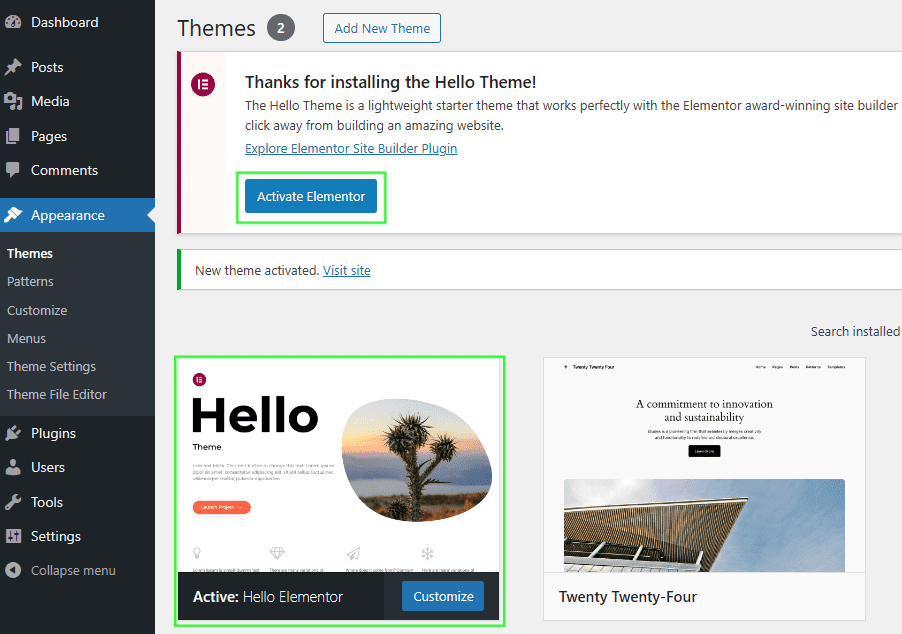
Accessing the Theme Directory is easy. First, go to your WordPress dashboard. Then, find the “Appearance” tab. Click on “Themes.” You will see many theme options. These are free themes. You can search for specific themes. Use the search bar for this. Pick a theme that you like.
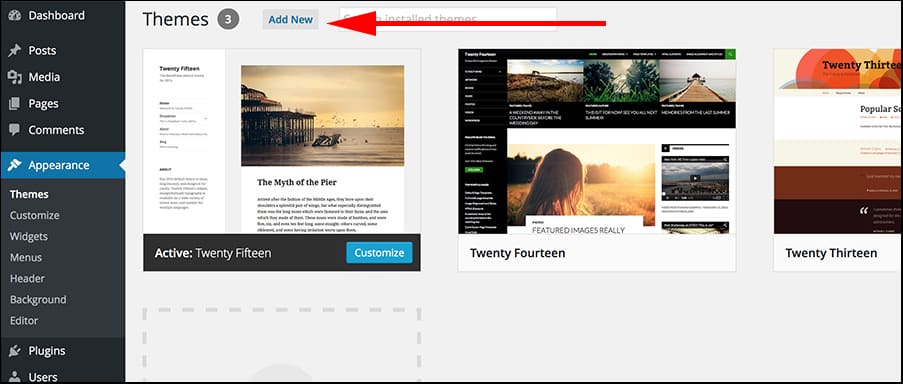
Uploading a Downloaded Theme is simple. Go to the “Themes” section again. Click on “Add New.” Find the “Upload Theme” button. Click on it. Choose the theme file from your computer. The file should be in .zip format. Click “Install Now.” Wait for the upload to finish.
Activating the New Theme is the last step. After uploading, look for the “Activate” button. Click on it. Your new theme is now live. Check your website. See the new look. Make sure everything works. Themes can change many things. Be ready for adjustments.
Customizing Your Theme
The WordPress Customizer is easy to use. It lets you make changes to your site’s look. Open the Customizer from your WordPress dashboard. You can see changes in real-time. This helps you to be sure everything looks right.
Colors and fonts make your site unique. Choose colors that match your brand. Pick fonts that are easy to read. The Customizer offers many options. Preview changes before saving.
A custom logo makes your site special. It shows your brand identity. Upload your logo in the Customizer. Make sure it fits well on the page. Adjust the size if needed. Save changes when you are happy.
Adding Themed Content
Start by logging into your WordPress dashboard. Look for the “Pages” section. Click “Add New” to create a fresh page. Enter a title that fits your theme. Write the content in the big box. You can add images or videos, too. Make sure everything looks nice.
Choose a design from your theme options. Use the menu to find the design settings. Add theme elements like headers or footers. They make your page look cool. Drag and drop to move things around. Preview before saving.
Add a meta description for your page. It helps search engines understand your content. Use simple words that match your page topic. Add keywords in your text. But don’t add too many. Keep your page loading fast. Speed is important for SEO.
Using Page Builders
Page builders make it easy to design your site. Many plugins are available. Some are popular. Elementor and Beaver Builder are favorites. They help create pages quickly. These plugins offer many features. Templates and widgets are included. Easy to use. Ideal for beginners. No coding needed. Just install and start.
Drag-and-drop editing is fun. Move items anywhere on the page. Change things fast. Create new sections easily. No need for complex steps. Just click and drag. Visual editing is simple. Everyone can do it. Build pages your way. Like playing a game. No stress, just creativity.
Custom layouts are special. Design unique pages. Choose sections you like. Add images and text. Make it yours. Every section can be different. Arrange parts as you wish. Use rows and columns. Create patterns that stand out. Personalize your website. Make visitors happy. They enjoy seeing something new.
Integrating Plugins For Enhanced Functionality
Plugins make pages better. Elementor helps with design. Yoast SEO helps with search. WooCommerce is great for shops. Each plugin adds value. Choose wisely for your needs.
Plugins must fit your theme. Some plugins may not work. Always check for compatibility first. Ask others about their experience. Read reviews from users. This saves time and trouble.
Good plugins make sites easy to use. Speed is important. Security keeps data safe. Navigation helps users find stuff. Happy users return often. Choose plugins that improve these areas.
Testing And Launching Your Page
Ensure your page looks good on phones, tablets, and computers. Use WordPress tools to preview each device. Double-check images, text, and buttons. They should fit well on every screen. Adjust if needed to improve appearance and function.
Pages sometimes have loading problems or broken links. Check for these issues before launching. Fix any errors you find. Use plugins to help spot and solve problems quickly. A well-functioning page keeps visitors happy.
Once your page is ready, hit the publish button. Share your new page with friends and followers. Use social media or email for sharing. Encourage others to visit your page. The more visits, the better!
Credit: www.greengeeks.com
Frequently Asked Questions
How Do I Add A Themed Page In WordPress?
To add a themed page in WordPress, navigate to ‘Pages’ in the dashboard. Click ‘Add New’, select your desired theme template, and customize your content. Ensure you save and publish for visibility. This process integrates your theme’s design elements seamlessly into your new page.
Can I Customize A Themed Page Layout?
Yes, you can customize a themed page layout using the WordPress editor. Modify sections by adding or removing blocks, changing styles, and adjusting layout settings. Utilize theme-specific options for unique customizations, ensuring your page aligns with your design preferences and brand identity.
Is A Plugin Needed For Themed Pages?
Plugins are not necessary for themed pages in WordPress. Most themes come with built-in templates that facilitate page creation. However, plugins like Elementor or WPBakery can enhance customization options, allowing more advanced design capabilities and functionalities for your themed pages.
How Do I Change A Page Theme?
To change a page theme, go to ‘Appearance’ in the WordPress dashboard. Select ‘Themes’, choose a new theme, and activate it. Then, edit your page using the new theme’s templates and settings. Always preview changes to ensure consistency in design and functionality.
Conclusion
Adding a themed page in WordPress is simple and rewarding. Follow the steps carefully. Customize the page to match your vision. Use themes wisely to enhance appeal. Keep your audience in mind. Maintain a consistent style for better engagement. Experiment with different themes to find what suits you best.
A well-designed page attracts and retains visitors. Make sure to regularly update your page. This keeps your content fresh and relevant. Practice makes perfect, so keep exploring. With time, creating themed pages becomes second nature. Enjoy building a site that reflects your unique style and brand.


