
Are you looking to build a community right on your WordPress site? Adding a forum can be the perfect way to bring your visitors together, spark conversations, and keep people coming back.
But if you’re wondering how to add a forum to WordPress without getting lost in technical details, you’re in the right place. This guide will walk you through simple steps to set up a forum that fits your needs and helps your site thrive.
Ready to turn your website into a buzzing hub of interaction? Let’s get started!
Credit: themeisle.com
Choosing The Right Forum Plugin
Choosing the right forum plugin is key to building a strong community on your WordPress site. The plugin shapes how users interact, post, and manage discussions. Picking the best one depends on your needs and site goals.
Good plugins offer easy setup, user-friendly design, and reliable support. Some focus on simple forums, while others add social features or advanced moderation tools. Understanding popular options and what features matter helps you decide.
Popular Forum Plugins For WordPress
Several plugins stand out for WordPress forums. bbPress is a classic choice, made by the WordPress team. It is lightweight and blends well with most themes. BuddyPress builds a social network with forums included. wpForo offers modern layouts and many features. Asgaros Forum is simple and fast, good for small communities. These plugins serve different needs and scales.
Features To Look For
Look for ease of use and setup. Check if the plugin supports user registration and profiles. Moderation tools, such as spam control and user bans, keep the forum clean. Mobile responsiveness ensures good viewing on phones. Integration with other plugins and themes matters. Customization options let you match your site’s look. Also, consider performance to avoid slow pages.
Comparing Free And Premium Options
Free plugins cover basic forum functions well. They suit small or new communities. Premium versions add extra features like advanced analytics, better support, and extra security. Premium plugins often offer more design choices and integrations. Consider your budget and how much control you want. Sometimes, free options are enough. Sometimes, investing in premium pays off for larger sites.
Credit: www.greengeeks.com
Preparing Your WordPress Site
Preparing your WordPress site is an important step before adding a forum. It ensures a smooth setup and avoids problems. Taking time to get ready protects your content and improves site performance. Follow these key steps to prepare your WordPress site properly.
Backup Your Website
Backing up your website saves a copy of all files and data. This prevents data loss if something goes wrong. Use a reliable backup plugin or your hosting service’s backup tool. Store backups in a safe place outside your server. Regular backups keep your website secure and easy to restore.
Update WordPress And Plugins
Keeping WordPress updated improves security and compatibility. Update the WordPress core to the latest version. Also update all plugins and themes to avoid conflicts. Running outdated software can cause errors when adding new features. Updates fix bugs and add important improvements.
Check Hosting Requirements
Forums need enough server resources to run smoothly. Check your hosting plan for PHP version, memory limit, and database support. Make sure your host meets the forum plugin’s technical needs. A good hosting environment prevents slow loading and crashes. Upgrading hosting may be necessary for large forums.
Installing The Forum Plugin
Installing a forum plugin in WordPress is the first step to create a community space on your site. This process is simple and fast. A good forum plugin lets visitors post questions, share ideas, and join discussions easily. Let’s explore how to install and set up the plugin.
Plugin Installation Steps
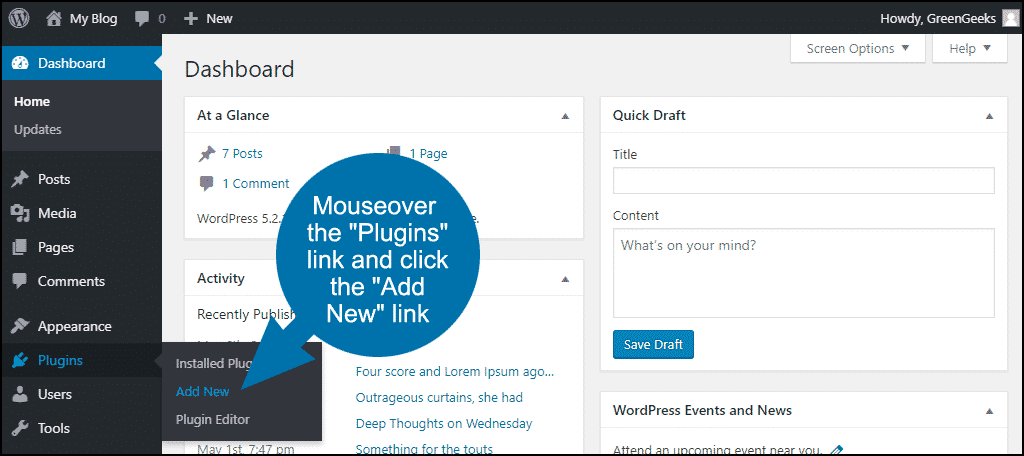
Log in to your WordPress dashboard. Go to the left menu and find “Plugins.” Click “Add New.”
Type the forum plugin’s name in the search box. Popular options include “bbPress” and “BuddyPress.”
Click the “Install Now” button next to your chosen plugin. Wait a few seconds for the installation to finish.
Once installed, click “Activate” to enable the plugin on your site. The plugin is now ready for configuration.
Activating And Configuring The Plugin
After activation, find the plugin’s settings in your dashboard menu. This location depends on the plugin used.
Set up your forum’s basic options like forum name and description. Keep it clear and simple for visitors.
Choose user roles and permissions. Decide who can post, reply, or moderate the forum.
Save your settings. Preview the forum on your site to make sure it works well.
Adjust settings as needed to fit your community’s needs. Your forum is ready for users to join.
Setting Up Forum Structure
Setting up a clear forum structure is important for user experience. It helps visitors find topics quickly. A well-organized forum keeps discussions neat and easy to follow. Start by creating categories and forums. Then set user roles and permissions. This approach builds a strong foundation for your WordPress forum.
Creating Categories And Forums
Categories act as main sections for your forum topics. They group related subjects together. For example, a tech forum may have categories like “Hardware” and “Software.” Inside each category, create forums for specific discussions. Forums are where users post questions and replies. Use clear names for both categories and forums. This helps users understand where to post. Keep the number of categories manageable to avoid confusion.
Managing User Roles And Permissions
User roles control what members can do on the forum. Common roles include administrators, moderators, and members. Administrators have full control over the forum settings. Moderators manage posts and keep discussions respectful. Members can create and reply to topics. Set permissions to limit spam and misuse. Assign roles carefully to maintain a safe community. Regularly review roles to ensure proper access levels.
Customizing Forum Appearance
Customizing your forum’s appearance helps create a unique space for your community. It makes your site look professional and easy to use. A well-designed forum keeps visitors interested and encourages participation.
Focus on themes and styles that match your site’s purpose. This makes navigation simple and enjoyable for users. The right look builds trust and invites more discussion.
Choosing A Compatible Theme
Select a WordPress theme that supports forums well. Some themes are built specifically for forums or work smoothly with popular forum plugins. Check if the theme is responsive and mobile-friendly. This ensures your forum looks good on all devices.
Pick a theme with clean layouts and clear fonts. Avoid themes with too many colors or clutter. A simple and neat design improves readability and user experience.
Adjusting Styles And Layouts
Use the theme customizer or plugin settings to change colors and fonts. Match your brand or website style. Adjust spacing and alignment to keep the forum tidy.
Consider adding a custom header or background image. This adds personality without distracting users. Test changes on different devices to ensure consistency.

Credit: www.wpcrafter.com
Enhancing Forum Functionality
Enhancing your WordPress forum helps create a better experience for users. It makes the forum safer and easier to use. You can add tools for managing posts, allow user sign-ups, and send updates.
These features keep the community active and organized. They also help you control the discussions and build trust among members.
Adding Moderation Tools
Moderation tools help keep conversations respectful and on-topic. You can approve or delete posts that break rules. Many forum plugins offer built-in moderation settings. These include options to flag inappropriate content and ban users. Good moderation prevents spam and harmful messages. It protects your forum’s quality and reputation.
Integrating User Registration
User registration lets visitors join your forum easily. Registered users can post, reply, and customize profiles. You can set up simple registration forms with plugins. This process helps you track members and control access. Registration also builds a sense of community among users. It encourages repeat visits and active participation.
Enabling Notifications And Subscriptions
Notifications keep users informed about new posts and replies. Subscriptions let members follow topics they like. These features boost engagement and return visits. You can enable email alerts or on-site notifications. Many plugins support flexible notification settings. Users stay connected without checking the forum constantly.
Launching And Promoting Your Forum
Launching your WordPress forum is an exciting step. It marks the start of building a community. Promotion helps bring in visitors and active members. Careful planning and effort ensure your forum grows steadily.
Before inviting users, test every feature. This guarantees smooth user experience. Once live, encourage participation and optimize your forum for search engines. These actions increase forum visibility and engagement.
Testing Forum Features
Check all forum functions before launch. Test posting, replying, and editing posts. Verify user registration and profile settings work well. Make sure notifications and private messages operate correctly. Fix any bugs or errors immediately. A smooth experience keeps users coming back.
Encouraging User Engagement
Start with interesting topics to spark conversations. Welcome new members with friendly messages. Create clear rules and guidelines for behavior. Reward active users with badges or special roles. Ask questions to invite responses. Regularly update content to keep the forum lively. Engaged users build a stronger community.
Using Seo For Forum Visibility
Optimize forum titles and descriptions with keywords. Use clear URLs for threads and categories. Add meta tags that describe your forum content. Ensure fast loading speed and mobile-friendly design. Encourage users to share valuable posts. High search engine ranking attracts more visitors. SEO helps your forum reach the right audience.
Maintaining And Growing Your Community
Building a forum on WordPress is only the first step. Keeping your community active and safe takes effort. Growing your forum means creating a space where users feel welcome and engaged. Regular care helps your forum stay healthy and popular. Here are key ways to maintain and grow your forum community.
Regular Updates And Backups
Keep WordPress and forum plugins updated. Updates fix bugs and improve features. Regular updates protect your site from security risks. Back up your forum data often. Backups prevent data loss from crashes or attacks. Store backups in a safe place. This ensures quick recovery if something goes wrong.
Handling Spam And Security
Spam can harm your forum’s reputation. Use anti-spam plugins to reduce unwanted posts. Set up user verification to block bots. Monitor new users and posts regularly. Remove spam quickly to keep the forum clean. Secure your site with strong passwords. Limit login attempts to stop hacking. A safe forum encourages more users to join.
Analyzing User Activity
Track how users interact with your forum. Use analytics tools to see popular topics. Find out what content gets the most replies. Spot inactive users and encourage them to participate. Understanding user behavior helps improve the forum experience. Adjust rules and features based on what members like. Engaged users make your community lively and growing.
Frequently Asked Questions
What Is The Easiest Way To Add A Forum To WordPress?
The easiest way is using a dedicated forum plugin like bbPress or BuddyPress. These integrate smoothly with WordPress and require minimal setup.
Can I Create A Free Forum On WordPress?
Yes, many plugins like bbPress are free. You can create and manage forums without extra cost.
How Do I Customize My WordPress Forum’s Appearance?
Most forum plugins offer customization options via WordPress customizer or plugin settings. You can change colors, layouts, and styles.
Is Adding A Forum Good For WordPress Seo?
Yes, forums generate user content and keywords, boosting site engagement and improving SEO rankings naturally.
Conclusion
Adding a forum to your WordPress site can boost user engagement. Choose the right plugin to match your needs and skills. Set up categories clearly to keep discussions organized. Encourage users to participate by making the forum easy to use.
Regularly check and update your forum for best performance. A well-maintained forum helps build a strong online community. Start small, learn as you go, and enjoy the interaction. Your WordPress site will become more lively and helpful.



