
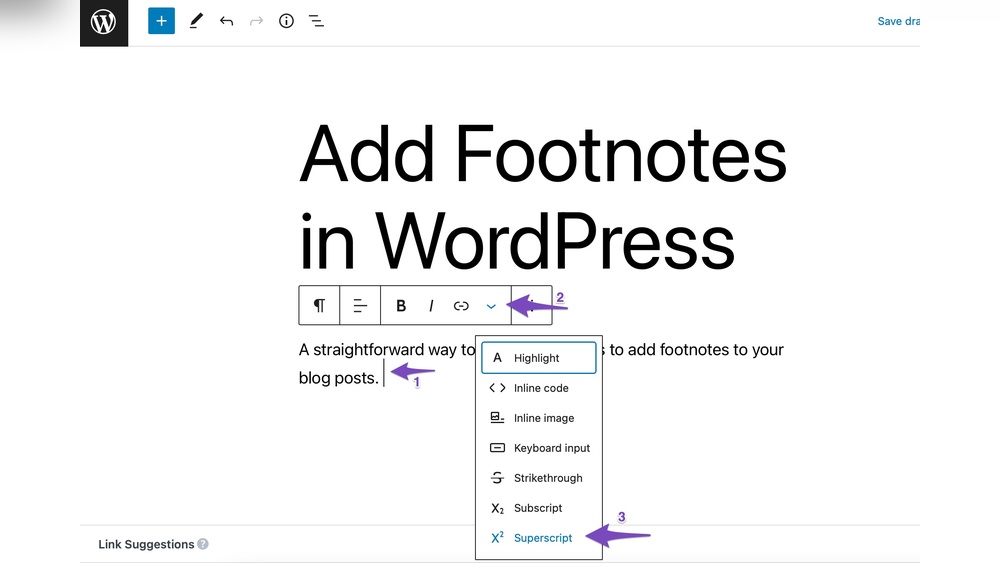
Are you looking to make your WordPress posts clearer and more professional? Adding footnotes can be a game-changer.
Footnotes help you share extra information or cite sources without cluttering your main content. But if you’ve ever wondered how to add a footnote in WordPress quickly and easily, you’re in the right place. You’ll discover simple steps and tips to create neat, clickable footnotes that keep your readers engaged and boost your blog’s credibility.
Keep reading to unlock the secrets to better content with just a few clicks!

Credit: www.wpbeginner.com
Why Use Footnotes
Footnotes serve an important role in writing. They help explain or give extra information without breaking the main flow. Using footnotes in WordPress makes your posts clear and trustworthy.
Footnotes guide readers to sources or details. They improve how readers understand your content. This small feature can make a big difference in your blog’s quality.
Benefits For Readers
Footnotes offer extra information without cluttering the text. Readers can choose to read them or skip. This keeps the main content simple and easy to follow.
They help readers check facts or learn more. This is useful for students and curious minds. Footnotes make your blog more helpful and user-friendly.
Enhancing Content Credibility
Footnotes show you use real sources. They prove your facts come from reliable places. This builds trust with your readers.
They also protect your content from claims of plagiarism. Citing sources with footnotes shows honesty. Readers will see you as a serious and honest writer.
Footnote Options In WordPress
WordPress offers several ways to add footnotes to your posts. Each method suits different needs and skill levels. Choose the best option to keep your content clear and professional.
Manual Footnotes
Create footnotes by adding numbers in your text. Then, list the notes at the end of your post. Use simple HTML tags like for superscript numbers. This method gives full control but needs more effort. It works well for short posts or few footnotes.
Using Plugins
Plugins simplify footnote creation. They add footnotes automatically with minimal work. Popular plugins include Easy Footnotes and Footnotes Made Easy. These tools insert clickable numbers and link notes smoothly. Ideal for longer posts or many footnotes. Installation is easy from the WordPress plugin directory.
Block Editor Features
The WordPress block editor has built-in options for footnotes. Use the “Custom HTML” or “Paragraph” blocks. Insert footnote numbers and explanations within these blocks. Some themes support footnote styles directly. This option blends manual control and ease of use. No extra plugins needed for simple footnotes.
Adding Manual Footnotes
Adding manual footnotes in WordPress gives you full control over your content. You can place footnotes exactly where you want. This method works well for small blogs or posts with only a few notes. It requires basic HTML skills but is easy to learn.
Creating Superscript Numbers
Start by typing the number for your footnote in the text. Wrap the number in the tag to make it superscript. For example, use 1 to show a small number above the text line. This shows readers that a footnote is available.
Linking To Footnote Text
Create a link from the superscript number to the footnote text at the bottom. Use the Your footnote text here. tag with an href pointing to a unique ID. For example, 1. Then, add the footnote text with the matching id attribute like
Using Plugins For Footnotes
Using plugins to add footnotes in WordPress makes the process simple and fast. Plugins handle numbering, linking, and formatting automatically. They save time and keep your posts clean. No need for manual coding or complex steps.
Popular Footnote Plugins
Several plugins help add footnotes easily. “Easy Footnotes” offers simple footnote creation and styling. “Footnotes” plugin supports multiple footnotes and custom designs. “CM Footnotes” is user-friendly and supports shortcodes. These plugins suit beginners and advanced users alike.
Installation And Setup
Go to your WordPress dashboard and open “Plugins” then “Add New”. Type the plugin name in the search box. Click “Install Now” and then “Activate”. Most plugins work right after activation. Some have settings to customize footnote styles. Check plugin instructions for extra options.
Inserting Footnotes With Plugins
After activation, insert footnotes while writing posts. Usually, a button appears in the editor toolbar. Click it to add footnote text and save. The plugin numbers footnotes automatically and links them properly. Footnotes show at the bottom of your post. Editing or deleting footnotes is simple through the same interface.
Footnotes With Block Editor
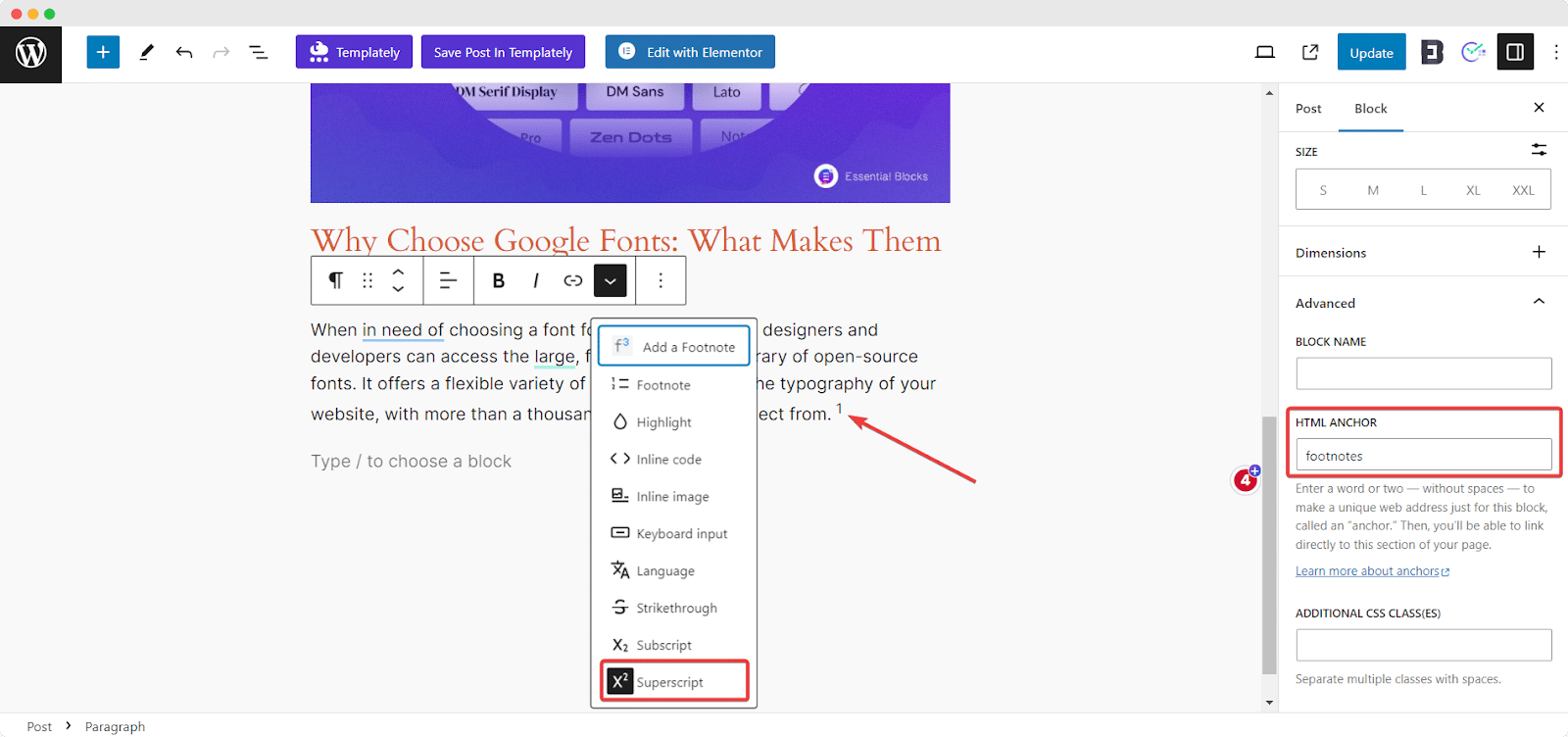
The Block Editor in WordPress makes adding footnotes easier. It lets you insert notes without complex coding. This helps readers understand your content better. Footnotes can clarify facts or add extra details. Using blocks, you control how footnotes appear on your page.
You can create footnotes directly inside the editor. This method keeps your content clean and organized. It also improves the reading experience on any device. The following sections explain how to use custom HTML blocks and add styles for footnotes.
Using Custom Html Blocks
Start by placing your cursor where the footnote will go. Add a new block and select “Custom HTML.” This block lets you write simple HTML code. Use tags for superscript numbers.
Example:
1Create a matching footnote at the bottom of your post. Use an anchor link for easy navigation.
This is the footnote text.Link the footnote number to the footnote text. This helps readers jump between the note and the content.
Adding Footnote Styles
Footnotes look better with custom styles. Add CSS to your theme or in the Block Editor’s “Additional CSS” area. Style the superscript numbers with a smaller font size.
sup { font-size: 0.8em; vertical-align: super; cursor: pointer; color: 0073aa; }Style the footnote text for clarity. Use a smaller font and a border or background color.
footnote-1 { font-size: 0.9em; border-top: 1px solid ccc; margin-top: 10px; padding-top: 5px; color: 555; }These simple styles improve footnote visibility. They keep the post neat and reader-friendly.
Credit: embedpress.com
Tips For Effective Footnotes
Footnotes help readers understand sources and extra details. Using them well makes your content clear and trustworthy. Keep footnotes simple and easy to follow. Avoid clutter and confusion. This section gives tips to use footnotes effectively in WordPress.
Keep Footnotes Clear And Concise
Write footnotes with short, clear sentences. Use simple words readers can easily understand. Avoid long explanations in footnotes. Stick to the main point to save space. Clear footnotes help readers find information fast. They improve the reading experience and keep your post neat.
Maintain Consistent Numbering
Number footnotes in order from start to end. Use the same style for all footnotes. This helps readers track notes without confusion. Avoid skipping or repeating numbers. Consistent numbering looks professional and organizes your content. It makes your post easier to follow and reference.

Credit: wordpress.org
Frequently Asked Questions
How Do I Add A Footnote In WordPress Editor?
To add a footnote in WordPress, use a footnote plugin or manually insert superscript numbers. Link the number to the footnote text at the bottom of your post for clear referencing.
What Is The Best Plugin For WordPress Footnotes?
Popular footnote plugins include “Easy Footnotes” and “Footnotes Made Easy. ” These plugins simplify footnote creation and management without coding, enhancing readability.
Can I Add Footnotes Without Plugins In WordPress?
Yes, you can manually add footnotes by inserting superscript numbers and linking them to corresponding notes at the post’s end using anchor tags.
Why Use Footnotes In WordPress Blog Posts?
Footnotes provide additional information or sources without cluttering the main text. They improve credibility and help readers access details easily.
Conclusion
Adding footnotes in WordPress helps readers find extra information easily. It makes your posts clear and trustworthy. You can do this with simple steps or plugins. Footnotes keep your content neat and organized. Try adding them to improve your blog’s quality.
Readers will appreciate the extra details without confusion. Start using footnotes today for better writing.



