
Are you ready to take control of your website with Yahoo Web Hosting? Accessing the control panel is your first step to unlocking a world of possibilities.
Whether you’re looking to update your site, manage your domains, or tweak settings for optimal performance, the control panel is your gateway to easy website management. But figuring out how to access it might seem a bit daunting at first.
Don’t worry, you’re not alone. This guide is here to simplify the process for you, ensuring that you can navigate the Yahoo Web Hosting control panel effortlessly. Dive in to discover how you can harness the full potential of your web hosting experience.
Yahoo Web Hosting Overview
Yahoo Web Hosting offers a simple way to manage your website. It provides tools to help you build and maintain your site. Users can create web pages with easy-to-use templates. The service includes email accounts for your domain.
Security is important. Yahoo provides SSL certificates to keep data safe. Support is available for any problems. Their team helps you solve issues quickly. This ensures your site runs smoothly.
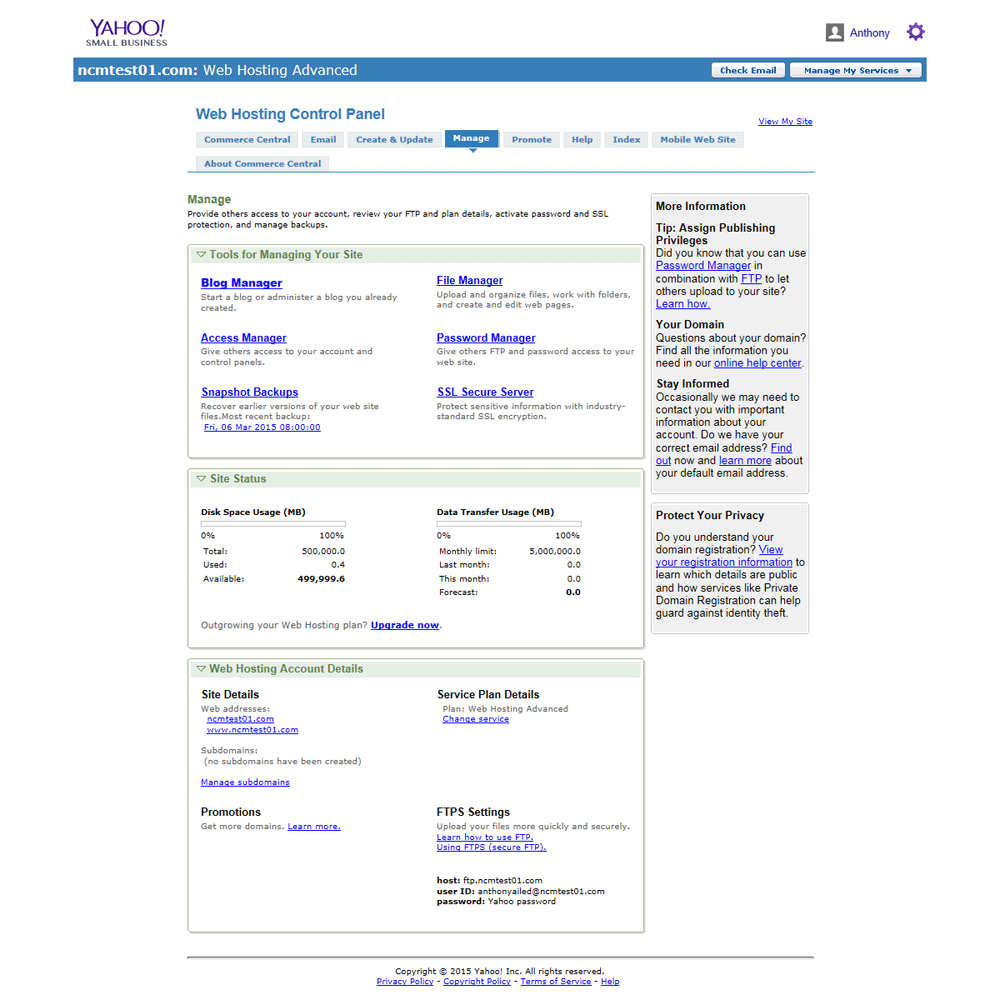
The control panel is user-friendly. You can access it anytime. It allows you to manage files, emails, and more. The panel is designed for users of all skill levels.
Credit: www.ncmonline.com
Setting Up Yahoo Web Hosting Account
Visit the Yahoo Web Hosting site. Click on the Sign Up button. Enter your details like name and email. Choose a strong password. Follow the steps to verify your email. After verification, your account will be ready. You can now use Yahoo Web Hosting.
Open the Yahoo Web Hosting page. Click on the Login button. Enter your registered email and password. Click the Sign In button. If details are correct, you will access your account. Keep your login details safe for future use.
Accessing The Control Panel
Start by visiting the Yahoo Small Business website. Find the login button. Click it to enter your account details. Use your Yahoo ID and password. Once logged in, look for the web hosting section. It’s usually at the top menu. Click on it. This leads you to the hosting services page. Here, you will see the option to access your control panel.
The dashboard is your main tool. It shows various sections. Website settings are easy to find. Click on them to change your site. You can also manage your domain settings here. Want to add new features? Check the tools section. It offers many options. The dashboard is user-friendly. Explore different tabs to learn more.
Key Features Of Yahoo Control Panel
The control panel offers easy-to-use website management tools. You can add or remove web pages with a few clicks. Uploading images and documents is simple. These tools help keep your website up-to-date. The interface is user-friendly. Even beginners can handle it.
Keeping your website safe is important. The security settings in the control panel help protect your data. You can set passwords for different areas. The system checks for threats. Updates are automatic. This makes your site secure and reliable.
Managing your domain is easy with Yahoo’s tools. You can change your domain name settings. It’s possible to connect new domains. This makes your online presence better. The interface is clear and simple. Anyone can use it without trouble.
Troubleshooting Access Issues
Experiencing difficulties accessing Yahoo Web Hosting Control Panel is common. Locate the login page by visiting Yahoo’s official website. Enter your username and password carefully to ensure proper access.
Common Login Problems
Many users face login issues with Yahoo Web Hosting. Often, the problem is incorrect username or password. Double-check each carefully. If the login page doesn’t load, check your internet connection. Sometimes, browser settings block access. Try clearing cookies and cache. Older browsers may not work well. Updating your browser can help. Pop-up blockers can also cause issues. Disable them temporarily if needed.
Resetting Passwords
Forgotten passwords are common. Yahoo allows easy password reset. Click on “Forgot Password” link. Follow the instructions. A verification code will be sent. Enter this code to set a new password. Make sure your email is up-to-date. Check spam folder for the code. Choose a strong password. Mix letters and numbers. Avoid using common words. Change passwords regularly for security.
Credit: help.turbify.com
Tips For Efficient Use
Use the support resources Yahoo offers. These can help solve issues fast. Visit the help center for guides. Find answers to many questions there. Contact support if you need more help. They can assist with specific problems.
Optimizing website performance is key. Fast websites keep visitors happy. Use tools to check your site’s speed. Fix any slow areas found. Reduce image sizes to make pages load faster. Check for broken links and fix them. Keep your website updated. Updates can improve speed and security.
Credit: www.godaddy.com
Frequently Asked Questions
Where Is The Web Hosting Control Panel?
Access the web hosting control panel through your hosting provider’s website. Log in using your account credentials. Look for a link or button labeled “Control Panel” or “cPanel” in the dashboard. Contact customer support if you have trouble locating it.
How Do I Log Into Hosting Control Panel?
To log into your hosting control panel, visit your hosting provider’s website. Enter your username and password in the designated login fields. Click the “Login” button to access your control panel. If you face issues, contact your hosting provider for assistance.
What Happened To Yahoo Small Business Web Hosting?
Yahoo Small Business rebranded to Verizon Small Business Essentials in 2021. Services remain unchanged for existing customers. New branding aims to enhance service offerings and support.
Does Yahoo Have Web Hosting?
Yahoo offers web hosting services through its subsidiary, Aabaco Small Business. They provide website hosting, domain registration, and e-commerce solutions. Hosting plans include features like website building tools, email accounts, and customer support. Suitable for small businesses and individuals seeking reliable hosting options.
Conclusion
Accessing the Yahoo Web Hosting Control Panel is simple. Follow the steps outlined. They guide you through the process smoothly. Managing your website becomes more efficient this way. Remember to keep your login details secure. This ensures your website stays protected.
Regularly update your information for the best experience. A well-managed control panel helps your site run smoothly. Take time to explore its features. This will improve your website management skills. Enjoy a hassle-free hosting experience with Yahoo. Stay organized and keep your site in top shape.
Happy hosting!


