
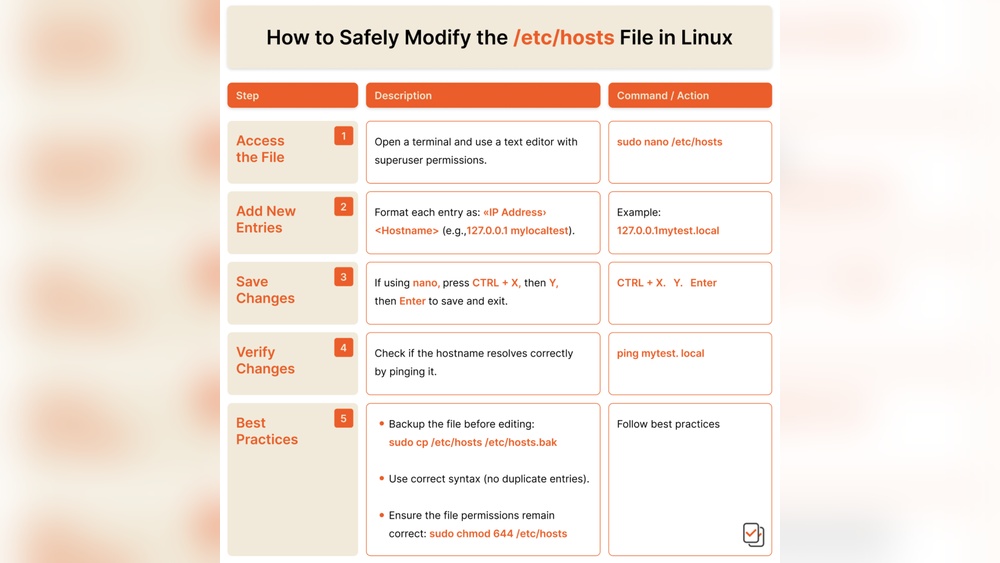
Are you tired of constantly editing your etc hosts file just to access your customer’s domains? It can be frustrating, time-consuming, and prone to errors.
But what if there was a simpler way to reach those domains without touching that tricky file every time? You’ll discover easy, effective methods to access customer domains quickly and smoothly. Keep reading, because mastering these tips will save you time and make your workflow much smoother.
You don’t want to miss this!
Limitations Of Etc Hosts File
The ETC hosts file is a simple way to map domain names to IP addresses. It can work for small tasks or quick tests. Still, it has clear limits that affect its use in many situations.
Understanding these limits helps to find better ways to access customer domains. The ETC hosts file is not designed for complex or large-scale needs.
Common Issues With Etc Hosts
The ETC hosts file can only hold a small number of entries. It is not easy to update or share across many computers. Changes require admin rights and can cause conflicts.
It does not support dynamic or automatic updates. This makes it slow and hard to manage in fast-changing environments. Errors in the file can lead to wrong domain resolution.
Security Concerns
The ETC hosts file is vulnerable to attacks. Malicious programs can change it to redirect users to harmful sites. There is no built-in protection or logging of changes.
Unauthorized edits can go unnoticed, risking sensitive data. This file is a weak point in network security. Relying on it can expose your system to risks.
Credit: forum.virtualmin.com
Dns-based Access Techniques
DNS-based access techniques offer a way to reach customer domains without editing the etc hosts file. They rely on the Domain Name System to resolve domain names to IP addresses. This method is flexible and easier to manage across multiple devices. It also helps avoid the risks of manual host file changes.
These techniques let you control how domain names are resolved on your network. They improve access speed and can add security layers. Using DNS to manage domain access simplifies the process for both users and administrators.
Using Custom Dns Servers
Custom DNS servers let you control domain name resolution directly. You can set up your own DNS server or use a third-party service. These servers can redirect customer domains to specific IP addresses. This method avoids the need to change each device’s hosts file.
Custom DNS servers also help manage many domains at once. They provide centralized control and quick updates. This setup works well for businesses with many users and devices.
Dns Over Https (doh)
DNS Over HTTPS (DoH) encrypts DNS queries. This prevents outsiders from seeing which domains you access. DoH improves privacy and security on the internet. It also helps avoid DNS-based attacks and censorship.
Using DoH means your DNS requests go through secure channels. Many browsers and operating systems support DoH today. This makes it easier to protect domain access without extra software.
Proxy And Vpn Solutions
Accessing customer domains without editing the etc hosts file can simplify your workflow. Proxy and VPN solutions offer practical ways to achieve this. They allow secure access to domains remotely and safely. These methods work well for developers, testers, and remote workers.
Using a proxy or VPN changes how your device connects to the internet. This change helps you reach customer domains without local file changes. Both options provide privacy and security features. They also help bypass restrictions that block domain access.
Setting Up A Secure Proxy
A proxy server acts as a middleman between your device and the internet. It forwards your requests to the customer domain safely. To set up a proxy, choose a reliable proxy service or host your own server. Configure your device or browser to use the proxy address and port.
Secure proxies use encryption to protect your data. This keeps your connection private and safe from attackers. Proxies can also cache data, which speeds up access to frequently visited sites.
Benefits Of Vpn Access
A VPN creates a secure tunnel between your device and the internet. This tunnel hides your real IP address and encrypts all data. VPNs allow access to customer domains as if you were on the same network.
VPNs improve security by protecting your data from hackers. They also help bypass geographic and network restrictions. Many VPN providers offer easy-to-use apps for quick setup. VPN access is ideal for remote teams needing safe and reliable domain access.

Credit: discourse.pi-hole.net
Leveraging Hosts Management Tools
Managing customer domains without editing the etc/hosts file is easier with hosts management tools. These tools help control domain access quickly and safely. They save time and reduce errors compared to manual file changes.
Hosts management tools offer a clear way to handle multiple domains. They let you update domain settings from one place. This approach suits teams and individuals who need fast domain access changes.
Automated Hosts File Managers
Automated hosts file managers update your hosts file automatically. You add or remove domains through a simple interface. The tool then changes the hosts file for you.
This method avoids manual typing mistakes. It also speeds up the process, especially if you work with many domains. Some tools offer backup options to protect your settings.
Cloud-based Domain Routing
Cloud-based domain routing uses online services to manage domains. Instead of editing local files, you control routing from the cloud. This method works well for remote teams and multiple devices.
It allows instant domain access updates without touching your computer’s hosts file. Cloud routing services often include security and monitoring features. These features help keep domain access safe and reliable.
Browser-based Domain Overrides
Browser-based domain overrides help you access customer domains without editing the etc hosts file. This method lets you redirect domains right inside your web browser. It is faster and safer than changing system files. You can test websites on different domains easily. No need to restart your computer or clear caches often.
Using browser tools, you control domain redirection for development or troubleshooting. These options work well for developers and testers who need quick domain changes. Everything happens inside the browser, so it keeps your system clean.
Developer Tools For Domain Redirection
Many browsers include developer tools that help with domain redirection. You can use the built-in network features to modify requests. Chrome and Firefox allow you to rewrite URLs temporarily. This lets you test sites on various domains without changing hosts files.
These tools work by intercepting browser requests. They redirect them to the desired domain or IP address. You can add rules to match certain URLs and change their destination. This is useful for debugging or testing new site versions.
Browser Extensions For Domain Control
Browser extensions offer easy ways to manage domain overrides. Extensions like “Requestly” or “ModHeader” let you set custom redirect rules. They work across many sites and allow quick edits. You do not need to touch system files or restart your browser.
These extensions are user-friendly and work with simple settings. You can turn domain redirects on or off with one click. This flexibility helps test customer domains faster and more efficiently. They also keep your main system settings safe.
Best Practices For Secure Domain Access
Accessing customer domains safely protects data and builds trust. Secure domain access helps stop cyber threats and unauthorized changes. Following best practices keeps your systems strong and reliable.
Focus on simple, clear steps to manage domain access securely. These steps reduce risks and make your work easier. Here are two key practices that improve security and control.
Maintaining Access Logs
Keep detailed logs of all domain access activities. Record who accessed the domain and when. Logs help track unusual actions and find potential problems quickly.
Store logs securely and review them regularly. Use automated tools to spot suspicious patterns. Clear logs help maintain transparency and accountability.
Regular Security Audits
Conduct security audits often to find and fix weaknesses. Check access rules, user permissions, and system settings. Audits reveal risks before they cause harm.
Update security policies based on audit results. Train your team to follow safe access procedures. Regular checks keep your domain access safe and smooth.

Credit: devhunt.org
Frequently Asked Questions
How Can I Access Customer Domains Without Editing /etc/hosts?
You can use local DNS servers or proxy tools to resolve domains. These methods avoid manual /etc/hosts changes. They offer dynamic and scalable domain management for customer environments.
What Tools Replace /etc/hosts For Domain Access?
DNSMasq, CoreDNS, and proxy servers can replace /etc/hosts. They provide flexible domain resolution and better control over domain routing. These tools simplify managing multiple customer domains efficiently.
Is It Safe To Bypass /etc/hosts For Domain Resolution?
Yes, using trusted DNS or proxy solutions is safe. They reduce human error and improve security by centralizing domain management. Always configure tools properly to avoid unauthorized access.
Can I Use Dns Servers To Access Customer Domains?
Absolutely. Setting up a local or private DNS server helps resolve customer domains. It centralizes domain management and eliminates the need for manual host file updates.
Conclusion
Accessing customer domains without editing the etc hosts file saves time. It reduces errors and simplifies your workflow. Using alternative methods keeps your system clean and organized. You can test domains quickly and easily. This approach works well for developers and testers alike.
Remember to keep security in mind while setting up access. Try these tips to improve your domain management today. Simple steps often lead to better results. Stay confident and keep learning new techniques.


