
Are you planning to launch a website and feeling overwhelmed by the technical details? One crucial aspect you can’t overlook is web hosting storage.
How much do you really need? Whether you’re starting a personal blog, an online store, or a portfolio, choosing the right amount of storage can make or break your online presence. It’s like choosing the right size suitcase for a trip – too small and you’ll leave important things behind, too big and you’re carrying unnecessary weight.
In this guide, we’ll break down everything you need to know about web hosting storage in simple terms. By the end, you’ll have the confidence to make an informed decision that perfectly fits your needs. Ready to dive in and eliminate the guesswork? Let’s get started!

Credit: www.ourchurch.com
Factors Influencing Storage Needs
Different websites need different storage. A blog might need less space. An e-commerce site needs more. Media-heavy sites, like photo galleries, require even more space. Choose based on your site’s type. This decision impacts storage needs greatly.
More content means more storage. A site with many articles or videos uses more space. Large images also need more storage. Plan for the amount of content you will have. This helps in estimating the storage you will need.
High traffic sites often need more storage. More visitors mean more data. This data gets stored on the server. It’s important to think about your site’s traffic. More traffic usually requires more storage space.
Think about your site’s future. Will it grow? Expect more content or visitors? Plan for extra storage now. This helps avoid problems later. Having extra space is always a good idea.
Credit: www.ryrob.com
Types Of Storage Options
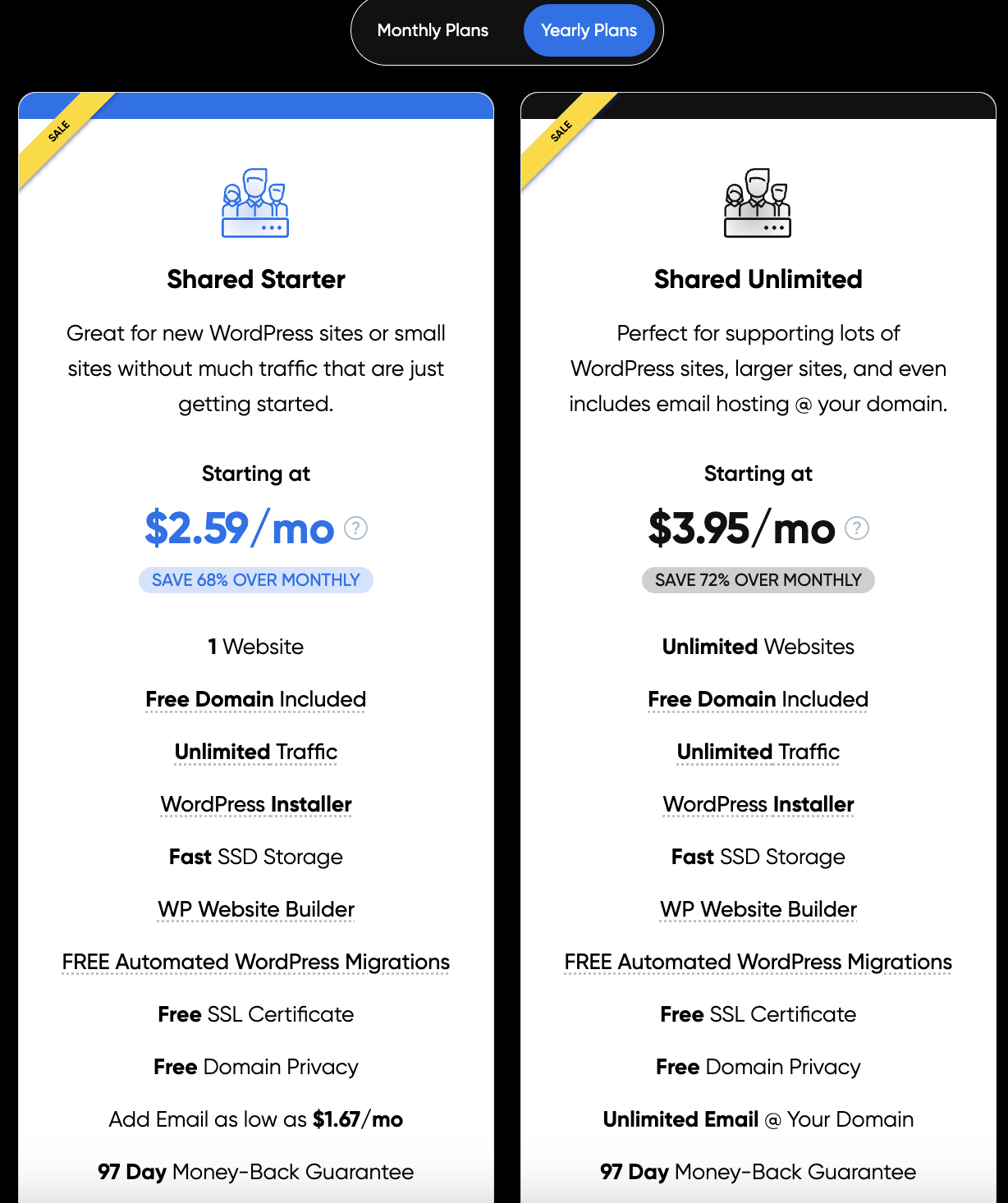
Shared hosting is like sharing a computer. Many websites use the same storage space. It’s cheap but can be slow. If one site uses a lot of space, others may get less. Good for small websites. Not for big ones with lots of data.
VPS hosting means you get your own part of a server. It’s like having a private room. More space and control than shared hosting. Costs more but is faster. Better for medium-sized websites. You can handle more traffic.
Dedicated hosting gives you a whole server. No sharing with others. Great for big websites with lots of data. It’s like owning the whole building. Expensive but offers full control. Perfect for sites with high traffic.
Cloud hosting uses many servers. Your site can grow easily. You pay for what you use. Ideal for growing websites. More flexible than other types. If one server fails, others help. Keeps your site running.
Assessing Your Website’s Storage Requirements
Start with checking your website’s current storage usage. Look at files and data stored. Identify which files take up the most space. Text files usually need less space. Images and videos need more space. Check your database size. Sometimes databases grow over time. Consider cleaning unused data.
Think about your website’s future. Do you plan to add more content? More content means more storage. Will you have more visitors? More visitors can mean more data saved. Consider growth in traffic and content. Plan for extra storage.
Media files like images and videos need more space. High-quality images use more storage. Videos can use a lot of space. Think about reducing file size. Use tools to compress images. Consider hosting large files on external platforms. This saves web hosting space. Always check the file type and size before uploading.
Optimizing Storage Usage
Compressing files saves a lot of storage space. Tools like ZIP and GZIP are useful. They reduce file size without losing data. Images can also be compressed. Try using JPEG or PNG formats. This helps in making websites load faster. Faster sites are better for user experience.
Content Delivery Networks, or CDNs, help save storage. They store copies of your website in different places. This means less load on your server. CDNs also make your site load faster. Fast loading improves the visitor experience. They provide storage solutions too.
Old files take up storage space. Regular cleanup helps free it. Delete files you no longer need. Clean up old backups too. This keeps your storage organized and neat. It also makes finding files easier. Regular checks ensure efficient storage use.
Common Mistakes To Avoid
People often ask for too much storagereal needs. Think about your website size. Check file sizes and content you will add. Don’t buy more than you need. This can save money. Choose wisely.
Many forget about backup storage. Backups are important. They save your data from loss. Always have extra space for backups. This keeps your website safe. Check if your host offers backup options. It’s worth it.
Websites can get busy. Traffic spikes happen. Plan for them. Spikes use more storage. Make sure you have room. Check your host’s traffic plans. Be ready for busy times. Don’t let your site slow down.
Choosing The Right Hosting Provider
Evaluating storage plans is key to finding the right host. Many plans offer different storage sizes. Choose a plan that fits your needs. Check if the storage is SSD or HDD. SSD is faster than HDD. This can improve your website speed.
Checking scalability options helps you plan for growth. Some hosts let you upgrade easily. This is good if your site will grow. Make sure the provider offers flexible plans. Flexibility keeps your site running smoothly as it grows.
Customer support is very important. Problems can happen anytime. Good support helps solve them quickly. Check if they offer 24/7 support. Look for live chat or phone support options. Quick help can save your business.
Credit: www.bitcatcha.com
Frequently Asked Questions
How Much Storage Do I Need To Host A Website?
Most websites need 1-5 GB of storage. Small websites use less, while larger sites may require more. Assess website size, content type, and potential growth. Choose scalable hosting plans for future needs.
Is 100gb Enough For A Website?
100GB is typically sufficient for most websites, including blogs, small businesses, and e-commerce sites. It offers ample storage for images, videos, and other content. For larger sites with heavy media use, consider monitoring usage regularly. Always evaluate your website’s needs to ensure optimal performance.
Is 20 Gb Storage Enough For A Website?
20 GB storage is typically enough for small to medium websites. It supports various features like images, videos, and databases. Larger websites with extensive media or e-commerce may need more storage. Regularly assess storage needs as your website grows to ensure optimal performance and user experience.
Is 50gb Enough For A Website?
50GB is usually enough for most small to medium-sized websites. It supports ample storage for content, images, and data. For large websites with high traffic or extensive multimedia, more storage might be needed. Regularly monitor usage to ensure optimal performance and avoid unexpected issues.
Conclusion
Choosing the right web hosting storage is crucial. Think about your website’s needs. Content size, traffic expectations, and future growth matter. Start small if uncertain. Upgrade as your site grows. It’s important to avoid paying for unused space. Regularly check your storage usage.
This helps in managing costs effectively. Keep your website’s performance optimal with the right storage choice. The right balance ensures smooth operations. Your online presence depends on it. Be proactive and make informed decisions. With these tips, you’re ready to choose wisely.
Your website deserves the best fit.


