
Are you planning to dive into the world of web hosting but unsure how much RAM your server needs? You’re not alone.
Many people overlook the importance of RAM in web hosting, only to face slow-loading pages and frustrated visitors later. But don’t worry, by the end of this article, you’ll have a clear understanding of how much RAM is just right for your needs.
You’ll learn how to make your website run smoothly, keep your visitors happy, and avoid unnecessary costs. So, if you’re ready to unlock the secrets of RAM for web hosting, read on and discover the path to a faster, more reliable website.
Types Of Web Hosting
Most beginners start with shared hosting. Here, many websites share the same server. This means resources like RAM are shared. It is cost-effective but not very powerful. Good for small websites and blogs. RAM needs are usually low. Often, 512MB to 1GB is enough.
VPS stands for Virtual Private Server. It offers more resources than shared hosting. You get your own slice of the server. This makes it more reliable and faster. Great for medium-sized websites. Typically, 1GB to 4GB RAM is needed. It depends on your site’s traffic.
Dedicated hosting gives you an entire server. No sharing with others. This means maximum resources. Best for big businesses and websites. RAM needs can be high. Usually, 4GB or more is required. Some sites may need even 16GB or more.
Cloud hosting uses many servers. Your site can use resources from multiple places. It is flexible and scalable. Ideal for growing websites. RAM can be increased as needed. Start with 1GB or 2GB. Increase it as your site grows.

Credit: www.hosting.co.uk
Role Of Ram In Hosting
RAM is like your computer’s short-term memory. It helps your website run fast. More RAM means your site can handle more tasks at once. Without enough RAM, your site may slow down. This affects how visitors see your site. They might leave if it is too slow.
Loading speed is important. Fast loading keeps visitors happy. More RAM helps your site load pages quickly. Less RAM can make pages load slowly. This can be frustrating for users. They might choose another site instead.
Scalability is about growth. More RAM helps your site grow. As traffic increases, your site can handle more visitors. If RAM is low, your site might crash. Enough RAM keeps your site stable as it grows.
Factors Influencing Ram Needs
More visitors mean your site needs more RAM. Heavy traffic can slow down your site. A busy website should have at least 4GB of RAM. Small sites with fewer visitors need less RAM.
Simple sites need less RAM. Complex websites with many features need more. A site with videos and images uses more RAM. Dynamic content like forums also increases RAM needs.
More users at the same time means more RAM. If 10 users visit together, you need more RAM. For 100 users, even more RAM is needed. Plan for your peak user times.
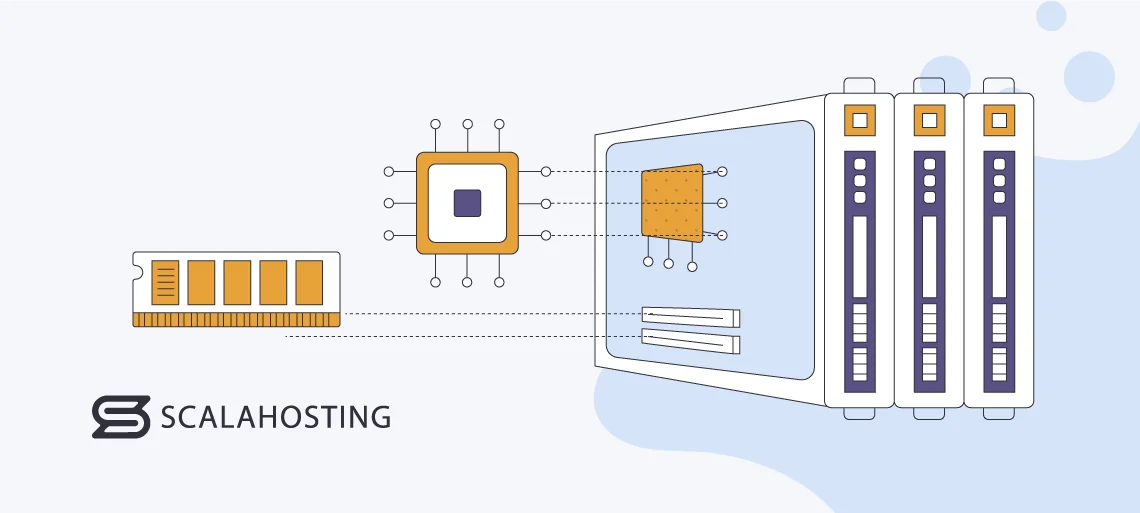
Credit: www.scalahosting.com
Ram Recommendations For Different Hosting Types
Basic websites need less RAM. 2GB RAM is usually enough. This amount handles simple tasks. Good for small blogs or personal sites. More RAM helps if you have videos or lots of images.
Online stores need more power. 4GB RAM is the starting point. This supports customer traffic and shopping carts. Large stores may need 8GB RAM. More products mean more RAM. It keeps the site fast and smooth.
Heavy apps need a lot of RAM. 16GB RAM is often required. This supports complex tasks and big databases. More RAM ensures fast loading times. It handles many users at once. Choose wisely based on your app’s needs.
Upgrading Ram: When And How
Choosing the right RAM for web hosting is crucial for performance. For small websites, 2-4 GB is often enough. Larger sites or those with high traffic may need 8 GB or more. Upgrading RAM can help improve speed and handle more visitors effectively.
Signs You Need More Ram
Your website feels slow. Pages take forever to load. Visitors leave quickly. These are signs of insufficient RAM. Frequent crashes indicate a problem. You notice high memory usage. Your site’s performance drops. These are clear warnings. Updating RAM could help.
Methods To Upgrade Ram
Adding more RAM is simple. Check your server’s capacity first. Some servers allow easy upgrades. Others need professional help. Ensure compatibility with existing hardware. Follow the user manual. Use online guides if needed. Upgrading RAM can improve performance.
Cost Considerations
RAM prices vary. Costs depend on the type and size. Larger RAM is more expensive. Budget carefully before purchasing. Compare different brands. Check reviews for reliability. Spending more can mean better quality. Aim for the best value within your budget.
Choosing The Right Hosting Plan
Start by thinking about what your website needs. Small websites might need less RAM. Large websites with many visitors need more RAM. E-commerce websites often need extra power. Consider your site’s traffic and features. More visitors mean more RAM. More features mean more RAM.
Look at different hosting providers. Check their RAM options. Some providers give flexible plans. Others offer fixed RAM amounts. Compare prices and features. Some providers have great support. Others offer faster speeds. Make sure you get good value for your money.
Find the right balance between cost and performance. Budget plans might have limited RAM. Premium plans might offer extra RAM. Think about what you can afford. Think about what your site needs. Don’t pay for more RAM than you need. But don’t choose too little RAM either. Your site should be fast and reliable.
Expert Insights On Web Hosting Ram
Choosing too little RAM can slow your website. Websites need RAM to handle visitors. Low RAM may lead to slow loading times. This can frustrate your users. Too much RAM can be a waste. It can cost more money without benefits. Finding the right balance is key. Avoid guessing your needs. Always check your website’s requirements. Plan for future growth and traffic spikes.
Monitor your website’s performance regularly. Use tools to track RAM usage. Upgrade RAM when your site grows. Keep your website code clean and simple. This helps save RAM. Optimize images and files to reduce RAM use. Choose a hosting plan that fits your RAM needs. Regular checks can help you stay on track.
Cloud hosting is becoming popular. It offers flexible RAM options. AI technologies are improving RAM management. These tools predict RAM needs. Virtualization is also on the rise. It helps in better RAM allocation. Staying updated with trends ensures better hosting decisions.

Credit: www.scalahosting.com
Frequently Asked Questions
How Much Ram Do I Need To Host A Website?
For basic websites, 2GB RAM is usually sufficient. Larger sites with higher traffic might require 4GB to 8GB. Complex applications or high-demand sites may need 16GB or more. Consider your site’s size, traffic, and application demands when choosing RAM.
Is 16gb Ram Enough For A Home Server?
16GB RAM is usually enough for a home server. It handles basic tasks like file sharing and media streaming efficiently. For more demanding applications, consider upgrading. Adjust based on your server’s specific needs and workload.
Is 4gb Ram Enough For A Web Server?
4GB RAM can suffice for small web servers with minimal traffic. For larger sites, consider upgrading. Optimal performance often requires more RAM, especially for dynamic content. Always evaluate server needs based on traffic and application demands.
Is 1 Core Enough For A Web Server?
A single core can handle basic web server tasks for low-traffic sites. Performance may suffer with increased traffic or complex applications. For optimal results, assess your specific needs and consider additional cores if your site grows or demands more resources.
Conclusion
Choosing the right RAM for web hosting is crucial. It affects speed and performance. More RAM means better handling of traffic spikes. Small websites can manage with less RAM. Larger sites need more resources. Consider your site’s needs carefully. Invest wisely in hosting solutions.
Your choice impacts user experience. Keep an eye on your site’s growth. Upgrade RAM as needed. Proper RAM ensures smooth operation. Happy hosting leads to happy visitors. Prioritize RAM based on your site’s demands. Efficient hosting supports your business goals.
Make informed decisions for optimal results.


