
Are you thinking about building a website with WordPress but unsure how much it will cost you each year? Knowing the true price of WordPress can help you plan your budget better and avoid surprises down the road.
Whether you’re starting a personal blog or a business site, understanding the yearly expenses is key to making the right decisions. You’ll discover all the hidden and obvious costs involved with WordPress, so you can confidently move forward without worrying about unexpected fees.
Keep reading to get a clear picture of what WordPress will really cost you every year.
WordPress Pricing Basics
Understanding WordPress pricing helps you plan your website budget. WordPress offers different options. Each option has its own costs and features. Knowing the basics can save you money and time.
Costs depend on the version you choose and hosting needs. Some parts are free, while others require payment. Let’s explore the key differences.
Free Vs Paid Versions
WordPress has a free version that many people use. It includes basic tools to build a website. Free themes and plugins are available, but with limits.
Paid versions add more features. These include premium themes, advanced plugins, and better support. Paid plans often remove ads and allow custom domains. The price varies based on the level of service.
Self-hosted Vs WordPress.com
Self-hosted WordPress means you buy hosting from a company. You install WordPress yourself. This gives full control over your site. Hosting costs vary but start around $3 to $10 per month.
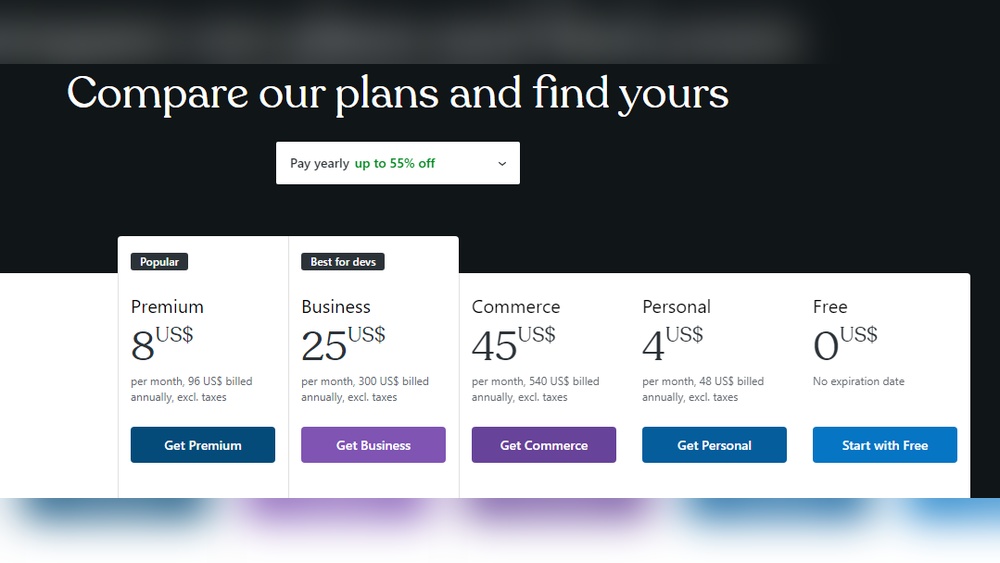
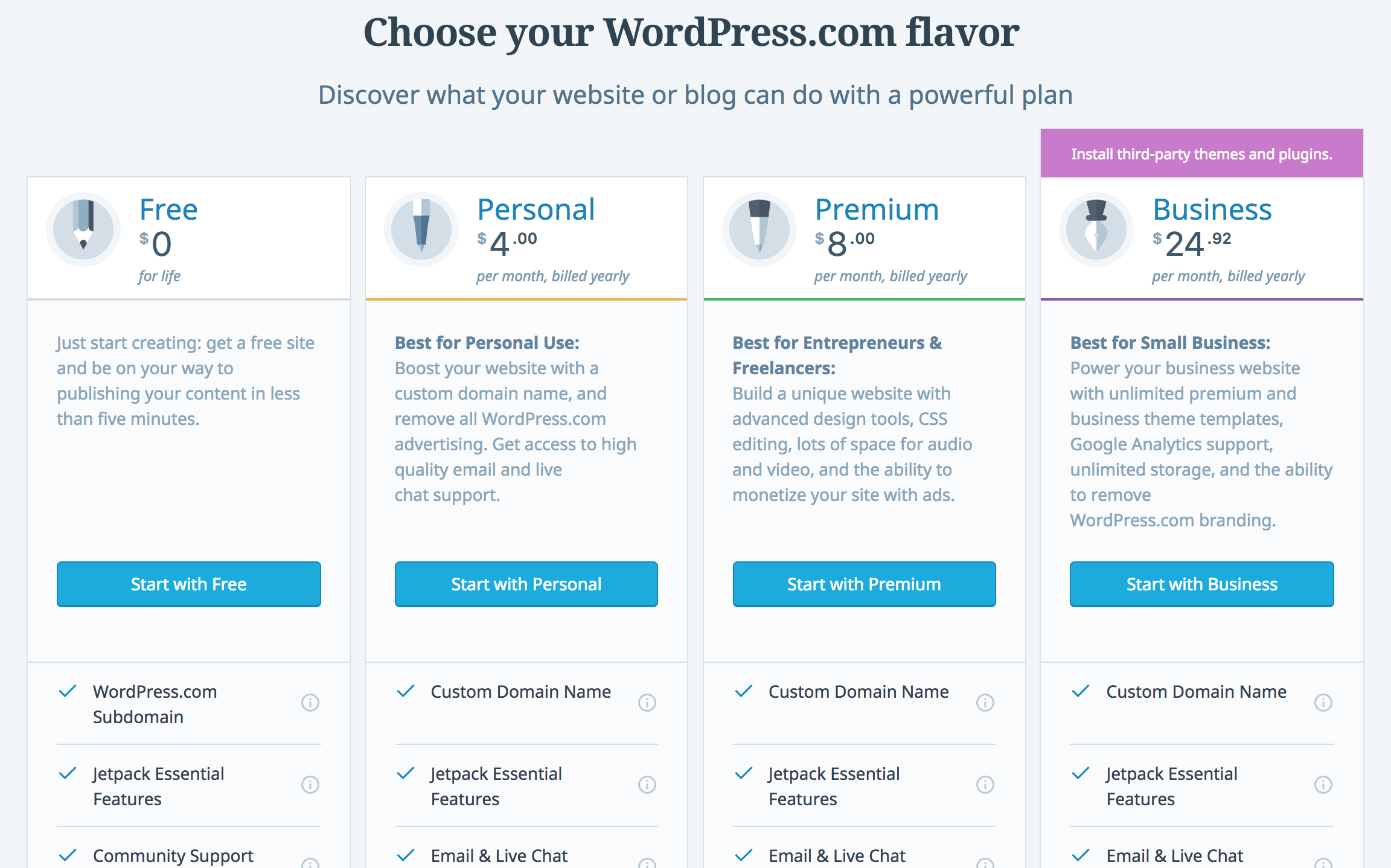
WordPress.com hosts your website for you. It offers free and paid plans. Free plans have limited features and show ads. Paid plans start at a few dollars monthly and include custom domains and more storage.
Credit: managewp.com
Domain Name Costs
Domain name costs are an important part of your WordPress website budget. A domain name is the web address people type to visit your site. It shapes your brand and makes your site easy to find. Understanding these costs helps you plan better for your site’s expenses.
Choosing A Domain
Picking the right domain name is crucial. It should be short, simple, and easy to remember. Many domain names end with extensions like .com, .net, or .org. Prices vary based on the extension you choose. Some unique extensions cost more. A typical domain name costs between $10 and $20 per year. You can buy domains from registrars like GoDaddy or Namecheap. Some hosting providers offer a free domain for the first year.
Domain Renewal Fees
Domain renewal fees are yearly charges to keep your domain active. Renewal costs can be higher than the first purchase price. Many domains renew at rates from $15 to $30 per year. Missing renewal payments can cause you to lose your domain. Set reminders to renew on time. Some registrars offer discounts for multi-year renewals. Keep track of renewal dates to avoid surprises.
Hosting Expenses
Hosting expenses are a key part of WordPress costs. Choosing the right hosting affects your website speed and security. Different hosting types offer various features and prices. Understanding these options helps you plan your budget well.
Hosting plans come with different levels of support and resources. These factors influence the yearly cost you will pay. Below are common hosting types and their cost ranges.
Shared Hosting
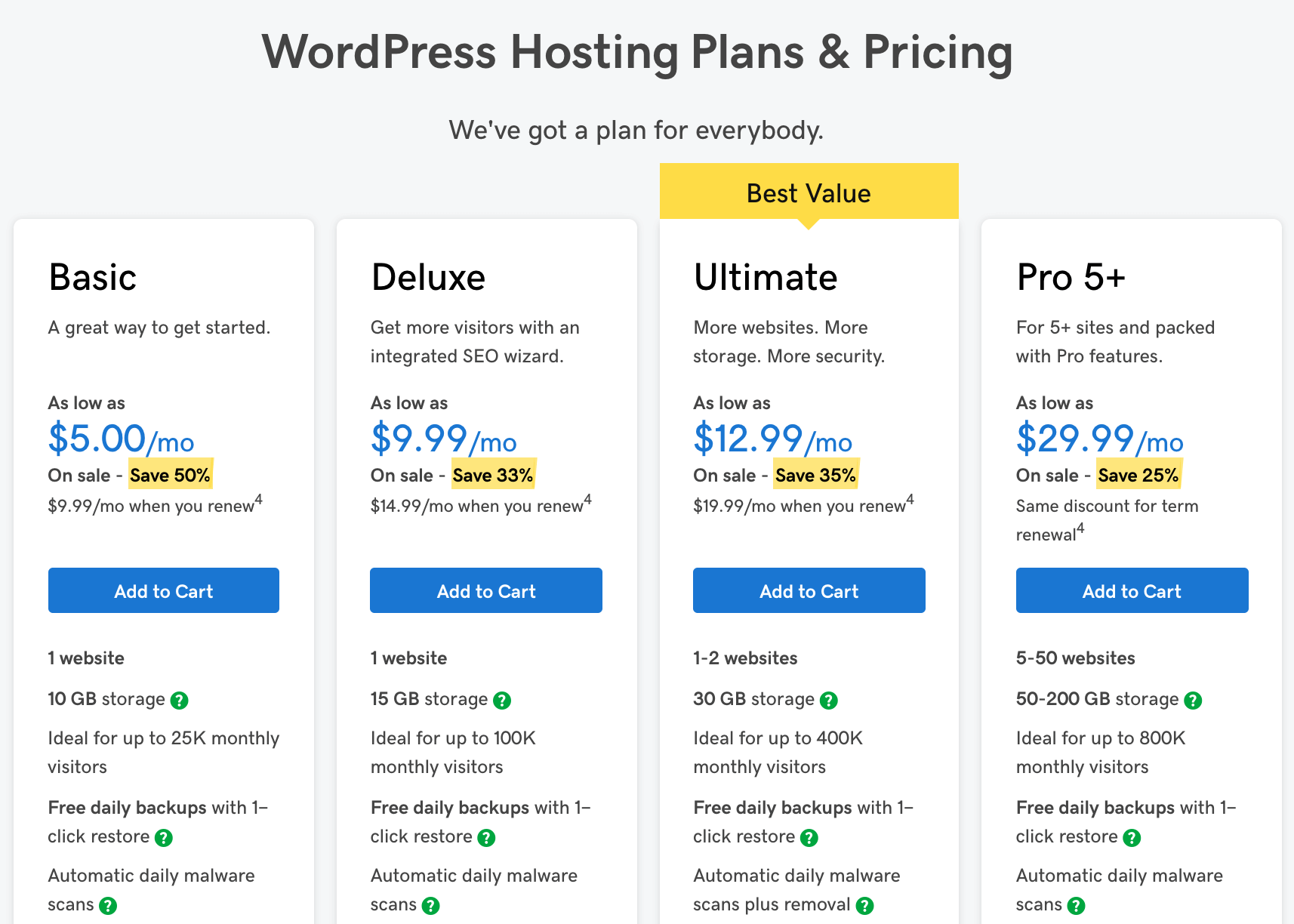
Shared hosting is the most affordable option. You share server space with other websites. Prices usually range from $30 to $100 per year. It suits small sites with low traffic. Performance may vary as resources are shared. Basic security and support are included.
Managed WordPress Hosting
Managed WordPress hosting offers better speed and security. The host handles updates, backups, and security scans. Prices range from $100 to $300 per year. It is ideal for growing websites needing more support. This option reduces technical work for site owners.
Vps And Dedicated Servers
VPS and dedicated servers provide the most control. You get dedicated resources and better performance. VPS costs start around $240 per year, while dedicated servers can be $1,000 or more. They suit large websites with high traffic. Full control requires technical knowledge.
Themes And Design
The look and feel of your WordPress site depend on themes and design choices. Themes control the layout, colors, fonts, and overall style. Choosing the right theme is important for your brand and user experience. Costs for themes vary widely, from free options to custom designs. Understanding these costs helps plan your yearly WordPress budget.
Free Themes
WordPress offers many free themes in its official directory. These themes cover many styles and purposes. Free themes are a great start for beginners or small sites. They come with basic features and regular updates. Some free themes allow customization, but options can be limited. Free themes cost nothing but may require extra plugins for added features.
Premium Themes
Premium themes offer more features, designs, and support. Prices usually range from $30 to $100 per theme. These themes often include advanced customization options. Buyers get support and regular updates from developers. Premium themes improve site appearance and user experience. They are ideal for businesses needing a professional look.
Custom Design Costs
Custom design means creating a unique theme from scratch. Costs depend on the designer and project complexity. Small custom themes may cost $500 to $2,000. Complex designs or full branding can reach $5,000 or more. Custom themes fit exact needs and build a strong brand identity. They take longer to develop but offer complete control over design.
Plugins And Extensions
Plugins and extensions enhance your WordPress site. They add new features and improve functionality. These tools vary in price and impact your yearly cost.
Free Plugins
Many plugins come at no cost. These are available in the WordPress plugin directory. Free plugins cover basics like SEO, security, and contact forms. They suit small websites or beginners. Updates and support may be limited.
Premium Plugins
Premium plugins require a one-time or yearly fee. They offer advanced features and regular updates. Premium tools often include better support. Prices can range from $20 to $200 annually. These plugins fit growing or professional sites.
Subscription-based Tools
Some plugins need monthly or yearly subscriptions. These tools often integrate with external services. Examples include email marketing or e-commerce platforms. Subscription costs vary from $5 to $50 per month. Budget for these when planning your WordPress expenses.
Credit: kinsta.com
Maintenance And Security
Maintaining and securing a WordPress site is essential for its smooth operation. It helps protect your content and visitor data. This also keeps your site running fast and free from errors. Understanding the costs involved in maintenance and security can help you plan your budget better.
Regular Updates
WordPress frequently releases updates for its core software. Themes and plugins also need updates. These updates fix bugs and improve features. Updating keeps your site safe from hackers. You might spend some time or money to manage these updates. Some choose automatic updates, while others hire help.
Backup Solutions
Backups save copies of your website data. They protect you if something goes wrong. You can use free or paid backup tools. Paid tools often offer automatic backups and easy restoration. Regular backups prevent data loss and reduce downtime. Budget for backup services to keep your site secure.
Security Services
Security services protect your site from attacks. They include firewalls, malware scans, and spam filters. Some services are free, but paid options offer stronger protection. Investing in security services lowers the risk of hacking. It also builds trust with your visitors.
Additional Costs To Consider
Building a WordPress site involves more than just hosting and themes. Some extra costs can add up quickly. These are important for a smooth and effective website. Knowing these helps plan your budget better.
Seo And Marketing Tools
SEO tools help your site rank higher on search engines. Many plugins and services offer advanced SEO features. Some are free, but premium versions may cost $50 to $200 yearly. Marketing tools like social media schedulers and analytics also add costs. These tools improve your site visibility and reach more visitors.
Email Hosting
Professional email hosting gives your site a trusted look. Using your domain for emails builds credibility. Basic email services might be free with hosting. But better email services often cost $20 to $100 per year. These services offer more storage and better security for your messages.
Professional Support
WordPress is easy to use but sometimes needs help. Hiring professional support can save time and fix issues fast. Support costs vary from $50 to several hundred dollars yearly. Paid support ensures your site stays updated and secure. It also helps with custom changes and troubleshooting.
Credit: www.webfx.com
Estimating Annual WordPress Costs
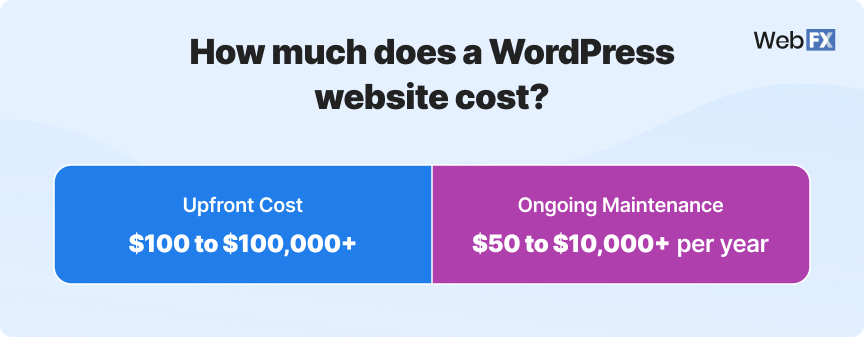
Estimating the annual cost of WordPress depends on the type of website you want. Costs vary from simple blogs to complex business sites. Knowing the price range helps you plan your budget. WordPress itself is free, but running a site has other expenses. These include hosting, themes, plugins, and sometimes professional help.
Budget-friendly Setup
A basic WordPress site can cost as little as $50 to $100 per year. This includes shared hosting and a free theme. Many hosting providers offer affordable plans under $5 per month. Free plugins and themes help keep costs low. This setup suits personal blogs or small hobby sites. Expect some limits in speed and customization.
Mid-tier Plans
Medium-sized sites often spend $100 to $500 annually. Managed WordPress hosting improves site speed and security. Premium themes and plugins add useful features but cost extra. Some plugins charge yearly fees from $30 to $100. This level fits small businesses or active bloggers. You get better support and more design options.
High-end Custom Sites
Large or custom WordPress sites cost $500 to thousands per year. Custom themes and plugins require professional developers. Dedicated hosting or VPS plans enhance performance and reliability. Regular maintenance and security services may add to expenses. This suits e-commerce sites or companies with complex needs. The investment ensures a unique and powerful website.
Tips To Save Money
Saving money on WordPress does not mean cutting corners. Small smart choices can lower your yearly costs. This section shares simple tips to keep your WordPress expenses low. Follow these ideas to build a website without overspending.
Choosing The Right Hosting
Hosting costs vary widely. Pick a plan that fits your needs. Start with shared hosting if your site is small. It costs less and works well for beginners. Avoid expensive plans unless your site needs more power. Check for discounts or yearly payment deals. These can save you money over time.
Using Free Resources
WordPress offers many free themes and plugins. Use these to avoid extra charges. Free tools often meet basic needs. Test different options to find the best fit. Avoid buying premium plugins unless necessary. Many free options provide good quality and support.
Bundling Services
Some providers offer bundles with hosting, domain, and email. Bundles usually cost less than buying separately. Look for deals that match your website needs. Bundling can save you both money and time. Always compare prices before choosing a bundle.
Frequently Asked Questions
How Much Does WordPress Cost Annually?
WordPress itself is free, but yearly costs include hosting, domain, and premium themes or plugins. Typical expenses range from $50 to $300 per year, depending on your site’s needs and chosen services.
What Affects The Yearly Cost Of WordPress?
Costs vary due to hosting plans, domain renewal, premium themes, plugins, and security services. More features and better performance increase expenses, while basic sites keep costs low.
Is WordPress Hosting Included In Annual Costs?
No, hosting is separate and essential for WordPress. Hosting prices differ by provider and plan, usually costing $30 to $150 annually for shared hosting options.
Can I Use WordPress For Free Forever?
Yes, WordPress software is free forever. However, you still need to pay for hosting, domain, and optional premium tools to run a website.
Conclusion
WordPress costs vary depending on your needs. Basic plans suit small websites with low budgets. Premium features and themes increase yearly expenses. Hosting and domain fees add to the total cost. Many free plugins help save money and add function.
Knowing these costs helps you plan your website better. Choose options that fit your goals and budget. WordPress remains a flexible and affordable choice for many users. Start small, grow as needed, and control your spending.


