
Thinking about building a WordPress website but unsure how much it will cost you? You’re not alone.
Budget is one of the biggest questions when starting a website. You want to get the best value without overspending or missing key features. This guide will break down the real costs involved in creating your WordPress site—no confusing jargon, just clear answers.
By the end, you’ll know exactly what to expect and how to plan your budget smartly. Ready to discover what your WordPress website will really cost? Let’s dive in.
Factors Influencing WordPress Costs
Understanding the costs of a WordPress website is important before starting. Many factors influence the total price. Each part adds to the final cost. Knowing these helps plan your budget well.
Domain And Hosting Fees
A domain name is your website’s address on the internet. Hosting is the space where your website lives. Both need yearly payments. Domain costs usually range from $10 to $20 per year. Hosting fees depend on the provider and plan. Shared hosting is cheaper, while dedicated hosting costs more.
Theme And Design Expenses
The theme controls the website’s look and feel. Free themes are available but offer limited features. Premium themes cost between $30 and $100. Custom designs made by professionals cost more. Design expenses vary by complexity and style.
Plugin And Functionality Costs
Plugins add special features to your site. Many plugins are free but some require purchase. Premium plugins can cost from $20 to $100 each. More plugins mean higher costs but better functionality. Choose plugins wisely to avoid extra expenses.
Customization And Development
Custom coding changes how your website works. Simple tweaks cost less. Complex features need expert developers and higher fees. Development costs depend on time and skill needed. Custom work makes your site unique but adds to the price.
Maintenance And Updates
Websites need regular updates to stay safe and fast. Maintenance includes backups, security checks, and fixing issues. Some hire professionals; others do it themselves. Monthly or yearly fees apply for professional support. Regular care protects your investment.
Comparing Free Vs Premium Themes
Choosing between free and premium WordPress themes affects your website’s cost and design. Both options have pros and cons. Understanding these helps make a smart choice for your site’s needs.
Benefits Of Free Themes
Free themes cost nothing, making them ideal for tight budgets. They offer basic features and simple designs. Many free themes are easy to install and use. They often get updates from the WordPress community. Good for blogs or small sites with low traffic.
When To Choose Premium Themes
Premium themes provide advanced features and unique designs. They include regular updates and better support. Choose premium for business sites or when you need custom options. They improve site speed and SEO tools. Ideal for users wanting more control and style.
Cost Differences And Value
Free themes cost zero but may lack features. Premium themes typically cost $30 to $100 yearly. The price covers updates, support, and extras. Premium themes can save time and offer more value. Consider your website goals before deciding.
Essential Plugins And Their Price Range
Plugins add important features to any WordPress website. They help with security, SEO, speed, and more. Some plugins are free, while others cost money. Knowing the price range helps plan your website budget better.
Must-have Free Plugins
Many essential plugins come at no cost. For example, Yoast SEO helps improve your site’s search ranking. Wordfence Security protects your site from hackers. Contact Form 7 allows visitors to send messages easily. These free tools cover basic needs without spending a dime.
Premium Plugin Options
Paid plugins offer extra features or better support. Prices usually range from $20 to $100 per plugin. Popular premium plugins include WPForms for advanced forms and WooCommerce Extensions for online stores. Investing in premium plugins can boost your site’s power and look.
Subscription Vs One-time Payments
Some plugins charge a one-time fee. Others require yearly or monthly subscriptions. One-time payments give permanent access but may lack updates. Subscription plans keep plugins updated with new features. Choose the model that fits your budget and needs best.
Credit: kinsta.com
Custom Development And Design Pricing
Custom development and design pricing varies a lot. It depends on who builds the site and what you want. Custom websites can cost more than templates. You pay for unique features and design that fits your brand. Understanding the price helps plan your budget better.
Freelancers Vs Agencies
Freelancers usually charge less than agencies. They work alone and have lower costs. Agencies have teams with different skills. They offer more services but charge more. Choose freelancers for small projects and agencies for complex needs.
Hourly Rates And Project Costs
Freelancers often charge between $25 and $75 per hour. Agencies charge $75 to $150 or more. Some projects have a fixed price. Hourly rates can add up fast with big projects. Clear project goals help control costs.
Scope And Complexity Impact
The bigger and more complex the website, the higher the cost. Features like custom plugins or e-commerce increase price. Simple blogs cost less than online stores. More pages or special design add to the total.
Ongoing Maintenance Costs
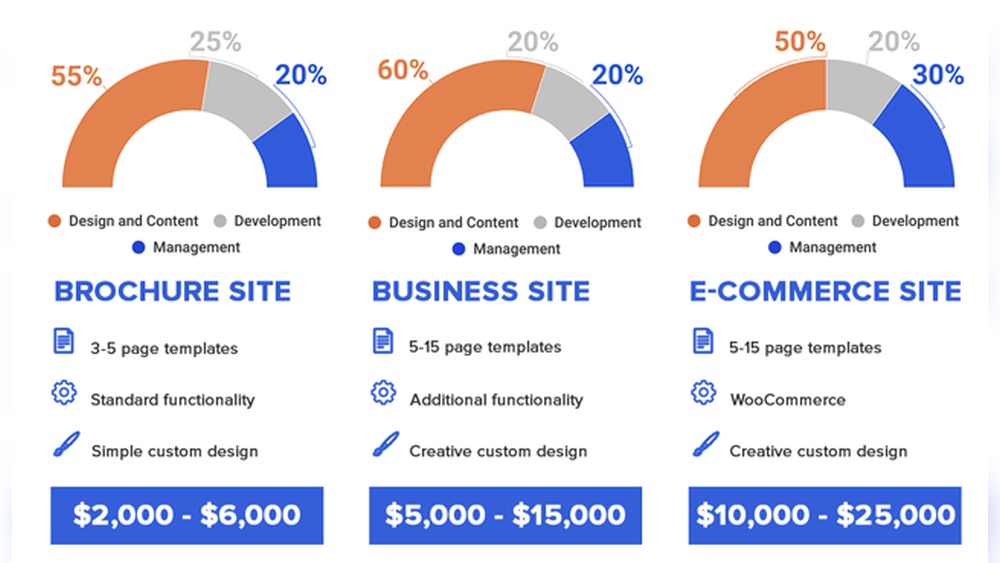
Budgeting for a WordPress website depends on the type of site you want. Different websites need different features and designs. This affects the overall cost. Knowing what each type requires helps plan your budget well.
Below, find common website types and their typical costs. This guide helps set clear expectations.
Personal Blogs
Personal blogs are simple and often use free themes. Hosting and domain costs are low. You may spend $50 to $200 per year. Extra costs come from premium themes or plugins. Most bloggers start small and grow later.
Small Business Sites
Small business websites need more features like contact forms and galleries. Custom design may cost more. Expect to spend between $500 and $3,000. This includes hosting, themes, and some custom work. These sites focus on branding and easy navigation.
E-commerce Stores
E-commerce sites need special tools for selling online. Payment gateways and product pages add to cost. Budget from $1,000 to $10,000 or more. Costs depend on the number of products and security features. A good store must be safe and fast.
Large Enterprise Websites
Large enterprise sites require advanced design and functionality. Custom development and integrations increase price. Costs often start at $10,000 and can rise much higher. These sites handle lots of traffic and complex data. Professional support and maintenance are essential.
Budgeting For Different Website Types
Building a WordPress website often comes with hidden costs. These expenses may not appear in the first quote. They can increase your overall budget without warning. Knowing these costs helps you plan better. It avoids surprises during your project.
Ssl Certificates
SSL certificates protect your website and visitors. They create a secure connection. Many hosting providers include free SSL certificates. Some require you to buy one separately. Paid certificates offer extra features and warranties. Renewals can cost money every year. Missing SSL can harm your site’s trust and SEO.
Seo Services
SEO improves your site’s visibility on search engines. Basic SEO is free with many themes and plugins. Advanced SEO services often come at a price. Hiring experts for keyword research and content helps. Without SEO, your site may get little traffic. Budgeting for SEO is important for success.
Third-party Integrations
Plugins and tools add features to your site. Some are free, but many require payment. Email marketing, payment gateways, and booking systems cost extra. These integrations might charge monthly or yearly fees. Choosing the right tools affects your budget. Check costs before adding new features.
Hidden Costs To Watch Out For
Saving money on your WordPress website is possible with smart choices. Simple steps can lower costs without losing quality. These tips help you spend less and still build a good site.
Choosing The Right Hosting Plan
Pick a hosting plan that fits your needs and budget. Avoid expensive plans with features you won’t use. Shared hosting is good for small websites and costs less. Look for plans with good reviews and reliable uptime. This keeps your site online without extra fees.
Leveraging Free Resources
Use free themes and plugins from the WordPress directory. Many free tools work well for basic needs. Avoid paid themes unless you need special features. Free tutorials and guides help you learn without paying. These resources save money on design and functionality.
Diy Vs Hiring Professionals
Doing it yourself saves money but needs time and effort. Use easy WordPress builders for simple design tasks. Hiring professionals costs more but offers expert help. Choose professionals only for complex tasks like custom coding. Balance your skills and budget for the best result.
Credit: www.elegantthemes.com
Credit: www.hostinger.com
Frequently Asked Questions
How Much Does A Basic WordPress Website Cost?
A basic WordPress website typically costs between $100 and $500. This includes domain registration, hosting, and a simple theme. Additional features or custom designs will increase the price. DIY setups are cheaper, while professional help costs more.
What Affects The Cost Of A WordPress Website?
The cost depends on design complexity, plugins, hosting quality, and developer fees. Custom themes and advanced features raise the price. Basic sites with free themes and minimal plugins cost less. Ongoing maintenance also adds to overall expenses.
Are There Hidden Costs In WordPress Website Development?
Yes, hidden costs include premium plugins, security, backups, and SSL certificates. Custom development and SEO services also increase expenses. It’s essential to budget for these to avoid surprises and maintain website performance and security.
Can I Build A WordPress Site For Free?
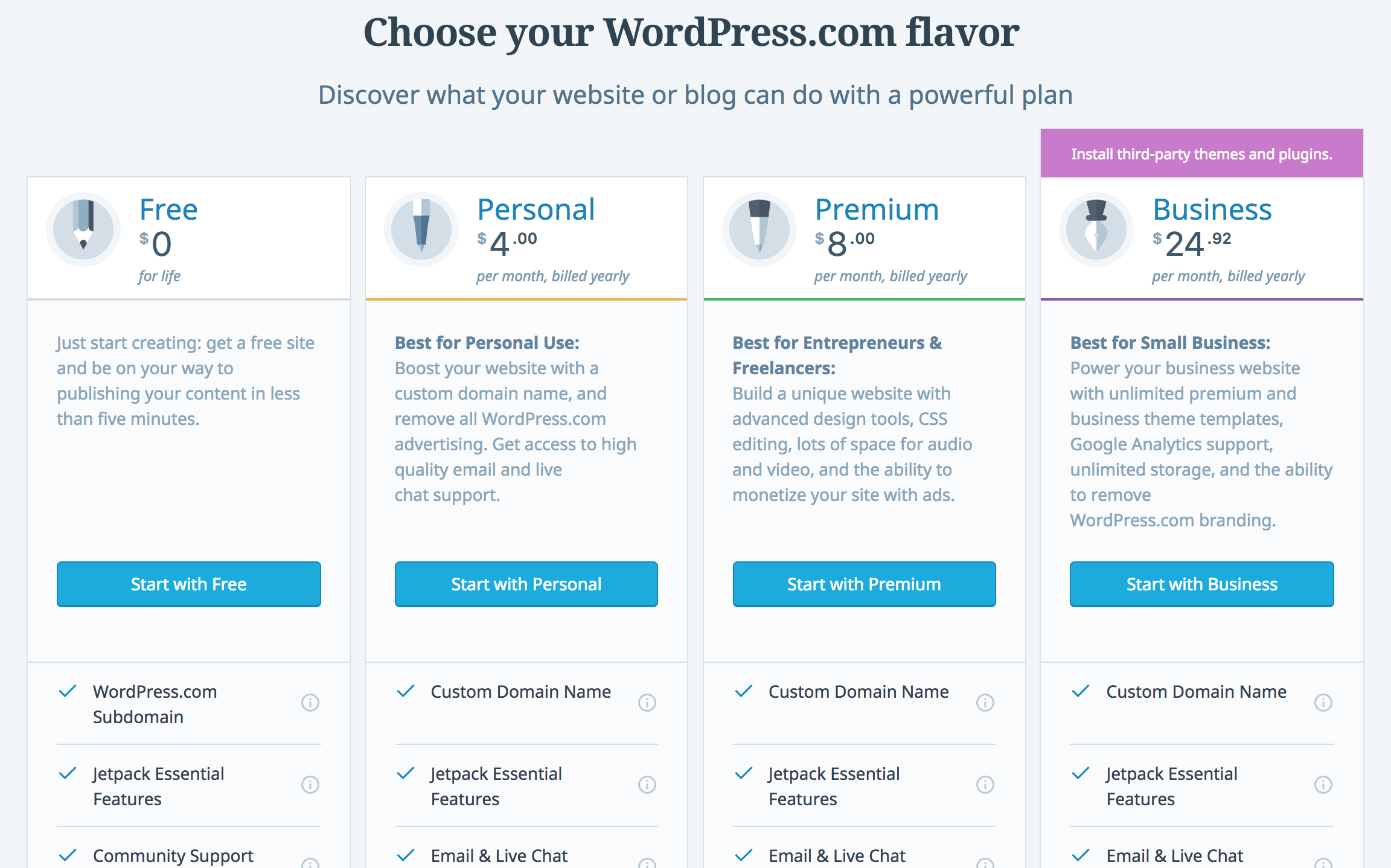
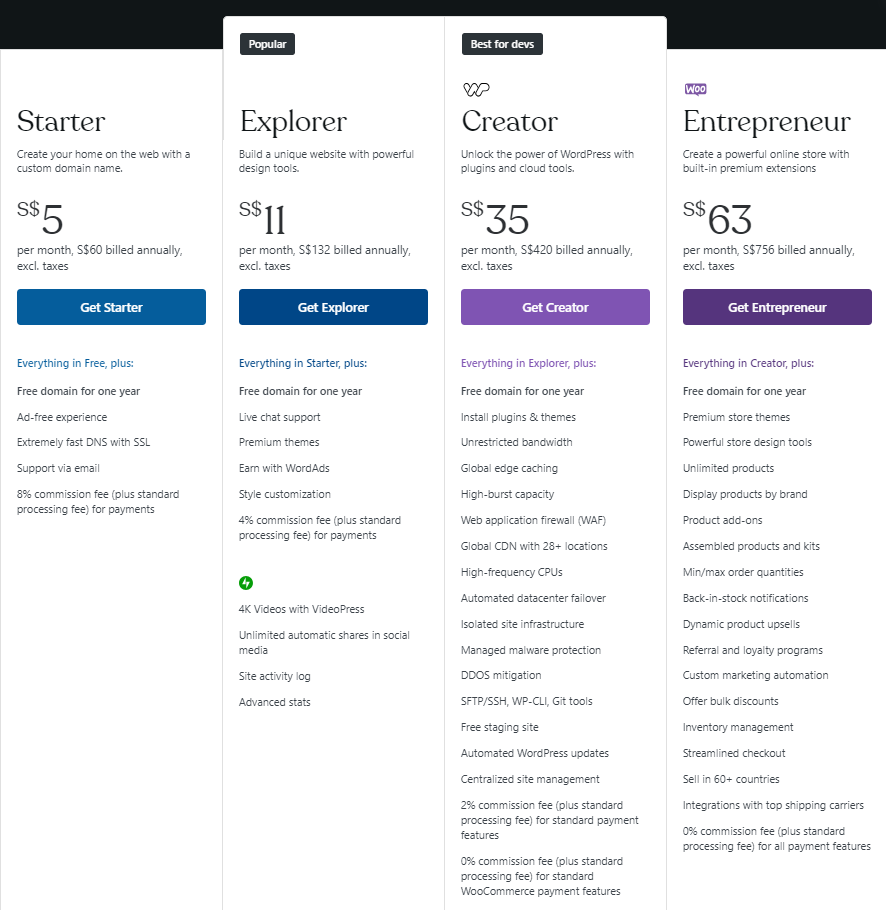
You can create a free WordPress. com site with limited features and WordPress ads. For full control, you need paid hosting, a domain, and possibly premium themes or plugins, which will incur costs.
Conclusion
A WordPress website cost depends on your needs and choices. Hosting, themes, and plugins add to the price. You can build a simple site for less or invest more for extra features. Planning your budget helps avoid surprises later. Take time to compare options and decide what fits you best.
A clear idea saves money and effort. Your website can grow as your goals grow too. Start small, then add more when ready. It’s your project, your pace, your cost.


