
Are you wondering how many websites you can create with WordPress? Whether you want to start a personal blog, build a business site, or manage multiple projects, knowing your options is key.
Imagine having the power to control several sites from one place—how much easier would that make your online presence? You’ll discover exactly how many sites you can have on WordPress and how to make the most of this powerful platform.
Keep reading to unlock the secrets that can help you grow your digital footprint without limits.
WordPress Site Limits
WordPress allows users to create websites with different setups. The number of sites you can have depends on your configuration. Site limits vary between a single site and a multisite network. Understanding these limits helps plan your web projects.
Single Site Vs Multisite
A single WordPress site hosts one website only. It is simple and easy to manage. This setup suits blogs, portfolios, and small business sites.
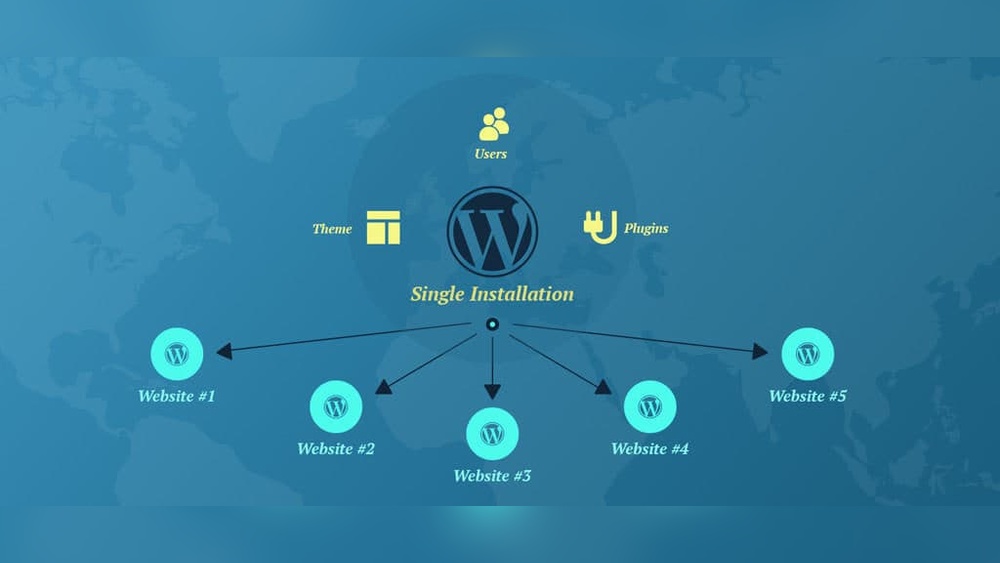
Multisite lets you run many sites under one WordPress installation. Each site can have its own content and users. It is ideal for schools, companies, or groups managing multiple sites.
The multisite network shares plugins and themes across sites. It saves space and maintenance time. Single sites do not share resources and operate independently.
Default Site Restrictions
By default, WordPress does not limit the number of sites on a multisite network. Server resources and hosting plans set practical limits.
Single sites have no built-in limit since only one site exists. The size and traffic depend on hosting capacity.
Multisite networks may slow down if too many sites use heavy resources. Hosting providers may restrict site numbers based on your plan.
Setting Up Multiple Sites
Setting up multiple sites on WordPress allows you to manage several websites from one dashboard. This is helpful for businesses, blogs, or projects that need separate sites but want to keep things simple. WordPress has a special feature called Multisite that makes this possible. It lets you create and run many sites without installing WordPress again and again.
Enabling Multisite Feature
To start, you must enable the Multisite feature in WordPress. This requires editing a file called wp-config.php. You add a line of code to this file to turn on the network setup. This line tells WordPress to prepare for multiple sites. After saving the file, you will see a new option in your WordPress dashboard to create a network.
Network Setup Steps
Once the Multisite feature is active, you can follow a few steps to set up your network. First, choose if your sites will use subdomains (site1.example.com) or subdirectories (example.com/site1). Next, give your network a name and enter your admin email. WordPress will then ask you to add some code snippets to two files: wp-config.php and .htaccess. After this, log in again. Your network is ready, and you can add new sites anytime from the dashboard.
Managing Multisite Networks
Managing a WordPress multisite network involves handling many websites under one installation. It lets you run multiple sites easily. But it also needs careful control to keep things organized.
You must understand how to manage users and site settings well. This helps keep your network safe and running smoothly. Clear roles and good admin habits are key parts of managing multisites.
User Roles And Permissions
Each user in a multisite has a specific role. Roles define what users can and cannot do. Common roles include Super Admin, Administrator, Editor, and Subscriber.
Super Admins have full control over all sites. They can add or delete sites and manage network settings. Administrators manage individual sites only. They cannot access the whole network.
Setting correct permissions stops mistakes and keeps your network secure. Give users only the access they need. Review roles regularly to avoid security risks.
Site Administration Tips
Regularly update WordPress core, themes, and plugins. Updates fix bugs and improve security. Schedule backups often to protect your data.
Use a naming system for sites to keep them organized. Clear names make it easy to find sites fast. Limit the number of plugins to avoid slow sites.
Monitor site performance. Slow sites can affect the whole network. Fix issues quickly to keep users happy. Good communication with site admins helps solve problems faster.
Credit: www.wpzoom.com
Hosting Considerations
Choosing the right hosting is key for managing multiple WordPress sites. Hosting affects speed, security, and how many sites you can run smoothly. Picking the best hosting depends on your needs and budget. It also depends on how much traffic your sites get and how much space they need.
Shared Vs Dedicated Hosting
Shared hosting means many websites share one server. It costs less and suits small sites. But sharing can slow your sites if others use too many resources. Dedicated hosting gives you a whole server for your sites. It costs more but offers better speed and control. You can run many sites without slowdowns.
Performance And Resource Allocation
Performance depends on CPU, RAM, and storage. These resources affect how fast your sites load. Shared hosting limits these resources for each site. Dedicated hosting lets you use all resources freely. More resources mean better performance and handling more visitors. Monitor your sites to avoid exceeding resource limits.
Limitations And Challenges
Managing multiple WordPress sites comes with limits and challenges. These can affect your site’s performance and user experience. Understanding these issues helps you make better choices.
Plugin And Theme Compatibility
Not all plugins or themes work well across many sites. Some plugins may cause conflicts or slow down your sites. Themes might not support all features or plugins on every site. Keeping everything updated is important but can be time-consuming. Compatibility issues can cause errors or broken layouts.
Security Concerns
More sites mean more security risks. Each site can be a target for hackers or malware. Weak passwords or outdated plugins increase risks. Managing security settings for many sites is hard. A single breach can affect all your sites, especially in a network. Regular backups and strong security practices are essential.

Credit: blogvault.net
Alternatives To Multisite
WordPress Multisite lets you manage many websites under one dashboard. Some users want different ways to run multiple sites. These options give more control and can suit different needs. Here are two common alternatives to WordPress Multisite.
Multiple WordPress Installs
You can install WordPress separately for each site. Each install works on its own with unique settings. This method keeps sites fully independent. You can choose different themes and plugins for each site. Updates on one site do not affect the others. It requires more server space and management effort. But it offers full control for every site owner.
Using Subdomains And Subdirectories
Sites can be organized using subdomains or subdirectories. Subdomains look like site1.example.com. Subdirectories appear as example.com/site1. This setup helps keep sites separate but under one domain. Each site can have its own content and style. It is easier to manage than many separate installs. Many hosts support subdomains and subdirectories without extra cost.

Credit: wordpress.com
Frequently Asked Questions
How Many Websites Can You Create On WordPress?
You can create unlimited websites using WordPress. With WordPress. com, the limit depends on your plan. Self-hosted WordPress allows you to build as many sites as your server supports.
Is There A Limit On WordPress Multisite Networks?
WordPress multisite has no fixed limit on sites. The number depends on your server’s capacity and performance. It’s ideal for managing multiple websites under one installation.
Can I Use One WordPress Account For Multiple Sites?
Yes, one WordPress account can manage multiple sites, especially on WordPress. com. For self-hosted sites, you manage each installation separately but can use tools to control multiple sites.
Does WordPress Hosting Affect The Number Of Sites?
Yes, hosting plans influence how many sites you can run. Shared hosting often limits sites, while VPS or dedicated hosting allows more websites with better performance.
Conclusion
WordPress lets you create many websites from one account. Each site can have its own look and content. You can manage all sites easily in one place. Hosting plans may limit how many sites you can make. Choose the plan that fits your needs best.
Start small and grow your sites over time. WordPress offers great tools for beginners and pros. Explore your options and enjoy building your websites.


