Are you wondering how long it takes for Namecheap DNS changes to kick in? You’re not alone.
Whether you’re setting up a new website or making adjustments to an existing one, waiting for DNS changes can be nerve-wracking. You might be eager to see your updates live, but understanding the timeline is crucial. We’ll dive into the specifics of Namecheap DNS propagation, offering you clarity and peace of mind.
By the end, you’ll know exactly what to expect and how to ensure your changes go smoothly. Stick around—your website’s success could depend on it.
Dns Propagation Time
Namecheap DNS changes usually take 24 to 48 hours to fully propagate across the internet. This time allows updates to spread to all servers globally, ensuring smooth access to your website. Patience is key during this period.
When you change the DNS settings for your domain on Namecheap, one common question is: how long will it take for these changes to propagate across the internet? Understanding DNS propagation time is essential, especially if you’re setting up a new website or making significant changes to an existing one. DNS propagation refers to the time it takes for the DNS information to be updated worldwide. Let’s dive into what influences this time and how you can manage your expectations.What Is Dns Propagation?
DNS propagation is the period during which updated DNS information spreads to DNS servers globally. Every time you change DNS settings, these changes need to be communicated across numerous servers. This process can be quick, but sometimes it takes longer than expected. Factors like network congestion and DNS cache settings affect propagation speed.Factors Affecting Dns Propagation Time
Several elements determine how quickly DNS changes are recognized globally. Your Internet Service Provider’s (ISP) cache settings can significantly impact this. Some ISPs cache DNS information for up to 48 hours, which can delay seeing your changes. Also, the TTL (Time-To-Live) value set in your DNS records affects the propagation.Average Time For Namecheap Dns Propagation
Typically, Namecheap DNS changes can take anywhere from a few minutes to 48 hours to propagate fully. However, most users experience updates within 24 hours. If you notice delays, check your TTL settings or consult Namecheap support for guidance. Patience is key during this waiting period.How To Speed Up Dns Propagation
You can take steps to potentially speed up DNS propagation. Lowering the TTL value before making changes ensures quicker updates, but remember to set it back to a higher value later to reduce server load. Clear your browser cache and flush your DNS to help your local devices see changes faster. Have you tried switching your DNS servers to a more reliable provider?What To Do If Dns Propagation Takes Too Long
If propagation seems excessively slow, consider troubleshooting. Check your DNS settings for errors and ensure Namecheap’s DNS servers are correctly configured. Contacting Namecheap support can provide clarity and guidance. Are there other settings you might have overlooked that could be impacting the speed? Understanding DNS propagation time helps manage expectations and can reduce stress during website launches or DNS changes. Have you had experiences with DNS propagation delays? How did you handle them?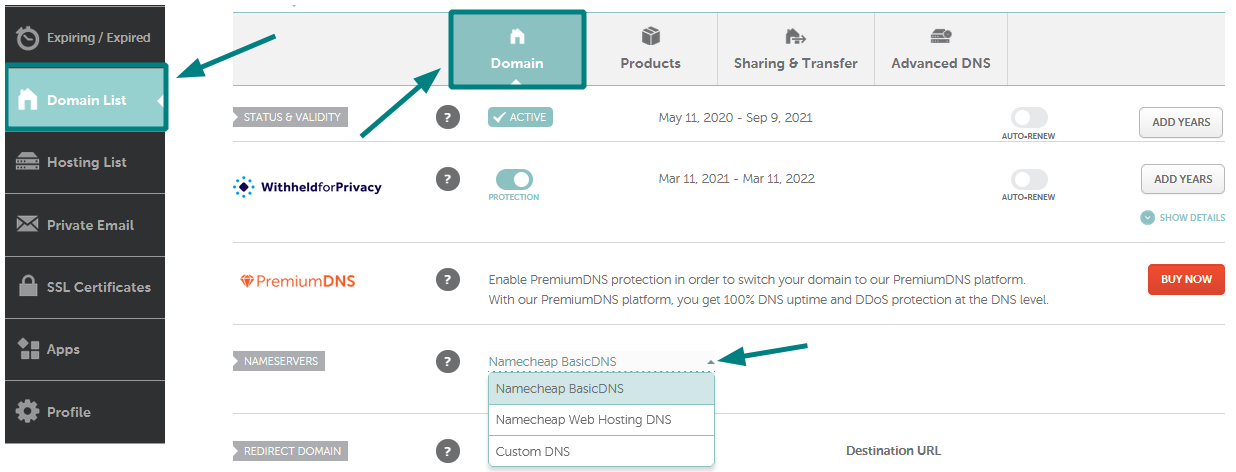
Credit: www.namecheap.com
Factors Affecting Speed
Several factors can affect the speed of Namecheap DNS updates. Server loads and network traffic play significant roles in timing. Typically, DNS changes might take anywhere from a few minutes to 48 hours to propagate fully.
When you’re dealing with DNS propagation, patience can sometimes be in short supply. Understanding the factors that affect how quickly your DNS changes take effect can help manage expectations and reduce stress. Namecheap DNS can take anywhere from a few minutes to 48 hours to propagate fully, and several key factors play a role in this timeline. ###1. Ttl (time To Live) Settings
The TTL setting dictates how long a DNS record is cached by DNS servers before a refresh is required. Lowering the TTL before making changes can speed up propagation. If you set your TTL to a shorter time, say 300 seconds (5 minutes), you might see faster changes. But remember to reset it back to a longer time afterward to reduce server load. ###2. Dns Server Caching
DNS servers around the globe cache records for efficiency. A server may not immediately check for updates if it has a record cached. This caching can delay the propagation of your DNS changes. Knowing this, it’s wise to plan for some delays, especially if the DNS servers involved have long cache times. ###3. Changes In Dns Records
Not all DNS changes are equal in complexity. Simple changes like modifying an A record can propagate quicker than complex setups involving multiple record types. If you’re making several changes, you might notice varied propagation times for each change. It’s fascinating how a small tweak can have a ripple effect. ###4. Registrar And Dns Provider
The speed of DNS propagation can also depend on your registrar and DNS provider. Namecheap generally has a good reputation for fast DNS changes, but this isn’t universal for all registrars. Have you ever noticed how some providers just seem to take their time? It’s worth considering this when choosing or evaluating your DNS provider. ###5. Global Dns Network Spread
Your changes need to travel across a vast network of global DNS servers. Depending on where these servers are located, propagation times can vary. It’s like sending a letter across the world—some places are just quicker to reach than others. This variability is normal and expected. ###6. Internet Service Provider (isp) Policies
Your ISP’s caching policies can also play a role. Some ISPs cache DNS records longer than others, delaying updates. Have you ever wondered why a website update takes longer to appear on your device compared to a friend’s? This could be the reason. Monitoring your DNS propagation can help you stay informed and reduce any downtime. Tools like DNS checker websites can provide real-time updates on your changes across different locations. Are you prepared to wait a bit longer, or will you take steps to speed things up? Understanding these factors can help you decide.Optimizing Dns Performance
Optimizing DNS performance can enhance website speed and reliability. A well-optimized DNS setup ensures users reach your site quickly. Namecheap DNS offers great features, but understanding optimization is key.
Understanding Dns Propagation
DNS propagation affects how quickly changes spread across the internet. It can vary from a few hours to 48 hours. During this time, updates reach different DNS servers worldwide. Patience is vital during this propagation period.
Choosing The Right Dns Servers
Picking the correct DNS servers impacts performance. Namecheap provides reliable DNS servers. Using these can reduce latency and improve access speed. Ensure your DNS servers are geographically closer to your target audience.
Reducing Ttl (time To Live) Values
TTL values determine how long DNS information is cached. Lowering TTL values can speed up changes. It forces DNS servers to refresh more often. This ensures users get the latest site updates quickly.
Regular Monitoring And Testing
Consistent monitoring of DNS performance is crucial. Tools like DNS Checker can help identify issues. Regular tests ensure DNS servers respond promptly. Address any issues immediately to maintain optimal performance.
Implementing Redundancy
Redundancy involves having backup DNS servers. This ensures site availability during server downtime. Namecheap supports secondary DNS configurations. It provides an added layer of reliability for your website.
Credit: help.mailgun.com
Credit: help.mailgun.com
Frequently Asked Questions
How Long Does The Dns Process Take?
DNS changes typically take up to 48 hours to propagate. Some updates may be visible in minutes. Factors affecting time include server settings and ISP caching. Ensure DNS records are correctly configured for faster propagation. Regularly check updates through DNS tools for real-time progress.
How Long Does It Take For A Namecheap Domain?
A Namecheap domain registration typically completes within minutes. Occasionally, it may take up to 24 hours. Ensure your payment is processed for faster registration.
How Long Should A Dns Request Take?
A DNS request typically takes between 20 to 120 milliseconds. Speed depends on server location and network quality. Fast DNS resolution improves website performance and user experience. Ensure DNS servers are properly configured for optimal speed and reliability. Regularly monitor DNS performance to maintain efficient response times.
How Long Does Dns Validation Take?
DNS validation typically takes a few minutes to 48 hours. Propagation time depends on DNS server updates. Ensure accurate DNS settings for faster validation. Refresh the DNS cache if necessary.
Conclusion
Understanding Namecheap DNS propagation time is essential. Generally, it takes 24-48 hours. During this period, patience is key. Changes might not appear instantly. DNS updates need time to spread globally. Checking periodically helps track progress. If delays persist, consider troubleshooting.
Contacting Namecheap support can provide additional guidance. Always ensure DNS settings are correct. This ensures smooth transitions and updates. Being informed minimizes potential confusion. Clear steps lead to efficient DNS management. Stay patient and informed for best results.