
Are you thinking about building a website but aren’t sure if WordPress is the right choice for you? You’ve probably heard a lot about it, but how good is WordPress really?
Whether you want a simple blog, an online store, or a professional portfolio, your website needs to be easy to manage, look great, and work smoothly. You’ll discover what makes WordPress stand out—and where it might fall short. By the end, you’ll know exactly if WordPress fits your needs, so you can make the best decision for your online presence.
Keep reading to find out!
Credit: www.wpbeginner.com
WordPress Popularity In 2025
WordPress remains a strong choice for websites in 2025. Its popularity continues to rise due to ease of use and flexibility. Many people trust WordPress for blogs, business sites, and online stores. It adapts well to different needs and skill levels.
User Base Growth
The number of WordPress users keeps growing each year. More beginners and professionals choose it for their websites. This growth happens because WordPress offers many themes and plugins. These tools help users create unique sites quickly. The community support also attracts new users. They find help and advice easily.
Market Share Trends
WordPress holds a large part of the website market. In 2025, it powers over 40% of all websites globally. This shows steady growth compared to previous years. Its open-source nature allows constant improvement. Competitors exist but WordPress stays popular for its reliability. Many small and big brands prefer WordPress for their online presence.

Credit: www.youtube.com
Key Features Of WordPress
WordPress stands out because of its rich set of features. These features help users create websites easily. They fit both beginners and experts. The platform offers tools that simplify website building and management. Each feature adds value to the user experience and website functionality.
Customization Options
WordPress lets you change your site’s look and feel. You can edit colors, fonts, and layouts. The platform supports custom menus and widgets. Users can add personal touches without coding skills. It allows full control over the website’s appearance and structure.
Plugin Ecosystem
Thousands of plugins extend WordPress’s capabilities. Plugins add features like SEO tools, contact forms, and security. You can select plugins for almost any need. Installing and managing plugins is simple. They keep your site updated with new functions.
Themes And Design Flexibility
WordPress offers thousands of free and paid themes. Themes control the overall design and style of a site. You can switch themes without losing content. Many themes are responsive, working well on phones and tablets. This variety helps create unique and professional websites.
Performance And Speed
Performance and speed are key factors for any website. WordPress offers solid options to keep sites fast and responsive. Fast loading times improve user experience and help with search rankings.
Loading Times
WordPress sites can load quickly with the right setup. Default installations are decent but need tweaks for best speed. Page size and server quality affect loading times a lot. Choosing a good hosting provider can make a big difference. Smaller images and fewer plugins also help pages load faster.
Optimization Techniques
Several techniques improve WordPress speed. Caching stores page copies to serve visitors faster. Minifying CSS and JavaScript files reduces file size. Using a Content Delivery Network (CDN) spreads content globally, cutting down load time. Optimizing images by compressing them keeps pages light. Lazy loading delays image loading until needed, speeding up initial page display.
Security Measures
Security is a top priority for any website owner. WordPress offers strong features to protect your site. These features work to stop hackers and keep your data safe. Understanding WordPress security helps you run a safer website.
Built-in Protections
WordPress has many built-in tools to protect your site. It updates itself regularly to fix security issues. These updates close gaps hackers might use. WordPress also limits login attempts. This stops hackers from guessing passwords easily. The platform uses strong password enforcement. This helps users create safer passwords. WordPress files are protected from direct access. It keeps hackers from changing important files. These built-in protections form the first defense line.
Recommended Security Plugins
Security plugins add extra layers of protection. They scan your site for malware and threats. Many plugins offer firewalls to block bad traffic. They also monitor login attempts and block suspicious IPs. Some plugins send alerts about security issues. Regular scans help find weak spots early. Popular plugins are easy to install and use. They help non-experts keep their sites safe. Using these plugins improves your site’s defense greatly.
Ease Of Use
WordPress stands out for its ease of use. It helps people create websites without deep technical skills. The platform offers tools that simplify website building. Even beginners can start quickly and with confidence.
User Interface
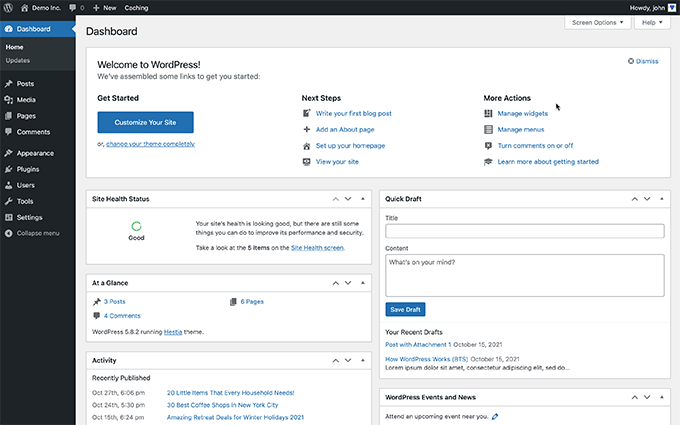
The WordPress dashboard is clean and simple. It uses clear menus and icons. Users find it easy to navigate between sections. Creating posts, pages, and media uploads is straightforward. The interface focuses on user needs. This reduces confusion and saves time.
Learning Curve For Beginners
WordPress does not require coding knowledge to start. Beginners can learn the basics within hours. Helpful guides and tutorials are widely available. Tasks like adding content or changing themes are easy. Mistakes can be fixed without stress. The platform grows with the user’s skills, allowing for more advanced customization later.
Seo Capabilities
WordPress offers strong SEO capabilities that help websites rank well on search engines. It provides tools and features that make SEO tasks easier for beginners and experts. These built-in options and plugins work together to improve site visibility and traffic.
Seo Plugins
WordPress supports many SEO plugins that simplify optimization. Plugins like Yoast SEO and All in One SEO help users edit meta titles and descriptions. They also guide keyword use and readability. These tools generate XML sitemaps automatically. They help search engines find and index pages faster. Users can control social media sharing settings too. SEO plugins save time and improve site rankings.
Built-in Seo Features
WordPress has built-in features that support SEO without extra tools. It creates clean URLs that are easy to read by users and search engines. The platform allows control over site structure and navigation. It supports mobile-friendly themes, which search engines prefer. WordPress also optimizes site speed, improving user experience. Alt text can be added to images easily. These features help websites perform better in search results.
Cost And Value
Understanding the cost and value of WordPress helps you decide if it fits your needs. WordPress offers options for different budgets and goals. It provides a flexible platform that can be as simple or advanced as you want.
Pricing Models
WordPress has several pricing models. You can use the free version or choose paid plans. Paid plans vary by features and support levels. Hosting costs are separate if you use WordPress.org. These costs depend on the hosting provider and plan. Themes and plugins may add extra expenses. You pay only for what you need.
Free Vs Paid Options
The free version of WordPress is powerful. It includes basic tools to start a website. You get access to many free themes and plugins. Paid options unlock more features and customization. Premium themes offer unique designs and better support. Paid plugins add advanced functions like SEO tools or e-commerce. Choosing between free and paid depends on your goals. Free works well for simple sites. Paid suits businesses or growing projects needing more control.
Credit: www.seobility.net
Community And Support
WordPress has a strong community and support system. This helps users solve problems and learn quickly. Whether you are a beginner or an expert, help is easy to find. The community shares ideas, tools, and tips. This makes WordPress a reliable platform for websites.
Forums And Documentation
The WordPress forums are active and friendly. Thousands of users ask and answer questions daily. You can find help on almost any topic. The official WordPress documentation is also detailed. It covers basics and advanced topics clearly. Both resources are free and open to all. They help users fix issues without stress.
Professional Support Services
Many companies offer professional WordPress support. These services include setup, maintenance, and troubleshooting. They provide fast and expert help. Some offer 24/7 customer support for urgent needs. Hiring professionals can save time and effort. This option suits businesses that need reliable website management.
Comparisons With Other Platforms
Choosing the right platform for your website is important. WordPress is popular, but other options exist. Comparing WordPress with other platforms helps you decide what fits your needs best.
WordPress Vs Wix
Wix offers an easy drag-and-drop builder. It suits beginners who want quick setup. WordPress requires more time to learn but gives greater control. It supports thousands of plugins and themes.
Wix limits customization and SEO tools. WordPress allows full control of design and SEO settings. For blogs or complex sites, WordPress works better. Wix is good for simple, small websites.
WordPress Vs Squarespace
Squarespace features beautiful, ready-made templates. It is user-friendly and includes hosting. WordPress separates hosting and design but offers more flexibility. Squarespace has fewer plugins than WordPress.
WordPress suits larger sites needing special features. Squarespace fits users who want style with ease. Both platforms support blogging and e-commerce. WordPress has stronger SEO capabilities than Squarespace.
Future Trends And Updates
The future of WordPress looks bright with many updates on the horizon. These changes aim to make the platform easier to use and more powerful. WordPress continues to evolve, keeping up with web design and technology trends. Users can expect smoother experiences and more tools to build their websites.
Upcoming Features
WordPress plans to add new features that simplify site building. These include better block editing tools and more design options. The focus is on making the platform faster and more flexible. Users will find it easier to create custom layouts without coding. There is also a push for improved mobile editing and performance.
Impact Of Ai And Automation
Artificial intelligence is becoming part of WordPress. AI helps with content creation, SEO, and site management. Automation can handle tasks like backups and updates automatically. This saves time and reduces errors. AI tools will also suggest improvements to make websites better. The goal is to help users focus on creativity rather than technical details.
Frequently Asked Questions
What Are The Main Benefits Of Using WordPress?
WordPress offers flexibility, ease of use, and a large plugin ecosystem. It supports SEO and responsive design. It’s ideal for blogs, e-commerce, and business sites, making it a top choice for beginners and professionals alike.
Is WordPress Good For Seo Optimization?
Yes, WordPress is excellent for SEO. It offers SEO-friendly themes, plugins like Yoast SEO, and clean code. These features help improve search rankings and make content optimization easier for users of all skill levels.
Can WordPress Handle High Traffic Websites?
WordPress can handle high traffic with proper hosting and caching. Using a reliable server and performance plugins ensures fast loading. Many large sites successfully run on WordPress, proving its scalability and robustness.
How Secure Is A WordPress Website?
WordPress security depends on regular updates, strong passwords, and security plugins. While it’s secure by default, user practices impact safety. Proper maintenance and backups are essential to protect against vulnerabilities.
Conclusion
WordPress offers a simple way to build websites. It works well for beginners and experts alike. You can choose many themes and plugins to fit your needs. The platform keeps updating to stay current and safe. Many people use WordPress for blogs, shops, and portfolios.
It helps you create a site without coding skills. Overall, WordPress is a strong, flexible tool worth trying. It makes website creation easier and more accessible for everyone.


