
Switching web hosts might seem daunting, but how easy is it really? If you’re thinking about making a change, you’re likely seeking better performance, superior support, or maybe a more budget-friendly option.
Imagine a seamless transition where your website enjoys a smoother, faster, and more reliable home. This transformation doesn’t have to be a headache. You’re about to discover how straightforward the process can be, and why it might be the best move for your online presence.
Keep reading to find out how you can effortlessly shift your website to a new host without losing sleep over technical details. Your digital future awaits – are you ready to explore the possibilities?
Credit: www.hostpapa.com
Assessing Web Hosting Needs
Knowing your web hosting needs is important. Each website has different needs. Some need more storage. Some need faster loading times. Understand what your website requires. Think about the size of your website. Is it big or small? Does it have lots of images or videos? Consider the traffic you expect. More visitors need more resources. Check if you need special software. Some websites need special tools. Make a list of your needs. This will help in choosing the right host. It makes switching easier too. Don’t rush this step. It saves time later.
Researching Hosting Providers
Prices for hosting can vary a lot. Some hosts offer low starting prices. Others may charge more. It’s important to check what each plan includes. Some plans have more features. Others might be very basic. Look for hidden fees. Sometimes, there are extra costs. Make sure to read the fine print. This will help you find the best deal.
Good support is very important. Hosts should offer 24/7 help. This means help is always available. Check reviews for their support team. Happy customers often mention great support. Look for multiple ways to contact support. Phone, email, and chat are common. Quick responses are a good sign. Fast help can solve problems quickly.
Uptime means the site is live. Most hosts promise 99% uptime or more. This means your site works almost all the time. Read their uptime policy. Check if they offer refunds for downtime. A good host will have few issues. Reliable uptime is key for any site.
Preparing For Migration
Backing up your website is very important. Keep all your files safe. Use a reliable tool or service. Make sure you have a copy of everything. This includes text, images, and codes. Double-check the backups. This step saves you from losing data. It ensures your website is safe.
A checklist helps in staying organized. List each step for migration. Include domain settings and emails in the list. Also, note database details. Review the list carefully. Missing a step can cause problems. Tick off each item as you complete it. This makes sure nothing is forgotten. It helps in a smooth migration process.
Transferring Domain And Files
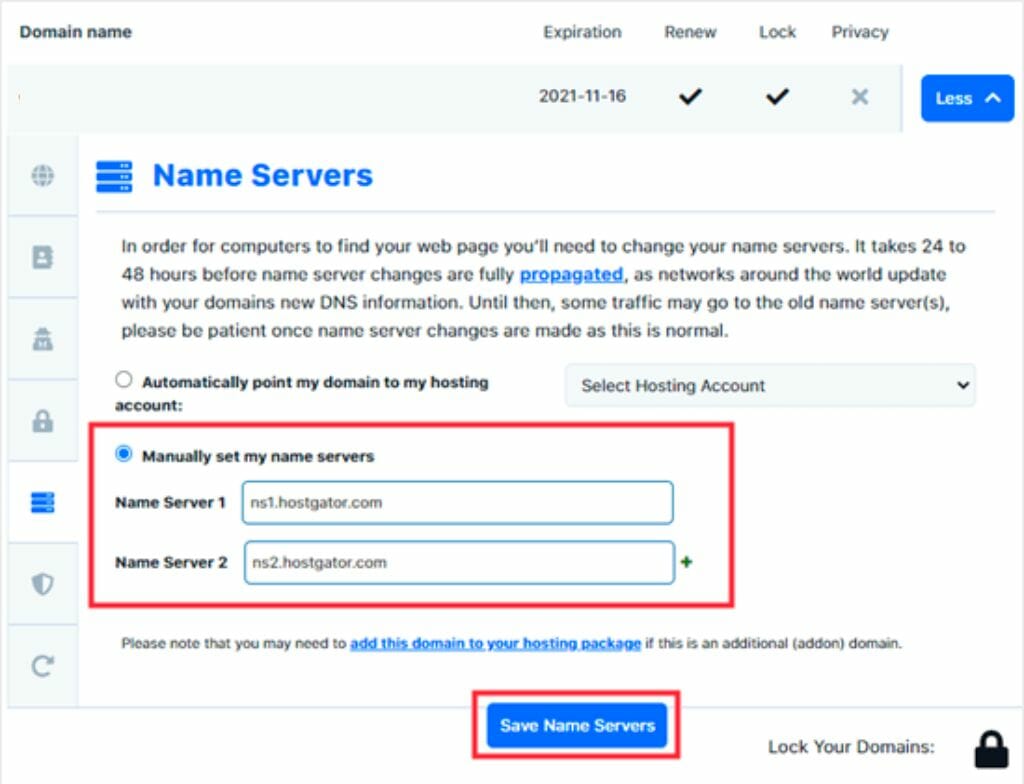
Change the DNS settings to point to your new host. This step is crucial for your website. Without it, visitors cannot find your site. Locate the DNS settings in your domain account. Update the nameservers to those provided by your new host. Changes may take a few hours to update. Patience is needed.
Upload your website files to the new host. Use an FTP client for this task. It helps move files from your computer to the server. Ensure all files are moved. Check for missing files after the transfer. This step completes the hosting change. Your site is now ready on the new server.
Testing And Troubleshooting
Switching web hosts can be simple with the right steps. Ensure data backup and check compatibility. Troubleshoot any minor issues to ensure a smooth transition.
Checking Website Functionality
Ensure your website works after changing hosts. Check all links and images. Verify if forms and buttons perform correctly. Make sure all pages load fast. This helps find problems early. Use tools to see if your site is secure. Security is important for user trust. Check your site’s speed. Speed affects user experience. If your site is slow, users may leave.
Resolving Common Issues
Sometimes, errors occur after switching hosts. Fix broken links quickly. They can confuse visitors. Resolve any image loading issues. Images must load fast and correctly. Address slow page loads. Slow pages frustrate users. Check for missing content. Missing content can affect your site’s look. Ensure your site is mobile-friendly. Many users use phones to browse. A good host ensures smooth mobile access. Seek help if problems persist. Experts can solve tricky issues.

Credit: www.whatsthehost.com
Finalizing The Transition
Security certificates keep your website safe. Updating these certificates is essential. Begin by checking your new host’s SSL options. Some hosts offer free SSL. Others may charge a fee. Ensure that the certificates are active. This step protects user data. It also improves search rankings. Secure sites are trusted more by visitors. Always verify certificate validity dates. This avoids unexpected issues.
Informing users about changes is important. Use simple language when communicating. Send emails to your subscribers. Post updates on social media. This keeps everyone informed. Explain why the change is happening. Assure them that their data is safe. Clear communication builds trust. It helps maintain user loyalty.
Benefits Of Switching Hosts
Changing web hosts can boost your site’s speed. Faster sites keep visitors happy. Quick loading pages make users stay longer. A fast site also ranks better on search engines. Search engines love fast sites. Better performance means more visits. More visits mean more success.
New hosts might offer better tools. These tools help in managing your site. You might get more storage for your files. Some hosts provide easier-to-use dashboards. This makes site management simple. New features can also mean better security. Security keeps your site safe from threats.
Credit: diggitymarketing.com
Potential Challenges
Changing web hosts might lead to downtimereputation. Some hosts offer a migration service. This helps reduce downtime. But, it’s not always perfect. Backups are crucial. They protect your data. Always have a plan. This ensures your site stays online.
Not all hosts are the same. Some have different software versions. This can cause compatibility issues. Your website might not work well. Check your site’s requirements first. Make sure the new host supports them. Contacting support can help. They might offer solutions. Ensure your site runs smoothly on the new host.
Frequently Asked Questions
How Hard Is It To Change A Website Host?
Changing a website host can be simple or complex. It depends on site size and technical expertise. Most hosting providers offer guides and support. Ensure you backup your site before transferring. DNS settings need updating for seamless transition. With proper planning, the process is manageable and straightforward.
Can I Transfer My Website From One Host To Another?
Yes, you can transfer your website to a new host. Backup your files and databases first. Choose a reliable hosting provider. Follow their migration instructions carefully. Ensure domain settings point to the new host. Check website functionality after transfer. Contact support if issues arise during migration.
How Long Does It Take To Change Website Hosting?
Changing website hosting usually takes 24 to 72 hours. This includes DNS propagation and file migration. Plan ahead to minimize downtime. Backup your data before starting. Seek assistance from your new hosting provider for a smooth transition. Ensure your website runs smoothly post-migration.
How Hard Is It To Change Your Website Domain?
Changing your website domain can be challenging. It involves technical steps, SEO considerations, and potential traffic loss. Plan carefully, update all links, and use 301 redirects. Ensure your new domain is optimized for search engines. Proper execution minimizes risks and maintains your site’s search ranking.
Conclusion
Switching web hosts can be straightforward with proper planning. Start by researching reliable hosting providers. Compare features and prices. Backup your website data before moving. Follow the new host’s migration guide. Check your site after transferring. Ensure everything works smoothly.
Seek support if issues arise. Many hosts offer helpful customer service. Time your move to avoid downtime. This keeps your site accessible to visitors. Remember, patience and preparation are key. With careful steps, changing hosts becomes simple. Your website can thrive with the right host.
Embrace the process. Enjoy a smoother online experience.


