

You might wonder how secure your WordPress password really is. After all, your website’s safety depends on it.
Understanding how WordPress hashes passwords can give you peace of mind and help you protect your site better. You’ll discover the simple yet powerful way WordPress keeps your login details safe from hackers. Keep reading, because knowing this could change how you think about website security forever.
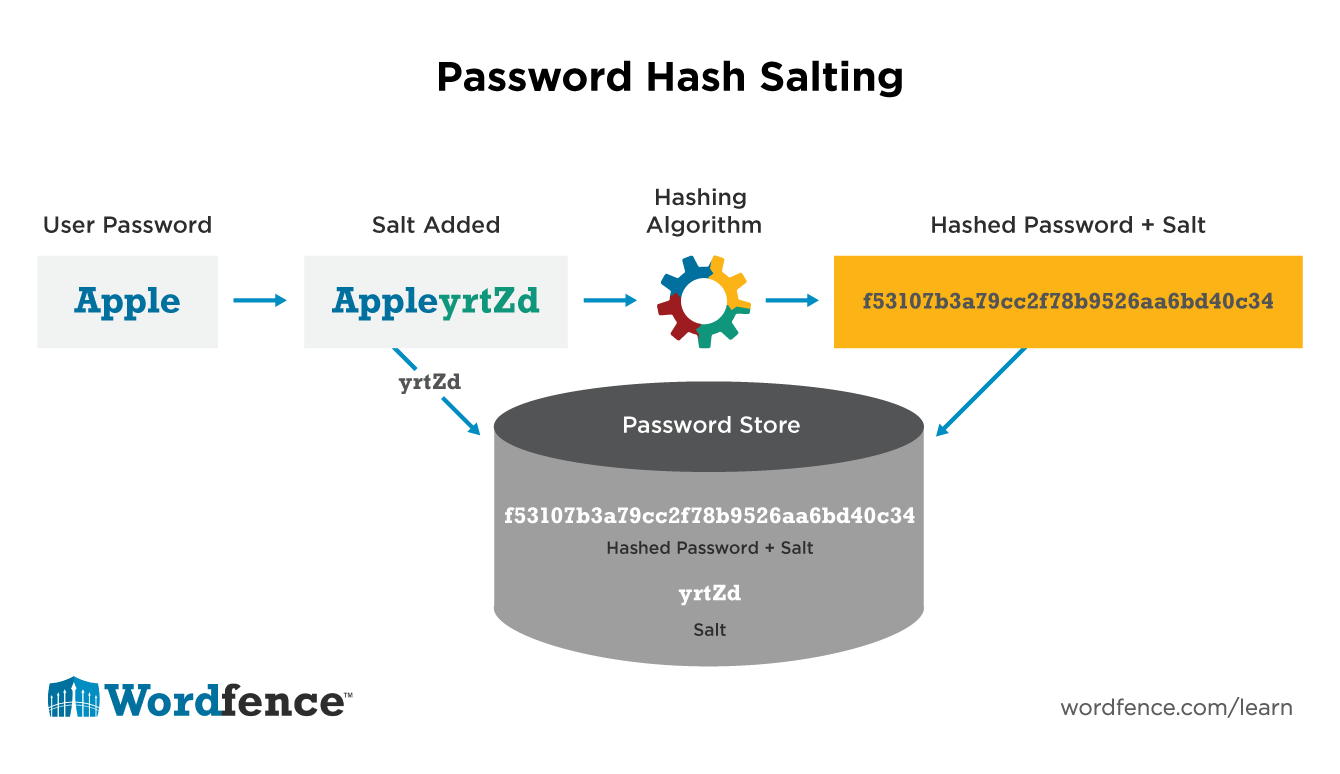
Credit: www.wordfence.com
WordPress Password Security Basics
WordPress password security is a key part of keeping websites safe. It protects user accounts from being accessed by others. Strong security starts with how passwords are stored. WordPress uses special methods to hide passwords so no one can read them directly. This system helps stop hackers from stealing passwords and gaining control.
Why Password Hashing Matters
Password hashing turns a password into a secret code. This code looks like random letters and numbers. WordPress stores this code instead of the actual password. If someone tries to steal passwords, they only get the hashed code. The real password stays safe and hidden.
Hashing makes it hard for hackers to guess passwords. Even if they get the hashed data, they cannot easily find the original password. This protects user accounts and keeps websites secure.
Common Threats To WordPress Logins
Hackers try many ways to break into WordPress accounts. They use stolen passwords from other sites. They try easy or common passwords. They also use software to guess passwords quickly.
Weak passwords and no protection make it easier for hackers. Without hashing, stolen passwords can be read and used right away. WordPress’s password hashing helps stop these common threats.
Password Hashing In WordPress
WordPress protects user passwords by hashing them before storage. Hashing turns passwords into fixed-length strings of characters. These strings do not reveal the original password.
This method helps keep passwords safe, even if the database is exposed. WordPress uses strong techniques to ensure password security.
Hashing Algorithms Used
WordPress uses the Portable PHP password hashing framework (Phpass). It supports algorithms like bcrypt and salted MD5. Bcrypt is preferred for its strength and security.
These algorithms create complex hashes that are hard to reverse. This prevents attackers from recovering the original password easily.
Salt And Its Role
Salt is random data added to the password before hashing. It makes each hash unique, even for identical passwords. This stops attackers from using pre-made hash tables.
WordPress adds salt automatically in its hashing process. Salting improves security by increasing password hash complexity.
Phpass Library Explained
The Phpass library handles password hashing in WordPress. It creates strong, salted hashes using secure algorithms. Phpass adapts to different server capabilities.
It also manages password verification during login. This library balances security and performance for WordPress sites.
How WordPress Processes Passwords
WordPress handles passwords with care to keep user accounts safe. It uses special methods to protect passwords from theft or misuse. This process starts the moment a user types a password and continues through login and updates.
From User Input To Database Storage
When a user creates a password, WordPress does not save it directly. Instead, it changes the password into a coded string called a hash. This hash is unique and cannot be turned back into the original password. WordPress uses a strong hashing algorithm called bcrypt. It adds a random value, called a salt, to the password before hashing. This step makes each hash different, even for the same password. The final hash is then stored safely in the database.
Verification During Login
At login, WordPress does not compare the typed password with the stored hash. Instead, it hashes the entered password again using the same method. Then, it checks if this new hash matches the stored one. If they match, the user is allowed in. This method keeps the actual password hidden and secure.
Handling Password Updates
When a user changes their password, WordPress repeats the hashing process. It creates a new hash with a fresh salt. This new hash replaces the old one in the database. This keeps passwords current and secure at all times.
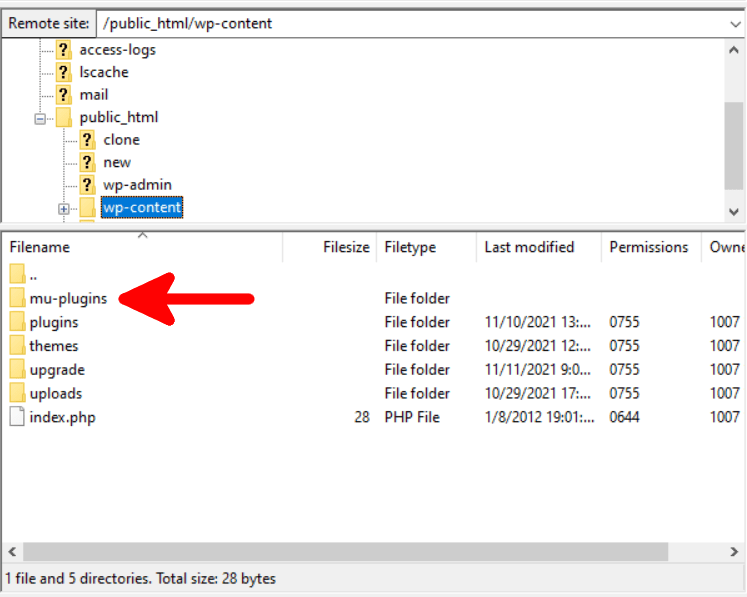
Credit: www.scalahosting.com
Security Enhancements In Recent WordPress Versions
WordPress has improved its security by upgrading how it handles passwords. These changes make user accounts safer from hackers. WordPress updates focus on better hashing methods and using reliable PHP functions. This ensures passwords stay protected even if a breach occurs.
Improvements In Hashing Techniques
Recent WordPress versions use stronger hashing algorithms. These algorithms make it harder to reverse-engineer passwords. WordPress now employs adaptive hashing, which adjusts complexity over time. This method keeps pace with evolving computer power. It slows down attackers trying to guess passwords.
Use Of Php’s Native Functions
WordPress uses PHP’s built-in password hashing functions. These are secure and tested by many developers. Using native functions reduces coding errors. It also ensures compatibility with PHP updates. Functions like password_hash() and password_verify() provide robust security layers.
Backward Compatibility Considerations
WordPress maintains support for older password hashes. This helps users keep their passwords after updates. The system detects old hashes and upgrades them on login. This process happens without user action. It balances security with ease of use.
Best Practices For Secure WordPress Logins
Keeping WordPress logins safe is very important. Strong security stops hackers from breaking in. Using the right methods protects your site and users. Follow these best practices to keep your WordPress login secure and simple.
Choosing Strong Passwords
Pick passwords that are hard to guess. Use a mix of letters, numbers, and symbols. Avoid common words or easy patterns. Change passwords often to reduce risk. Strong passwords make it tough for attackers to succeed.
Implementing Two-factor Authentication
Add an extra step to your login process. Two-factor authentication asks for a code after your password. This code comes from your phone or email. It stops hackers even if they know your password. Enable this feature to boost your site’s safety.
Keeping WordPress Updated
Always use the latest WordPress version. Updates fix security holes and bugs. They improve how your site runs. Running old versions invites hackers to attack. Regular updates keep your site strong and protected.
Plugins And Tools For Password Security
WordPress uses strong methods to keep passwords safe. Plugins and tools help improve this security. They add extra layers of protection for user passwords. These tools also make it easier to manage and check password safety. Let’s explore some common options.
Password Management Plugins
These plugins help users store and manage passwords safely. They often use encryption and hashing to protect data. Some plugins generate strong passwords automatically. Others alert users about weak or repeated passwords. They keep your site secure by enforcing good password habits.
Security Audit Tools
Security audit tools scan your WordPress site for vulnerabilities. They check if passwords are stored securely and warn about risks. These tools test for weak hashing methods or outdated practices. They provide reports to help site owners fix security gaps. Regular scans help maintain strong password protection.
Custom Hashing Solutions
Developers can create custom hashing methods for passwords. These solutions use strong algorithms like bcrypt or Argon2. Custom hashing can add unique salts to each password. This makes it harder for hackers to crack hashes. Custom solutions offer tailored security for specific site needs.
Troubleshooting Password Hash Issues
Troubleshooting password hash issues in WordPress is important for site security and user access. Password hashes protect user passwords by turning them into coded strings. Sometimes, these hashes cause login problems or errors.
Understanding common errors and how to fix them helps keep your site safe. Recovering access without risking security is critical. Debugging login problems involves checking both the password hashes and WordPress settings.
Common Errors And Fixes
One common error is corrupted password hashes. This can happen during site migration or plugin conflicts. Fix it by resetting the password through the database or WordPress dashboard.
Another issue is outdated hashing algorithms. WordPress updates its hashing methods. Ensure your site runs the latest WordPress version for improved security.
Incorrect database encoding also causes hash problems. Make sure your database uses UTF-8 encoding to store hashes correctly.
Recovering Access Safely
Reset passwords using the WordPress “Lost Password” feature. It creates a new, secure hash automatically. Avoid editing password hashes directly in the database unless you know what you do.
Use trusted plugins for password recovery. They ensure the process keeps security intact. Always back up your site before making changes to passwords or user data.
Debugging Login Problems
Check error logs for clues about password hash failures. Enable WordPress debugging mode to see detailed messages. Test user logins after disabling all plugins to spot conflicts.
Clear browser cookies and cache to rule out client-side issues. Verify that your wp-config.php file has correct settings for authentication keys. These keys affect hash validation and login security.
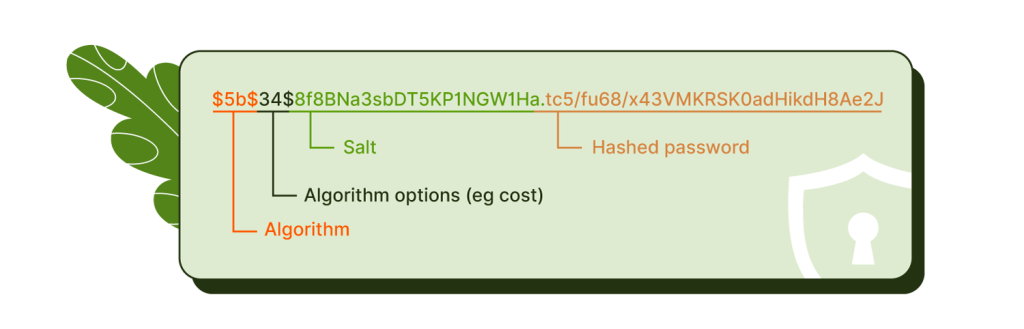
Credit: getshieldsecurity.com
Frequently Asked Questions
How Does WordPress Hash Passwords Securely?
WordPress uses the Portable PHP password hashing framework (PHPass) for secure password hashing. It applies salted hashing with multiple iterations, making passwords difficult to crack. This method enhances security by protecting passwords even if the database is compromised.
What Hashing Algorithm Does WordPress Use?
WordPress primarily uses the bcrypt algorithm via PHPass for password hashing. Bcrypt adds a salt and performs multiple hashing rounds. This process strengthens password protection against brute-force and rainbow table attacks.
Why Is Salting Important In WordPress Password Hashing?
Salting adds random data to passwords before hashing. WordPress uses unique salts for each password, preventing attackers from using precomputed hash tables. This ensures even identical passwords have different hash values, enhancing security.
Can WordPress Password Hashing Be Customized?
Yes, developers can customize password hashing by using plugins or modifying the wp_hash_password() function. However, it’s essential to maintain strong algorithms like bcrypt to ensure password security and compatibility.
Conclusion
WordPress uses strong methods to keep passwords safe. It hashes passwords with secure algorithms. This makes it very hard for hackers to steal them. Every password gets a unique salt to add extra protection. This system helps protect users and their data.
Understanding how WordPress hashes passwords builds trust in the platform. Staying aware of these security steps keeps websites safer. Simple but effective. That’s how WordPress guards your login details.


