
Struggling with a WordPress theme that’s stuck in French when you need it in English? You’re not alone!
Many find themselves puzzled by language barriers in their digital projects. Imagine the frustration of having a beautifully designed site that can’t communicate with your audience because of a language mismatch. But don’t worry, there’s a solution. Converting your WordPress theme from French to English isn’t as daunting as it seems.
This guide will walk you through the process step-by-step, ensuring your site speaks directly to your audience without any lost translations. Ready to transform your website into an accessible and engaging platform? Let’s dive in and get your WordPress theme talking in a language your users understand!
Credit: translatepress.com
Language Compatibility
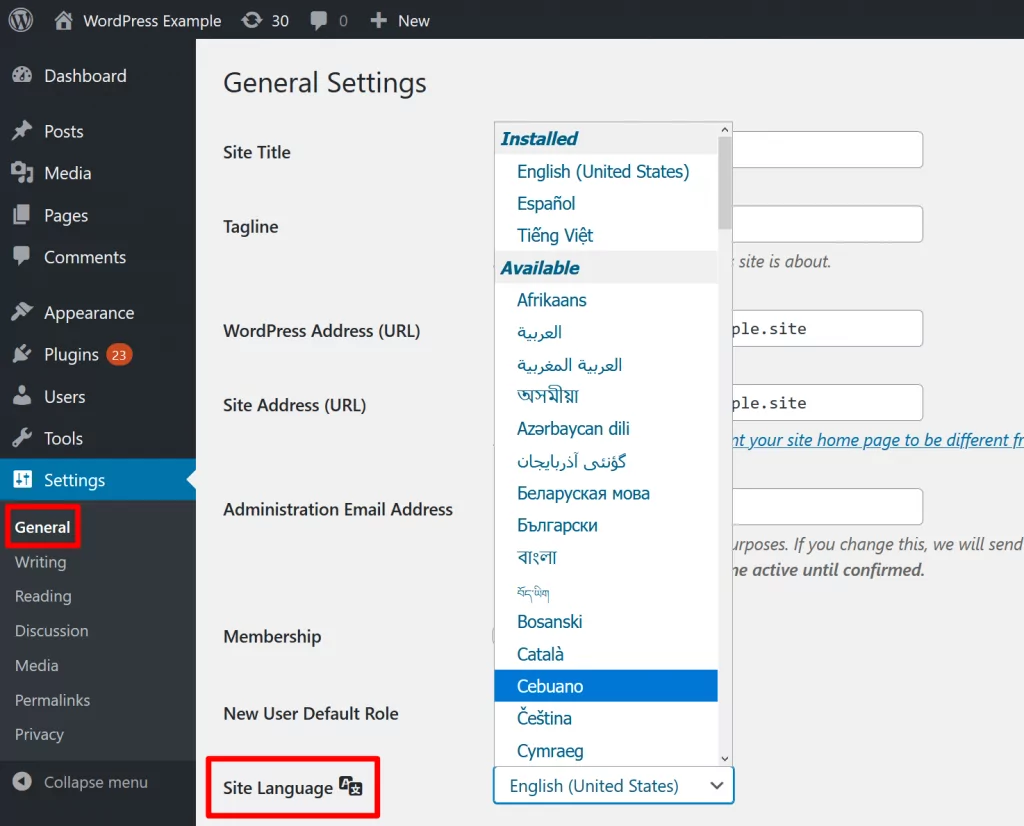
Converting a WordPress theme from French to English is simple. First, go to the WordPress dashboard. Find the “Settings” section and click on it. Then, choose “General.” Here, you can see the language option. Change it to English. Save your changes.
Some themes might need extra steps. Check the theme documentation. Look for translation settings. Use plugins like Polylang or WPML. These plugins help with translations. They make the process easier and faster.
Themes may have custom strings. Translate them using a tool like PoEdit. Download the theme’s .po file. Open it in PoEdit. Translate each string to English. Save the file. Upload it back to your server. Now, your theme is in English.
Credit: www.dataprovider.com
Identify Text Elements
Start by finding text in your theme. Many themes have language files. These files often contain all the text strings. Look for a folder named languages or lang. You can also find text in PHP files. Check inside the theme’s main folder. Examine the header and footer files. They often contain important text.
Use a text editor to open these files. Search for French words or phrases. Change them to English. Be careful with coding syntax. Wrong changes can break the theme. Look for gettext functions. They usually start with _e() or __(). These are often used for translation. Ensure translations are accurate. Double-check changes to avoid mistakes.
Translation Tools
Plugins help change languages fast. They are easy to use. You can find many plugins online. Choose the one that fits your needs. Some plugins are free. Others may cost money. Loco Translate is a good choice. It is popular. The tool is simple and effective. It helps change text from French to English. Plugins save time and effort. They are a smart choice for beginners. Always backup your site before using a plugin. This keeps your data safe.
Manual translation needs patience. It is more detailed. You change text word by word. This takes time. But it is very accurate. Start by checking all text parts. Translate them one by one. Use a simple dictionary for help. Some words have many meanings. Choose the right one. This method is best for small sites. It gives control over the process. You learn about your site. This is good for personal growth.
Localization Files
Localization files help change a theme’s language. These files are called .po and .mo. They store text strings for translation. The .po file is editable. It shows text in both languages. The .mo file is a machine-readable version. WordPress uses it to display translated text.
To edit, use a tool like Poedit. Open the .po file in Poedit. Change French text to English. After editing, save changes. Poedit creates a new .mo file. Upload the new .mo file to your WordPress theme directory. Your theme will now show English text.
Theme Options Panel
Start by logging into your WordPress dashboard. Find the Appearance menu on the left. Click on Theme Options. This opens the Theme Options Panel. It’s like a control room for your theme.
Inside the panel, look for the Language tab. Here, you can switch languages. Select English from the dropdown menu. Save your changes. Now your theme speaks English. It’s that simple!
Testing And Verification
Transforming a WordPress theme from French to English involves editing language files. Locate and modify the theme’s. po and. mo files using translation tools. Ensure all text elements, including plugins and widgets, are accurately converted for a seamless user experience.
Check Frontend Language
Look at your website’s pages. Make sure all texts are in English. Menus, buttons, and headings should be checked. Sometimes, small parts remain in French. These can be overlooked. Use a translation plugin for help. It finds and changes missed words. Don’t forget to check the footer and sidebar too.
Debugging Common Issues
Errors might show up on your site. Broken links or missing images are possible. Fix them right away. Plugins can cause trouble sometimes. Disable them one by one to find the problem. Themes may also need updates. Keep everything up-to-date to avoid issues. Testing is key. Always check after changes. A clean site means happy visitors.
Seo Considerations
Meta tags are very important for SEO. They help search engines understand your page. Always translate meta titles and meta descriptions. Use simple and clear words. This helps your page rank better. Do not forget to check for spelling errors. Spelling mistakes can confuse search engines.
URLs should be easy to read. Make them simple and clear. Use English words instead of French. This helps users and search engines. A good URL uses keywords. It also avoids special characters. Keep the URL short. A short URL is easy to remember. This improves your site’s visibility.
Updating And Maintenance
Switching a WordPress theme from French to English involves a few steps. Begin by accessing the theme files via the WordPress dashboard. Locate language files and edit them using a translation tool or plugin, ensuring accurate translation while preserving functionality.
Handling Updates
WordPress themes need updates. Updates fix bugs and add new features. Always backup your site before updating. This protects your work. After updating, check if the theme works. Look for any errors. If you find issues, restore the backup. Keep your theme up-to-date. It keeps your site safe.
Maintaining Language Consistency
Ensure your theme uses English everywhere. Check menus, buttons, and widgets. Some parts might still be in French. Use a translation plugin. This helps in converting text. Review your site regularly. Make sure all new content is in English. This helps users understand your site better.
Credit: www.cssigniter.com
Frequently Asked Questions
How Do I Change The Language Of My WordPress Theme?
Change your WordPress theme language by editing the wp-config. php file. Set your desired language code in the WPLANG constant. Ensure the language files are installed in the theme’s directory. Use a translation plugin like Loco Translate for easier management.
Adjust settings and save changes to apply the new language.
How Do You Translate Your WordPress Theme Into Any Language?
Translate your WordPress theme using the Poedit tool or Loco Translate plugin. Create a new language file, edit translations, and save. Update your WordPress settings to use the desired language. Ensure theme supports translation by checking text domain compatibility. Follow WordPress documentation for detailed steps.
How Do I Change My Website From French To English?
Switch your website language in the CMS settings to English. Update content manually if needed. Ensure translations are accurate.
How Do I Manually Translate In WordPress?
To manually translate in WordPress, use a plugin like Polylang or WPML. Install it via the WordPress dashboard, activate, and configure settings. Add new content in different languages by creating translated pages or posts. Ensure proper language switching for seamless navigation.
Conclusion
Converting a WordPress theme from French to English is manageable. Follow the steps carefully. First, locate the language files. Then, edit the text strings. Use a translation tool if needed. Save changes and test the theme. Make sure everything displays correctly.
Check for any untranslated parts. Adjust them manually. It’s a straightforward process. Just take your time. Your site will soon display in English. This enhances accessibility for a wider audience. Keep learning and exploring WordPress options. With practice, you’ll gain confidence.
Your site can reach more users efficiently.


