
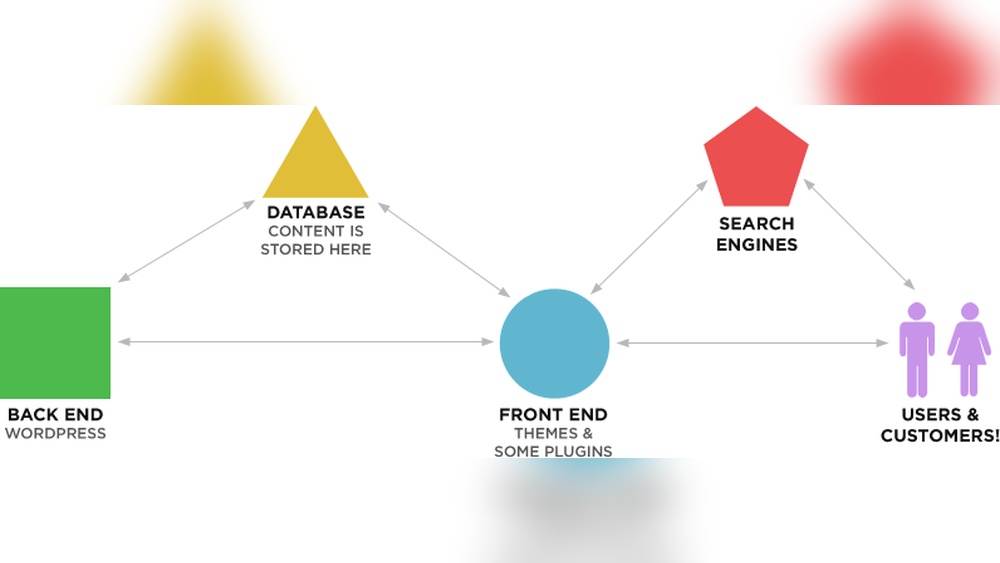
Have you ever wondered how WordPress websites actually work behind the scenes? If you’re thinking about building your own site or just curious about what makes these websites tick, understanding the basics can give you a real advantage.
Imagine being able to customize your site exactly how you want, without needing to be a tech expert. This article will break down everything in simple terms, so you can see how your WordPress website comes to life and why it’s such a powerful tool for anyone looking to create a strong online presence.
Keep reading, and you’ll discover how easy it can be to take control of your website’s design, content, and functionality.
Credit: www.hostinger.com
WordPress Basics
WordPress is a popular tool for creating websites. It helps people build websites without needing to know coding.
Many websites use WordPress because it is easy and flexible. Understanding the basics helps you see how it works.
What Is WordPress
WordPress is a content management system (CMS). It lets you create and manage website content easily.
This platform is free and open-source. It means anyone can use and change it.
WordPress started as a blogging tool. Now, it supports many types of websites.
Types Of WordPress Sites
WordPress can create blogs, business sites, and online stores. It also supports portfolios and forums.
You can build simple sites or complex ones with many features. The choice depends on your needs.
Each type uses WordPress differently, but all share the same platform.
Key Components
WordPress has three main parts: themes, plugins, and content.
Themes control how your site looks. You can change colors, layout, and fonts easily.
Plugins add extra functions like contact forms or SEO tools. You install them as needed.
Content is what you publish on your site. It includes text, images, and videos.
Core Architecture
Understanding the core architecture of WordPress helps explain how websites built on this platform function. WordPress is designed with a flexible structure that separates design, features, and content. This setup allows users to customize websites easily. The main parts include themes, plugins, and a database. Each plays a key role in making WordPress sites dynamic and user-friendly.
Themes And Templates
Themes control the look and feel of a WordPress website. They include templates that decide how pages appear. Templates handle layouts for posts, pages, and other content types. Changing a theme can completely change a site’s design without altering the content. Themes also include styles like colors and fonts. This system keeps design and content separate for easier updates.
Plugins And Extensions
Plugins add new features or improve existing ones on a WordPress site. They can do simple tasks like adding contact forms or complex functions like SEO tools. Extensions allow site owners to customize functionality without coding. Users install and activate plugins through the WordPress dashboard. This modular system helps build powerful websites tailored to specific needs.
Database Role
The database stores all the website’s information securely. It holds posts, pages, user data, and settings. WordPress uses MySQL or MariaDB databases for this purpose. When someone visits a site, WordPress fetches data from the database to display pages. The database makes content easy to update and manage. It keeps everything organized and accessible in real time.
Content Management
Content management is the heart of every WordPress website. It allows users to add, change, and organize information easily. The platform offers simple tools to handle text, images, and other media. This helps keep the website fresh and engaging. Managing content does not require advanced skills. Anyone can learn to use WordPress for daily updates.
Creating And Editing Content
WordPress uses a visual editor that feels like a word processor. Users write posts and pages in a clean, simple interface. Editing is quick, with options to format text, add links, and insert images. Changes save instantly or schedule for later. This flexibility helps keep content timely and relevant. The editor supports blocks, which are small content sections. Blocks make it easy to add different elements like text, images, or videos.
Media Handling
Uploading images and videos is simple in WordPress. The media library stores all files in one place. Users can drag and drop files or upload from their computer. WordPress automatically resizes images to fit the website design. It also allows adding descriptions and alt text for SEO. Media files can be reused across posts and pages. This saves time and keeps the website organized.
User Roles And Permissions
WordPress supports multiple user roles to control access. Each role has specific permissions to add or edit content. Administrators manage the entire site, while editors handle content approval. Authors write and publish their own posts. Contributors can draft posts but need approval to publish. Subscribers only read content and manage their profiles. This system keeps the site secure and organized.
Credit: maxobiz.com
Site Functionality
Site functionality is the core of any WordPress website. It controls how visitors interact with the site. Every action, from clicking a link to loading a page, depends on it. Understanding how WordPress works helps you build a better website.
How WordPress Loads Pages
WordPress loads pages using PHP and MySQL. When a user visits a page, WordPress runs PHP scripts. These scripts ask the database for content. The database sends back the text, images, and other data. WordPress then combines this data with the site’s theme. The final page appears in the user’s browser.
This process happens quickly, usually in seconds. It allows dynamic content to show without saving static files. Every page view is unique and can change based on user input or settings.
Permalinks And Urls
Permalinks are the permanent URLs for your pages and posts. WordPress creates clean and readable URLs automatically. These URLs help search engines find your content easily. Good permalinks improve both user experience and SEO.
Site owners can customize permalinks to match their brand or content style. Clear URLs make it simple for visitors to remember and share links. They also help organize content into categories and tags.
Caching And Performance
Caching speeds up WordPress sites by storing copies of pages. Instead of building the page from scratch every time, WordPress uses cached versions. This reduces server load and speeds up page delivery.
Many WordPress plugins offer caching features. They optimize performance without changing the website’s design or content. Faster websites keep visitors happy and improve search rankings.
Customization And Design
WordPress websites offer many ways to change how your site looks and works. Customization and design are key parts of building a unique website. You can adjust almost every part of your site without needing to code.
Design choices help your website reflect your style. You can control colors, fonts, layouts, and more. This flexibility makes WordPress a popular choice for blogs, shops, and portfolios.
Theme Customization Options
Themes control the overall look of your WordPress site. You can pick from thousands of free and paid themes. Each theme has settings to change colors, fonts, and layouts.
The WordPress Customizer lets you see changes live. Adjust your header, footer, and background easily. This tool is simple and helps you design quickly.
Custom Post Types And Fields
Standard posts and pages may not fit every website need. Custom post types let you create new content types. For example, you can add portfolios, testimonials, or products.
Custom fields add extra information to posts. This can be dates, prices, or ratings. They help organize and display content clearly.
Using Page Builders
Page builders simplify website design with drag-and-drop tools. You can build pages block by block without coding. Popular builders include Elementor, Beaver Builder, and Divi.
These tools offer ready-made templates and widgets. Add images, text, buttons, and more with ease. Page builders speed up the design process and offer full control.
Security And Maintenance
Security and maintenance are key for any WordPress website. They keep the site safe and running smoothly. Without proper care, websites can face hacks, slow performance, or crashes.
Regular attention to security stops threats early. Maintenance ensures all parts of the site work well together. This section covers common security practices, backup strategies, and the importance of updates and compatibility.
Common Security Practices
Start with strong passwords for all user accounts. Use two-factor authentication to add extra protection. Limit login attempts to stop hackers from guessing passwords. Install security plugins to monitor and block suspicious activity. Remove unused plugins and themes to reduce risk. Always use secure hosting and SSL certificates for safe data transfer.
Backup Strategies
Backups save your website data in case of problems. Schedule automatic backups to avoid forgetting this task. Store backups in different locations, like cloud storage or an external drive. Test backups regularly to make sure they work. Backup both files and the database for full protection.
Updates And Compatibility
Keep WordPress core, themes, and plugins up to date. Updates fix security holes and add new features. Check compatibility before updating to avoid breaking your site. Use a staging site to test updates before applying them live. Regular updates help your website stay secure and fast.
Hosting And Deployment
Hosting and deployment are vital parts of running a WordPress website. They make your site accessible to visitors worldwide. Hosting stores your website files on a server. Deployment means getting your website live on the internet.
Choosing the right hosting and deploying your site correctly ensures fast loading and fewer problems. This section explains the basics of hosting and deployment for WordPress.
Choosing A Hosting Provider
Pick a hosting provider that fits your website needs. Look for good speed, uptime, and customer support. Shared hosting is affordable for small sites. Larger sites may need dedicated or VPS hosting. Check if the host offers easy WordPress installation and backups.
Installation Process
Installing WordPress is usually simple. Many hosts offer one-click WordPress installs. You just enter your site name, username, and password. The system sets up the database and files for you. Manual installation requires uploading WordPress files and creating a database. Follow the on-screen instructions to finish setup.
Migrating WordPress Sites
Migration means moving a WordPress site from one host to another. It involves copying all files and the database. Use plugins or manual methods for migration. Back up your site before starting. Update your domain settings after moving. Test the site to ensure everything works well.
Advanced Features
WordPress offers advanced features that help websites grow and do more. These features make WordPress flexible for many types of websites. They support developers and site owners with powerful tools.
Rest Api Integration
The REST API lets WordPress connect with other apps and services. It allows data to move between WordPress and mobile apps or websites. Developers use it to build custom features and improve user experience. This makes WordPress a strong platform for modern web projects.
Multisite Networks
Multisite allows running many websites from one WordPress installation. It saves time by managing updates and plugins in one place. Schools, businesses, and bloggers use multisite to handle many sites easily. It helps keep control and consistency across all sites.
Ecommerce Capabilities
WordPress supports online stores with powerful ecommerce plugins. WooCommerce is the most popular plugin for selling products and services. It offers payment options, inventory control, and shipping settings. This makes WordPress a good choice for starting an online shop.
Credit: www.youtube.com
Frequently Asked Questions
How Does WordPress Power Websites?
WordPress uses PHP and MySQL to build dynamic websites. It combines themes, plugins, and content to display pages. This CMS manages content efficiently, allowing easy updates without coding. Its flexible architecture supports blogs, shops, and portfolios, making it versatile for many website types.
What Role Do Themes Play In WordPress?
Themes control the design and layout of WordPress sites. They determine site appearance, colors, fonts, and structure. Users can switch themes easily without affecting content. Themes help create unique, professional websites tailored to branding and style preferences.
How Do WordPress Plugins Enhance Functionality?
Plugins add features and tools to WordPress sites. They extend capabilities like SEO, security, contact forms, and e-commerce. Users install plugins to customize their site without coding. Plugins make WordPress adaptable to various business and personal needs.
How Is Content Managed In WordPress?
Content is created and edited using the WordPress editor. Posts, pages, images, and media are organized in the dashboard. WordPress stores all content in a database, which it retrieves dynamically. This system makes content updates simple and fast.
Conclusion
WordPress websites work by combining themes, plugins, and content. They use a database to store information securely. Users can easily update or add new pages without coding. This makes WordPress a popular choice for many. Understanding these basics helps you create and manage sites with confidence.
The platform offers flexibility for blogs, shops, or portfolios. Simple tools make website building accessible for everyone. Now, you know how WordPress keeps your website running smoothly.


