
Are you curious about how WordPress themes actually work? Whether you’re building your first website or looking to customize your blog, understanding themes can make a huge difference.
Themes control the look and feel of your site without needing to touch any code. Imagine being able to change colors, layouts, and fonts with just a few clicks—sounds powerful, right? You’ll discover exactly how WordPress themes shape your website and how you can use them to make your site stand out.
Keep reading, and you’ll unlock the secrets to creating a site that truly reflects your style and goals.

Credit: www.youtube.com
What WordPress Themes Are
WordPress themes control how your website looks and feels. They change the colors, fonts, and layout. Themes make websites unique without coding.
Each theme has a style and design. You can switch themes anytime. This helps keep your site fresh and interesting.
Design And Layout
The design is the visual part of a theme. It decides where the header, menus, and content go. Layouts help organize pages clearly for visitors.
Templates And Files
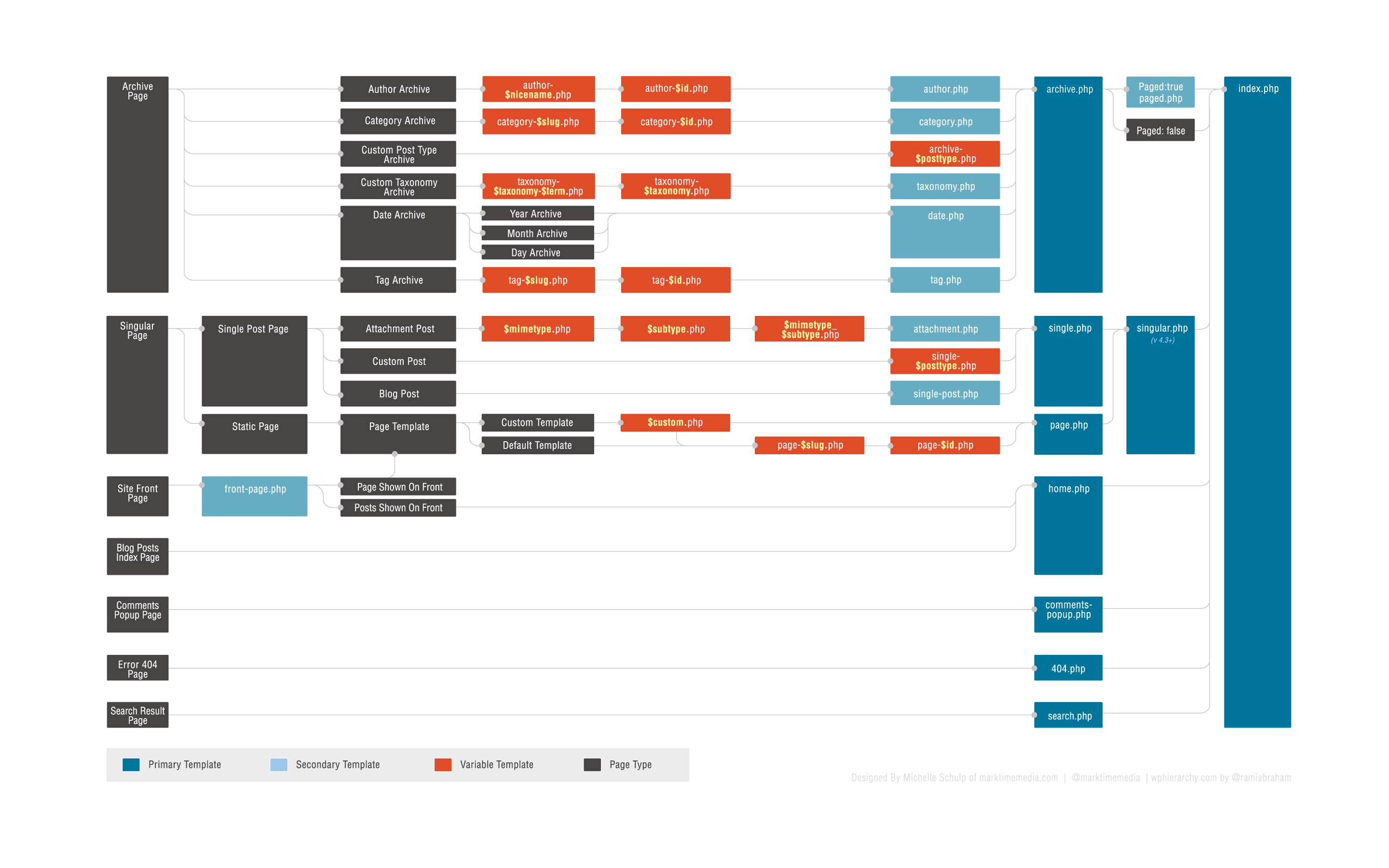
Themes use templates to show different pages. Templates include files for the homepage, posts, and archives. These files work together to build your site.
Customization Options
Themes offer settings to change colors, fonts, and images. You can adjust these without touching code. This makes your site fit your style.
Credit: wordpress.org
Core Components Of A Theme
WordPress themes shape the look and feel of a website. They control layouts, colors, and fonts. Themes use several core components to build and display pages. These parts work together to create the final site design. Understanding these components helps you grasp how themes function.
Templates And Template Files
Templates are files that define the structure of pages. Each template controls a specific type of page, like the homepage or blog posts. Template files use PHP code to pull content from WordPress. They arrange text, images, and other elements on the page. Templates decide what content shows and where it appears.
Stylesheets And Css
Stylesheets contain CSS code that styles the website. CSS controls colors, fonts, spacing, and layout details. The main stylesheet is called style.css. It tells browsers how to display HTML elements. Good CSS makes a site visually appealing and easy to read.
Theme Functions
Theme functions add extra features to the website. They are written in a file named functions.php. This file can enable menus, widgets, and custom post types. Functions also control how WordPress behaves with the theme. They enhance the theme beyond simple page layouts.
How Themes Control Site Appearance
The way a WordPress theme controls your site’s appearance is key to its look and feel. Themes shape your site’s style without changing your content. They set the tone through colors, fonts, and layout. Each theme comes with built-in options to customize these features. This makes your site unique and easy to navigate.
Layout And Design Options
The layout decides how content is arranged on your pages. Themes offer different layouts like full-width or boxed. You can choose where sidebars appear or remove them. Some themes let you change the header and footer styles. This controls the overall flow and structure of your site.
Typography And Colors
The theme sets default fonts for headings and body text. You can often pick from various font styles and sizes. Colors define your site’s mood and brand identity. Themes provide color schemes or let you create your own. These controls keep your site consistent and visually appealing.
Widget And Menu Areas
Widgets add extra features like search bars or social links. Themes define specific widget areas on your site. You can place widgets in sidebars, footers, or headers. Menus help visitors navigate through your pages. Themes allow custom menu locations and styles. This makes your site user-friendly and organized.
Theme Customization Tools
WordPress themes come with tools that help you change how your site looks. These tools make it easy to adjust colors, fonts, and layouts. You do not need to know coding. Theme customization tools give you control over your site’s design. They help create a unique look that fits your style.
Using The Customizer
The Customizer is a built-in WordPress tool. It shows a live preview of your site while you make changes. You can change site title, colors, header images, and menus here. The Customizer is simple and works well for small edits. It saves changes automatically, so you see updates in real time. No need to refresh your site to see changes.
Page Builders And Drag-and-drop
Page builders let you design pages by dragging elements. You can add text blocks, images, buttons, and more. No coding skills are needed to build complex layouts. Popular page builders include Elementor, Beaver Builder, and Divi. They offer many design options and templates. This tool is great for users who want full control of page design.
Child Themes For Safe Editing
Child themes keep your changes safe when updating a theme. They inherit the parent theme’s style and features. You can edit code or add new styles without losing work. Using a child theme protects your customizations from being overwritten. It is the best way to make advanced changes. Always use a child theme for safe and easy editing.
Choosing The Right Theme
Choosing the right WordPress theme is a key step in building a website. The theme shapes how your site looks and works. It affects user experience and site performance. Picking a theme that fits your needs helps create a strong online presence. The right theme makes managing your site easier and more enjoyable.
Matching Theme To Site Purpose
The theme should fit the purpose of your site. A blog theme works well for articles and stories. An online store theme has features for selling products. Look for themes designed for your site type. This choice helps visitors find what they need quickly. It also supports your site’s goals clearly.
Performance And Speed Considerations
Fast themes improve user experience and SEO rankings. Choose themes with clean, simple code. Avoid themes with too many built-in features you won’t use. Test theme demos to check loading times. A lightweight theme keeps your site running smoothly.
Responsive And Mobile-friendly Design
Most users visit sites on phones or tablets. A responsive theme changes layout to fit screen size. Mobile-friendly themes make navigation easy on small devices. Google favors mobile-friendly sites in search results. Select themes that look good on all devices.
Extending Themes With Plugins
WordPress themes control the look of your website. Plugins add new features and tools. Together, they create a powerful website. Plugins extend themes without changing the core design. This helps keep the site flexible and easy to update.
Enhancing Functionality
Plugins add features that themes do not have. You can add contact forms, SEO tools, or social sharing buttons. These features improve how visitors use your site. Plugins let you customize your site to fit your needs.
Maintaining Compatibility
Themes and plugins must work well together. Developers follow WordPress rules to ensure this. Using popular plugins reduces the risk of conflicts. Always update themes and plugins to keep them compatible and secure.
Popular Plugin Integrations
Some plugins are often used with many themes. WooCommerce turns a site into an online store. Elementor helps build pages with drag and drop. Yoast SEO improves search engine rankings. These plugins add important functions to most websites.
Best Practices For Theme Management
Managing WordPress themes properly helps keep your website fast, safe, and visually appealing. Themes control how your site looks and functions. Poor management can cause errors, slow loading, or security risks. Best practices make your site reliable and easy to update. Follow these steps to keep your theme in top shape.
Regular Updates And Maintenance
Update your theme regularly. Theme developers fix bugs and improve features. Updates also protect your site from security threats. Check for updates every week or two. Use the WordPress dashboard to apply updates quickly. Test updates on a staging site first. This avoids problems on your live site. Remove unused themes to reduce clutter and risks.
Backup And Recovery Strategies
Create backups before any theme changes. Backups save your site’s data and design. Use plugins or hosting services that offer automatic backups. Store backups in different locations, like cloud and local drives. Test recovery from backups regularly. This ensures you can restore your site fast if needed. Backups give peace of mind during theme edits or updates.
Security Considerations
Choose themes from trusted sources only. Free themes can hide malware or vulnerabilities. Keep themes and plugins updated to close security gaps. Avoid using outdated or unsupported themes. Use security plugins to monitor your site. Limit user access to only trusted people. Regularly scan your site for malware. Strong security protects your website and visitors.

Credit: kinsta.com
Frequently Asked Questions
What Is A WordPress Theme?
A WordPress theme is a collection of files that control your website’s design and layout. It defines the visual appearance and functionality without altering the core WordPress software. Themes help customize your site’s look to match your brand or style easily.
How Do WordPress Themes Affect Website Performance?
Themes impact loading speed, responsiveness, and SEO. Well-coded themes optimize images and scripts, improving user experience. Poorly designed themes can slow down your site and hurt search rankings. Choosing lightweight, regularly updated themes ensures better performance.
Can I Customize WordPress Themes Without Coding?
Yes, many WordPress themes offer built-in customization options via the WordPress Customizer. You can change colors, fonts, layouts, and more with a few clicks. For advanced changes, page builders and child themes provide code-free or minimal coding solutions.
Are Free WordPress Themes Safe To Use?
Free themes from the official WordPress repository are generally safe and regularly reviewed. However, always check user reviews, update frequency, and developer reputation. Avoid themes from untrusted sources to reduce security risks like malware or vulnerabilities.
Conclusion
WordPress themes control how your site looks and feels. They change colors, layouts, and fonts easily. Themes work with WordPress to show content in a nice way. You can switch themes anytime without losing your posts. Choosing the right theme helps your site stand out.
Understanding themes makes managing your website simpler. Keep exploring themes to find the best fit. Your website’s style depends on your theme choice. Simple tools, big impact.


