
Are you eager to make your WordPress site stand out but feeling overwhelmed by the technical details? You’re not alone.
Understanding how themes work in WordPress can feel like unlocking a secret code to transforming your website’s look and feel. Imagine having the power to create a professional, visually stunning site without needing to write a single line of code.
That’s the magic of WordPress themes. We’ll simplify the complex and show you how themes can become your best ally in creating a website that not only looks amazing but also functions seamlessly. Keep reading to discover how you can harness the power of themes to captivate your audience and enhance your online presence effortlessly.

Credit: wordpress.org
Basics Of WordPress Themes
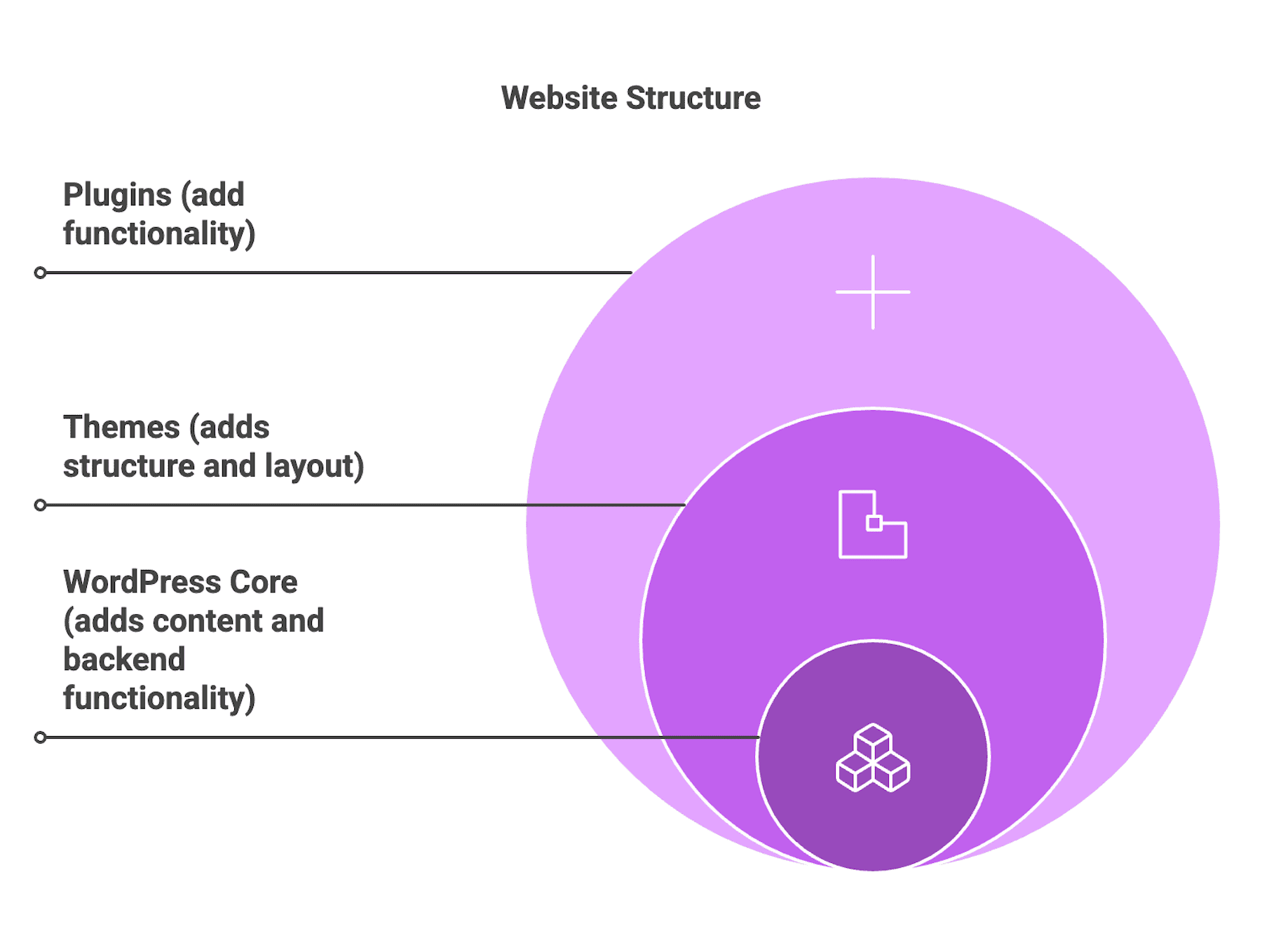
Themes in WordPress are like clothes for your website. They change how your site looks and feels. Themes can make your site colorful or simple. They help show your site’s style and personality. A theme has layouts, colors, and fonts. It is like a template for your site.
Using themes makes a website unique. Themes help show your message clearly. They make sites easy to navigate. Good themes make sites look professional. They help users find information quickly. Themes improve how people experience your site. They are important for branding. Themes can change how your site works. They make it better and faster. Themes help your site stand out.
Credit: www.elegantthemes.com
Structure Of A Theme
A WordPress theme is made of many files and folders. These files live in a main folder. The main folder has a special name. This name is the theme’s name. Inside, there are PHP files, CSS files, and images. Each file has a job. Some files help with layout. Some files help with style.
The most important file is style.css. It tells WordPress about the theme. Another important file is index.php. It shows the main page. Themes also have template files. These files make pages look nice.
Every theme has a functions.php file. It adds special features. These might be menus or widgets. A theme can have other files too. Some themes have a header.php file. It controls the top part of a page.
Customizing Themes
The Theme Options Panel helps you change your website’s look. It’s like a toolbox for your site. You can pick colors, fonts, and layouts. This makes your site unique. Many themes offer these options. Some have more choices than others. Explore the panel to see what you can do.
The Customizer is another way to change your theme. It lets you see changes live. You can edit your header, footer, and more. Want to change your logo? Do it here. Adjust your background? Easy. The Customizer is user-friendly. Even beginners can use it with ease.
Installing And Activating Themes
WordPress themes make your website look nice. To install a theme, first go to your WordPress dashboard. Find the Appearance tab and click on it. Next, choose Themes from the list. Now, click on the Add New button. You will see many themes to choose from. You can also search for a theme you like. Once you find it, click Install.
After you install a theme, you need to activate it. Go to the Themes section in your dashboard. You will see your new theme there. Click on the theme. Then, click the Activate button. Your theme is now live on your site. Check your site to see the new look. If you don’t like it, you can change it anytime.
Creating A Child Theme
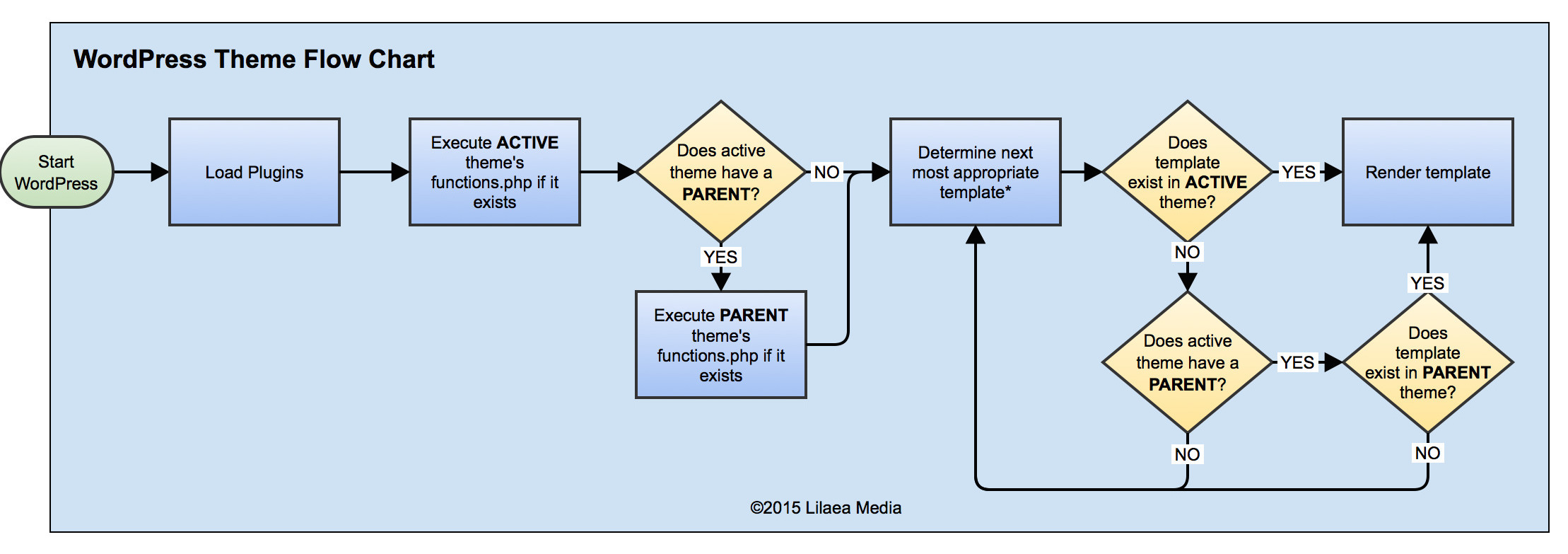
Child themes help keep your website safe. They protect changes during updates. You can easily change your site’s design. This way, the main theme stays untouched. Child themes are good for learning. They let you test new ideas safely. Making a child theme is simple.
Create a new folder in themes directory. Name it after the parent theme. Add a style.css file inside the folder. Write a simple code in style.css. Use it to show the parent theme. Add a functions.php file. Use it to load parent styles. Activate your child theme in WordPress. Your child theme is ready to use.
Theme Development Basics
Building a theme starts with a clear plan. First, decide the layout. Keep it simple and clean. Next, choose a color scheme. Colors should match your brand. Fonts matter too. Pick two or three easy-to-read fonts. Then, create a header and a footer. These are important parts of your theme.
A good text editor is a must. VS Code or Sublime Text are popular choices. A browser to test your theme is also key. Most developers use Chrome or Firefox. Both have great tools for developers. You also need a WordPress installation. This is for testing your theme. Finally, a version control system like Git helps track changes.
Best Practices For Themes
WordPress themes change the site’s look and feel without altering content. Users can switch themes to update design or layout easily. Best practices include choosing responsive themes and updating them regularly for security.
Responsive Design
Responsive design is very important. Themes should look good on all devices. Phones, tablets, and computers. This helps users have a good experience. If a theme is not responsive, users leave the site. This can hurt traffic.
Use flexible layouts. They adjust to different screen sizes. This keeps images and text clear. Also, test your theme on different devices. Make sure it works everywhere.
Seo Considerations
SEO is important for themes. It helps websites rank higher. Use clean code. Search engines can read it easily. Fast loading time is also key. Slow websites lose visitors.
Include alt tags for images. This helps search engines understand them. Use keywords in your theme’s code. This improves SEO. Don’t forget meta tags. They describe your site’s content.
Troubleshooting Theme Issues
Themes in WordPress control the look and feel of a site. They define layout, colors, and fonts. Understanding themes helps in resolving design issues effectively.
Common Problems
Many users face theme conflicts with plugins. This can break your site. Site loading can become slow. Broken layouts are also common. Pages may not display correctly. Widgets can disappear. Menus can shift locations. Errors may show in the dashboard. These issues are frustrating.
Solutions And Tips
Always update your themes. This fixes many problems. Check for plugin updates. They may solve conflicts. Deactivate plugins one by one. This finds the faulty plugin. Use a child theme for custom changes. It protects the original theme. Clear the cache often. This improves site speed. Check theme settings regularly. They may reset after updates. Use tools for error checking. They find hidden issues.
Resources And Support
Many people use WordPress. They share tips and tricks on community forums. These forums have answers to many questions. Users can ask for help. Others are happy to assist. It’s a friendly place to learn.
WordPress has official documentation. It is like a big guidebook. This guide helps users understand themes. It explains how to change and customize themes. Easy to read and follow. Users can find step-by-step instructions. This documentation is very helpful.
Credit: www.childthemeplugin.com
Frequently Asked Questions
How Does A WordPress Theme Work?
A WordPress theme determines your site’s design and layout. It controls visual aspects like colors, fonts, and styles. Themes can include templates and features, enhancing functionality. You can customize themes to align with your brand identity. Choose a theme that suits your site’s purpose and audience preferences.
What Happens When You Activate A Theme On WordPress?
Activating a theme on WordPress changes your site’s design and layout. It adjusts colors, fonts, and widgets. Customizations from the previous theme might be lost. New theme features become available for your site’s appearance. Always preview before activating to ensure it meets your requirements.
What Is The Difference Between A Theme And A Template In WordPress?
A theme in WordPress controls the overall design and style of your website. A template is a single page layout within the theme. Themes provide the framework, while templates define specific page structures. Both work together to create a cohesive site appearance.
Are WordPress Themes Worth It?
Yes, WordPress themes are worth it. They offer customization, improve design, and enhance user experience. Themes save time and provide professional layouts. They are SEO-friendly and regularly updated for security. Investing in a good theme boosts website performance and aesthetics.
Conclusion
Themes in WordPress make website design easy and flexible. They let you change appearance without altering content. You can choose from many free or premium themes. Each theme offers unique features and styles. Customization is key. It helps your website stand out.
Always ensure your theme is responsive. Mobile-friendly sites attract more visitors. Regular updates keep your theme secure and functional. A well-chosen theme enhances user experience. It improves your website’s performance and look. With a good theme, your site becomes more engaging.
Remember, a theme sets the tone for your site. Choose wisely for lasting impact.


