

Are you struggling to find the right way to sign into your WordPress blog? You’re not alone, and the good news is—it’s simpler than you think.
Whether you’re new to blogging or just need a quick refresher, this guide will walk you through every step so you can access your blog without hassle. Keep reading, and you’ll be managing your WordPress site like a pro in no time.
Credit: www.wpbeginner.com
Locate Your WordPress Login Page
Finding your WordPress login page is the first step to managing your blog. Without it, you cannot access the dashboard or make changes. The login page is usually simple to find but may vary depending on your setup.
This section explains easy ways to locate your WordPress login page. Knowing the correct URL saves time and avoids confusion.
Common Login Url Patterns
Most WordPress sites use standard URLs for login. Try adding /wp-login.php at the end of your website address. For example, www.yoursite.com/wp-login.php.
Another common URL is /wp-admin. It also leads to the login page if you are not signed in. For example, www.yoursite.com/wp-admin.
Try these URLs first before looking for custom login links. Many hosts keep these default URLs active.
Using The Admin Toolbar
If you are already signed in on another device, use the Admin Toolbar to find the login page. Look for the site name or WordPress logo on the top left.
Clicking these usually gives a menu with a link to the dashboard and logout. The dashboard link takes you to the admin area after login.
This method helps when you want to switch devices or browsers without searching for the URL again.
Credit: www.hostinger.com
Enter Your Credentials
Entering your credentials is the key step to access your WordPress blog. This process keeps your site safe and ensures only you can make changes. You must provide the correct username or email and a password.
Careful attention to these details makes signing in quick and smooth. Let’s explore how to use your username or email and create a strong password.
Username Vs Email Address
You can use either your username or email address to sign in. Usernames are unique names you chose when creating your account. Emails are the addresses linked to your WordPress account.
Using your email might be easier to remember. Usernames are shorter and sometimes quicker to type. Both work the same in the login box. Choose whichever feels best.
Creating A Strong Password
Your password protects your blog from hackers and unwanted access. Use a mix of letters, numbers, and symbols. Avoid simple words or easy-to-guess combinations.
Strong passwords are usually at least eight characters long. Change your password regularly for better security. Keep it private and never share it with others.
Troubleshoot Login Issues
Login problems can stop you from accessing your WordPress blog. Troubleshooting these issues helps you get back inside quickly. Simple fixes often solve the problem without needing expert help. Follow these steps to fix common login troubles and regain control.
Resetting Your Password
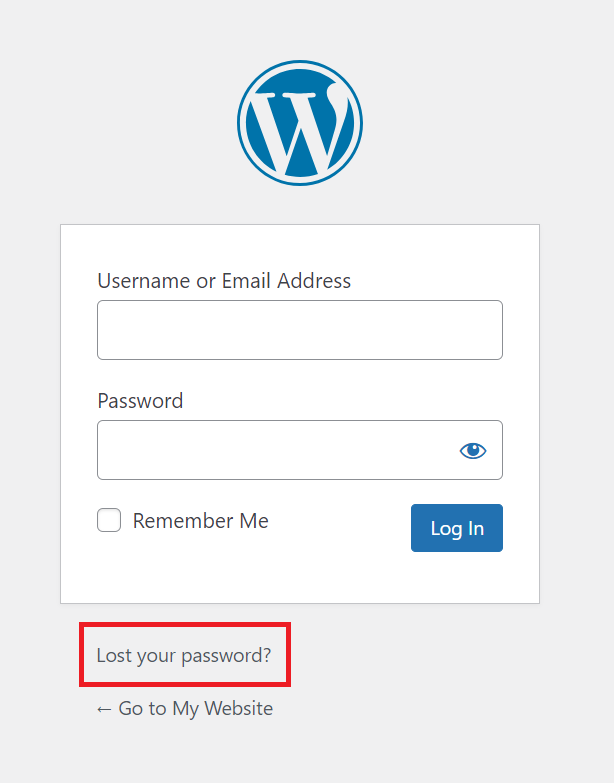
Start by resetting your password. Click the “Lost your password?” link on the login page. Enter your username or email address. Check your email for a reset link. Follow the link to create a new password. Choose a strong, easy-to-remember password. This step solves most login problems.
Clearing Browser Cache
Your browser saves site data to load pages faster. Sometimes, this cache causes login issues. Clear your browser cache and cookies to fix this. Open browser settings, find the clear browsing data option. Select cache and cookies, then clear them. Restart the browser and try logging in again.
Checking User Roles
WordPress assigns roles that control access levels. If your role is incorrect, you may not log in properly. Access your database or ask your site admin to check your user role. Ensure you have the right permissions to log in and edit the site. Fixing user roles can restore your access.
Enable Faster Access
Enabling faster access to your WordPress blog saves time and effort. It helps you log in quickly without repeating the process every time. Small steps can make a big difference in your daily routine.
These simple methods improve your sign-in experience. They keep your account safe and reduce hassle. Try these tips to speed up your WordPress login.
Remember Me Option
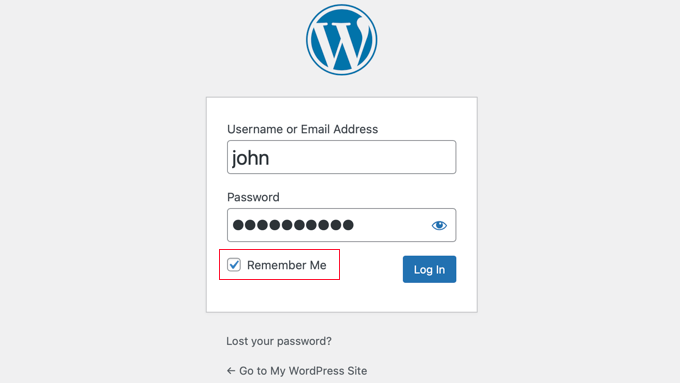
The “Remember Me” box appears on the login page. Checking it keeps you signed in for days. This option stores a cookie in your browser.
It lets WordPress recognize you next time. Avoids typing username and password again. Use it only on personal or trusted devices.
Using Password Managers
Password managers save your login details securely. They fill in your username and password automatically. This way, you don’t need to memorize or type them.
Many browsers have built-in password managers. Or use apps like LastPass or 1Password. These tools protect your data and speed up login.
Two-factor Authentication Setup
Two-factor authentication adds an extra security step. It requires a code after entering your password. Codes come from an app or text message.
This method keeps your blog safe from hackers. It also lets you log in quickly once set up. Use apps like Google Authenticator for easy access.
Secure Your Login Page
Securing your WordPress login page is a key step to protect your blog from hackers. Attackers often try to break in by guessing passwords. A strong defense helps keep your site safe and your data private.
Simple security steps reduce risks and prevent unauthorized access. These measures make it harder for bad actors to enter your site. Let’s explore some practical ways to secure your login page.
Limit Login Attempts
Limiting login attempts stops hackers from guessing passwords. After several failed tries, users get locked out temporarily. This blocks repeated attacks and protects your site from brute force hacking.
You can use plugins to set limits on login attempts. These tools track failed logins and block suspicious users. This simple step adds a strong layer of security to your blog.
Use Ssl Certificates
SSL certificates encrypt data sent between users and your site. This keeps login details safe from interception by third parties. It also shows a padlock icon, building trust with visitors.
Most web hosts offer free SSL certificates. Installing one on your site is easy and important. It helps protect your login information during transmission.
Change Default Login Url
The default WordPress login URL is easy to guess. Changing it makes it harder for attackers to find your login page. This reduces automated attacks and spam login attempts.
Plugins can help you create a custom login URL. Choose a unique and hard-to-guess address. This simple change improves your blog’s security significantly.

Credit: wordpress.com
Frequently Asked Questions
How Do I Find My WordPress Login Page?
To find your WordPress login page, add “/wp-login. php” or “/wp-admin” to your website URL. For example, www. yoursite. com/wp-login. php. This directs you to the login screen where you can enter your credentials to access your blog dashboard.
What If I Forget My WordPress Password?
Click the “Lost your password? ” Link on the login page. Enter your username or email to receive a password reset link. Follow the email instructions to create a new password and regain access to your WordPress blog.
Can I Sign Into WordPress Using Social Media Accounts?
By default, WordPress doesn’t support social media logins. However, you can install plugins like “Social Login” to enable signing in with Facebook, Google, or Twitter accounts. This simplifies login but requires additional setup in your WordPress dashboard.
Why Am I Redirected Away From The WordPress Login Page?
Redirection issues often occur due to plugin conflicts or incorrect URL settings. Clear your browser cache and cookies. Disable plugins via FTP if needed. Verify your site URL in the WordPress settings to fix login redirection problems.
Conclusion
Signing into your WordPress blog is simple and quick. Just remember your username and password. Use the correct web address to reach the login page. Keep your login details safe to protect your site. If you forget your password, use the reset option.
Regularly logging in helps you keep your blog updated. Stay confident and enjoy sharing your ideas online.


