
Are you feeling stuck with your current web hosting provider? Maybe you’re facing frequent downtime or poor customer service.
Whatever the reason, moving your website domain hosting might be the solution you need. Imagine having a more reliable, faster, and efficient hosting service. It can transform your online presence and boost your site’s performance. You might think the process is complex or daunting, but it’s simpler than you might expect.
By following the right steps, you can ensure a seamless transition without compromising your website’s functionality. Stick around, and we’ll guide you through the entire process, ensuring that you have all the information you need to make a smooth switch. Your dream hosting solution is just a few steps away.

Credit: www.reddit.com
Choosing A New Hosting Provider
Think about the space your site needs. Do you need email accounts? How many? Consider the traffic your site gets. Is it heavy or light? Decide if you need extra features. Like backups or security.
Look at different packages. Check the storage offered. See the bandwidth limits. Compare the prices. Are they reasonable? Look for special features. Like free domain names or SSL certificates. Choose a package that fits your needs.
Customer support is very important. Make sure it is available 24/7. Check if they offer live chat. Can you call them? Look for positive reviews. Good support helps you solve problems quickly.
Preparing For Domain Transfer
Moving your website domain hosting involves several steps. First, unlock the domain and obtain the authorization code. Then, update DNS settings and initiate the transfer with your new hosting provider.
Backing Up Website Data
Always keep a backup of your website. It is very important. Backing up keeps your data safe. Use a trusted backup tool. Save the backup on your computer. Also, save it on a cloud service. This way, your data is always safe.
Checking Domain Eligibility
Not all domains are ready for transfer. Check if your domain is eligible for transfer. The domain must be at least 60 days old. Make sure it is not locked. Also, check if there are no outstanding fees.
Unlocking Your Domain
Domains often have a lock. This lock keeps them safe. You need to unlock your domain to move it. Go to your domain settings. Find the lock option. Turn it off. Now your domain is ready to move.
Initiating Domain Transfer
To transfer your domain, you need an authorization code. This code is like a key. It unlocks the transfer process. You get it from your current registrar. Log into your account. Look for the domain settings. Find the section labeled “Transfer” or “Auth Code”. Copy the code. Keep it safe. You will need it soon.
With your authorization code ready, start the transfer. Go to the new registrar’s website. Look for the “Transfer Domain” option. Enter your domain name. Paste the authorization code. Follow the steps. Submit the request. Pay any fees if needed. Wait for confirmation. The new registrar will handle most of the work.
After submission, watch the transfer progress. Log into the new registrar account. Check the transfer status regularly. It might take a few days. Keep an eye on your email. Look for updates. If issues arise, contact support. They will help you solve problems. Once complete, your domain is now with the new host. Celebrate your successful transfer!
Credit: elementor.com
Configuring New Hosting Setup
First, gather all your website files. These include HTML, CSS, and images. Use an FTP client to upload them. FileZilla is a popular choice. Connect to your new hosting account. Enter your server’s IP address, username, and password. Drag and drop your files into the server’s directory. Ensure all files are in the correct folders.
Databases store your website’s data. Use phpMyAdmin or a similar tool. Create a new database on your hosting account. Note down the database name, username, and password. Import your old database into the new one. Use the import function in phpMyAdmin. Check for errors after importing.
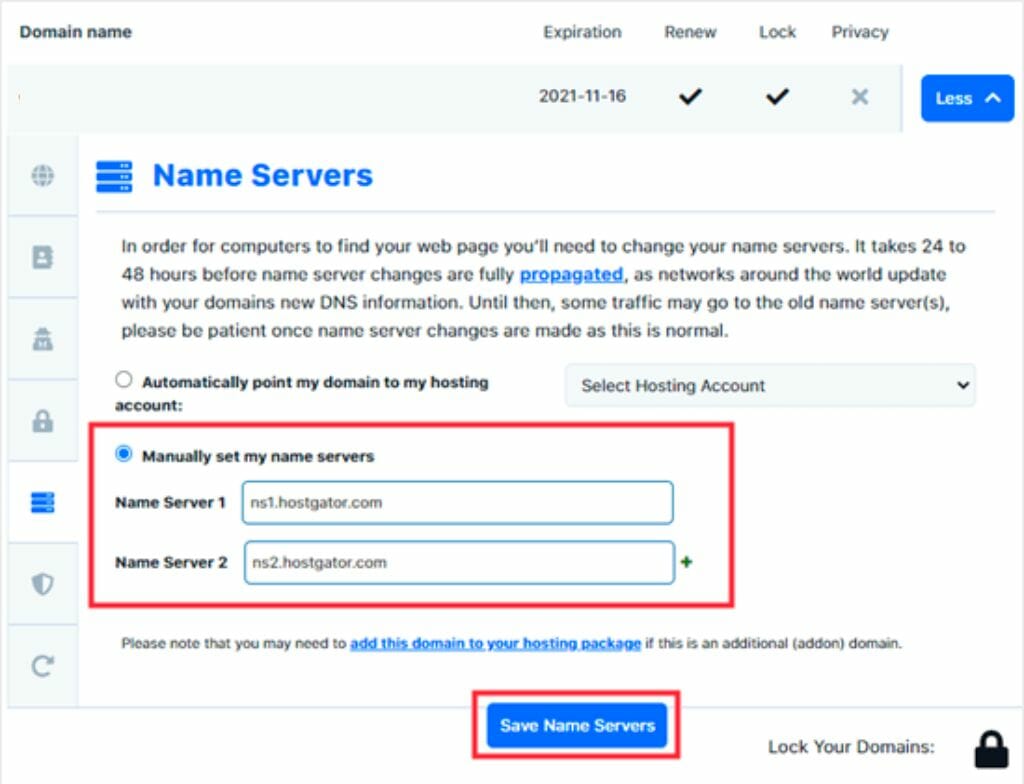
DNS settings link your domain to your new server. Log in to your domain registrar. Find the DNS settings option. Change the nameservers to those provided by your new host. Save the changes. DNS changes can take up to 48 hours to update. Check your website after this period to ensure it’s working.
Testing And Troubleshooting
Check if pages load properly. Click on links to see if they work. Ensure images display correctly. Test forms to confirm they send information.
Look for broken links on your site. Identify slow-loading pages. Fix errors in the code. Check for missing content.
Verify email settings in the control panel. Send test emails to check delivery. Ensure spam filters do not block emails. Confirm email forwarding works well.
Finalizing The Transition
Verifying Domain Transfer is crucial. Ensure the domain points to the new host. Check the DNS settings. They must be correct. It can take 24 to 48 hours. This is called propagation.
Updating SSL Certificates is essential. SSL keeps your site secure. Get a new certificate from your host. Install it correctly. This protects data on your website. Visitors will see a padlock icon.
Notifying Users of Changes is polite. Send an email to your users. Let them know about the move. Explain any new features. Tell them if there will be downtime. This builds trust and keeps them informed.
Credit: diggitymarketing.com
Frequently Asked Questions
How Do I Move My Website To Another Hosting?
To move your website, first back up all files and databases. Transfer them to the new hosting provider. Update DNS settings to point to the new server. Test the website on the new host to ensure everything works. Finally, cancel the old hosting service.
Can I Move My Domain To A Different Host?
Yes, you can move your domain to a different host. First, unlock your domain and obtain the transfer code. Then, provide the code to your new host. The transfer process typically takes a few days. Ensure your domain registration details are up-to-date for a smooth transfer.
How Difficult Is It To Transfer A Domain?
Transferring a domain is generally straightforward. Unlock the domain and get the authorization code from your current registrar. Initiate the transfer with the new registrar. Some registrars may take a few days to complete the process. Ensure domain privacy settings are correct to avoid delays.
How Do I Transfer A Domain To A New Provider?
Start by unlocking your domain at the current provider. Obtain the transfer authorization code. Initiate the transfer at the new provider by entering the code. Confirm the transfer via email. Wait for the domain to transfer, which usually takes up to 7 days.
Conclusion
Moving your website domain hosting can seem complex. But, it’s manageable with careful planning. Start by choosing a new host. Ensure it meets your needs. Backup your site data. This step is crucial. Transfer your domain registration next. Follow the new host’s instructions closely.
Test your website thoroughly after the move. Check links, images, and functionality. Troubleshoot any issues promptly. Keep your visitors informed throughout the process. Good communication builds trust. Remember, patience is key. With these steps, you can move your hosting smoothly.
Enjoy your new hosting experience!


