
Have you ever found yourself staring at your computer screen, wondering who exactly is hosting your website? If your mind is filled with questions like “Who is my web host?”
Or “How do I even find out? “, you’re not alone. Knowing your web host is crucial for managing your site efficiently, troubleshooting issues, and ensuring your online presence is secure. But don’t worry, you’re about to uncover the mystery behind your web host.
This guide will walk you through simple steps to identify your web hosting provider, giving you the clarity and control you need. Keep reading to empower yourself with essential knowledge that could transform how you manage your website.
Understanding Web Hosting
Web hosting is like a house for websites. It gives them a place to stay online. Web hosts are companies that rent space on their servers. This helps websites to be seen by people everywhere. Think of them as the landlord of your website. They take care of your site’s needs, such as storage and data.
Finding out who your web host is can be easy. Check your billing statement for hosting details. Hosting companies send emails about payments and services. Look for emails from them in your inbox. Sometimes, the domain registrar is also the host. Visit your domain settings to find hosting information.
Checking Your Website Details
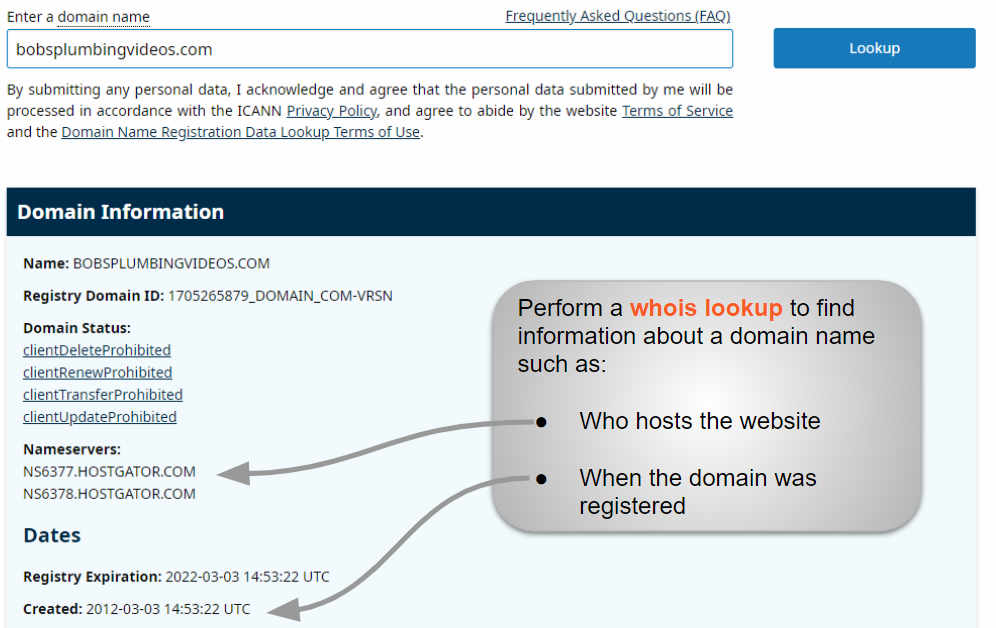
Sometimes it’s hard to know who hosts your website. Start by checking your website details. You can do this by looking at the domain information. Use a tool like WHOIS. This tool shows the name of your web host. It also shows other important details. You might need to visit a WHOIS website. Enter your domain name in the search bar. The results will tell you the web host name.
Another way is to check your email records. Look for emails from the hosting company. They might have sent you emails when you signed up. These emails often contain the host’s name. Also, check your billing records. The name of your web host should be there. This helps you confirm the information.
Using Online Tools
Domain lookup services can help find your web host. They show who owns a domain. Some popular services are Whois.net and ICANN Lookup. Enter your domain name in the search box. The service will display the hosting details. You will see the host’s name, address, and more. It’s a quick way to identify your web host.
Web hosting checker tools are handy. They make finding your web host easy. Use tools like Hosting Checker or Site24x7. Enter your website URL in the tool. It will show the web host name. These tools are often free. They provide fast results. A simple way to learn who hosts your site.

Credit: hostingchecker.com
Accessing Your Domain Registrar
Find your domain registrar to know your web host. Visit Whois.net or ICANN websites. Enter your domain name. Click search to get details. Look for “Registrar” in the results. This shows where you bought your domain. Check the email from the domain purchase. It often has registrar details. You can also visit your domain registrar’s site. Log in to see all domain info. Look for the hosting section. This may show your web host. Knowing your registrar helps you manage your website. It gives you control over domain settings. You can change your web host if needed. Regular checks ensure your site runs smoothly.
Reviewing Billing Information
Check your billing statements to find your web host. Many people get bills from their web host. Look for any email or paper bill related to your website. These bills often have the host’s name or logo. If you use a payment service, log into that account. Check the transaction history for web hosting payments. This will show you who you pay for hosting.
Contact your domain provider. They might have info about your host. Sometimes, the domain and web host are the same. They can help you find the right information. Remember, all this info is important. It helps you keep track of your website.
Consulting Website Administration
Find out who manages your website. Contact the website administrator. They have access to hosting details. Administrators know about the web hosting provider. They can share this information with you. Ask them directly. Be clear about what you need. This helps in getting the right answers.
Check your email records. Emails from the hosting company may help. Look for any hosting-related emails. These emails might contain important details. Ask your website team for more help. They might know who hosts your site. This approach saves time and effort.
Contacting Customer Support
Customer support can help find your web host. Most web hosts have a support team. You can contact them through email or phone. They usually have a help center on their website. Check the website for contact details. You might find a support chat option. It’s often quick and easy to use. Write down any important details given to you. This will help if you need support again.
Keep your account information handy. Support might ask for your account number. This helps them find your details fast. Always ask for a support ticket number. It helps track your issue later. This way, you can follow up easily. Staying organized can make things smoother.
Credit: www.boldgrid.com
Common Web Hosting Companies
Many websites are hosted by popular companies. GoDaddy is a big name. They host lots of sites. Bluehost is another choice. Known for its good service. HostGator offers reliable plans. Many people trust them. SiteGround has strong support. Users often praise it. DreamHost gives good deals.
InMotion Hosting is popular too. Their speeds are fast. A2 Hosting is known for speed. They have great uptime. iPage provides budget options. Great for small sites. Namecheap is famous for domains. They host many sites too. Hostinger is low-cost. Many beginners use it.
Amazon Web Services offers cloud hosting. Big companies use it. Google Cloud is powerful. Offers many features. Microsoft Azure has strong tools. Used by many businesses. These are just a few. Many more host websites.
Maintaining Hosting Records
Keep all your hosting records safe and organized. Store your login details in a secure place. Use a password manager to remember them. It’s easier than trying to remember them yourself. Make a list of important details. This includes IP addresses and server details. Save the support contact for your host. You might need it in the future.
Check your email regularly. Your hosting provider may send updates. These could be about service changes or new features. Keep a copy of these emails. They can be useful later. Stay informed about your web hosting account. Always know where your records are.
Credit: whitepeak.io
Frequently Asked Questions
How Do I Know Whois Hosting My Website?
Check your website’s WHOIS information using tools like Whois. net or ICANN WHOIS. Enter your domain name. Find hosting details in the registrar section. This provides information on the company hosting your website. You may also contact your domain registrar for further assistance.
What Is Your Website Host?
Our website is hosted on Bluehost. They offer reliable, fast, and secure hosting services. With 24/7 customer support, Bluehost ensures optimal uptime and performance for your site. Their hosting plans are affordable and scalable, making them a popular choice for businesses and bloggers alike.
How Can I Find My Host?
Check your domain’s DNS settings to find your host. Use online tools like WHOIS to identify hosting providers. Contact your website administrator or check emails for hosting details. Review billing statements or invoices for hosting information.
How Do I Find Out Who Owns My Website Domain?
Use WHOIS lookup tools online to find domain ownership details. Enter your domain name to access the registrant’s information. Alternatively, check with your domain registrar for ownership records. Ensure your domain registration details are updated to reflect accurate information.
Conclusion
Understanding your web host is crucial. It impacts your site’s performance. Easy steps can help find it. Check your hosting plan details. Use online tools for verification. Contact your domain provider for assistance. Stay informed about your hosting service. This knowledge aids in troubleshooting.
Ensures smooth website operations. Avoid delays due to hosting issues. Keep your site running efficiently. Regularly review your hosting needs. Make informed decisions for upgrades. Choose a reliable host for peace of mind. Protects your site and user experience. A well-hosted site thrives online.


