
Are you a web designer or developer who has recently started offering web hosting services to your clients? If so, you might find yourself puzzled about how to invoice them correctly.
Crafting an invoice for web hosting services can be tricky, especially if you’re new to it. But don’t worry—understanding the process is simpler than you might think, and it can significantly benefit your business. Imagine having a seamless, professional way to bill your clients that not only ensures timely payments but also enhances your credibility.
A well-structured invoice not only communicates professionalism but also builds trust with your clients, ensuring they return for more services. In this guide, you’ll discover straightforward steps and essential tips to create an effective invoice for your web hosting services. By the end of this article, you’ll feel confident and ready to send out your invoices, leaving no room for confusion or mistakes. Let’s dive in and make invoicing an easy and rewarding task for your business!

Credit: www.hostafrica.com
Choosing An Invoicing Method
Creating invoices by hand is a traditional method. This option uses paper or simple software. Accuracy is key in manual invoicing. Every item and amount must be clear. Templates can help create invoices faster. Double-check for errors. Manual invoicing is easy but takes time. It may suit small businesses or freelancers. Ensure invoices are sent timely.
Automated tools simplify invoicing. These tools reduce errors and save time. Software handles calculations and tracks payments. Invoice templates are ready to use. Automated tools send invoices promptly. They remind clients about payments due. Small businesses can benefit from these tools. Choose a tool that fits your needs. Ensure security and reliability.
Credit: www.paymoapp.com
Essential Invoice Components
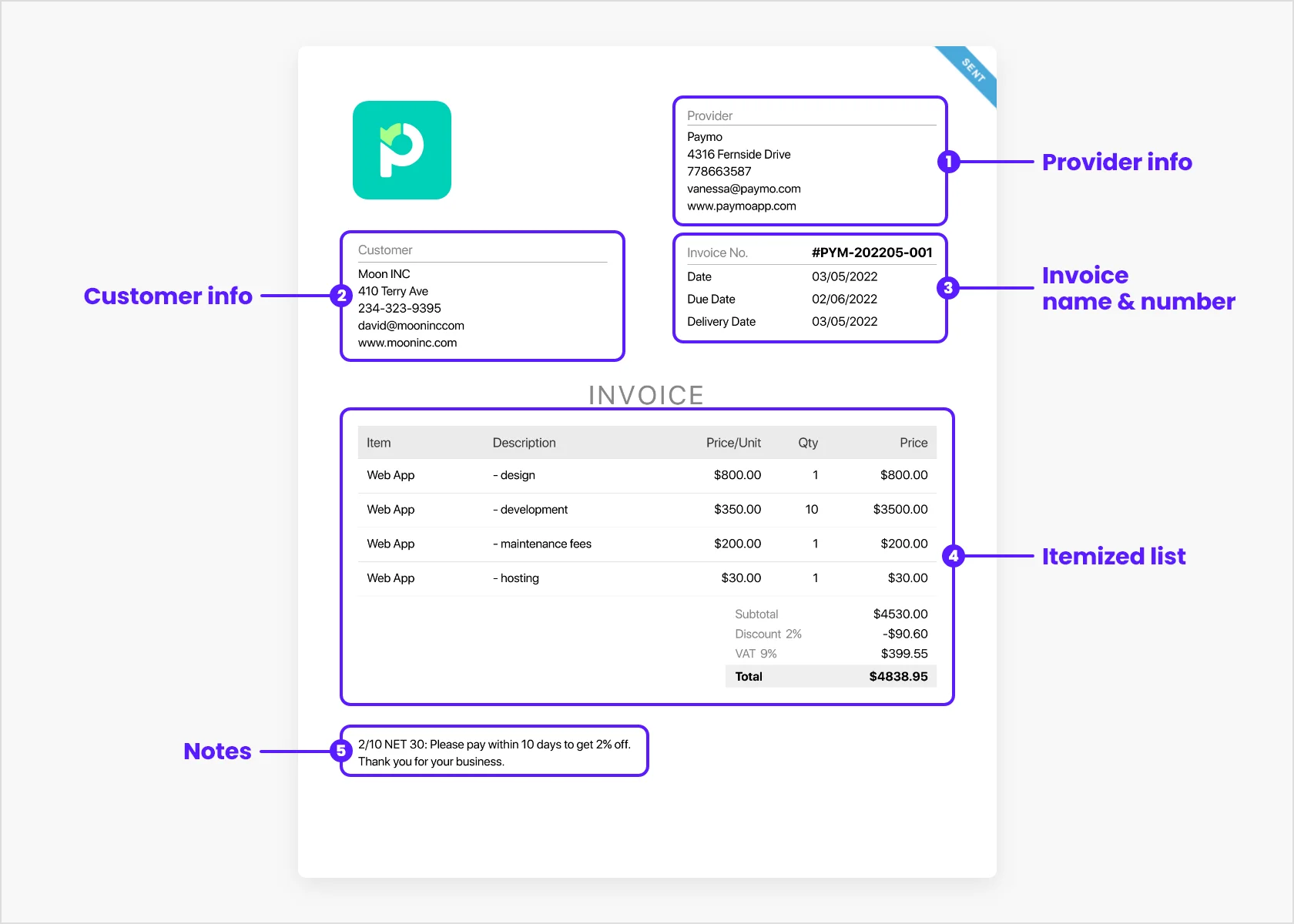
Every invoice must have contact information. Include your name, address, and phone number. Also, add your email for quick reach. The client’s details are important too. Write their name, address, and contact info. This helps in easy communication. It makes the invoice look professional.
An invoice needs a unique number. This number helps track payments. Write the invoice date clearly. It shows when you sent it. This is crucial for records. Both the number and date are essential parts.
List all services provided. Be clear and detailed. Each service should have a cost. This helps the client understand charges. Use a table for neatness. It makes reading easier and avoids confusion.
| Service | Cost |
|---|---|
| Web Hosting | $100 |
| Domain Setup | $20 |
Clearly state payment terms. Mention accepted payment methods. Add the due date for payment. It’s important to avoid delays. This keeps the process smooth. Clients appreciate clarity and precision.
Setting Pricing For Web Hosting
Pricing depends on many factors. Market rates can help guide you. Check what others charge. Look at different web hosting plans. Compare their features. See what is offered. Use this info to set your rates. Be fair but competitive. This helps attract clients. They feel they get value.
Each client has unique needs. Create custom packages to fit them. Start with basic services. Add more as needed. Storage and bandwidth are key. Offer choices. Provide support options too. This can include 24/7 help. Make each package clear. Clients like knowing what they get. It builds trust.
Including Taxes And Fees
It’s important to know the tax rules in your area. Some places have special taxes for services. Check if your state or country has specific tax rates for web hosting. Always add this tax to the invoice. This keeps everything clear and correct. Clients should see what they pay for. Nobody likes surprises!
Sometimes there are extra fees. These can include setup fees or maintenance costs. Always state these fees clearly. Write them on the invoice. This helps clients understand their total cost. Transparency builds trust. A clear invoice means fewer questions later.
Payment Methods And Options
Creating an invoice for web hosting involves listing services, costs, and payment options clearly. Include your business name, client’s details, and due date. Ensure easy payment by offering various methods like bank transfer, credit card, or online payment platforms.
Digital Payment Platforms
Many businesses use digital payment platforms for invoices. PayPal is popular for easy payments. Stripe lets clients use credit cards. Both offer security and are fast. Clients like these options. They are convenient and save time. No need to visit banks. Instant payments make tracking easy.
Traditional Payment Methods
Some clients prefer traditional methods. Checks are common for many. Bank transfers are secure. These methods need more time. They are reliable for big payments. Some clients use cash. Always provide a receipt. Safety is important. Keep records for all payments.
Common Invoicing Mistakes
Clients expect clear charges. Always check your pricing details. Mistakes can lead to anger. Review every line of your invoice. Double-check your calculations. Ensure the services match the agreed price. Overcharging can hurt your reputation. A clear invoice earns trust. Trust brings repeat business.
Clear communication prevents confusion. Use simple words. Clients need to understand the invoice. Explain every charge. Include contact details for questions. Respond quickly to client queries. Quick replies build positive relationships. Positive relationships lead to loyal clients.
Follow-up On Unpaid Invoices
Polite reminders help clients remember unpaid bills. Send a friendly email first. Include the invoice number and amount. Be clear about the due date. A soft tone works best. Sometimes clients just forget. A gentle nudge can help them pay.
Listen carefully to the client’s concerns. Stay calm and polite. Understand the issue from their side. Offer solutions that work for both. Maybe a payment plan or discount. Communicate clearly and resolve quickly. This builds trust and keeps clients happy.

Credit: www.waveapps.com
Frequently Asked Questions
How Do I Issue An Invoice To A Client?
Create an invoice with your business details, client information, and itemized services. Include the total amount due, payment terms, and due date. Use invoicing software for professional templates. Email the invoice directly to the client, ensuring all details are accurate for prompt payment.
How Do I Create An Invoice For A Client?
To create an invoice, include your business details, client’s information, and itemized list of services or products. Add payment terms, invoice number, and due date. Use invoicing software or templates for consistency. Verify accuracy before sending. Ensure the format is clear and professional.
How Do I Send An Invoice To My Client?
To send an invoice, use invoicing software or a template. Include client details, services, and payment terms. Save it as a PDF and email it directly to the client. Ensure clarity and accuracy for prompt payment.
How Can I Bill My Client Online?
Use online invoicing software like PayPal, FreshBooks, or QuickBooks. Create an invoice with client details, services, and amount. Send it via email or direct link. These platforms allow easy tracking and secure payments. Ensure your client receives and understands the invoice for prompt payment.
Conclusion
Sending invoices for web hosting can be straightforward. Understand your services clearly. Use simple invoicing tools to make the process easier. Ensure all details are accurate. Include service dates, costs, and payment options. Transparency builds trust with clients. Timely invoicing helps maintain cash flow.
Regular communication with clients is important. It clarifies expectations and avoids misunderstandings. Keep records of all transactions for future reference. Being organized saves time and effort. A well-managed invoicing system contributes to business success. Follow these steps for smooth client billing.


