
Are you trying to uncover the mystery of who hosts your website? Maybe you’ve lost track of your web host amidst the chaos of digital data, or perhaps you’re planning to switch to a better service.
Whatever your reason, knowing who holds the keys to your site is crucial for effective management and optimal performance. But don’t worry, finding this information isn’t as tricky as it seems. In this guide, you’ll discover simple steps to identify your web host, empowering you to make informed decisions for your online presence.
Let’s dive in and demystify the process together!

Credit: www.linkedin.com
Check Domain Registration
Want to find out who hosts your website? Use a WHOIS lookup tool. These tools show details about your website’s domain. You can see the registrar’s name and contact info. It’s like a phone book for websites. These tools are easy to find online. Many are free to use. Just type in your domain name. Then hit the search button.
After using a WHOIS tool, you get a report. This report tells you the registrar details. Look for the section with the registrar’s name. You might also find their email and phone number. This info helps you contact them if needed. Keep this information safe. It’s important for your website’s security.
Explore Hosting Provider Options
Shared hosting means sharing a server with others. It is a budget-friendly option. Your website may load slower during busy times. This is because resources are shared. It’s great for small websites or blogs. Many people start with shared hosting. It is easy to set up and manage.
Dedicated hosting gives you a whole server. It is more expensive but offers more control. Your website can handle more traffic. It is a good choice for big websites or businesses. You can customize the server as you want. This option provides better security too.
Cloud hosting uses many servers. It helps your website stay online. Even if one server fails, others keep running. This option is scalable. You can add more resources as needed. It is good for growing websites. Cloud hosting offers flexibility and reliability.
Analyze Dns Records
Accessing DNS Information is key to finding your web host. Visit your domain registrar’s website. Use their tools to view DNS settings. Look for nameservers. Nameservers point to your web host. They are like an address book for websites.
Also, consider online DNS lookup tools. These tools provide DNS information. Type your domain name. See all DNS records. Find the nameservers. Note them down. Nameservers reveal the web host details.
Understanding DNS Components helps in the process. DNS stands for Domain Name System. It translates domain names to IP addresses. Several components exist. Nameservers are just one. Look for A records too. They link domain names to IP addresses. Also, observe CNAME records. They are aliases for your domain. Each component plays a role. Understanding them aids in finding your web host.
Utilize Online Tools
Many online tools help find your website’s host. Tools like WhoIsHostingThis and HostAdvice are popular. They are easy to use and quick. Just enter your website’s URL, and the tool shows your host. These tools are free and helpful for beginners.
Tool results may show names like Bluehost or GoDaddy. These names are your web host companies. Check the tool’s results carefully. Sometimes, the results might show a different name. This name could be a proxy or a third-party service. Understanding the results helps you manage your site better.
Contacting Domain Support
Discovering your web host is simple. Start by checking your domain registrar’s control panel for hosting details. Alternatively, use online tools like WHOIS to identify the hosting provider quickly.
Reaching Out To Registrar
First, find your domain registrar. Check the WHOIS database. This helps you find who registered your domain. Once you know, visit their website. Look for the contact details. You can email or call them. They might have live chat support too. Ask them about your web host. Be clear and polite. They usually help fast. Keep your registration details handy. This makes the process smoother.
Getting Support From Hosting Provider
Locate your hosting provider’s website. Search for their support page. You can find a phone number or email there. Sometimes, they offer live chat help. Send them a message. Ask them about your account details. Provide your domain name. They can verify your information quickly. Get ready to share your account ID. This helps them find your details. Be patient and polite. Hosting providers are usually helpful.
Review Website Backend
Access your website’s control panel. It is often called cPanel. You need a username and password. These are given by your web host. Look for a section named Hosting Details. This section shows important information.
You might find the IP address of your host. The host’s name could be there too. Sometimes, there’s a support contact. This is useful if you need help.
Check for a label like “Account Information”. It often lists the web host. Look for a tab that says Server Information. The server name is usually there.
It’s important to note the provider’s name. This helps in case of issues. Ensure you save this information.
Consult Documentation
Look through your hosting agreements. These are the papers from when you got your website. They often have details about your web host. Find the name of the company that is hosting your website. Usually, it’s on the first page. This is important to know. It helps you manage your site better. Don’t forget to check the terms and conditions. Sometimes, they have extra details.
Go back to your purchase records. These records show what you bought. They may have the name of your web host. Look for emails from the time you bought your hosting. These emails often have important details. They can help you find your web host. Keep these records safe. They are useful for future reference.
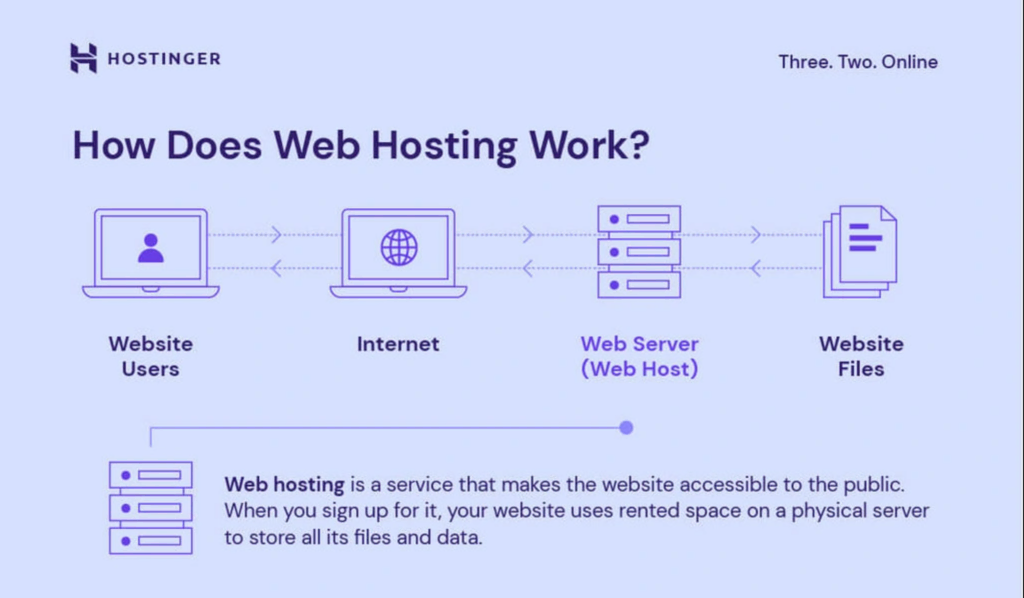
Credit: www.hostinger.com
Credit: whitepeak.io
Frequently Asked Questions
How To Find Out The Web Host Of A Website?
Use online tools like WhoIsHostingThis or HostAdvice to identify a website’s hosting provider. Simply enter the website URL, and the tool reveals the hosting details. Alternatively, check the website’s DNS records for hosting information using services like MXToolbox or DNSstuff.
What Is Your Website Host?
Our website is hosted by Bluehost. They offer reliable, fast, and secure hosting services, ensuring optimal performance.
How Can I Find My Host?
To find your host, check your web hosting account information or contact your hosting provider for details. Use online tools like WHOIS to identify your website’s host.
How Do I Know The Web Server Of A Website?
Use online tools like “Whois” or “Netcraft” to identify the web server of a website. Check HTTP headers via browser developer tools for server details.
Conclusion
Finding your website’s host is easier than it seems. Start with simple tools online. Check your domain registrar details. Contact your website developer for help. Look into site settings for hosting info. Many hosting services offer support. Ask them directly if unsure.
Keep your hosting details safe. This prevents future confusion. Understand your hosting needs clearly. Choose the right plan for your website’s growth. Regular checks help manage your site better. Stay informed and secure your site’s success. Hosting knowledge builds confidence in managing your website.


