
Are you scratching your head, trying to figure out who your web host is? It can feel like a mystery wrapped in a riddle, especially if you’re new to managing a website.
But don’t worry, you’re not alone. Identifying your web host is crucial for making informed decisions about your site’s performance, security, and potential growth. Imagine having control and clarity over your website’s future. Sounds empowering, right? Stick around, because you’ll discover simple, effective ways to uncover the identity of your web host.
With this knowledge, you’ll be better equipped to optimize your site and possibly save money. Ready to dive in? Let’s unravel this mystery together!
What Is A Web Host
A web host is like a house for your website. It keeps your website on the internet. This lets people visit your site anytime. The web host saves your site’s files on its computers. These computers are called servers.
Web hosting helps your site stay online. It keeps your site safe and fast. If too many people visit at once, a good host helps your site stay up. It also offers support if something goes wrong. This makes web hosting very important.
| Type | Description |
|---|---|
| Shared Hosting | Many sites share one server. It is cheap and simple. |
| VPS Hosting | Part of a server just for you. More space and speed. |
| Dedicated Hosting | Whole server for your site. Very fast and secure. |
| Cloud Hosting | Uses many servers. Good for big sites. |
Credit: www.boldgrid.com
Common Reasons To Identify Your Web Host
Websites can have problems sometimes. Pages may load slowly or not at all. Knowing your web host helps fix these issues. You can contact support. They will help solve technical problems. This ensures your site runs smoothly.
Changing web hosts is common. You need your current host’s details. This helps in transferring data. You can move files easily. This makes the process simple and efficient. A smooth move keeps your site online.
Hosting services need renewal. It is important to know who hosts your site. You can check billing details. This helps in planning and budgeting. No surprise fees. Stay informed about your service costs.
Checking Domain Registration Details
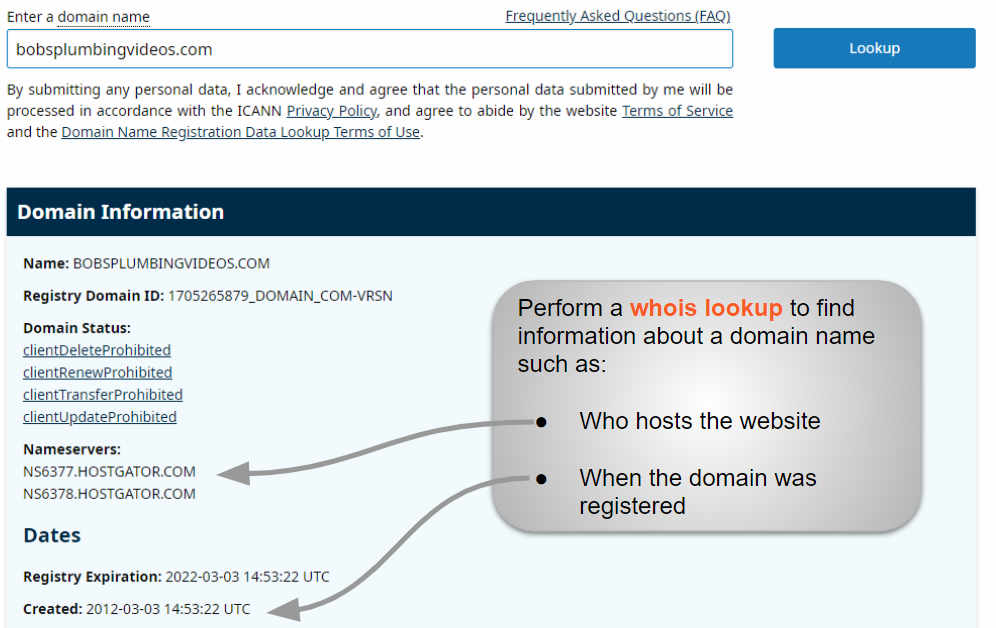
WHOIS lookup tools help find web host details. They show who owns a domain. These tools are simple to use. Type your domain name in the search box. Press the search button. Results show data about the domain.
They show the registrar’s name. Also, the contact details. You can find the creation and expiration dates. This is useful for managing your domain.
Understanding WHOIS data can be fun. The registrar is often the host. Look for the nameserver details. They can hint at the hosting company. Also, check the technical contact. This might be your host.
Knowing how to read WHOIS data helps. It helps in finding the right information. It’s like solving a puzzle.
Credit: whitepeak.io
Exploring Web Hosting Control Panel
Discovering your web host involves checking your domain’s WHOIS information. It provides details about the hosting provider. Alternatively, accessing your website’s control panel can reveal the hosting service.
Accessing Cpanel Or Plesk
Many websites use cPanel or Plesk for control. These tools help manage your site. cPanel and Plesk have many options. You can find a lot about your hosting here. Look for sections called Server Information or Account Details. These sections show your web host’s name. Sometimes, it shows more details like IP address. Remember, cPanel and Plesk are user-friendly. They have easy-to-understand menus. Click around to learn more about your hosting service.
Identifying Hosting Details
Finding out who hosts your site is easy. First, log into your control panel. Look for a section named Server Information. Here, you might see the hosting company name. Some control panels show a support email or contact number. This helps you know who to ask for help. Remember, each control panel might look different. But the basic info is usually there. Take your time to explore the options.
Contacting Your Domain Registrar
Registrar’s Role in Web Hosting: Every website needs a host. The registrar helps find your host. The registrar is like a middleman. They connect your domain to the host. You must know your registrar for web hosting. They hold vital information. This helps you manage your website easily.
Finding Registrar Contact Information: You can check your domain details. Visit the WHOIS website. Enter your domain name. You will see your registrar’s name. Their contact details will be there too. You can email them. You can call them. Ask them about your web host. They will guide you. It’s simple and fast.

Credit: community.cloudflare.com
Using Online Hosting Check Tools
Popular Hosting Checker Tools help you know your web host. These tools are easy to use. Just enter your website URL. Get instant results. Some tools are free. Others may have a fee. Popular choices include WhoIsHostingThis and HostAdvice. They provide accurate info. Check your hosting provider in seconds. No tech skills needed. Easy for beginners. Fast and reliable. Helpful for website owners.
Limitations of Online Tools are important to know. Not all tools show correct info. Some may miss updates. A few tools might not support all domains. Results can vary. Always double-check with other tools. Using multiple tools is smart. Some tools have ads. Avoid clicking ads. Keep checking regularly. Get the most accurate data for your website.
Consulting Your Website Developer
Your website developer knows a lot about your site. They often have details about your web host. Developers choose hosts based on reliability and performance. They can tell you which host they picked. If you have a developer, ask them for this info. They might have emails or documents with host details. This can help you find the answer quickly.
Developer’s Insights On Hosting
Developers know why a host was chosen. They look at cost, features, and support. They ensure the host fits the website needs. Their insights can guide you. Knowing this helps you understand your hosting better. It’s important to ask questions. Get clear answers from your developer. This will help you learn more.
Alternative Methods For Identification
Sometimes, you need other ways to find your host. Use online tools to check your website. These tools show hosting details. Contact the company that registered your domain. They might have hosting info. Look at any old emails you received. Sometimes, hosts send welcome emails. These can tell you the host name. Explore all options. This way, you will know your web host.
Steps To Change Your Web Host
Identifying your web host involves checking your domain’s WHOIS information. Access online WHOIS tools and enter your domain name. View details to find your hosting provider.
Preparing For Host Migration
Backup your website first. This keeps your data safe. Save all important files. Download them to your computer. Check your domain settings. Make sure they can be changed. Write down your email settings. This helps with setup later. List all plugins and themes used. This ensures nothing is lost.
Choosing A New Hosting Provider
Research different hosts. Compare their features. Look at their prices. Check for good support. Read customer reviews. Pick a host with reliable service. Make sure they offer easy migration. Choose one with enough space. Bandwidth is important too. Verify they support your software. Check if they provide security options. Fast servers are important.
Frequently Asked Questions
How Do I Know Whois Hosting My Website?
Use a WHOIS lookup tool to find your website’s hosting details. Enter your domain name, and it will display the hosting provider’s information. You can find many free WHOIS tools online to quickly obtain this data. This helps you identify who hosts your website.
What Is Your Website Host?
Our website is hosted by Bluehost, known for reliable and fast hosting services. They offer excellent support and competitive pricing. Bluehost ensures optimal website performance with robust security features and easy scalability options. Choose Bluehost for a seamless hosting experience and enhanced site speed.
How Can I Find My Host?
Check your website’s hosting provider through your domain registrar’s account. Use tools like WHOIS to identify the host. Access your website’s cPanel or hosting dashboard for details. Contact your web developer or IT support for assistance if needed.
How Do I Find Out Who Owns My Website Domain?
Use a WHOIS lookup tool to find domain ownership details. Enter your domain name to see the registrant’s information. This helps identify the owner and contact details. Some information might be private due to privacy protection.
Conclusion
Finding your web host is simpler than you might think. Start with online tools like WHOIS lookup. These provide quick insights into your domain details. Check your email records for registration confirmations. They often reveal the hosting provider. Contact your domain registrar for assistance.
They can guide you in discovering your host. Explore your website’s control panel for host information. It’s often hidden in plain sight. Understanding your web host helps in managing your site better. So, take these steps and gain clarity on your hosting situation.


