
Have you ever wondered who is hosting your website? Knowing your web host is crucial for managing your website effectively.
Whether you’re looking to upgrade your hosting plan, troubleshoot issues, or simply understand your site better, identifying your web host is the first step. But how do you find out this information? Don’t worry; you’re not alone in this quest.
Many website owners have the same question, and finding the answer is simpler than you might think. By the end of this article, you’ll have the tools and knowledge you need to uncover your web host with ease. Let’s dive in and unravel the mystery behind your website’s home on the internet.
Credit: www.boldgrid.com
What Is A Web Host?
A web host is a company that stores websites. It keeps your site safe. It makes your site available online. Every site needs a host. Without hosting, people can’t see your site. Web hosts have big computers. These computers are called servers. Servers store all your site files.
There are many web hosts. Some are small. Some are big. Some hosts are expensive. Some are cheap. Pick one that suits your needs. Good hosts keep your site fast. Fast sites are better for users. Happy users come back. Choose wisely!
Checking Your Website’s Hosting Provider
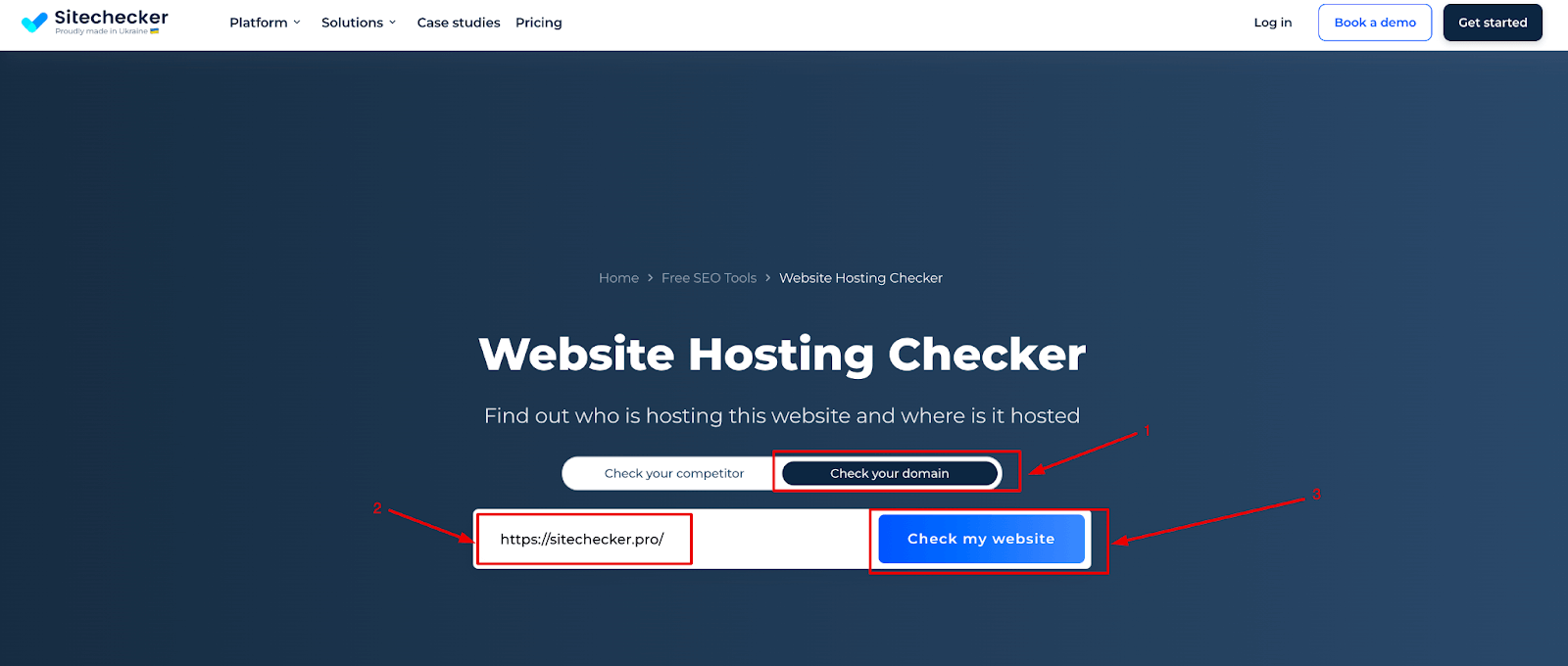
There are many tools to find your web host. One popular tool is WhoIsHostingThis. Enter your website’s URL. The tool will show your hosting provider. Another tool is HostAdvice. It works in a similar way. Both are easy to use. Results are quick and clear.
Check the source code of your website. Right-click on your webpage. Select “View Page Source”. Look for lines with the word “host”. Sometimes, the host’s name is there. This method may not always work. But it can give hints. Keep an eye on any familiar names.
Domain Registrar Vs. Web Host
A domain registrar helps you buy and manage your website’s name. It is like buying a house address. A web host stores all your website files. It is like renting a space to build your house. Your domain name points to the web host. This helps people find your site online.
Some companies offer both services. Others specialize in just one. It’s important to know what each service does. This helps you choose the right provider. Check your website settings to find your web host. Look for hosting information in your account. This is often in the settings or billing section.
Credit: sitechecker.pro
Accessing Hosting Account Information
First, open your web browser. Type your host’s website address. This is the URL where you manage your site. Look for a button that says “Log In” or “Sign In”. Click it. Enter your username and password. These are your account details. If you forget them, click “Forgot Password”. Follow the steps to reset it. Now, you are in your account. Here, you can see all your site details.
Billing records show what you have paid. They are in your account. Look for a tab or section called Billing or Payments. Click on it. You will see a list of bills. Check them to know your payment history. If you see something wrong, contact support. They can help you fix it. Keep an eye on your billing. It helps you know your web host.
Contacting Customer Support
Need to know your web host? Check your email for hosting details or contact customer support for quick assistance. They can guide you on how to find this information easily.
Questions To Ask
Start with the basics. Ask them who is hosting your website. They might know right away. Check if they have any records about your web host. It’s important to confirm this. You might need this info later.
Ask about the account details. Make sure you understand the details. This can help in identifying your web host. Also, inquire about any billing information. Sometimes this info will reveal the host’s name. Knowing these details is crucial.
Information To Prepare
Prepare your account number. Have your website name ready. These are crucial to identify your host. Keep your login details handy. They might ask for it. Also, gather any emails from your host. These can provide useful clues. Be ready with this information.
Exploring Hosting Control Panels
cPanel is a popular tool for managing websites. You can find files, emails, and other tools. The dashboard is colorful and easy to use. Each icon has a name. Click on them to access features. Want to check your website stats? There’s an icon for that too. Just click and explore. To set up email accounts, select the email icon. Make changes with a few clicks.
Plesk is another tool for web hosting. It looks different from cPanel. The main menu is on the left. Click on Websites & Domains to see your sites. Use the Tools to manage files and databases. Need to add a new domain? There’s a button for that. Choose Mail to set up emails. Simple and clear. Both cPanel and Plesk make hosting easy.
Using Whois To Identify Host
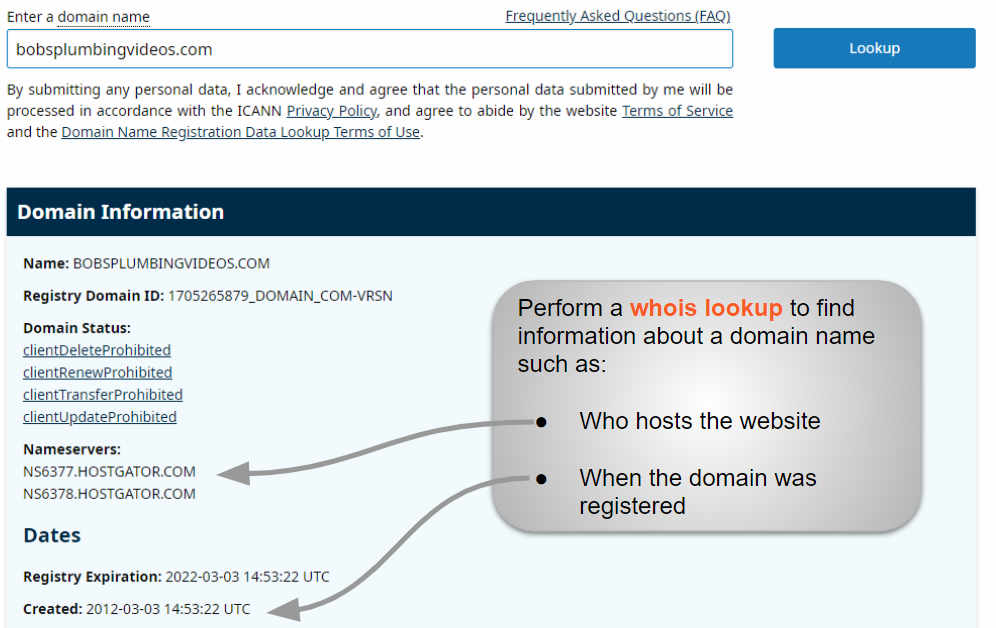
WHOIS is a tool to find out who hosts your website. It shows information about the domain and hosting provider. You can use WHOIS websites to get this data. Enter your domain name and hit search. The results will display your host details. Name, address, and contact of the host are shown. This method is simple and fast. Good for beginners.
Sometimes, the details may be hidden. This happens if privacy protection is enabled. In such cases, WHOIS might show limited info. But mostly, it works well. Always check if the data is up to date. Outdated info can lead to confusion.
Understanding Shared Vs. Dedicated Hosting
Shared hosting means you share a server with others. It is like sharing a big house. Everyone gets a room, but shares the kitchen. This makes it cheaper. But, it can be slower if many people use it at once.
Dedicated hosting means you have your own server. Like having your own house. It is private and fast. You can do more with it. But, it costs more money.
Choosing between shared and dedicated depends on needs. Small sites can do fine with shared hosting. Big sites might need dedicated for better performance.
Evaluating Hosting Services
Speed matters for your website. A fast website keeps users happy. Check the loading time of your site. Use tools like Google PageSpeed Insights. This tool gives you scores. Lower scores mean slower sites. Slow sites can lose visitors. Downtime is also important. It tells you if your site goes offline. Hosting services should have high uptime rates. Look for 99% uptime or more. This means your site is almost always online.
Good support is vital. Sometimes, things go wrong. You need help fast. Check if the host offers 24/7 support. This means help is available anytime. Look for multiple support ways. Phone, chat, and email are good options. Response time is key. Faster replies mean quicker fixes. Read reviews to know others’ experiences. Happy customers usually mean good support.

Credit: community.cloudflare.com
Choosing A New Web Host
Picking the right web host is important. Speed matters. Fast websites keep users happy. Reliability is key. Websites need to be up all the time. Support should be helpful. Good support solves problems fast. Cost matters too. Some hosts are cheap but lack features. Security is crucial. Protect data from hackers. Scalability helps when traffic grows. Choose a host that grows with your needs.
| Provider | Main Feature |
|---|---|
| Bluehost | Good for beginners |
| HostGator | Affordable plans |
| SiteGround | Great support |
| GoDaddy | Domain services |
Frequently Asked Questions
How Do I Know Who Is Hosting My Website?
To find your website host, check your domain’s WHOIS information. Use online WHOIS tools to search your domain, revealing the hosting provider’s details. Alternatively, contact your domain registrar for assistance. You can also access your website’s control panel for hosting provider information.
What Is Your Website Host?
Our website is hosted on Bluehost. They provide reliable hosting services with excellent customer support and performance.
How Can I Find My Host?
Find your host by checking your domain registrar’s account or use online tools like WHOIS lookup. You can also contact your website developer or IT support for assistance. Ensure you have access to your domain management settings to verify the hosting provider details.
How Do I Find My Hosting Account?
Log in to your hosting provider’s website using your account credentials. Check the dashboard for hosting account details. Access the control panel for more information. Contact customer support for assistance if needed. Always keep your login information secure to prevent unauthorized access.
Conclusion
Finding your web host doesn’t have to be complex. Use the steps shared above. Check your billing records for hosting details. Use online tools for a quick check. Contact your domain registrar for more help. Always keep your hosting information safe and accessible.
Understanding your host improves your website management. This knowledge helps in resolving issues faster. Share this guide with friends who might need it. Stay informed and ensure your website runs smoothly. Happy hosting!


