Are you struggling with messy or confusing URLs on your WordPress site? Your permalink—the web address for your posts and pages—is a key part of how visitors find and remember your content.
But what if you want to make it cleaner, easier to read, or more SEO-friendly? Editing your permalink might seem tricky, but it’s simpler than you think. You’ll learn exactly how to edit a permalink in WordPress step-by-step, so you can take control of your site’s links and boost your online presence.
Keep reading to unlock the secrets that can make your URLs work harder for you.
Credit: www.wpbeginner.com
Permalinks And Seo
Permalinks play a key role in how search engines read and rank your website. These are the URLs that lead visitors to your pages and posts. Clear and simple permalinks help both users and search engines understand the content of your page. This can improve your site’s visibility and attract more visitors.
Why Permalinks Matter
Permalinks give a clear address to each page on your site. They help visitors know what to expect before clicking. Simple and descriptive URLs are easier to remember and share. Search engines use permalinks to find and index your pages quickly. A good permalink structure also improves user experience on your site.
Impact On Search Rankings
Search engines prefer URLs that include relevant keywords. These keywords help the engine understand the topic of your page. Clean permalinks avoid unnecessary numbers or symbols, which can confuse search engines. Good permalinks can increase click-through rates from search results. This can lead to better rankings and more organic traffic.
Credit: www.greengeeks.com
Types Of Permalink Structures
Permalinks are the web addresses for your posts and pages. WordPress offers different structures for these links. Each type affects how your URLs look and how search engines read them. Choosing the right permalink structure helps visitors understand your content better.
Default Options
WordPress includes several default permalink styles. The simplest is the plain option, which uses numbers. It looks like “?p=123”. This format is not easy to read or remember. Another default style uses the date and name of the post. It shows the year, month, day, and post title. This structure is clearer and good for news sites. There is also a month and name option, which removes the day. It keeps URLs shorter but still organized by date.
Custom Structures
WordPress lets you create custom permalink structures. You can mix words, dates, and numbers to suit your needs. For example, you can use only the post name for clean URLs. Or add categories to show the topic of the post. Custom permalinks improve user experience by making links descriptive. They also help search engines rank your pages better. Editing these structures requires understanding WordPress tags like %postname% or %category%. These tags tell WordPress what to include in the URL.
Editing Permalinks In WordPress
Editing permalinks in WordPress helps improve your site’s SEO and user experience. A permalink is the permanent web address of your posts and pages. Clear, simple URLs make it easier for visitors to find and remember your content. WordPress allows you to customize these links globally and individually for each post or page.
Accessing Permalink Settings
Start by logging into your WordPress dashboard. Look for the “Settings” menu on the left side. Click “Permalinks” to open the permalink settings page. Here, you can view and change how your URLs are structured across the site. It is the main area to control the global permalink style.
Changing Global Permalink Structure
On the Permalink Settings page, several common options appear. You can choose formats like “Plain,” “Day and name,” “Month and name,” or “Post name.” Select the option that best fits your website’s needs. For example, “Post name” is clean and SEO-friendly. After choosing, click “Save Changes” to update all URLs.
Editing Individual Post Urls
To edit a single post’s URL, open the post editor in WordPress. Just below the post title, find the permalink field. Click the “Edit” button to change the URL slug. Use simple words related to your post content. Save or update the post to apply the new URL. This method helps create unique, easy-to-read links for each post.
Best Practices For Seo-friendly Permalinks
Creating SEO-friendly permalinks helps improve your website’s search ranking. Clear and simple URLs make it easier for users and search engines to understand your content. Following best practices ensures your permalinks are effective and easy to share.
Using Keywords
Include important keywords related to your post in the permalink. This tells search engines what the page is about. Keep keywords relevant and specific to the content. Avoid keyword stuffing, which can harm SEO.
Keeping Urls Short
Short URLs are easier to read and remember. They load faster and look cleaner in search results. Remove unnecessary words like “and,” “the,” or “of” from the permalink. Focus on the main topic of the page.
Avoiding Special Characters
Special characters can confuse browsers and search engines. Use only letters, numbers, and hyphens in your URLs. Avoid spaces, underscores, and symbols like &, %, or $. This keeps your permalinks simple and reliable.
Handling Permalink Changes Safely
Changing a permalink in WordPress needs careful steps. It can affect your website traffic and user experience. Handling permalink changes safely helps keep your site running smoothly. It also protects your SEO rankings and prevents errors.
Always plan how to manage old URLs. Make sure visitors and search engines find the right pages after updates. This keeps your website professional and trustworthy.
Setting Up Redirects
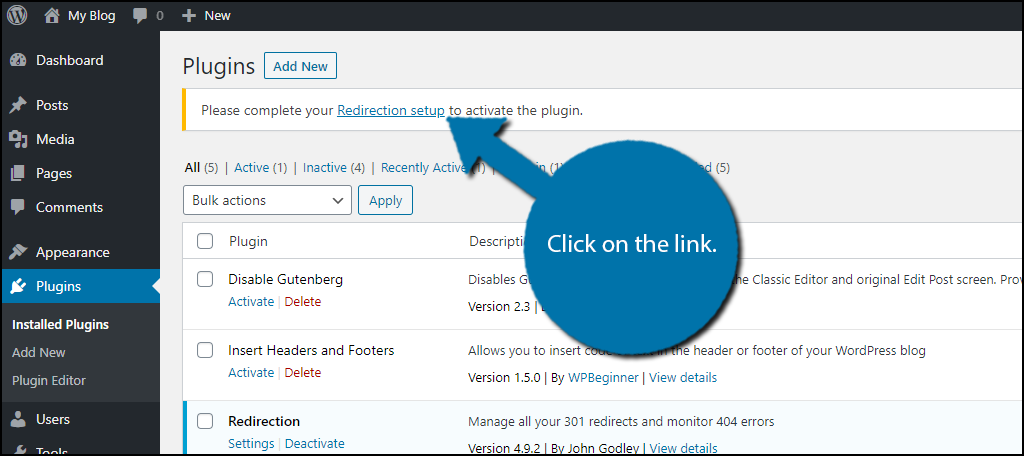
Redirects send visitors from old URLs to new ones. This stops broken links and lost traffic. Use a 301 redirect to tell search engines the change is permanent. Plugins like Redirection can help set this up easily. Test redirects to confirm they work. This keeps your site’s SEO intact and users happy.
Avoiding Broken Links
Broken links frustrate visitors and harm SEO. Check your website for links pointing to old permalinks. Update them to the new URLs or use redirects. Tools like Broken Link Checker can find broken links fast. Fixing these links improves user experience and site ranking. Always review your links after editing permalinks.
Plugins To Manage Permalinks
Editing permalinks in WordPress can be easier with the right plugins. These tools help you control your URLs without changing code. Plugins save time and reduce mistakes. They make managing links simple, even for beginners.
Popular Permalink Plugins
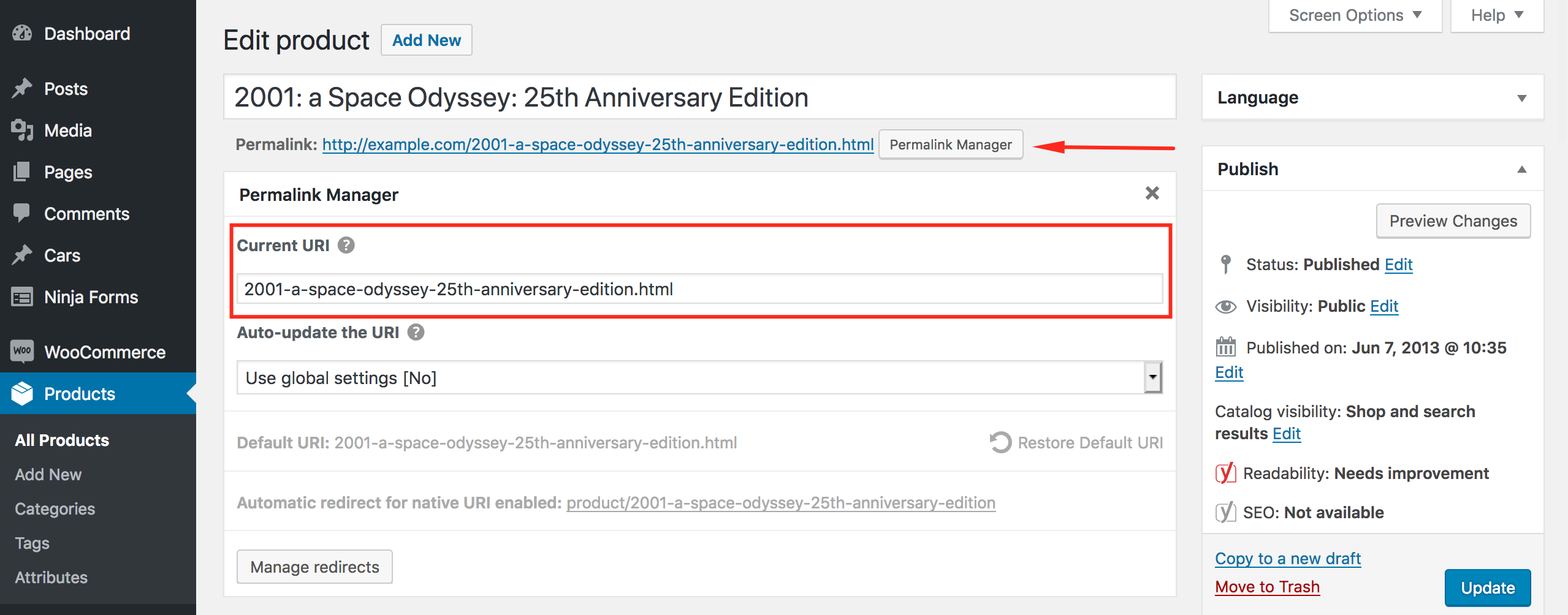
Several plugins help manage permalinks effectively. Permalink Manager Lite offers easy URL editing for posts and pages. Redirection handles URL changes and redirects to avoid broken links. Custom Permalinks allows unique URLs for individual posts and categories. These plugins have user-friendly interfaces and good support.
Features To Look For
Choose plugins with clear URL editing options. Check if the plugin supports redirects to avoid 404 errors. Look for compatibility with your WordPress version. A plugin with backup and restore options adds security. Easy setup and regular updates improve reliability. Good customer support is helpful for troubleshooting.
Credit: permalinkmanager.pro
Frequently Asked Questions
How Do I Change A Permalink In WordPress?
To change a permalink, open the post or page editor. Click the permalink under the title. Edit the URL slug and save your changes. This updates the permalink instantly without affecting your content.
Can I Customize Permalinks For Seo In WordPress?
Yes, WordPress lets you customize permalinks for SEO. Go to Settings > Permalinks and choose a structure. Use keywords in your URLs for better ranking and readability. Custom URLs improve user experience and search engine visibility.
Will Editing A Permalink Affect My Website Ranking?
Changing a permalink can impact SEO if not handled correctly. Always set up 301 redirects from old URLs to new ones. This preserves link equity and prevents broken links, maintaining your search engine rankings.
Is It Possible To Edit Permalinks For Pages And Posts?
Yes, you can edit permalinks for both pages and posts individually. Open the editor for your content, then modify the permalink slug. Save changes to apply the new URL immediately.
Conclusion
Editing a permalink in WordPress is simple and quick. It helps make your web address clear and easy to read. Clear permalinks improve your site’s visibility in search engines. Changing them carefully avoids broken links and lost visitors. Always check your links after editing to keep your site working well.
Small steps like this make your website better for users and search engines. Keep practicing these tips to manage your WordPress site with confidence.