
Are you a startup looking for a reliable and cost-effective web hosting solution? AWS LightSail could be the perfect answer for you.
It’s designed with simplicity and affordability in mind, making it ideal for small businesses eager to get online without breaking the bank. Imagine having the power of Amazon Web Services at your fingertips, but without the complexities and high costs.
That’s exactly what LightSail offers. As you explore this article, you’ll discover how AWS LightSail can transform your web hosting experience, providing you with the tools and resources to scale your startup effortlessly. Let’s unlock the potential of your business together. Keep reading to learn how you can harness this technology to give your startup the competitive edge it needs.

Credit: aws.amazon.com
Benefits Of Aws Lightsail For Startups
AWS Lightsail is great for startups because it is cost-efficient. You get a fixed monthly price. This helps in planning budgets. No surprise fees to worry about. It’s a good deal for small businesses.
AWS Lightsail is simple to use. Even beginners can manage it. The user interface is easy to understand. No need for special skills. Start hosting your website quickly. This saves time and effort.
Start small and grow big. AWS Lightsail offers scalability. You can add more resources as needed. This is helpful when your business grows. No need to switch platforms. Just upgrade your plan.
Getting Started With Aws Lightsail
Start by creating an AWS account. Visit the AWS website. Click the Sign Up button. Fill in your details. Make sure you use a valid email. You will receive a confirmation email. Follow the instructions in the email. Your account will be ready.
Log into your AWS account. Go to the Lightsail section. Click on Create Instance. Choose the operating system. Select the instance plan. Ensure it fits your needs. Click the Create button. Your instance will be set up in minutes.
Access your instance dashboard. Set your domain name. Adjust the server settings. Configure the firewall. Ensure security is tight. Check your settings. Save your changes. Your website is now ready to host.
Deploying Your Website
Start by picking a blueprint that suits your needs. AWS Light Sail offers many options. You can choose WordPress for blogs. Or select Node.js for apps. Each blueprint comes with pre-installed software. This makes setup easy and fast. Make sure to select one that fits your project.
Linking your domain is important. First, buy a domain name if needed. Use AWS Light Sail to manage DNS settings. This connects your domain to your server. Make sure the DNS records point to the Light Sail IP address. Wait for changes to update. This might take a few minutes.
SSL certificates keep your site safe. They protect data between users and servers. Use AWS Light Sail’s built-in tools to add SSL. This process is simple. Follow step-by-step guides. A secure site builds trust with visitors. Always keep your SSL certificate updated.
Credit: aws.amazon.com
Managing And Monitoring Resources
Startups can effectively manage resources using AWS Light Sail for web hosting. This platform offers simple and affordable solutions. It helps in deploying and monitoring websites efficiently. With AWS Light Sail, startups can scale their web presence smoothly.
Using Lightsail Console
The Lightsail Console is user-friendly. It helps manage web resources. You can see server details quickly. It shows CPU and memory use. You can start or stop servers easily. This console is very helpful.
Performance Monitoring Tools
Lightsail offers tools for checking performance. These tools show server health. You can view traffic data. You can also see error logs. These tools help keep your site running smoothly.
Regular Backups And Snapshots
Regular backups are important. Lightsail makes it easy. You can create snapshots quickly. Snapshots save server data. If something goes wrong, use a snapshot. This helps recover data fast. Keep your data safe with regular snapshots.
Security Best Practices
Firewalls act as a shield for your server. They block unwanted traffic. Set up rules to filter network data. Use default settings wisely. Customize rules based on needs. Protect sensitive information from hackers. Regularly check firewall logs. Adjust settings if needed.
Software updates fix bugs and vulnerabilities. Keep systems up-to-date. Install patches promptly. Regular updates prevent security breaches. Outdated software is risky. Check for updates weekly. Schedule updates during low traffic times. Keep backups before updating.
Manage who can access your server. Limit user permissions. Use strong passwords for accounts. Enable two-factor authentication. Review access logs regularly. Remove inactive users. Change passwords often. Monitor access attempts closely.

Credit: cloudvisor.co
Scaling Your Web Application
AWS Light Sail offers different instance plans for startups. Begin with a basic plan. As your web app grows, you can switch to a larger plan. Upgrading is easy and quick. Choose the plan that fits your needs. Each plan has more resources. More CPU, RAM, and storage. Ideal for growing startups.
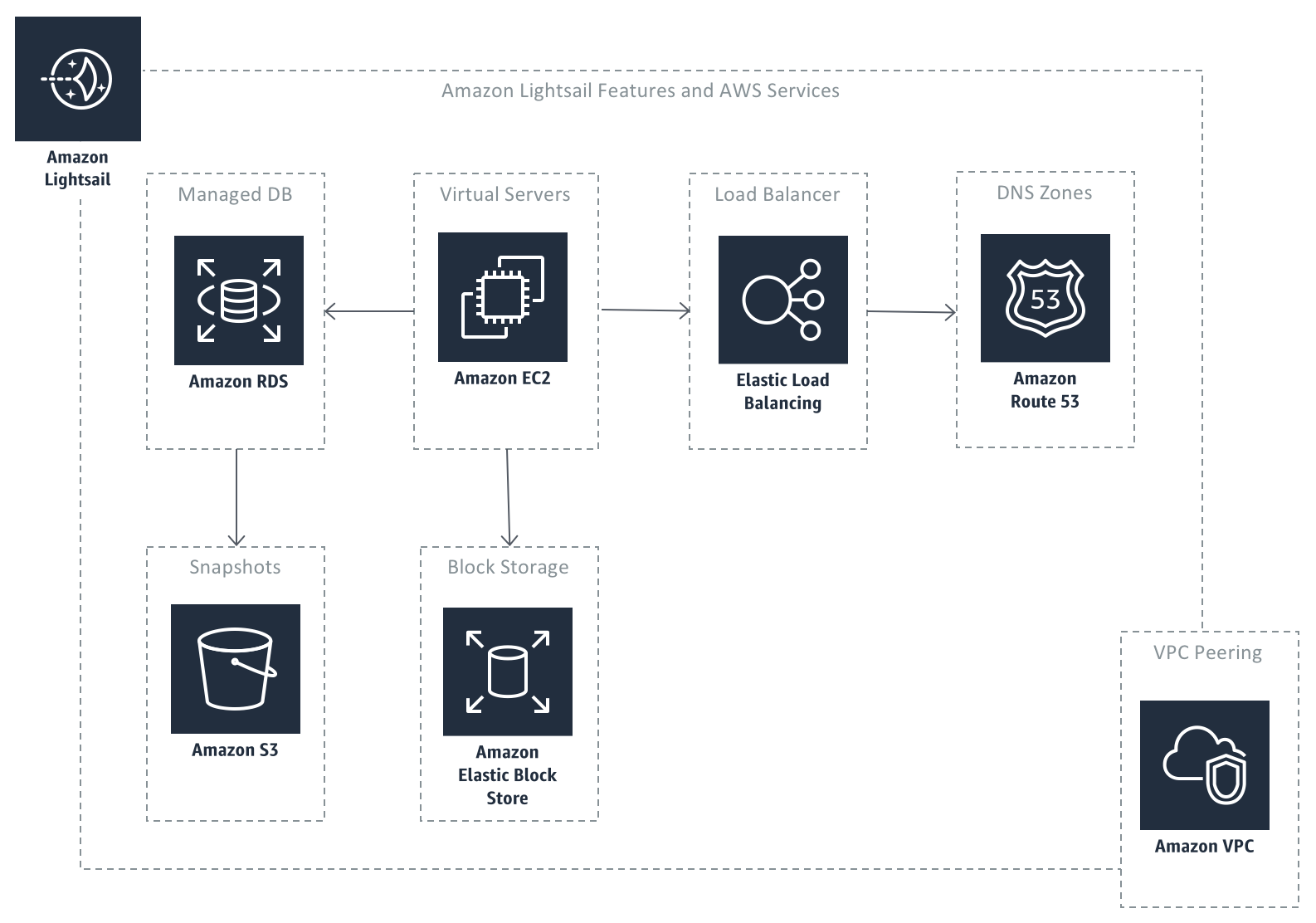
Light Sail can work with other AWS services. You can use S3 for storing files. Connect to RDS for databases. Use CloudFront for faster content delivery. These services make your app better. They add more features and power. Easy to set up and use.
Load balancing helps manage traffic to your app. It spreads the load across servers. This keeps your app running fast. Light Sail has built-in load balancing. It’s simple to configure. Your app stays online even with many users. Keeps everything smooth and stable.
Case Studies And Success Stories
Startups can efficiently host websites with AWS LightSail. This service offers cost-effective, scalable solutions. Many startups have succeeded using its simple interface and reliable performance.
Startup Success With Lightsail
Small businesses find AWS Lightsail easy to use. It offers fast setup and low cost. Many startups like these features. They save money and time. Lightsail provides reliable services. It supports growth with ease. Startups can scale up or down quickly. This flexibility is vital for young companies.
Innovative Uses Of Lightsail
Startups use Lightsail in creative ways. Some host websites effortlessly. Others run simple apps. Lightsail offers easy backups and monitoring. This helps startups manage tasks smoothly. It fits well with small-scale needs. Lightsail’s simplicity attracts many users. It supports various programming languages. This makes it adaptable for different projects.
Lessons Learned From Early Adopters
Early users of Lightsail learned many things. They found the importance of regular backups. Keeping data safe is crucial. They also learned about resource management. Using only needed resources saves money. Monitoring helps avoid issues early. It ensures smooth operations. Lightsail’s user-friendly interface is a key benefit. It reduces learning time for new users.
Frequently Asked Questions
When Should I Use Aws Lightsail?
Use AWS Lightsail for simple web applications, blogs, or small-scale projects needing easy management and predictable pricing. It’s ideal for beginners looking for a straightforward cloud hosting solution. Lightsail provides virtual servers, storage, and networking, making it perfect for quick deployments without extensive cloud experience.
What Is The Purpose Of Aws Lightsail?
AWS Lightsail provides an easy way to launch and manage virtual private servers. It offers pre-configured development stacks. Users benefit from simplified pricing and scalability. Lightsail is ideal for small businesses and developers seeking a quick, cost-effective cloud solution. It integrates seamlessly with other AWS services.
Can You Use Aws For Web Hosting?
Yes, AWS is a reliable platform for web hosting. It offers scalable solutions like EC2, S3, and RDS. Businesses can choose flexible pricing models. AWS ensures high availability, security, and global reach. Utilize AWS services to efficiently host and manage websites.
Does Amazon Lightsail Have A Cpanel?
Amazon Lightsail does not include cPanel by default. Users can manually install cPanel on Lightsail instances. This requires purchasing a cPanel license separately. Lightsail provides easy-to-use management options and integrates with other AWS services for seamless operations. Consider Lightsail’s offerings to find the best fit for your hosting needs.
Conclusion
AWS LightSail offers startups a reliable web hosting solution. It’s cost-effective and easy to use. Startups can quickly deploy websites with minimal effort. LightSail provides essential features for growing businesses. It ensures scalability and security without complexity. Ideal for startups seeking simplicity and efficiency.
With AWS LightSail, startups can focus on growth. They don’t need to worry about technical details. LightSail’s user-friendly interface makes web hosting straightforward. It’s a smart choice for startups entering the digital space. Consider AWS LightSail for seamless web hosting.
Your startup deserves a strong online presence.


